
roomq
v1.1.6
Published
> Download latest npm package from [here.](https://www.npmjs.com/package/roomq)


Readme
Install
Download latest npm package from here.
RoomQ Backend SDK - Javascript
The RoomQ Backend SDK is used for server-side integration to your server. It was developed with TypeScript.
High Level Logic
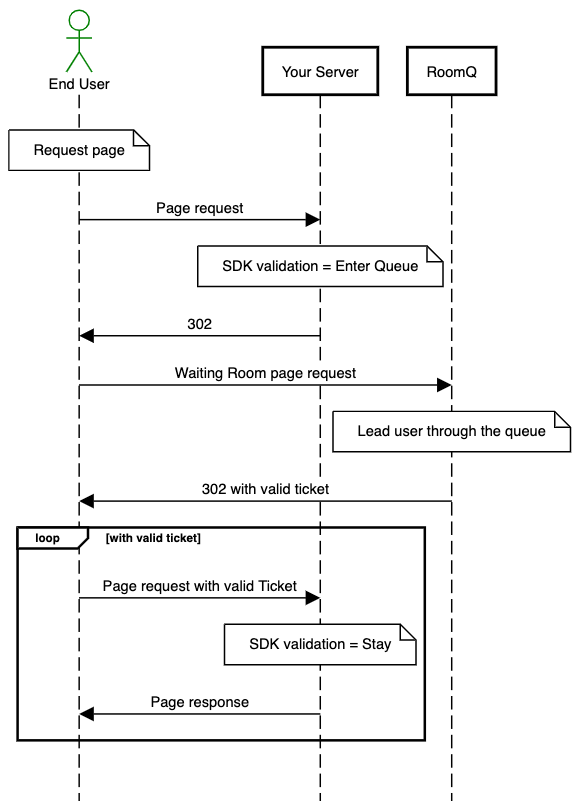
- End user requests a page on your server
- The SDK verify if the request contain a valid ticket and in Serving state. If not, the SDK send him to the queue.
- End user obtain a ticket and wait in the queue until the ticket turns into Serving state.
- End user is redirected back to your website, now with a valid ticket
- The SDK verify if the request contain a valid ticket and in Serving state. End user stay in the requested page.
- The end user browses to a new page and the SDK continue to check if the ticket is valid.
How to integrate
Prerequisite
To integrate with the SDK, you need to have the following information provided by RoomQ
- ROOM_ID
- ROOM_SECRET
- ROOMQ_TICKET_ISSUER
Major steps
To validate that the end user is allowed to access your site (has been through the queue) these steps are needed:
- Initialise RoomQ
- Determine if the current request page/path required to be protected by RoomQ
- Initialise Http Context Provider
- Validate the request
- If the end user should goes to the queue, set cache control
- Redirect user to queue
Integration on specific path
It is recommended to integrate on the page/path which are selected to be provided. For the static files, e.g. images, css files, js files, ..., it is recommended to be skipped from the validation. You can determine the requests type before pass it to the validation.
Implementation Example
With client side integration
Here is an example of RoomQ integration in an Express/Node.js application.
The client-side SDK requires access to the ticket cookie, which necessitates setting httpOnly to false. This allows client-side JavaScript to access the cookie, essential for the SDK's functionality.
While it is recommended to set the secure flag to true to ensure cookies are only sent over HTTPS, you may set it to false during development if HTTPS is unavailable.
const express = require("express");
const cookieParser = require("cookie-parser");
const RoomQ = require("roomq").default;
const app = express();
app.use(cookieParser());

const ROOM_ID = "YOUR ROOM ID";
const ROOM_SECRET = "YOUR ROOM SECRET";
const ROOMQ_TICKET_ISSUER = "YOUR TICKET ISSUER";

// Initialise SDK
const roomq = new RoomQ(ROOM_ID, ROOM_SECRET, ROOMQ_TICKET_ISSUER);

function initializeExpressHttpContextProvider(req, res) {
  return {
    getHttpRequest: function () {
      var httpRequest = {
        getUserAgent: function () {
          return this.getHeader("user-agent");
        },
        getHeader: function (headerName) {
          var headerValue = req.header(headerName);

          if (!headerValue) return "";
          return headerValue;
        },
        getAbsoluteUri: function () {
          return req.protocol + "://" + req.get("host") + req.originalUrl;
        },
        getUserHostAddress: function () {
          return req.ip;
        },
        getCookieValue: function (cookieKey) {
          return req.cookies[cookieKey];
        },
        getQueryValue: function (key) {
          return req.query[key];
        },
      };
      return httpRequest;
    },
    getHttpResponse: function () {
      var httpResponse = {
        setCookie: function (cookieName, cookieValue, domain, expiration) {
          var expirationDate = new Date(expiration.getTime());
          res.cookie(cookieName, cookieValue, {
            expires: expirationDate,
            path: "/",
            domain: domain,
            secure: true,
            httpOnly: false,
          });
        },
      };
      return httpResponse;
    },
  };
}

app.get("/", async (req, res) => {
  try {
    // Initial Http context provider
    const provider = initializeExpressHttpContextProvider(req, res);

    // The URL of the destination after user finish queuing in the waiting room
    // If set null, the default behaviour is return to the current path
    // If this is handling a POST request, it should not set null.
    const returnURL = null;

    // Session ID is the unique key for a RoomQ Ticket
    // If you want to issue unique ticket per login user,
    // you can pass your userId as the sessionId
    const sessionId = null;

    const result = roomq.validate(provider, returnURL, sessionId);
    if (result.needRedirect()) {
      res.set({
        "Cache-Control": "no-cache, no-store, must-revalidate, max-age=0",
        Pragma: "no-cache",
        Expires: "Fri, 01 Jan 1990 00:00:00 GMT",
      });
      res.redirect(result.getRedirectURL());
      return;
    }

    // Request can continue
    res.send("Entered");
  } catch (e) {
    // There was an error validating the request
    console.log("ERROR:" + e);
  }
});

app.listen(8080, () => {
  console.log("start listening on 8080");
});
Without client side integration
The following is a RoomQ integration example in Express/Node.js.
Set httpOnly to true to prevent access from JavaScript, which enhances security by ensuring that the cookie is not accessible through client-side scripts. This is beneficial if you don't require client-side integration, as it reduces the risk of cross-site scripting (XSS) attacks.
While it is recommended to set the secure flag to true to ensure cookies are only sent over HTTPS, you may set it to false during development if HTTPS is unavailable.
const express = require("express");
const cookieParser = require("cookie-parser");
const RoomQ = require("roomq").default;
const app = express();
app.use(cookieParser());

const ROOM_ID = "YOUR ROOM ID";
const ROOM_SECRET = "YOUR ROOM SECRET";
const ROOMQ_TICKET_ISSUER = "YOUR TICKET ISSUER";

// Initialise SDK
const roomq = new RoomQ(ROOM_ID, ROOM_SECRET, ROOMQ_TICKET_ISSUER);

function initializeExpressHttpContextProvider(req, res) {
  return {
    getHttpRequest: function () {
      var httpRequest = {
        getUserAgent: function () {
          return this.getHeader("user-agent");
        },
        getHeader: function (headerName) {
          var headerValue = req.header(headerName);

          if (!headerValue) return "";
          return headerValue;
        },
        getAbsoluteUri: function () {
          return req.protocol + "://" + req.get("host") + req.originalUrl;
        },
        getUserHostAddress: function () {
          return req.ip;
        },
        getCookieValue: function (cookieKey) {
          return req.cookies[cookieKey];
        },
        getQueryValue: function (key) {
          return req.query[key];
        },
      };
      return httpRequest;
    },
    getHttpResponse: function () {
      var httpResponse = {
        setCookie: function (cookieName, cookieValue, domain, expiration) {
          var expirationDate = new Date(expiration.getTime());
          res.cookie(cookieName, cookieValue, {
            expires: expirationDate,
            path: "/",
            domain: domain,
            secure: true,
            httpOnly: true,
          });
        },
      };
      return httpResponse;
    },
  };
}

app.get("/", async (req, res) => {
  try {
    // Initial Http context provider
    const provider = initializeExpressHttpContextProvider(req, res);

    // The URL of the destination after user finish queuing in the waiting room
    // If set null, the default behaviour is return to the current path
    // If this is handling a POST request, it should not set null.
    const returnURL = null;

    // Session ID is the unique key for a RoomQ Ticket
    // If you want to issue unique ticket per login user,
    // you can pass your userId as the sessionId
    const sessionId = null;

    const result = roomq.validate(provider, returnURL, sessionId);
    if (result.needRedirect()) {
      res.set({
        "Cache-Control": "no-cache, no-store, must-revalidate, max-age=0",
        Pragma: "no-cache",
        Expires: "Fri, 01 Jan 1990 00:00:00 GMT",
      });
      res.redirect(result.getRedirectURL());
      return;
    }

    // Request can continue
    res.send("Entered");
  } catch (e) {
    // There was an error validating the request
    console.log("ERROR:" + e);
  }
});

app.listen(8080, () => {
  console.log("start listening on 8080");
});
Ajax calls
RoomQ doesn't support validate ticket in Ajax calls yet.
Browser / CDN cache
If your responses are cached on browser or CDN, the new requests will not process by RoomQ. In general, for the page / path integrated with RoomQ, you are not likely to cache the responses on CDN or browser.
Delete Ticket / Extend Ticket
Delete or Extend Ticket are not supported in backend SDK integration.