
rough-table
v0.1.4
Published
A vanilla JS library that renders hand-drawn style borders on HTML tables using Rough.js. Just add a class.

Maintainers
 h-kono-it
Readme
rough-table
HTML tables that look hand-drawn — without breaking accessibility.
Add a class to any <table> and get sketch-style borders. The table's DOM structure is never modified — only an SVG border overlay is added — so screen readers, search engines, and keyboard navigation all work exactly as they would with a plain HTML table.
Demo
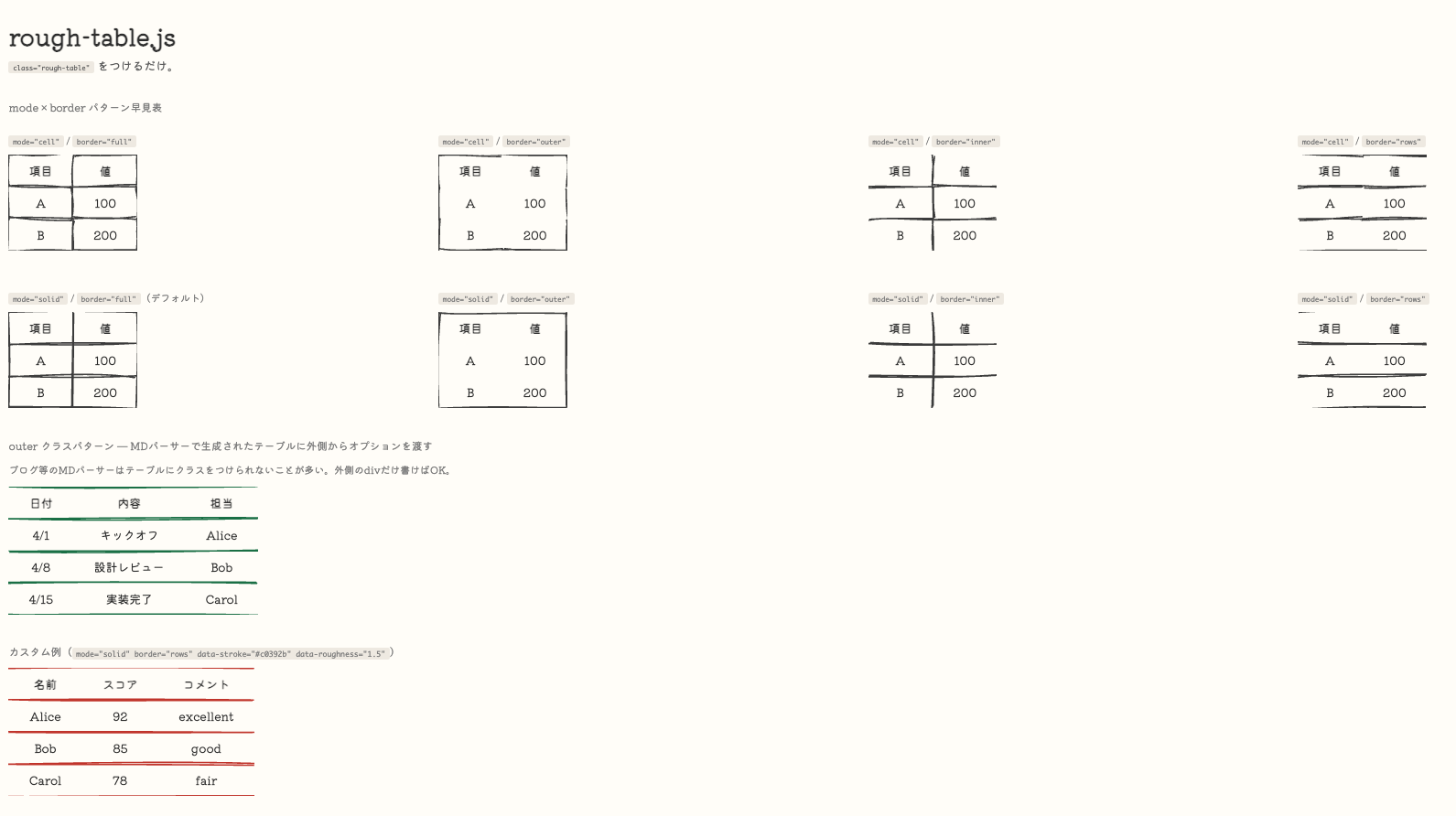
Install
npm install rough-tableOr via CDN (no build step needed):
<script src="https://unpkg.com/roughjs@latest/bundled/rough.js"></script>
<script src="https://unpkg.com/rough-table/rough-table.min.js"></script>
Usage
A. Add a class to the <table> directly
<table class="rough-table">
  <thead>
    <tr><th>Item</th><th>Status</th></tr>
  </thead>
  <tbody>
    <tr><td>Design</td><td>Done</td></tr>
    <tr><td>Implementation</td><td>In progress</td></tr>
  </tbody>
</table>
B. Wrap with an outer element (for Markdown parsers)
Useful when you can't add a class to the <table> itself (e.g. blog CMS, Markdown parsers).
<div class="rough-table-outer" data-mode="solid" data-border="rows">

| Item | Status |
|------|--------|
| Design | Done |
| Implementation | In progress |

</div>
Options are read from the outer element; the inner <table> requires no modification.
Options
Set via data-* attributes on the <table> (pattern A) or the outer element (pattern B).
| Attribute | Description | Default |
|---|---|---|
| data-mode | Drawing mode: cell or solid | solid |
| data-border | Border pattern (see below) | full |
| data-roughness | How rough the lines look | 1.5 |
| data-stroke | Line color | #444 |
| data-stroke-width | Line width | 2 |
| data-bowing | Line bowing amount | 1 |
data-mode
| Value | Description |
|---|---|
| cell | Draws borders cell by cell — like stamping each cell individually |
| solid (default) | Draws the outer frame first, then adds inner grid lines — closer to how you'd draw a table by hand |
data-border
| Value | Description |
|---|---|
| full (default) | All borders |
| outer | Outer frame only |
| inner | Inner grid lines only (no outer frame) |
| rows | Top/bottom frame + horizontal dividers only (no vertical lines) |
Examples
<!-- Solid, rows only — clean and natural -->
<table class="rough-table" data-mode="solid" data-border="rows">

<!-- Outer frame only -->
<table class="rough-table" data-mode="solid" data-border="outer">

<!-- Red, rougher lines -->
<table class="rough-table" data-stroke="#c0392b" data-roughness="3">
Narrow screens
Tables that can't shrink any further (long inline <code>, URLs, unbreakable tokens) would otherwise push the whole page into a horizontal scroll on mobile. The container keeps itself inside its parent and moves the overflow into its own horizontal scroll, so the border overlay scrolls together with the table:
/* injected automatically, at the top of <head> */
.rough-table-container {
  display: inline-block;
  max-width: 100%;
  overflow: auto;
}
These are defaults, not inline styles — your own stylesheet overrides them without !important:
/* let a wide table bleed out of the content column instead */
.rough-table-container { max-width: none; overflow: visible; }
Two things to be aware of:
- The container becomes a scroll container on both axes. CSS computes
overflow-y: visibletoautowhen the other axis isn'tvisible, so a single axis isn't possible. Tooltips or dropdowns inside cells will be clipped, and aposition: stickyheader sticks to the container rather than the viewport. - The
<table>itself is normalized todisplay: table; overflow: visible. If you settable { display: block; overflow-x: auto }(a common Markdown-CSS idiom), the table would become its own scroll container and the border overlay — which lives beside it — would stay behind while the cells moved. Horizontal scrolling is consolidated on the container instead.
Manual initialization
If you add tables dynamically after page load:
// Re-scan for all .rough-table and .rough-table-outer elements
RoughTable.init();

// Apply to a specific selector
RoughTable.init('.my-custom-class');

// Apply to a single element
RoughTable.draw(document.querySelector('table'));
Requirements
- Rough.js v4 or later must be loaded before this library.
- Modern browser with
ResizeObserversupport (tables redraw automatically on resize).
License
MIT