
rte-rich-text-editor
v1.0.33
Published
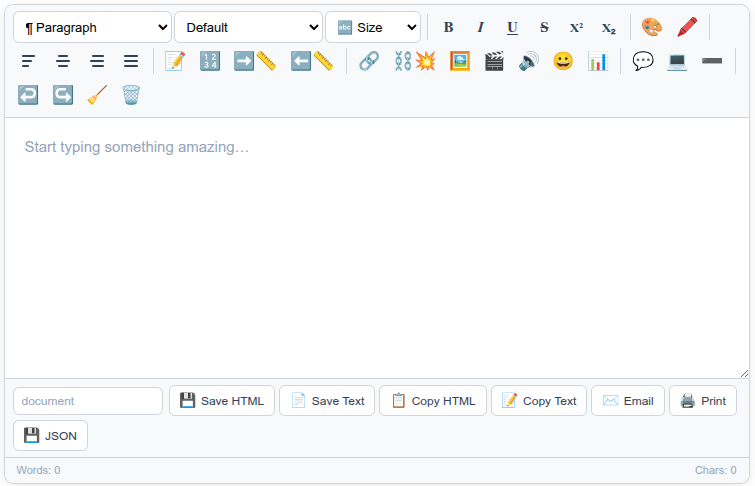
WYSIWYG rich-text editor in one script tag. Zero dependencies, no framework, no jQuery. Tables, images, links, HTML and Markdown export.

Maintainers
 ruusvuu
Readme
RTE — Rich Text Editor




A powerful, standalone rich text editor you can embed into any website. One script tag. Zero dependencies.
Install
npm / yarn / pnpm
npm install rte-rich-text-editorCDN / Direct Download
Just drop the script tag into any HTML page:
<script src="https://rte.whitneys.co/rte.js"></script>No CSS file needed — styles are injected automatically.
Quick Start
Browser (script tag)
<div id="editor"></div>
<script src="https://rte.whitneys.co/rte.js"></script>
<script>
  const editor = RTE.init('#editor');
</script>
CommonJS (Node / require)
const RTE = require('rte-rich-text-editor');
const editor = RTE.init('#editor');
ES Modules (import)
import RTE from 'rte-rich-text-editor';
const editor = RTE.init('#editor');
React
import { useEffect, useRef } from 'react';
import RTE from 'rte-rich-text-editor';

function Editor() {
  const ref = useRef(null);
  const editorRef = useRef(null);

  useEffect(() => {
    editorRef.current = RTE.init(ref.current);
    return () => editorRef.current?.destroy();
  }, []);

  return <div ref={ref} />;
}
Vue
<template>
  <div ref="editorEl"></div>
</template>

<script setup>
import { ref, onMounted, onUnmounted } from 'vue';
import RTE from 'rte-rich-text-editor';

const editorEl = ref(null);
let editor = null;

onMounted(() => { editor = RTE.init(editorEl.value); });
onUnmounted(() => { editor?.destroy(); });
</script>
Options
const editor = RTE.init('#editor', {
  placeholder: 'Write something...',  // placeholder text
  height: '400px',                     // minimum editor height
});
Features
| Category | Details | |---|---| | Formatting | Bold, Italic, Underline, Strikethrough, Superscript, Subscript | | Headings | H1–H4 dropdown | | Typography | 9 font families, 7 size levels | | Colors | 40-swatch text color & highlight picker + custom hex | | Alignment | Left, Center, Right, Justify (SVG icons) | | Lists | Bullet, Numbered, Indent, Outdent | | Media | Image, Video, Audio — URL, file upload, drag & drop, clipboard paste | | Insert | Links, Emoji picker, Table (visual grid selector), Blockquote, Code block, Horizontal rule | | Export | Save HTML, Save Text, Copy HTML, Copy Text, Email, Print/PDF, JSON | | Keyboard | Ctrl+B/I/U/S/Z/Y, Ctrl+Shift+Z | | Status | Live word & character count | | Theming | CSS custom properties for full visual control |
API
Content
editor.getHTML()          // "<p><strong>Hello</strong></p>"
editor.setHTML('<p>Hi</p>')
editor.getText()          // "Hello"
editor.getFullHTML()      // complete HTML document with styles
editor.getJSON()          // { html, text, wordCount, charCount, createdAt }
Export
editor.saveHTML('doc.html')   // download HTML file
editor.saveText('doc.txt')    // download text file
editor.copyHTML()             // rich HTML to clipboard (paste into Gmail, etc.)
editor.copyText()             // plain text to clipboard
editor.email('[email protected]', 'Subject')
editor.print()                // print preview / save as PDF
Lifecycle
editor.focus()
editor.destroy()
Properties
editor.element   // the contenteditable div
editor.wrapper   // the outer .rte-wrap container
Events
editor.onChange = ({ html, text, words, chars }) => {
  console.log(words, 'words');
  // auto-save, live preview, etc.
};
Theming
Override CSS custom properties to match your brand:
.rte-wrap {
  --rte-accent: #e94560;
  --rte-bg: #1a1a2e;
  --rte-toolbar-bg: #16213e;
  --rte-border: #334155;
  --rte-hover: #1e3a5f;
}
TypeScript
Full type definitions are included (rte.d.ts).
import RTE, { RTEInstance, RTEChangeData } from 'rte-rich-text-editor';

const editor: RTEInstance = RTE.init('#editor')!;
editor.onChange = (data: RTEChangeData) => { ... };
Related Packages
| Package | Description | |---|---| | rte-rich-text-editor | Core editor — lightweight, 33 toolbar controls | | rte-rich-text-editor-ws | WebSocket connector for RTE | | rte-rich-text-editor-bundle | RTE + WebSocket in one file | | rte-rich-text-editor-pro | Pro editor — 16 toolbar groups, AI, slash commands, mentions | | rte-rich-text-editor-pro-ws | RTEPro + WebSocket in one file | | wskit-client | Universal WebSocket client | | websocket-toolkit | Universal WebSocket client (alternate name) |
Website: rte.whitneys.co · GitHub: MIR-2025/rte
Changelog
All notable changes to rte-rich-text-editor will be documented in this file.
[1.0.26] - 2026-02-18
- Added "Link Text" field to Insert Link popup — set custom anchor text or leave blank to wrap selection
[1.0.25] - 2026-02-18
- Added cleanHTML() for clean exports (strips resize classes, image overlays, contenteditable attributes)
[1.0.24] - 2026-02-18
- Restored accidentally deleted package screenshot (rte.png)
[1.0.23] - 2026-02-18
- Added Cut/Copy/Paste toolbar buttons and Ctrl+X/C support for selected images
- Fixed color picker losing text selection on click (mousedown preventDefault)
- Fixed toolbar tooltip z-index (tooltips no longer hidden behind next row of buttons)
[1.0.22] - 2026-02-18
- Added filename input to export bar for custom export filenames
[1.0.21] - 2026-02-18
- Added cross-links to all 7 npm packages in README
[1.0.20] - 2026-02-18
- Added Tab key navigation in tables (Tab = next cell, Shift+Tab = previous cell)
- Tab at last cell automatically creates a new row
[1.0.19] - 2026-02-18
- Added CHANGELOG.md to package, appended changelog to README
[1.0.18] - 2026-02-18
- Version bump for README updates
[1.0.17] - 2026-02-17
- Added
exportCSSoption to append custom CSS togetFullHTML()exports - Added
exportTemplateoption for full control overgetFullHTML()output (use{{content}}placeholder)
[1.0.16] - 2026-02-17
- Media responsive: images, video, and audio scale with
max-width: 100%andheight: auto
[1.0.15] - 2026-02-17
- Added changelog to README
[1.0.14] - 2026-02-17
- Added explicit
type="button"tobtn()andfmtBtn()helpers
[1.0.13] - 2026-02-17
- Added
type="button"to all editor buttons viael()helper to prevent form submission when editor is inside a<form>
[1.0.12] - 2026-02-17
- Made editor vertically resizable (CSS
resize: vertical, removedmax-heightcap)
[1.0.11] - 2026-02-17
- Removed
max-width: 100%on images so they insert at full native resolution - Changed
.rte-contentoverflow fromoverflow-y: autotooverflow: autofor horizontal scrolling
[1.0.10] - 2026-02-17
- Added click-to-resize image handles with proportional drag resizing
- Blue overlay with 4 corner handles appears on image click
- Delete/Backspace removes selected image, Escape clears selection
- Resize classes stripped from
getHTML()andgetJSON()exports - Cleanup in
destroy()method
[1.0.9] - 2026-02-16
- Added related package links (ws, bundle) to README
[1.0.8] - 2026-02-16
- Added repository URL, author, and bugs URL to package metadata
- Added MIT LICENSE file
[1.0.7] - 2026-02-16
- Removed mailto integration from Email button to fix Socket.dev network access warning
- Email button now copies rich HTML to clipboard instead of opening mail client
[1.0.6] - 2026-02-16
- Updated README CDN/script tag examples to use full domain
[1.0.5] - 2026-02-16
- Improved Email button: copies rich HTML to clipboard then opens mail client
[1.0.4] - 2026-02-16
- Added screenshot to npm README
[1.0.3] - 2026-02-16
- Reverted fetch-based URL-to-base64 conversion to fix Socket.dev network access warning
[1.0.2] - 2026-02-16
- Added fetch-based base64 encoding for URL-pasted images (reverted in 1.0.3)
[1.0.1] - 2026-02-15
- Fixed stale package name reference in ESM entry point
[1.0.0] - 2026-02-15
- Initial release
- Single-file rich text editor with embedded CSS, zero dependencies
- UMD wrapper for browser, CommonJS, and AMD support
- Full toolbar: formatting, fonts, sizes, colors, alignment, lists, media, tables, emoji
- Export bar: Save HTML, Save Text, Copy HTML, Copy Text, Email, Print/PDF, JSON
- Drag & drop and clipboard paste for images, video, audio
- CSS custom properties for theming
- TypeScript declarations included
Security
Treat editor output as untrusted if any untrusted users can write content.
- Sanitize server-side before storing or rendering. The editor outputs raw HTML — always run it through a sanitizer (e.g. DOMPurify, sanitize-html) before persisting or displaying to other users.
- Disallow dangerous patterns:
javascript:links, inline event handlers (onclick,onerror, etc.),<iframe>,<script>,<object>,<embed>, and<form>tags.
License
MIT