
rte-rich-text-editor-pro
v1.0.39
Published
AI-powered WYSIWYG editor in one script tag. Claude, GPT and Gemini, slash commands, @mentions, tables, find and replace, Markdown. Zero dependencies.

Maintainers
 ruusvuu
Readme
RTEPro — Full-Featured WYSIWYG Editor with AI




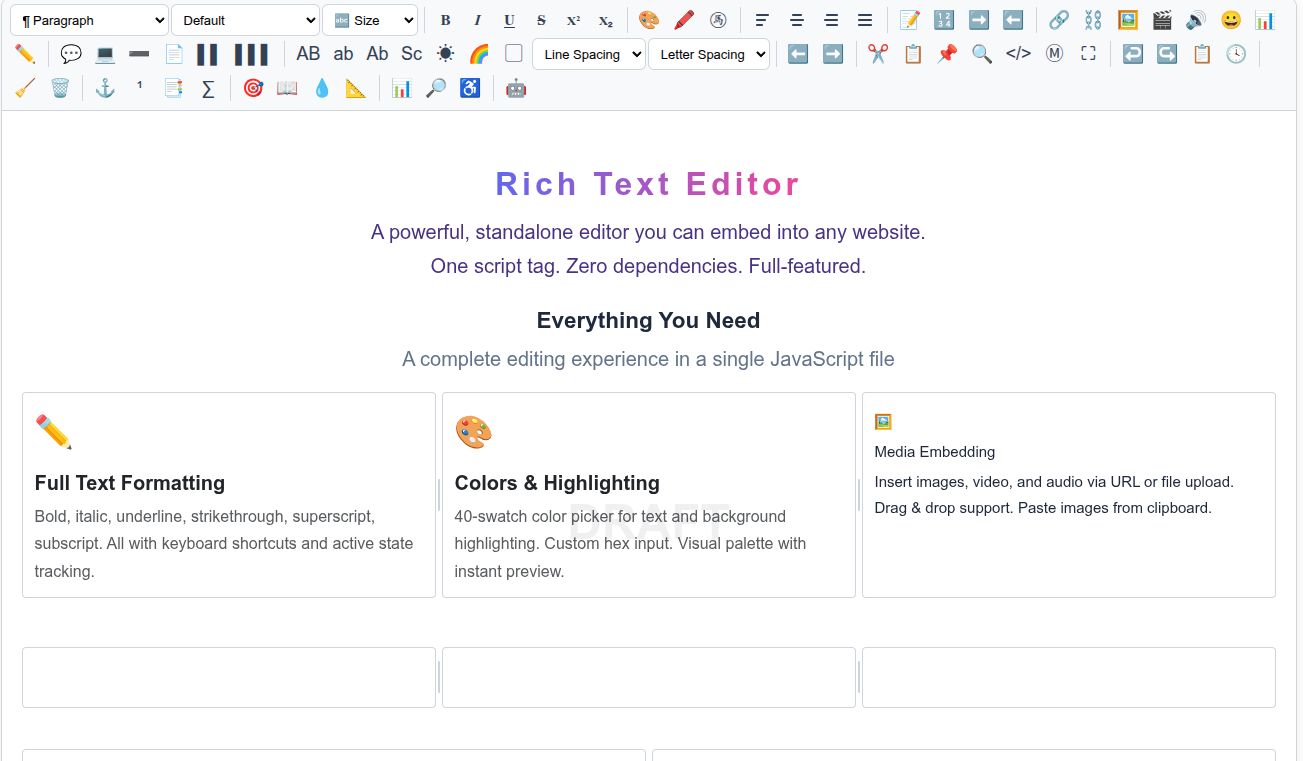
A standalone, embeddable rich text editor with AI integration, 16 toolbar groups, slash commands, mentions, version history, and more. One script tag. Zero dependencies.
Install
npm install rte-rich-text-editor-proOr via CDN:
<script src="https://unpkg.com/rte-rich-text-editor-pro/rte-pro.js"></script>Quick Start
<div id="editor"></div>
<script src="rte-pro.js"></script>
<script>
  const editor = RTEPro.init('#editor', {
    placeholder: 'Start typing...',
    height: '400px',
  });
</script>
AI Integration
Supports Anthropic Claude (default), OpenAI GPT, and Google Gemini. Set aiProvider to switch providers.
Warning: Never use
apiKeyin production web apps — it exposes your API key in the browser where anyone can steal it. UseaiProxyto route requests through your own server, which keeps the key secret.
Recommended: Server-side proxy (keeps your key safe)
// Anthropic (default)
const editor = RTEPro.init('#editor', {
  aiProxy: '/api/ai',
});

// OpenAI
const editor = RTEPro.init('#editor', {
  aiProvider: 'openai',
  aiModel: 'gpt-4o',
  aiProxy: '/api/ai',
});

// Gemini
const editor = RTEPro.init('#editor', {
  aiProvider: 'gemini',
  aiModel: 'gemini-2.0-flash',
  aiProxy: '/api/ai',
});
Your proxy endpoint receives the JSON body from the editor with a _provider field indicating which provider to route to. Set the corresponding API key server-side (ANTHROPIC_API_KEY, OPENAI_API_KEY, or GEMINI_API_KEY).
Simple endpoint mode (aiEndpoint)
If you'd rather own the whole model call server-side, use aiEndpoint instead of
aiProxy. The editor sends one high-level request and expects a simple response —
no provider-shaped body:
const editor = RTEPro.init('#editor', { aiEndpoint: '/api/ai/write' });- Request:
POST <aiEndpoint>withcredentials: 'same-origin'(sends the session cookie) and body{ "prompt": "<action + document text>" }. - Response:
{ "ok": true, "text": "<generated text>" }, or{ "ok": false, "error": "<message>" }to surface an error (e.g. an entitlement/paywall). Non-streaming.
Your server owns the model, the system prompt, auth/entitlement, and rate limits;
the key never reaches the browser. The editor sanitizes the returned text before
it is previewed or inserted (allowlist — no <script>, no on* handlers, no
javascript: URLs), so untrusted model output can't inject script. If you also
store the content and render it elsewhere, sanitize on that path too.
Secure your proxy — it spends your API key
aiProxy keeps the key off the client, but the proxy endpoint itself is now the
thing that spends your money. Treat it as protected infrastructure, not an open
relay — otherwise anyone who finds the URL (or any other site) can run up your bill.
At minimum, gate it with:
- Same-origin only. Require the
Originheader to match your host and reject the rest (blocks other sites and naive scripts). If it's a logged-in app, require auth instead/as well. - Rate limit per IP. A simple per-IP/minute cap stops floods.
- A global daily budget cap. Per-IP limits don't bound total spend — viral traffic or an IP-rotating abuser can still add up. A hard daily ceiling (per-IP and global) across all callers is the real cost bound; return a friendly "limit reached" when hit.
- Cap output tokens. Clamp
max_tokens(and Gemini'smaxOutputTokens) server-side so a single request can't request a huge, expensive completion. Don't forward the client's rawmodel/token counts unchecked. - Cap request body size (e.g. 256 KB) so the input can't be abused either.
Example gate (Express):
const AI_MAX_TOKENS = 4096, AI_DAY_GLOBAL_MAX = 300, AI_DAY_IP_MAX = 30;
let day = '', dayGlobal = 0; const dayByIp = new Map(), hits = new Map();
app.use('/api/ai', express.json({ limit: '256kb' }), (req, res, next) => {
  const origin = req.get('origin');
  try { if (!origin || new URL(origin).host !== req.get('host')) return res.status(403).json({ error: 'Forbidden' }); }
  catch { return res.status(403).json({ error: 'Forbidden' }); }
  const now = Date.now(); const recent = (hits.get(req.ip) || []).filter(t => now - t < 60000);
  recent.push(now); hits.set(req.ip, recent);
  if (recent.length > 30) return res.status(429).json({ error: 'Slow down' });
  const d = new Date().toISOString().slice(0, 10);
  if (d !== day) { day = d; dayGlobal = 0; dayByIp.clear(); }
  dayGlobal++; const ipc = (dayByIp.get(req.ip) || 0) + 1; dayByIp.set(req.ip, ipc);
  if (dayGlobal > AI_DAY_GLOBAL_MAX || ipc > AI_DAY_IP_MAX) return res.status(429).json({ error: 'Daily AI limit reached' });
  if (typeof req.body.max_tokens === 'number') req.body.max_tokens = Math.min(req.body.max_tokens, AI_MAX_TOKENS);
  next();
});
Direct API key (only for local dev / internal tools)
const editor = RTEPro.init('#editor', {
  aiProvider: 'openai',
  aiModel: 'gpt-4o',
  apiKey: 'sk-...',
});
Toolbar Groups (16)
format · text · color · align · list · insert · block · style · direction · tools · history · cleanup · advanced · mode · analysis · ai
Show only specific groups:
RTEPro.init('#editor', {
  toolbar: ['text', 'format', 'insert', 'ai'],
});
Features
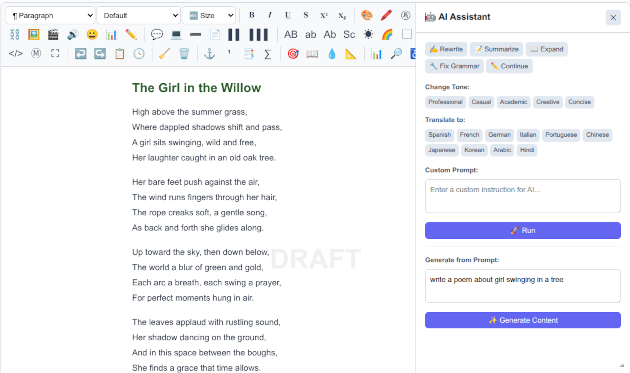
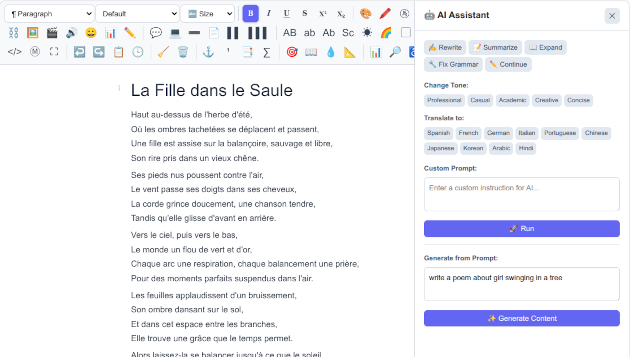
- AI Panel — Rewrite, summarize, expand, fix grammar, change tone, translate (10 languages), continue writing, generate from prompt. Supports Anthropic Claude, OpenAI GPT, and Google Gemini with SSE streaming. Ask AI Anything lets you type any freeform instruction using the editor's current content as context — e.g. "Make this more formal", "Add bullet points", "Explain this in simpler terms".
- Slash Commands — Type
/for headings, lists, quotes, code, tables, images, dividers, and more. - @ Mentions — Type
@to search and insert mentions from a configurable list. - Find & Replace — Ctrl+F with regex support, match highlighting, and replace all.
- Source View — Toggle HTML source editing with Ctrl+/.
- Markdown Toggle — Switch between WYSIWYG and Markdown with Ctrl+Shift+M.
- Version History — Save, browse, and restore document versions.
- 50-State Undo/Redo — Custom snapshot-based undo system.
- Fullscreen — F11 or Ctrl+Shift+F.
- Content Analysis — Readability (Flesch-Kincaid), SEO checker, accessibility checker.
- Tables — Insert, add/delete rows and columns, context menu editing.
- Footnotes & TOC — Auto-numbered footnotes, generated table of contents.
- Gridlines — Toggle element outlines for layout debugging.
- Auto-Save — Configurable localStorage persistence with restore prompt.
- Drag & Drop — Reorder blocks by dragging.
- Focus Mode — Dim non-active paragraphs.
- Watermark — Overlay text (e.g., "DRAFT").
- Word/Char Goals — Progress bars for writing targets.
Options
| Option | Type | Default | Description |
|---|---|---|---|
| placeholder | string | '' | Placeholder text |
| height | string | '300px' | Editor height |
| apiKey | string | null | API key (direct, not recommended for production) |
| aiProxy | string | null | Server proxy URL for provider-shaped AI requests (recommended) |
| aiEndpoint | string | null | Simple server endpoint: POST { prompt } → { ok, text } (cookie-authed, non-streaming) |
| aiProvider | string | 'anthropic' | AI provider: 'anthropic', 'openai', or 'gemini' |
| aiModel | string | 'claude-haiku-4-5' | AI model (provider-specific) |
| toolbar | string[] | null | Toolbar groups to show (null = all) |
| autosave | boolean/number | false | Auto-save interval (true = 30s, or ms) |
| wordGoal | number | 0 | Word count goal |
| charGoal | number | 0 | Character count goal |
| mentions | array | [] | Mention suggestions [{name, id, avatar?}] |
| hashtagUrl | string | null | Hashtag link pattern, e.g. '/tags/{{tag}}' |
| watermark | string | null | Watermark overlay text |
| focusMode | boolean | false | Start in focus mode |
| maxVersions | number | 20 | Max saved versions |
API
editor.getHTML()        // Clean HTML string
editor.getText()        // Plain text
editor.getMarkdown()    // Markdown conversion
editor.getJSON()        // { html, text, words, chars }
editor.getFullHTML()    // Full document with styles
editor.setHTML(html)    // Set content
editor.insertAtCursor(html)
editor.getWordCount()
editor.getCharCount()
editor.isEmpty()
editor.focus()
editor.blur()
editor.toggleFullscreen()
editor.toggleSource()
editor.toggleMarkdown()
editor.toggleGridlines()
editor.toggleFindBar()
editor.toggleFocusMode()
editor.toggleSpellcheck()
editor.saveVersion(label?)
editor.getReadability()        // { score, grade, level }
editor.getSEOIssues()          // string[]
editor.getAccessibilityIssues() // string[]
editor.print()
editor.destroy()

editor.onChange = ({ words, chars }) => { ... }
Security
Treat editor output as untrusted if any untrusted users can write content.
- Sanitize server-side before storing or rendering. The editor outputs raw HTML — always run it through a sanitizer (e.g. DOMPurify, sanitize-html) before persisting or displaying to other users.
- Disallow dangerous patterns:
javascript:links, inline event handlers (onclick,onerror, etc.),<iframe>,<script>,<object>,<embed>, and<form>tags. - Never use
apiKeyin production — useaiProxyto keep API keys server-side.
License
MIT — phpMyDEV, LLC
Related Packages
| Package | Description | |---|---| | rte-rich-text-editor | Core editor — lightweight, 33 toolbar controls | | rte-rich-text-editor-ws | WebSocket connector for RTE | | rte-rich-text-editor-bundle | RTE + WebSocket in one file | | rte-rich-text-editor-pro | Pro editor — 16 toolbar groups, AI, slash commands, mentions | | rte-rich-text-editor-pro-ws | RTEPro + WebSocket in one file | | wskit-client | Universal WebSocket client | | websocket-toolkit | Universal WebSocket client (alternate name) |
Website: rte.whitneys.co · GitHub: MIR-2025/rte
Changelog
All notable changes to rte-rich-text-editor-pro will be documented in this file.
[1.0.21] - 2026-02-25
- Added interactive checklists:
/checklistslash command, toolbar button, click-to-toggle, Enter key handling - Added floating/bubble toolbar on text selection (Bold, Italic, Underline, Link, Highlight)
- Added AI autocomplete ghost text with Tab-to-accept (
aiAutocompleteoption) - Added
setAiAutocomplete()API method - Checklist inline styles for email-compatible export
[1.0.20] - 2026-02-23
- Added multi-provider AI support: OpenAI (
gpt-4o) and Google Gemini (gemini-2.0-flash) alongside Anthropic Claude - Added
aiProvideroption ('anthropic'|'openai'|'gemini') - Server proxy now routes via
_providerfield to the correct upstream API - Updated README with multi-provider examples and
aiProvideroption docs
[1.0.18] - 2026-02-21
- Fixed editor background color not included in exported/rendered HTML
[1.0.17] - 2026-02-21
- Added Editor Background color button — changes entire editor content area background color
[1.0.16] - 2026-02-19
- Added
aiProxyoption to proxy AI requests through your server (keeps API key secret) - API key no longer required in browser when using
aiProxy - Updated README with security warning about direct
apiKeyusage in production
[1.0.14] - 2026-02-18
- Added "Link Text" field to Insert Link popup — set custom anchor text or leave blank to wrap selection
[1.0.13] - 2026-02-18
- Fixed HTML export stripping column layout classes (columns, page breaks, mentions now preserved)
- Fixed drag handle and column handle elements leaking into exports
- Added inline styles for email-compatible column exports (table-cell layout)
- Added cleanText() for drag-handle-free text exports
[1.0.12] - 2026-02-18
- Restored accidentally deleted package screenshots (rte-pro.png, rte-pro-fr.png)
[1.0.11] - 2026-02-18
- Added Cut/Copy/Paste toolbar buttons and Ctrl+X/C support for selected images
- Fixed color picker losing text selection on click (mousedown preventDefault)
- Fixed gradient text overwriting existing styles (now preserves bold, italic, etc.)
- Fixed columns not allowing new content below (added trailing paragraph)
- Added "Remove Columns" to right-click context menu
- Fixed toolbar tooltip z-index (tooltips no longer hidden behind next row of buttons)
[1.0.10] - 2026-02-18
- Added Find & Replace screenshot to README
[1.0.9] - 2026-02-18
- Added filename input to export bar for custom export filenames
[1.0.6] - 2026-02-18
- Added Tab key navigation in tables (Tab = next cell, Shift+Tab = previous cell)
- Tab at last cell automatically creates a new row
[1.0.2] - 2026-02-17
- Fixed onChange not firing on toolbar actions (added MutationObserver)
- Fixed
apireference error during init - Strip document-level tags (DOCTYPE, html, head, style, body) from AI responses and exports
- Removed max-width:800px constraint from exported HTML
- Custom 50-state undo/redo now wired to Ctrl+Z/Y and toolbar buttons
[1.0.1] - 2026-02-17
- Added screenshot to npm README
- Added CHANGELOG.md to package
- Added
rte-pro.pngto package files
[1.0.0] - 2026-02-17
- Initial release — full-featured WYSIWYG editor with AI integration
- 16 configurable toolbar groups (format, text, color, align, list, insert, block, style, direction, tools, history, cleanup, advanced, mode, analysis, ai)
- AI panel with Anthropic Claude SSE streaming (rewrite, summarize, expand, fix grammar, change tone, translate, continue writing, generate from prompt)
- AI responses output as clean HTML with automatic markdown-to-HTML fallback
- Slash commands — type
/for 15+ quick-insert commands - @ mentions — type
@to search and insert from configurable mention list - Hashtag auto-linking with configurable URL pattern
- Find & Replace with regex support and match highlighting
- Source view (HTML editing) with Ctrl+/
- Markdown toggle (HTML↔MD) with Ctrl+Shift+M
- Fullscreen mode (F11 / Ctrl+Shift+F)
- Custom 50-state undo/redo system (replaces browser's limited undo)
- Version history — save, browse, and restore document snapshots
- Auto-save to localStorage with restore prompt on init
- Content analysis: Flesch-Kincaid readability, SEO checker, accessibility checker
- Tables with add/delete rows/columns and context menu editing
- Footnotes (auto-numbered) and Table of Contents generation
- Gridlines/element outlines for layout debugging
- Drag & drop block reordering
- Focus/distraction-free mode
- Watermark overlay
- Word/character count goals with progress bars
- Code syntax highlighting (keywords, strings, comments, numbers)
- Special characters popup (currency, math, arrows, Greek, symbols)
- Text shadow, gradient text, borders, block background, editor background popups
- Anchor/bookmark and Math/LaTeX insertion
- Columns layout (1/2/3), page break, text transform, line/letter spacing
- LTR/RTL direction toggle
- 30+ public API methods
- TypeScript declarations included
- UMD wrapper (browser global, CommonJS, AMD)
- Zero dependencies, single file (~118KB)