
rte-rich-text-editor-pro-ws
v1.0.27
Published
AI WYSIWYG editor plus real-time collaboration in a single file. Claude, GPT and Gemini, live sync, auto-save, slash commands, mentions. Zero dependencies.

Maintainers
 ruusvuu
Readme
RTEPro + WebSocket Bundle




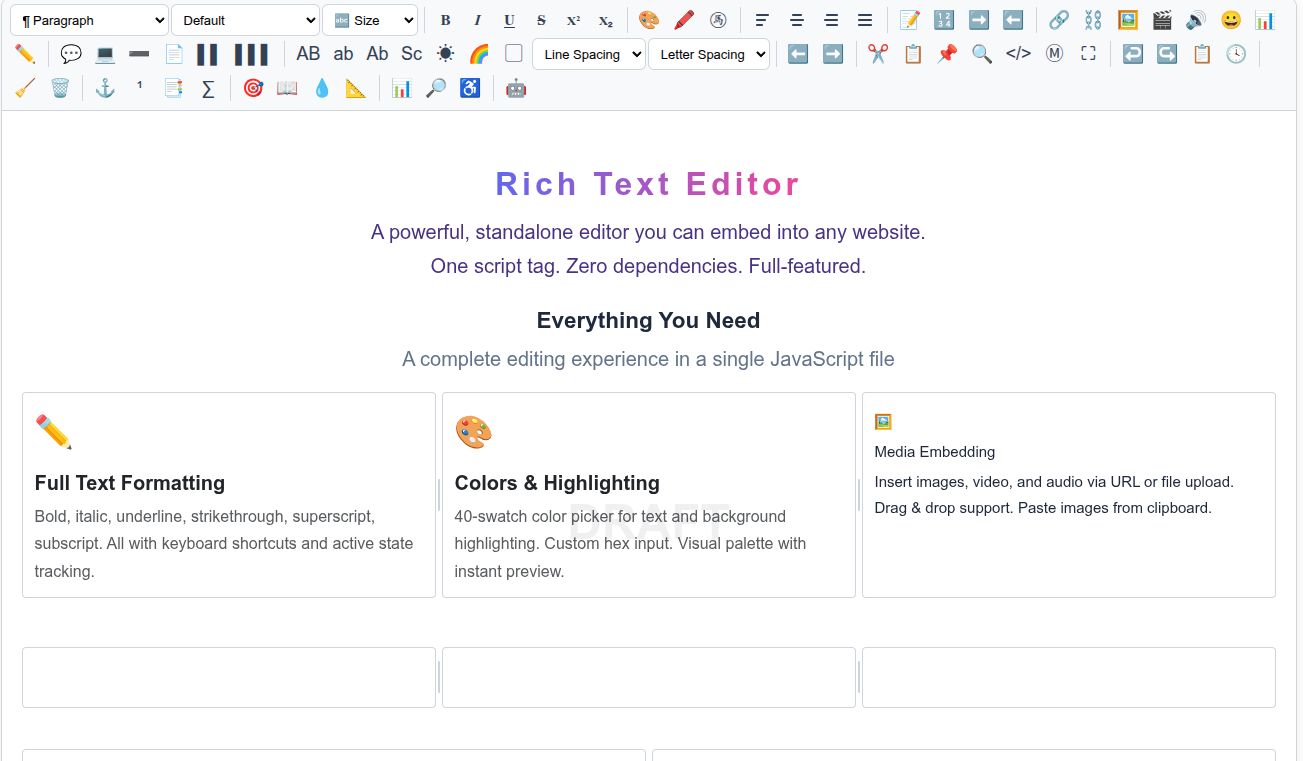
RTEPro full-featured WYSIWYG editor + WebSocket connector in a single file. AI integration, real-time collaboration, auto-save. Zero dependencies.
Install
npm install rte-rich-text-editor-pro-wsOr via CDN:
<script src="https://unpkg.com/rte-rich-text-editor-pro-ws/rte-pro-ws.js"></script>Quick Start
<div id="editor"></div>
<script src="rte-pro-ws.js"></script>
<script>
  const editor = RTEPro.init('#editor', {
    placeholder: 'Start typing...',
    height: '400px',
    aiProxy: '/api/ai',  // recommended — see AI Integration below
  });

  const ws = RTEProWS.connect(editor, 'wss://yourserver.com/ws', {
    docId: 'doc-123',
    userId: 'user-abc',
  });
</script>
What's Included
This bundle combines two libraries into one file:
- RTEPro — Full-featured WYSIWYG editor with AI, 16 toolbar groups, slash commands, mentions, version history
- RTEProWS — WebSocket connector for real-time collaboration and auto-save
RTEProWS Options
| Option | Type | Default | Description |
|---|---|---|---|
| docId | string | null | Document identifier |
| userId | string | null | Current user identifier |
| debounceMs | number | 1000 | Debounce interval for auto-save |
| reconnect | boolean | true | Auto-reconnect on disconnect |
| reconnectMaxMs | number | 30000 | Max reconnect delay |
| reconnectBaseMs | number | 1000 | Initial reconnect delay |
| heartbeatMs | number | 30000 | Heartbeat ping interval |
| autoSave | boolean | true | Auto-save content on changes |
| onOpen | function | null | WebSocket open callback |
| onClose | function | null | WebSocket close callback |
| onError | function | null | Error callback |
| onSaved | function | null | Server confirmed save |
| onRemoteUpdate | function | null | Remote user change received |
| onMessage | function | null | Any incoming message |
RTEProWS API
ws.save()        // Send explicit save request
ws.send(data)    // Send custom message
ws.disconnect()  // Close connection, stop reconnecting
ws.reconnect()   // Reconnect manually
ws.state         // "connecting" | "open" | "closing" | "closed"
ws.socket        // Raw WebSocket instance
Backend Protocol
Incoming Messages (server → client)
{ "type": "load",   "html": "<p>...</p>" }
{ "type": "update", "html": "<p>...</p>", "userId": "..." }
{ "type": "saved",  "version": 5 }
{ "type": "error",  "message": "..." }
Outgoing Messages (client → server)
{ "type": "join",   "docId": "...", "userId": "..." }
{ "type": "change", "docId": "...", "userId": "...", "html": "...", "text": "...", "words": 42, "chars": 256 }
{ "type": "save",   "docId": "...", "userId": "...", "html": "...", "text": "...", "words": 42, "chars": 256 }
{ "type": "ping" }
AI Integration
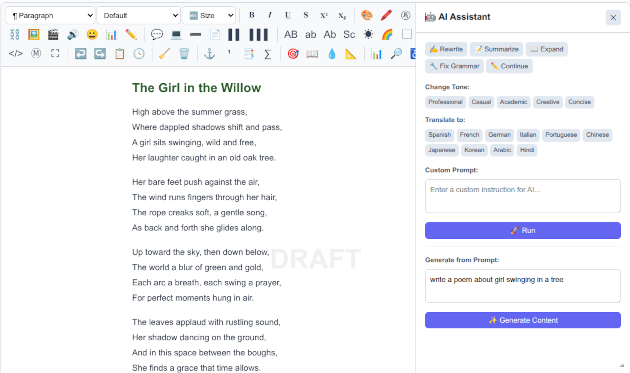
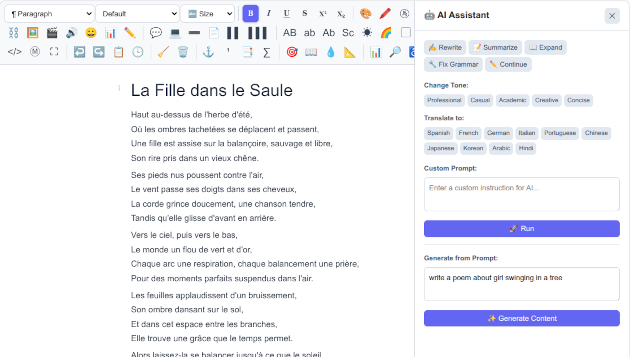
Supports Anthropic Claude (default), OpenAI GPT, and Google Gemini. Set aiProvider to switch providers.
Warning: Never use
apiKeyin production web apps — it exposes your API key in the browser where anyone can steal it. UseaiProxyto route requests through your own server, which keeps the key secret.
Recommended: Server-side proxy (keeps your key safe)
// Anthropic (default)
const editor = RTEPro.init('#editor', {
  aiProxy: '/api/ai',
});

// OpenAI
const editor = RTEPro.init('#editor', {
  aiProvider: 'openai',
  aiModel: 'gpt-4o',
  aiProxy: '/api/ai',
});

// Gemini
const editor = RTEPro.init('#editor', {
  aiProvider: 'gemini',
  aiModel: 'gemini-2.0-flash',
  aiProxy: '/api/ai',
});
Your proxy endpoint receives the JSON body from the editor with a _provider field indicating which provider to route to. Set the corresponding API key server-side (ANTHROPIC_API_KEY, OPENAI_API_KEY, or GEMINI_API_KEY).
Secure your proxy — it spends your API key
aiProxy keeps the key off the client, but the proxy endpoint itself is now the
thing that spends your money. Treat it as protected infrastructure, not an open
relay — otherwise anyone who finds the URL (or any other site) can run up your bill.
At minimum, gate it with:
- Same-origin only. Require the
Originheader to match your host and reject the rest (blocks other sites and naive scripts). If it's a logged-in app, require auth instead/as well. - Rate limit per IP. A simple per-IP/minute cap stops floods.
- A global daily budget cap. Per-IP limits don't bound total spend — viral traffic or an IP-rotating abuser can still add up. A hard daily ceiling (per-IP and global) across all callers is the real cost bound; return a friendly "limit reached" when hit.
- Cap output tokens. Clamp
max_tokens(and Gemini'smaxOutputTokens) server-side so a single request can't request a huge, expensive completion. Don't forward the client's rawmodel/token counts unchecked. - Cap request body size (e.g. 256 KB) so the input can't be abused either.
Example gate (Express):
const AI_MAX_TOKENS = 4096, AI_DAY_GLOBAL_MAX = 300, AI_DAY_IP_MAX = 30;
let day = '', dayGlobal = 0; const dayByIp = new Map(), hits = new Map();
app.use('/api/ai', express.json({ limit: '256kb' }), (req, res, next) => {
  const origin = req.get('origin');
  try { if (!origin || new URL(origin).host !== req.get('host')) return res.status(403).json({ error: 'Forbidden' }); }
  catch { return res.status(403).json({ error: 'Forbidden' }); }
  const now = Date.now(); const recent = (hits.get(req.ip) || []).filter(t => now - t < 60000);
  recent.push(now); hits.set(req.ip, recent);
  if (recent.length > 30) return res.status(429).json({ error: 'Slow down' });
  const d = new Date().toISOString().slice(0, 10);
  if (d !== day) { day = d; dayGlobal = 0; dayByIp.clear(); }
  dayGlobal++; const ipc = (dayByIp.get(req.ip) || 0) + 1; dayByIp.set(req.ip, ipc);
  if (dayGlobal > AI_DAY_GLOBAL_MAX || ipc > AI_DAY_IP_MAX) return res.status(429).json({ error: 'Daily AI limit reached' });
  if (typeof req.body.max_tokens === 'number') req.body.max_tokens = Math.min(req.body.max_tokens, AI_MAX_TOKENS);
  next();
});
Direct API key (only for local dev / internal tools)
const editor = RTEPro.init('#editor', {
  aiProvider: 'openai',
  aiModel: 'gpt-4o',
  apiKey: 'sk-...',
});
RTEPro Features
All features from rte-rich-text-editor-pro:
- 16 toolbar groups, AI panel (Anthropic Claude, OpenAI GPT, Google Gemini), slash commands, @ mentions. Ask AI Anything lets you type any freeform instruction using the editor's current content as context — e.g. "Make this more formal", "Add bullet points", "Explain this in simpler terms".
- Find & Replace, source view, markdown toggle, fullscreen
- 50-state undo/redo, version history, auto-save
- Content analysis (readability, SEO, accessibility)
- Tables, footnotes, TOC, gridlines, drag & drop, focus mode
- 30+ API methods, TypeScript declarations, UMD, zero dependencies
Security
Treat editor output as untrusted if any untrusted users can write content.
- Sanitize server-side before storing or rendering. The editor outputs raw HTML — always run it through a sanitizer (e.g. DOMPurify, sanitize-html) before persisting or displaying to other users.
- Disallow dangerous patterns:
javascript:links, inline event handlers (onclick,onerror, etc.),<iframe>,<script>,<object>,<embed>, and<form>tags. - Never use
apiKeyin production — useaiProxyto keep API keys server-side.
License
MIT — phpMyDEV, LLC
Related Packages
| Package | Description | |---|---| | rte-rich-text-editor | Core editor — lightweight, 33 toolbar controls | | rte-rich-text-editor-ws | WebSocket connector for RTE | | rte-rich-text-editor-bundle | RTE + WebSocket in one file | | rte-rich-text-editor-pro | Pro editor — 16 toolbar groups, AI, slash commands, mentions | | rte-rich-text-editor-pro-ws | RTEPro + WebSocket in one file | | wskit-client | Universal WebSocket client | | websocket-toolkit | Universal WebSocket client (alternate name) |
Website: rte.whitneys.co · GitHub: MIR-2025/rte
Changelog
All notable changes to rte-rich-text-editor-pro-ws will be documented in this file.
[1.0.16] - 2026-02-25
- Added interactive checklists:
/checklistslash command, toolbar button, click-to-toggle, Enter key handling - Added floating/bubble toolbar on text selection (Bold, Italic, Underline, Link, Highlight)
- Added AI autocomplete ghost text with Tab-to-accept (
aiAutocompleteoption) - Added
setAiAutocomplete()API method - Checklist inline styles for email-compatible export
[1.0.15] - 2026-02-23
- Added multi-provider AI support: OpenAI (
gpt-4o) and Google Gemini (gemini-2.0-flash) alongside Anthropic Claude - Added
aiProvideroption ('anthropic'|'openai'|'gemini') - Server proxy now routes via
_providerfield to the correct upstream API - Updated README with multi-provider examples and
aiProvideroption docs
[1.0.13] - 2026-02-21
- Fixed editor background color not included in exported/rendered HTML
[1.0.12] - 2026-02-21
- Added Editor Background color button — changes entire editor content area background color
[1.0.11] - 2026-02-19
- Added
aiProxyoption to proxy AI requests through your server (keeps API key secret) - API key no longer required in browser when using
aiProxy - Updated README with security warning about direct
apiKeyusage in production
[1.0.9] - 2026-02-18
- Added "Link Text" field to Insert Link popup — set custom anchor text or leave blank to wrap selection
[1.0.8] - 2026-02-18
- Fixed HTML export stripping column layout classes (columns, page breaks, mentions now preserved)
- Fixed drag handle and column handle elements leaking into exports
- Added inline styles for email-compatible column exports (table-cell layout)
- Added cleanText() for drag-handle-free text exports
[1.0.7] - 2026-02-18
- Added Cut/Copy/Paste toolbar buttons and Ctrl+X/C support for selected images
- Fixed color picker losing text selection on click (mousedown preventDefault)
- Fixed gradient text overwriting existing styles (now preserves bold, italic, etc.)
- Fixed columns not allowing new content below (added trailing paragraph)
- Added "Remove Columns" to right-click context menu
- Fixed toolbar tooltip z-index (tooltips no longer hidden behind next row of buttons)
[1.0.6] - 2026-02-18
- Added Find & Replace screenshot to README
[1.0.5] - 2026-02-18
- Added filename input to export bar for custom export filenames
[1.0.2] - 2026-02-18
- Added Tab key navigation in tables (Tab = next cell, Shift+Tab = previous cell)
- Tab at last cell automatically creates a new row
[1.0.0] - 2026-02-17
- Initial release — RTEPro editor + WebSocket connector bundled in a single file
- Includes all RTEPro 1.0.3 features (16 toolbar groups, AI integration, slash commands, mentions, etc.)
- WebSocket connector (RTEProWS) with auto-save, real-time collaboration, auto-reconnect, heartbeat
- Single script tag, zero dependencies