
rubric-scorer-cli
v1.0.0
Published
AI-powered rubric scoring tool - evaluate spoken text against scoring rubrics

Maintainers
 mohanchinnappan
Readme
🎯 Rubric Scorer CLI



An intelligent Node.js CLI tool that uses AI to evaluate and score user text (transcriptions, essays, responses) against custom rubrics. Perfect for educators, trainers, evaluators, and anyone who needs automated, consistent scoring with detailed feedback.
✨ Features
- 🤖 Multiple AI Providers: Ollama (local), OpenAI, Anthropic Claude, and Groq
- 📋 Flexible Rubric Support: Works with any rubric format (txt, md, json)
- 💬 Text Evaluation: Score spoken text transcriptions or written responses
- 🎨 Beautiful HTML Reports: Interactive dark-themed reports with Tailwind CSS
- 📊 Detailed Feedback: Criterion-by-criterion breakdown with strengths and improvements
- 💾 Export Options: Save reports as HTML or print-friendly PDFs
- 🔍 Visual Score Representation: Circular progress indicators and percentage scores
- ⚡ Fast Processing: Quick evaluation with detailed analysis
📦 Installation
npm install -g rubric-scorer-cli🎯 Usage
Basic Command Structure
rubric-scorer score \
  -r <rubric-file> \
  -t <text-file> \
  -m <ai-provider> \
  [--api-key <key>] \
  [--model-name <model>]
Quick Examples
1. Score with Ollama (Local, No API Key):
rubric-scorer score \
  -r rubrics/presentation-rubric.txt \
  -t transcripts/student-speech.txt \
  -m ollama
2. Score with OpenAI GPT-4:
rubric-scorer score \
  -r rubrics/essay-rubric.txt \
  -t submissions/essay.txt \
  -m openai \
  --api-key sk-proj-... \
  --model-name gpt-4-turbo
3. Score with Anthropic Claude:
rubric-scorer score \
  -r rubrics/coding-interview.txt \
  -t responses/candidate-answer.txt \
  -m anthropic \
  --api-key sk-ant-... \
  --model-name claude-sonnet-4.5-20250929
4. Score with Groq (Fast & Free Tier):
rubric-scorer score \
  -r rubrics/speaking-assessment.txt \
  -t transcripts/audio-transcription.txt \
  -m groq \
  --api-key gsk-... \
  --model-name mixtral-8x7b-32768
rubric-scorer score -t data/sample-1.txt -r data/rubric-1.txt -m groq --model-name openai/gpt-oss-20b --api-key gsk_...
5. Save Report to File:
rubric-scorer score \
  -r rubric.txt \
  -t response.txt \
  -m ollama \
  -o report.html
📋 Command Reference
Required Options
| Option | Alias | Description | Example |
|--------|-------|-------------|---------|
| --rubric <file> | -r | Path to rubric file | -r rubrics/math-rubric.txt |
| --text <file> | -t | Path to user text file | -t submissions/answer.txt |
| --model <provider> | -m | AI provider | -m ollama |
Optional Options
| Option | Description | Default |
|--------|-------------|---------|
| --api-key <key> | API key (not needed for Ollama) | - |
| --model-name <name> | Specific model | Provider default |
| --ollama-url <url> | Ollama server URL | http://localhost:11434 |
| --output <file> | Save HTML to file instead of browser | - |
🤖 Supported AI Models
🏠 Ollama (Local - Free)
Setup: Install from ollama.ai
# Pull a model
ollama pull llama3.2

# Use it
-m ollama --model-name llama3.2
Recommended Models:
llama3.2- Great balance of speed and qualityllama3.1- Excellent for detailed evaluationsmistral- Fast and efficientmixtral- Strong reasoning capabilities
🌐 OpenAI
API Key: Get from platform.openai.com
Recommended Models:
gpt-4-turbo- Best quality, comprehensive analysisgpt-4- Excellent evaluation capabilitiesgpt-3.5-turbo- Budget-friendly option
🧠 Anthropic Claude
API Key: Get from console.anthropic.com
Recommended Models:
claude-sonnet-4.5-20250929- Best balance (default)claude-opus-4.1- Highest qualityclaude-sonnet-4- Fast and capable
⚡ Groq
API Key: Get from console.groq.com
Recommended Models:
mixtral-8x7b-32768- Great quality (default)llama3-70b-8192- Strong reasoningllama3-8b-8192- Fast evaluation
📝 Rubric Format
Rubrics can be in any text format. The AI will interpret the scoring criteria intelligently.
Example Rubric (Simple):
Presentation Skills Rubric (Total: 100 points)

1. Content Quality (30 points)
   - Clear thesis and main points
   - Supporting evidence and examples
   - Logical organization

2. Delivery (30 points)
   - Clear speech and pronunciation
   - Appropriate pace and volume
   - Eye contact and body language

3. Engagement (20 points)
   - Audience interaction
   - Handling questions
   - Energy and enthusiasm

4. Visual Aids (20 points)
   - Quality of slides/materials
   - Effective use of visuals
   - Professional appearance
Example Rubric (Detailed):
Essay Scoring Rubric

Criteria 1: Thesis Statement (0-25 points)
- 20-25: Clear, compelling thesis with sophisticated argument
- 15-19: Clear thesis with adequate argument
- 10-14: Thesis present but unclear or weak
- 5-9: Vague thesis
- 0-4: No identifiable thesis

Criteria 2: Evidence and Support (0-25 points)
- 20-25: Extensive, relevant evidence with proper citations
- 15-19: Adequate evidence, mostly relevant
- 10-14: Some evidence but limited or weak
- 5-9: Minimal evidence
- 0-4: No supporting evidence

[... additional criteria ...]
JSON Format (Advanced):
{
  "title": "Speaking Assessment Rubric",
  "totalPoints": 100,
  "criteria": [
    {
      "name": "Fluency",
      "points": 25,
      "description": "Speech flows smoothly without excessive pauses or hesitation"
    },
    {
      "name": "Pronunciation",
      "points": 25,
      "description": "Clear articulation and correct pronunciation of words"
    },
    {
      "name": "Vocabulary",
      "points": 25,
      "description": "Appropriate word choice and variety"
    },
    {
      "name": "Grammar",
      "points": 25,
      "description": "Correct use of grammatical structures"
    }
  ]
}
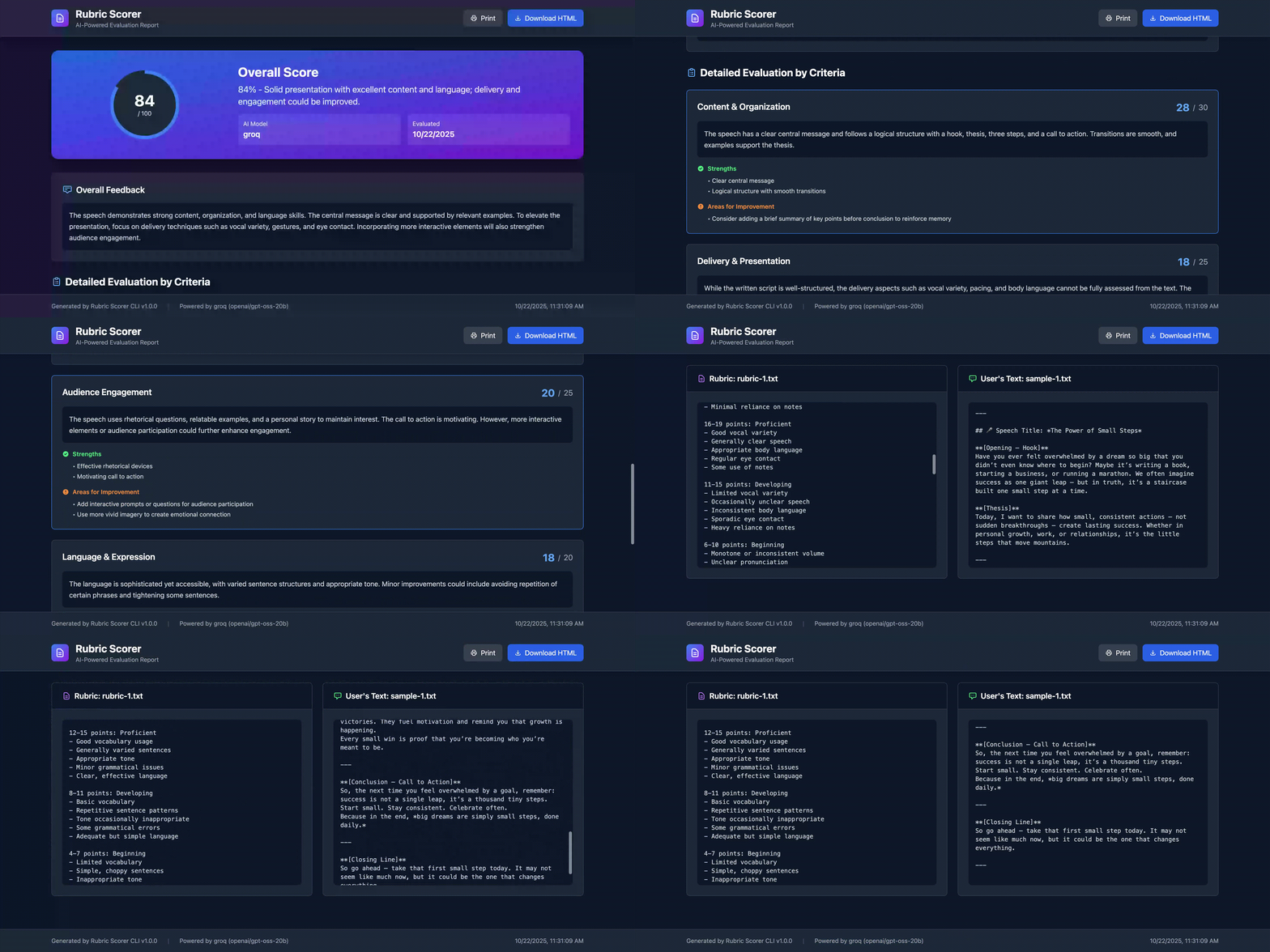
📊 HTML Report Features
The generated HTML report includes:
🎯 Score Summary Card
- Circular Progress Indicator: Visual representation of overall score
- Percentage Score: Easy-to-read percentage
- AI Model Badge: Shows which model was used
- Date Stamp: When the evaluation was performed
💬 Overall Feedback
- Comprehensive summary of performance
- General observations and recommendations
- Highlighted in a dedicated section
📋 Detailed Criteria Breakdown
For each criterion:
- Score Display: Points earned vs. maximum points
- Detailed Feedback: Specific comments on performance
- ✅ Strengths: What was done well
- ⚠️ Areas for Improvement: Specific suggestions
📄 Source Documents
- Rubric Display: Full rubric shown for reference
- User Text Display: The evaluated text shown in context
- Scrollable Sections: Easy to review long documents
🛠️ Action Buttons
- Print: Create PDF reports
- Download HTML: Save complete report
- Responsive Design: Works on all devices
🎓 Use Cases
Education
- Grade Essays: Automated first-pass grading with detailed feedback
- Evaluate Presentations: Score student presentations from transcripts
- Language Assessment: Evaluate speaking/writing proficiency
- Peer Review: Consistent rubric application across reviewers
Corporate Training
- Training Assessments: Evaluate role-play scenarios
- Interview Scoring: Consistent candidate evaluation
- Performance Reviews: Score based on competency rubrics
- Certification Tests: Automated practical exam grading
Content Evaluation
- Speech Analysis: Score public speaking engagements
- Content Review: Evaluate articles or blog posts
- Quality Assurance: Consistent content scoring
- Customer Service: Evaluate support interactions
🔧 Advanced Usage
Custom Ollama Server
rubric-scorer score \
  -r rubric.txt \
  -t text.txt \
  -m ollama \
  --ollama-url http://192.168.1.100:11434 \
  --model-name codellama
Batch Processing Script
#!/bin/bash
for file in submissions/*.txt; do
  echo "Scoring $file..."
  rubric-scorer score \
    -r rubric.txt \
    -t "$file" \
    -m ollama \
    -o "reports/$(basename $file .txt)-report.html"
done
Integration with CI/CD
# .github/workflows/score.yml
name: Score Submissions
on: [push]
jobs:
  score:
    runs-on: ubuntu-latest
    steps:
      - uses: actions/checkout@v2
      - name: Install Ollama
        run: curl -fsSL https://ollama.ai/install.sh | sh
      - name: Pull Model
        run: ollama pull llama3.2
      - name: Score Submission
        run: |
          npm install
          rubric-scorer score \
            -r rubric.txt \
            -t submission.txt \
            -m ollama \
            -o report.html
      - name: Upload Report
        uses: actions/upload-artifact@v2
        with:
          name: evaluation-report
          path: report.html
🔒 Security & Privacy
- API Keys: Pass via command line or environment variables
- Local Processing: Use Ollama to keep data private
- No Data Storage: Tool doesn't store evaluations
- Open Source: Review the code for security
🐛 Troubleshooting
Ollama Connection Error
# Check if Ollama is running
curl http://localhost:11434/api/tags

# Start Ollama
ollama serve
API Key Invalid
# Verify your API key format
echo $OPENAI_API_KEY
echo $ANTHROPIC_API_KEY
JSON Parsing Error
The tool handles this gracefully - if JSON parsing fails, it returns the raw feedback text.
Model Not Found
# For Ollama, pull the model first
ollama pull llama3.2
📈 Future Enhancements
- [ ] Support for multiple text files (batch scoring)
- [ ] Comparative analysis (compare multiple submissions)
- [ ] Historical tracking (store and compare scores over time)
- [ ] Custom rubric templates library
- [ ] PDF export directly from CLI
- [ ] Real-time audio transcription integration
- [ ] Web interface version
- [ ] API endpoint for integration
🤝 Contributing
Contributions welcome! Ideas for improvement:
- Please contact the author.
📄 License
MIT License (c) Mohan Chinnappan
🙏 Acknowledgments
- Powered by AI: Ollama, OpenAI, Anthropic, Groq
Made with ❤️ for educators, trainers, and evaluators everywhere!