
ruleprint
v0.1.0
Published
Command-line interface: init, scan, serve and build a rule book from a repository.
Downloads
143


Readme
RulePrint
A browsable book of business rules, generated from the code your team already writes. No documentation to maintain. Your only job is to say "yes".
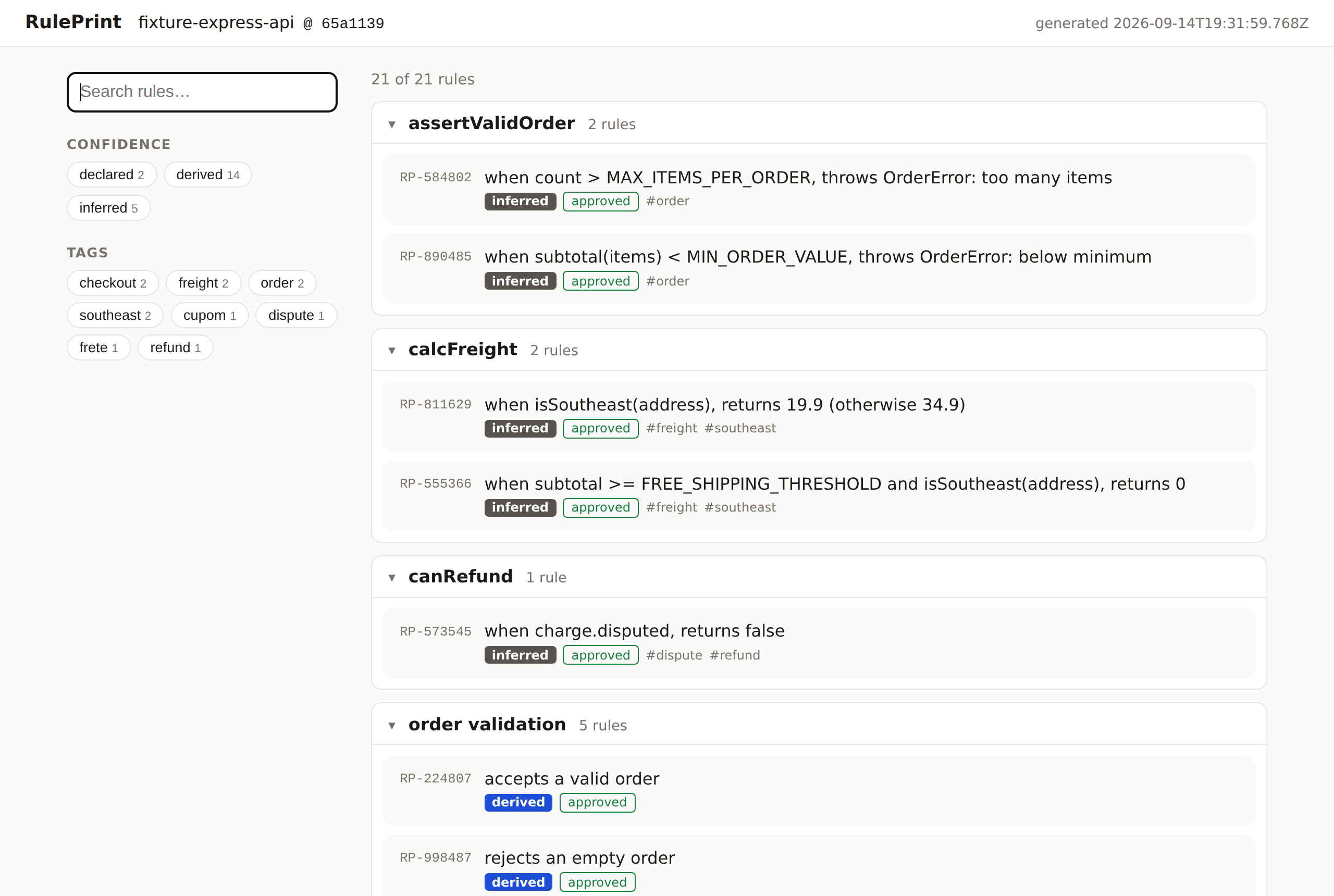
RulePrint points at a repository and drafts the rule book for you:
- Tests become rules. A vitest or jest tree like
describe('shipping') › it('is free above 300
in the Southeast')
becomes a rule with a link to the test. - People can promote and annotate. A markdown file in
.ruleprint/rules/makes a rule official; a// @rule RP-…comment links code to it. - Code can be read too (experimental). With a glossary of your domain terms, RulePrint infers rules from conditionals.
- Approval is the only human work. Approvals live in
ruleprint.lock, and CI fails when a rule changes without a new "yes".
Quick start
Requires Node 20.19+. Nothing to install globally:
cd your-project
npx ruleprint init              # scans the repository, writes ruleprint.json
npx ruleprint serve             # browse the rule book at http://localhost:4141
npx ruleprint approve --all     # approve what you see; writes ruleprint.lock
npx ruleprint check             # in CI: exit 1 when rules changed without approval
Commit ruleprint.json and ruleprint.lock so the rule book travels with the code. To pin a
version for the whole team, add it as a dev dependency: npm install --save-dev ruleprint.
Confidence levels
| Level | Where it comes from | In the book |
| ---------- | ------------------------------------------ | ---------------------------------------- |
| declared | written by a person in .ruleprint/rules/ | green badge, the official rule |
| derived | inferred from an automated test | blue badge, links to the test and status |
| inferred | inferred from the code's conditionals | grey badge, "not verified", to review |
Commands
| Command | What it does |
| ---------------------------------------------------------------------------------- | ------------------------------------------------------------------------------------------------------------ |
| ruleprint init [dir] | scans, writes ruleprint.json, prints the next steps |
| ruleprint scan [dir] [--out file] [--json] | the same scan for CI; --json prints a machine-readable summary |
| ruleprint serve [dir] [--port 4141] [--no-watch] | serves the UI; rescans and reloads the browser on every change |
| ruleprint build [dir] [--out ruleprint-site] | writes UI + ruleprint.json as a static site |
| ruleprint check [dir] [--json] | compares the scan with ruleprint.lock; exit 1 on added, changed, renamed or removed rules; lists orphans |
| ruleprint approve [dir] [ids...] [--all] [--by who] | approves changes (interactive in a terminal), writes ruleprint.lock, refreshes ruleprint.json |
| ruleprint promote <id> [-C dir] | writes .ruleprint/rules/<slug>.md so the rule becomes declared on the next scan |
| ruleprint describe <id> [text] [--from-file f] [-C dir] | writes the description into that markdown file (creates it when the rule is not declared yet) |
| ruleprint pr [-C dir] [--dry-run] [--no-push] [--no-fail-on-changes] [--limit n] | GitHub Action: comments on the pull request and approves rules from ticked boxes |
Exit codes: 0 ok, 1 (check and pr on a pull request) changes waiting for approval, 2
error. Every command is headless and CI-friendly.
GitHub Action
A bot keeps one comment per pull request with a checkbox per new, changed, renamed or removed rule.
Ticking a box approves the rule and commits ruleprint.lock to the branch.
- uses: actions/checkout@v4
- uses: cedric-sd/Ruleprint@v1
Inputs, permissions and limits: GitHub Action.
Learn more
- Full guide: declared rules, the experimental AST collector, how it works
ruleprint.jsonspecification- Roadmap
- Issues
Licensed under Apache-2.0.