
rust-learning-ide
v1.0.0
Published
Interactive Rust Learning IDE — Monaco Editor, AI Sidekick, integrated terminal, and 21+ commented examples

Maintainers
 mohanchinnappan
Readme
Rust Learning IDE
Browser-based Rust IDE powered by Monaco Editor. Write, compile, and run Rust programs with one click.
21+ line-commented examples — Basics → Ownership → Traits → Concurrency.
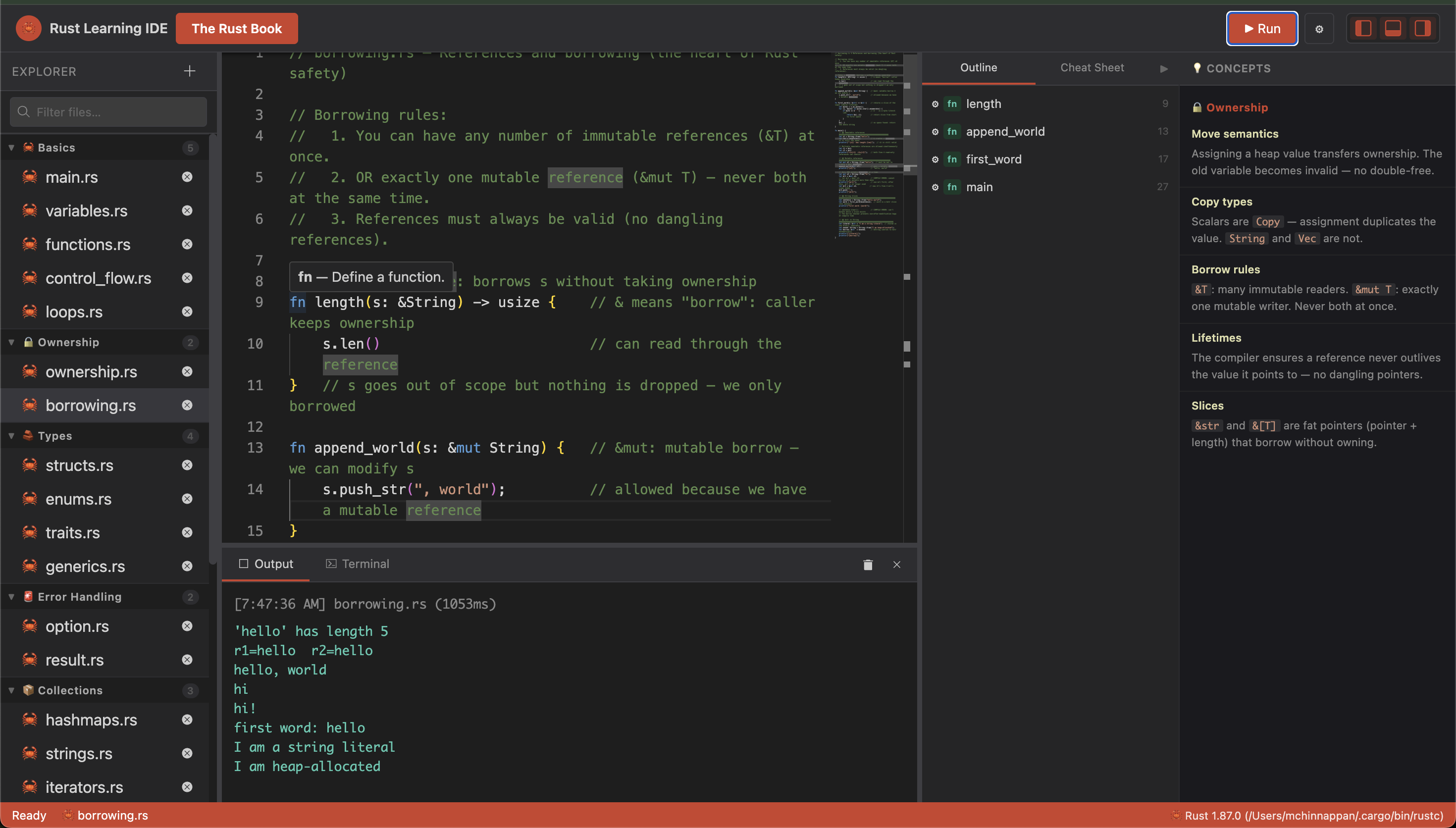
Scrrenshot
Installation
npm install -g rust-learning-ideQuick Start
rust-ide                          # default port 3000
rust-ide --port 4000              # custom port
rust-ide --enable-ai              # with AI Sidekick
rust-ide --enable-tour --enable-ai  # full experience
CLI Options
| Flag | Default | Description |
|---|---|---|
| -p, --port <n> | 3000 | Port |
| -h, --host <addr> | localhost | Host |
| --rust <path> | auto-detect | Path to rustc |
| --enable-tour | off | Splash screen + 9-step guided tour |
| --enable-ai | off | AI Sidekick panel |
Layout
┌─────────────────────────────────────────────────────┐
│  Header: Run · Save · Settings · [▣ ▣ ▣] toggles   │
├──────────┬──────────────────────────┬────────────────┤
│          │                          │                │
│ Sidebar  │   Monaco Editor          │  Outline       │
│ Explorer │   (drag splitters to     │  Cheat Sheet   │
│          │    resize any pane)      │  Concepts      │
│          ├──────────────────────────│                │
│          │   Output / Terminal      │                │
└──────────┴──────────────────────────┴────────────────┘
│  Status bar                                          │
└──────────────────────────────────────────────────────┘
Toolbar layout toggles (three buttons, top-right)
| Button | Toggles | |---|---| | ▣ (left bar) | Sidebar | | ▣ (bottom bar) | Output / Terminal panel | | ▣ (right bar) | Outline + Cheat Sheet + Concepts panel |
Splitters
Drag any of the three resize handles:
| Handle | Effect | |---|---| | Vertical — between Sidebar and Editor | Widen / narrow the sidebar | | Horizontal — between Editor and Output | Taller / shorter output panel (drag up or down) | | Vertical — between Editor and Right Panel | Widen / narrow the right panel |
Right Panel tabs
| Tab | Description | |---|---| | Outline | Live symbol list (fn, struct, enum, trait, impl, mod, …). Click any symbol to jump to its line. | | Cheat Sheet | 10-section Rust syntax reference. Click any code snippet to insert it at the cursor. | | Concepts | Concept explanations for the currently open file's topic (auto-updates on file open). |
Example Sections
| Section | Files | |---|---| | 🦀 Basics | main, variables, functions, control_flow, loops | | 🔒 Ownership | ownership, borrowing, lifetimes, slices | | 🧱 Types | structs, enums, traits, generics | | 🚨 Error Handling | option, result, question_mark | | 📦 Collections | vectors, hashmaps, strings, iterators | | ⚡ Closures | closures, functional | | 🧵 Concurrency | threads, channels, shared_state | | 📚 Stdlib | io, files, process | | 🔬 Advanced | smart_pointers, patterns, modules |
AI Sidekick
Start with --enable-ai. Supported providers: Ollama · Claude · OpenAI · xAI · Gemini.
Configure in ⚙ Settings (top-right). Requires an API key or a running Ollama instance.
Keyboard Shortcuts
| Shortcut | Action |
|---|---|
| Ctrl/Cmd + Enter | Compile and run current file |
| Ctrl/Cmd + S | Save current file |
| Escape | Close modals / clear file search |
Building a distribution (obfuscated)
/path/to/obfuscli build -p . --exclude "node_modules/*" --exclude "workspace/*" --exclude ".git/*"
# or, if obfuscli is on PATH:
npm run build
Output goes to dist/. Run from there with node dist/server.js.
Re-run the guided tour
localStorage.removeItem("rustide_tour_done_v1"); location.reload();Support This Work
If this tool has helped you, please consider donating to one of Mohan's suggested charities:
- ❤️ St. Jude Children's Research Hospital — fighting childhood cancer
- 🌍 Any charity supporting Developing Countries — food, water, education, healthcare
Your generosity makes a real difference. Thank you.
License
MIT © Mohan Chinnappan