
s1pilot
v0.4.0
Published
AI-native web app testing: describe a test in plain language, explore it once with a System 1 decision model, replay it deterministically, heal it with AI.

Maintainers
 sharma
Readme
s1pilot
Explore once with AI. Replay deterministically. Heal with AI.
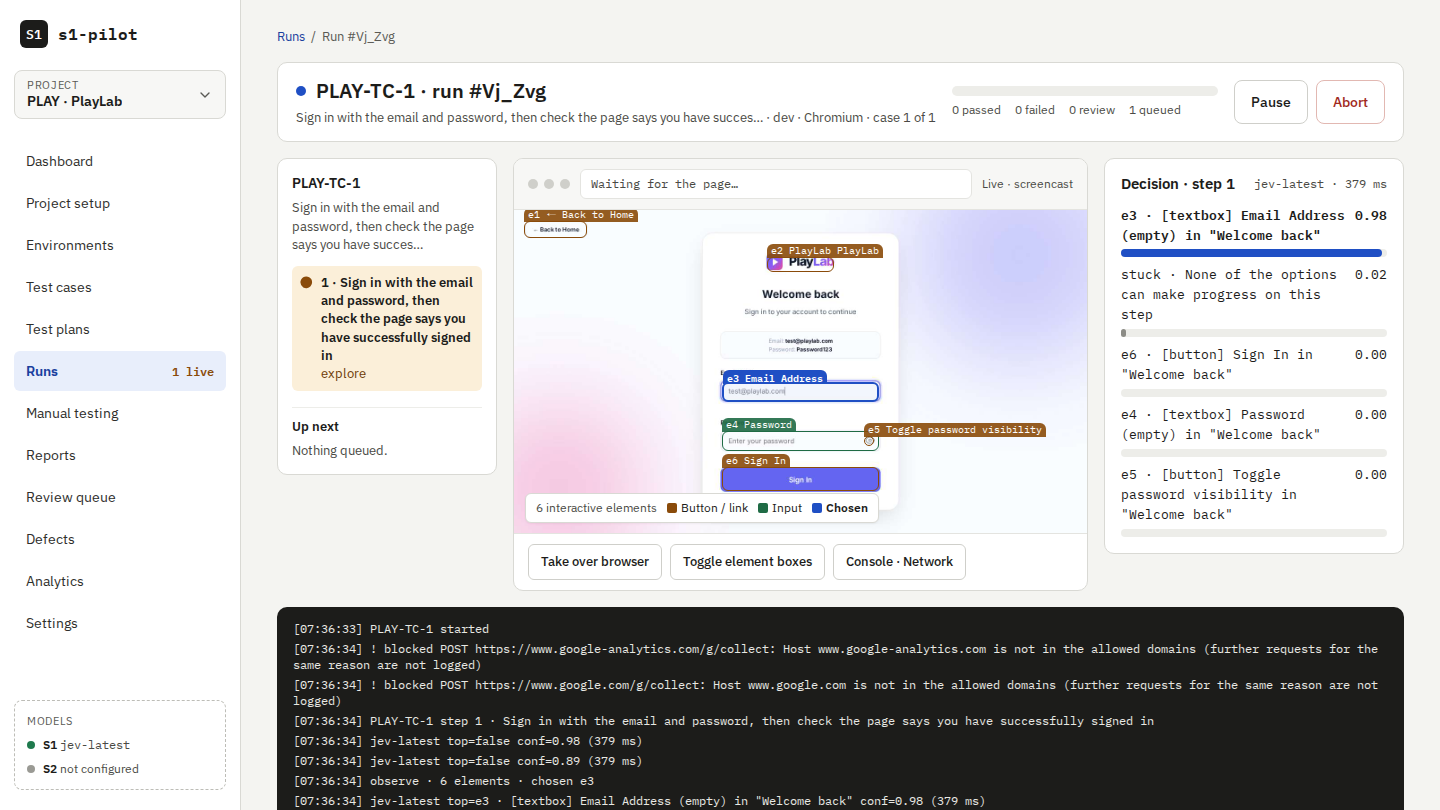
s1pilot is a web application testing platform where you write test cases in plain language. On the first run, a System 1 decision model drives a real browser one step at a time and decides what to click and type. The steps it resolves are saved as a learned script. Later runs replay that script without asking the model what to click, and only a step that broke because the page changed goes back to the model to be healed.
A System 1 model answers like a classifier: it picks one option and gives a probability, instead of writing free text. That's what makes each step inspectable and lets s1pilot ask for help when it's unsure.



Website and demo video · Getting started · Report an issue
Why s1pilot
- Plain-language tests. A step is an action plus an expected result, such as "Choose colour Blue and size M, then add to cart" and "Cart badge shows 1 item". You can add deterministic assertions where you want them.
- Fast, cheap reruns. Once a test has passed, it replays like a normal Playwright script. The model is only asked
what to do when something changed. Steps checked with
assertneed no model call at all. - Decisions you can inspect. A System 1 model answers with a choice and a probability. Every step records the options, the probabilities and the chosen action, so you can see why a test did what it did.
- It asks instead of guessing. When the model is not confident, an attended run pauses for your approval. An unattended run marks the step blocked instead of guessing.
- Full test management. Projects, environments, suites, test cases, plans, runs, a review queue, defects and analytics, in a local web app.
- Tests as code. Two-way sync between the database and YAML files in
.s1pilot/, so test changes can be reviewed in pull requests. - Runs in CI. A CLI with JUnit, JSON and HTML reports, meaningful exit codes and a pull request summary comment.
- Your data stays local by default. SQLite on your machine, and secrets that never reach a model.
Try it in one minute (no API key)
You need Node.js 22.12 or newer.
npm install -g s1pilot
npx playwright install chromium    # once: the browser test runs use
s1pilot demo
s1pilot demo starts a bundled demo shop, a scripted stand-in model and the web app, with a DEMO project that has
one ready test. Open the test, press Run now to watch it explore (each step shows its options and probabilities),
then run it again: the second run replays the learned script and the report says no model call. Nothing leaves your
machine. The scripted model only knows the demo test; connect a real model to write your own.
Quick start
You need a System 1 decision model endpoint (see Getting a model).
s1pilot uis1pilot ui starts the API, the run workers and the web app in one process and opens http://127.0.0.1:5317.
The project wizard walks you through connecting your model (Test connection detects the adapter) and writing your
first test.
For the full five-minute walkthrough, including the bundled demo shop, see Getting started.
How it works
plain-language step ──► observe the page ──► System 1 picks an action (with a probability)
                                                   │
                     confident ◄───────────────────┴──────────────► unsure
                         │                                             │
                 act and verify                     ask System 2 or a person, or mark the step blocked
                         │
          passed ──► save the learned script ──► next run: replay, with no model calls
                                                           │
                                          a step broke? ──► heal only that step and propose the change
Each run uses one of three modes:
| Mode | What it does |
|---|---|
| replay-heal (default) | Replays the learned script and heals broken steps with System 1. |
| explore | Uses the model for every step. |
| replay-only | Never calls a model, which is useful as a strict regression gate. |
A test case
# .s1pilot/suites/checkout/tc-042.yaml
key: SHOP-TC-42
title: Guest can check out a single item
priority: P1
tags: [checkout, guest, smoke]
parameters:
  - { size: M, colour: Blue }
steps:
  - action: Search for "t-shirt" and open the "Classic Tee" product
    expected: The product page for Classic Tee is shown
  - action: Choose colour {colour} and size {size}, then add to cart
    expected: Cart badge shows 1 item
    assert:
      - { type: elementText, role: status, contains: "1" }
  - action: Go to checkout as guest and fill the shipping form, then continue to the payment step
    inputs: [shipping_name, shipping_zip]
    expected: The payment step is displayed
    assert:
      - { type: urlMatches, pattern: "/checkout/payment" }
Steps are followed literally. Write each one to include the action that moves the flow on, as in "... then continue to the payment step".
A replay never asks the model what to do. A plain-language expected is still checked by the model on each run; use
assert checks (as above) where you want a step verified with no model call at all.
How is this different?
| | Model calls per rerun | Deterministic reruns | Inspectable decisions | Local-first | Test management |
|---|---|---|---|---|---|
| Playwright codegen | none | yes | n/a (recorded script) | yes | no |
| Agent-style AI browser tools | usually one LLM call per step, every run | no | free-text reasoning | varies | no |
| Commercial AI QA services | varies by vendor | varies | varies | usually no (SaaS) | yes |
| s1pilot | none for actions; only broken steps and expected checks | yes | options + probabilities per step | yes (SQLite, local models) | yes |
Some agent tools and services now cache actions too. Check each tool's current docs for its caching behaviour.
Getting a model
The fastest real option is Cloudflare's Clef on OpenRouter:
- Create an API key at https://openrouter.ai/keys and export it:
export S1PILOT_API_KEY=... - Check the endpoint:
s1pilot probe --url https://openrouter.ai/api/alpha/decisions --model cloudflare/clef --adapter systemone --timeout 30000 - In the project wizard (or
.s1pilot/project.yaml), use:
model:
  system1: { adapter: systemone, baseUrl: https://openrouter.ai/api/alpha/decisions, model: cloudflare/clef, apiKeyRef: env:S1PILOT_API_KEY, profileId: clef }
  thresholds: { act: 0.8, pass: 0.8, fail: 0.2, escalate: 0.5 }
Cloud calls take about 0.7–1.5 s each. To keep page data on your network, run a model locally and use the systemone
or openai-logprobs adapter (see Models).
Command line
s1pilot run ./.s1pilot/suites --reporter junit,html --out ./s1pilot-results| Command | What it does |
|---|---|
| s1pilot demo | Starts the web app with a demo shop, a scripted model and a ready test. No API key needed. |
| s1pilot ui | Starts the local web app (--port, --data-dir, --workers, --no-open). |
| s1pilot run [file-or-dir] | Runs YAML test cases. Exit codes: 0 passed, 1 failed, 2 needs review, 3 config error. |
| s1pilot run --plan <name> --server <url> | Runs a test plan on an s1pilot server and waits for the result. |
| s1pilot probe --url <endpoint> | Detects which adapter a model endpoint speaks, along with its capabilities and latency. |
| s1pilot sync export\|import\|status | Syncs between the database and the .s1pilot/ YAML folder. |
| s1pilot eval | Measures engine quality against seeded-bug fixture sites. |
| s1pilot calibrate | Suggests confidence thresholds from human review outcomes. It never applies them on its own. |
| s1pilot worker | Runs test jobs for a remote s1pilot server. |
| s1pilot ci-comment | Posts or updates the run summary comment on a pull request. |
Run s1pilot <command> --help to see all options.
Models
| Adapter | Use it for |
|---|---|
| systemone | System 1 decision endpoints (for example Clef via OpenRouter). |
| decide | Endpoints that speak the decide protocol. |
| openai-logprobs | OpenAI-compatible completions that return log-probabilities. |
| openai-chat | Chat models, used as System 2 for escalation. |
| mock | Scripted answers for tests and demos. |
Capability profiles in profiles/ set the
default confidence thresholds for each model. Tune them for the model you use: a correct pick can score just under a
threshold.
API keys are references, never values. Use apiKeyRef: env:S1PILOT_API_KEY in project settings, or --key /
S1PILOT_API_KEY on the command line.
Security and data
- Page content is treated as untrusted data and is never followed as instructions.
- Secret values (
secret:<key>,var:<key>,env:NAME) are never logged, sent to a model, or stored in traces, reports or screenshots. - Production environments are read-only by default. Sensitive actions such as paying, deleting or sending require approval.
- You control what page data is sent to the model in the project's Data sent to models setting. A local or LAN endpoint keeps page data on your network.
- Known limitation: Playwright
trace.zipfiles contain DOM snapshots that are not yet masked. Do not share traces from runs that type secrets.
To report a vulnerability, see SECURITY.md.
Team deployment
For a shared server with remote workers, Postgres and S3-compatible artifact storage, use the Docker Compose stack in
deploy/compose.team.yml.
Server and worker images are published to ghcr.io/sharma-open-source/s1pilot/{server,worker}.
Contributing
s1pilot is a TypeScript monorepo (pnpm and Turborepo) built with Playwright, Fastify, tRPC, Drizzle and React.
pnpm install
pnpm build
pnpm lint && pnpm typecheck && pnpm test
See CONTRIBUTING.md and AGENTS.md for conventions and the architecture plan.
Roadmap and community
- Roadmap: docs/plan.md (product plan and roadmap) and the changelog.
- Questions and ideas: GitHub Discussions.
- Want to help? Start with a good first issue.
⭐ Star the repository to follow releases.