
salesforce-mcp-lib
v1.1.1
Published
TypeScript stdio proxy bridging MCP clients to Salesforce Apex MCP endpoints via OAuth 2.0

Maintainers
 damecek
Readme
salesforce-mcp-lib


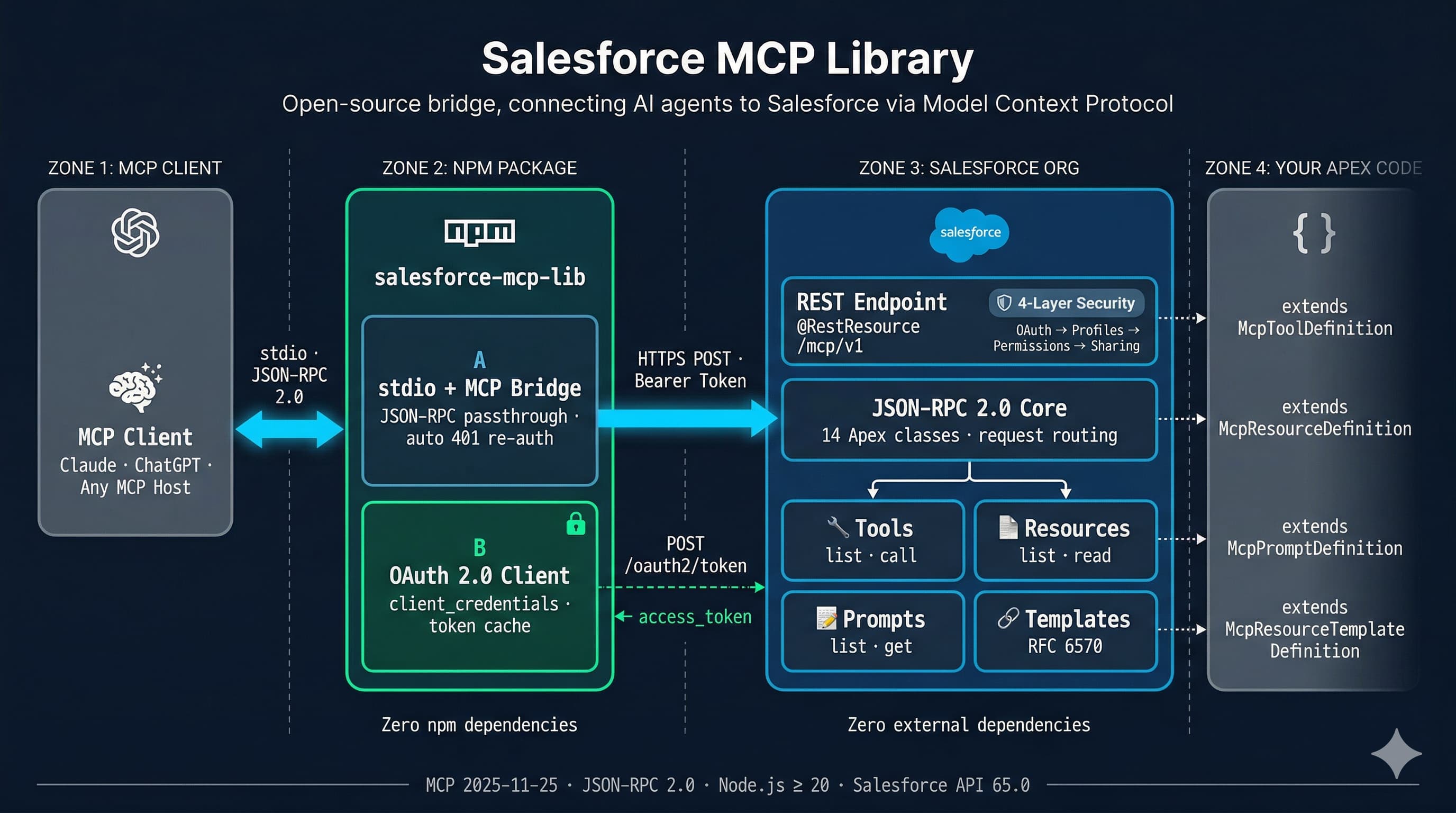
TypeScript proxy that bridges MCP clients to a Salesforce Apex MCP endpoint. Its main value is OAuth 2.0 token lifecycle management -- configure once, run forever. Optional when the consumer already handles Salesforce OAuth tokens.
Zero npm production dependencies. Node.js >= 20.
What it does
- Reads JSON-RPC 2.0 messages from stdin, forwards them over HTTPS to your Salesforce org
- Authenticates via OAuth 2.0 (client credentials or per-user authorization code with PKCE), caches tokens, and refreshes automatically
- Writes JSON-RPC responses to stdout, logs to stderr with automatic secret redaction
When to use this package
Use it when your MCP host does not manage Salesforce OAuth tokens on its own. This covers most desktop clients (Claude Desktop, Cursor, VS Code extensions) and any integration without a built-in Salesforce credential store. The proxy handles the full token lifecycle -- acquire, cache, refresh, re-authenticate on 401 -- so you configure credentials once and it runs forever.
Skip it when the consumer already handles Salesforce OAuth. Cloud platforms with native Salesforce connectors, automation services (n8n, Make), or custom agent orchestration layers that acquire a token, fire an agent with MCP, route the response, and repeat. The Apex endpoint is stateless -- no session to maintain between calls.
What the proxy handles for you: OAuth 2.0 flows (client credentials or authorization code with PKCE), token caching, automatic 401 re-authentication, secret redaction in logs.
What you take ownership of without it: token acquisition, token refresh, session expiry handling, and credential security.
See Architecture: Proxy and Direct Connection for the full rationale.
Usage
The auth mode is auto-detected: --client-secret present → client credentials flow; absent → per-user auth (authorization code + PKCE).
Per-User Auth (recommended)
Step 1 — one-time login:
npx salesforce-mcp-lib login \
  --instance-url https://your-org.my.salesforce.com \
  --client-id YOUR_CLIENT_ID
A browser window opens, you log in with your Salesforce credentials and grant access. Tokens are stored locally and persist across restarts via automatic refresh.
Step 2 — MCP client config (no --client-secret):
{
  "mcpServers": {
    "salesforce": {
      "command": "npx",
      "args": [
        "-y", "salesforce-mcp-lib",
        "--instance-url", "https://your-org.my.salesforce.com",
        "--client-id", "YOUR_CLIENT_ID",
        "--endpoint", "/services/apexrest/mcp/minimal"
      ]
    }
  }
}
See the Per-User Auth Setup Guide for External Client App configuration, headless environments, and troubleshooting.
Client Credentials (service account)
{
  "mcpServers": {
    "salesforce": {
      "command": "npx",
      "args": [
        "-y", "salesforce-mcp-lib",
        "--instance-url", "https://your-org.my.salesforce.com",
        "--client-id", "YOUR_CLIENT_ID",
        "--client-secret", "YOUR_CLIENT_SECRET",
        "--endpoint", "/services/apexrest/mcp/minimal"
      ]
    }
  }
}
With npx (no install needed)
npx salesforce-mcp-lib \
  --instance-url https://your-org.my.salesforce.com \
  --client-id YOUR_CLIENT_ID \
  --client-secret YOUR_CLIENT_SECRET \
  --endpoint /services/apexrest/mcp/minimal
CLI reference
MCP server mode
salesforce-mcp-lib [options]| CLI flag | Env variable | Required | Description |
|----------|-------------|----------|-------------|
| --instance-url | SF_INSTANCE_URL | Yes | Salesforce org URL |
| --client-id | SF_CLIENT_ID | Yes | External Client App consumer key |
| --client-secret | SF_CLIENT_SECRET | No* | External Client App consumer secret |
| --endpoint | SF_ENDPOINT | Yes | Apex REST endpoint path |
| --callback-port | SF_CALLBACK_PORT | No | OAuth callback port (default: 13338) |
| --log-level | SF_LOG_LEVEL | No | debug / info / warn / error (default: info) |
* When --client-secret is provided → client credentials flow. When omitted → per-user auth (requires prior login).
Login subcommand
salesforce-mcp-lib login [options]| CLI flag | Env variable | Required | Description |
|----------|-------------|----------|-------------|
| --instance-url | SF_INSTANCE_URL | Yes | Salesforce org URL |
| --client-id | SF_CLIENT_ID | Yes | External Client App consumer key |
| --headless | SF_HEADLESS | No | Print auth URL instead of opening browser |
| --callback-port | SF_CALLBACK_PORT | No | OAuth callback port (default: 13338) |
| --log-level | SF_LOG_LEVEL | No | Log level (default: info) |
Prerequisites
This proxy connects to an Apex MCP endpoint running in your Salesforce org. You need:
- Salesforce MCP Library installed in your org (install instructions)
- At least one
@RestResourceendpoint with registered MCP capabilities - An External Client App — either Client Credentials flow (service account) or Authorization Code + PKCE flow (per-user auth)
See the main README for the ECA quick-start guide (both auth modes).
How it works
MCP Client (Claude, ChatGPT, ...)
    ↕ stdio · JSON-RPC 2.0
salesforce-mcp-lib (this package)
    ↕ HTTPS POST · Bearer token
Salesforce Apex @RestResource endpoint
The proxy is a transparent JSON-RPC passthrough — it doesn't interpret MCP methods. All protocol logic lives in the Apex server.
The Apex @RestResource endpoint is the actual MCP server. This package provides OAuth token lifecycle management (acquire, cache, refresh, re-authenticate) and stdio-to-HTTPS transport. It does not interpret or modify MCP protocol messages.