
salesforce-org-health
v1.0.6
Published
World-class Salesforce Org Health Assessment Tool - Generate beautiful HTML reports with KPIs, charts, and risk analysis

Maintainers
 mohanchinnappan
Readme
🛡️ Salesforce Org Health Assessment Tool
A world-class, professional-grade Node.js application that analyzes your Salesforce org's security health and generates beautiful, interactive HTML reports with comprehensive KPIs, risk visualizations, and detailed data tables.
✨ Features
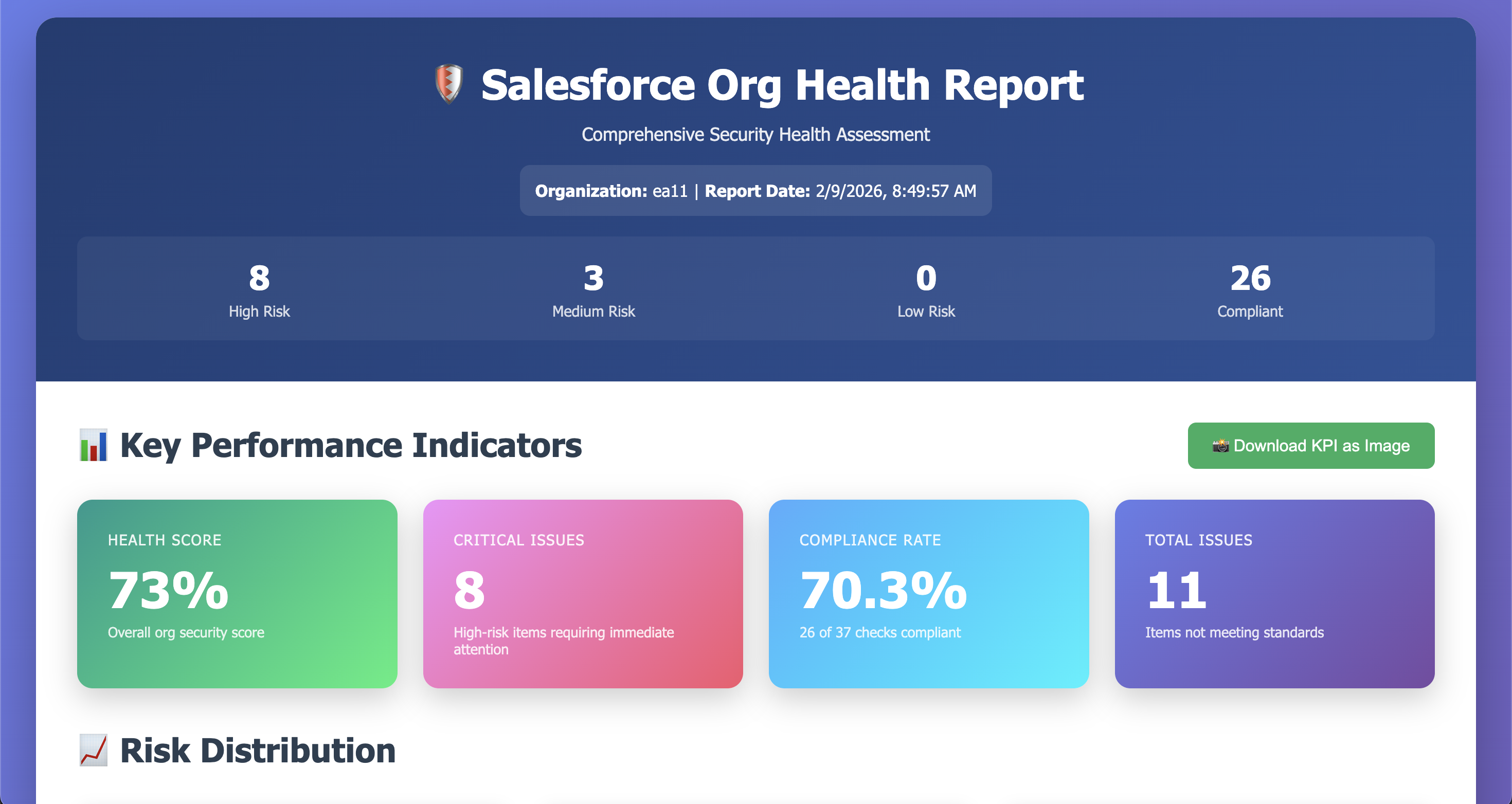
📊 Key Performance Indicators (KPIs)
- Health Score - Overall security score from Salesforce Security Health Check
- Critical Issues - Count of high-risk items requiring immediate attention
- Compliance Rate - Percentage of checks meeting Salesforce standards
- Total Issues - Complete count of non-compliant items
- Download KPI as Image - Export KPI section as a PNG image
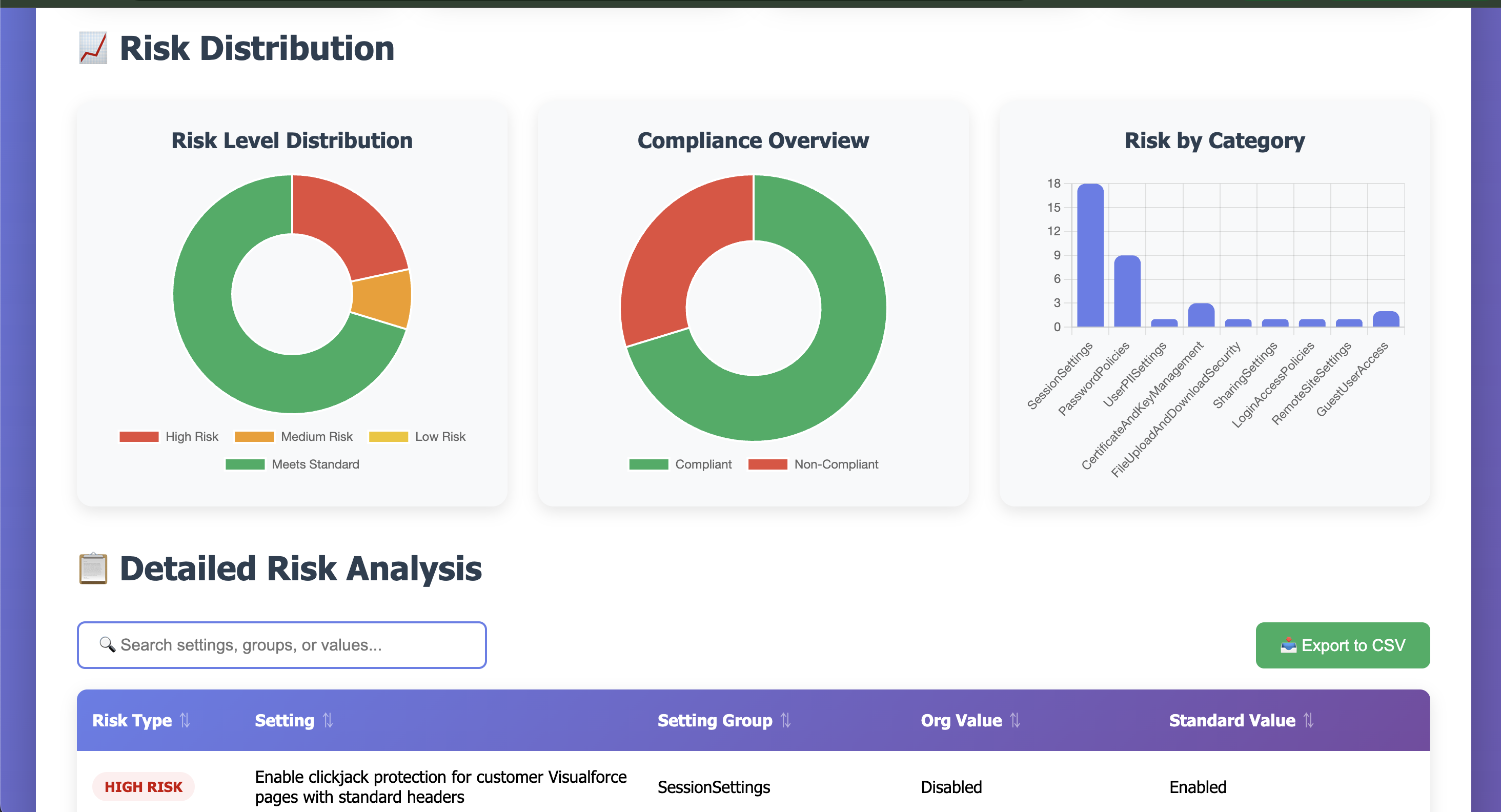
📈 Interactive Visualizations
- Risk Level Distribution - Donut chart showing high, medium, low risk, and compliant items
- Compliance Overview - Visual representation of compliant vs non-compliant checks
- Risk by Category - Bar chart breaking down issues by setting group
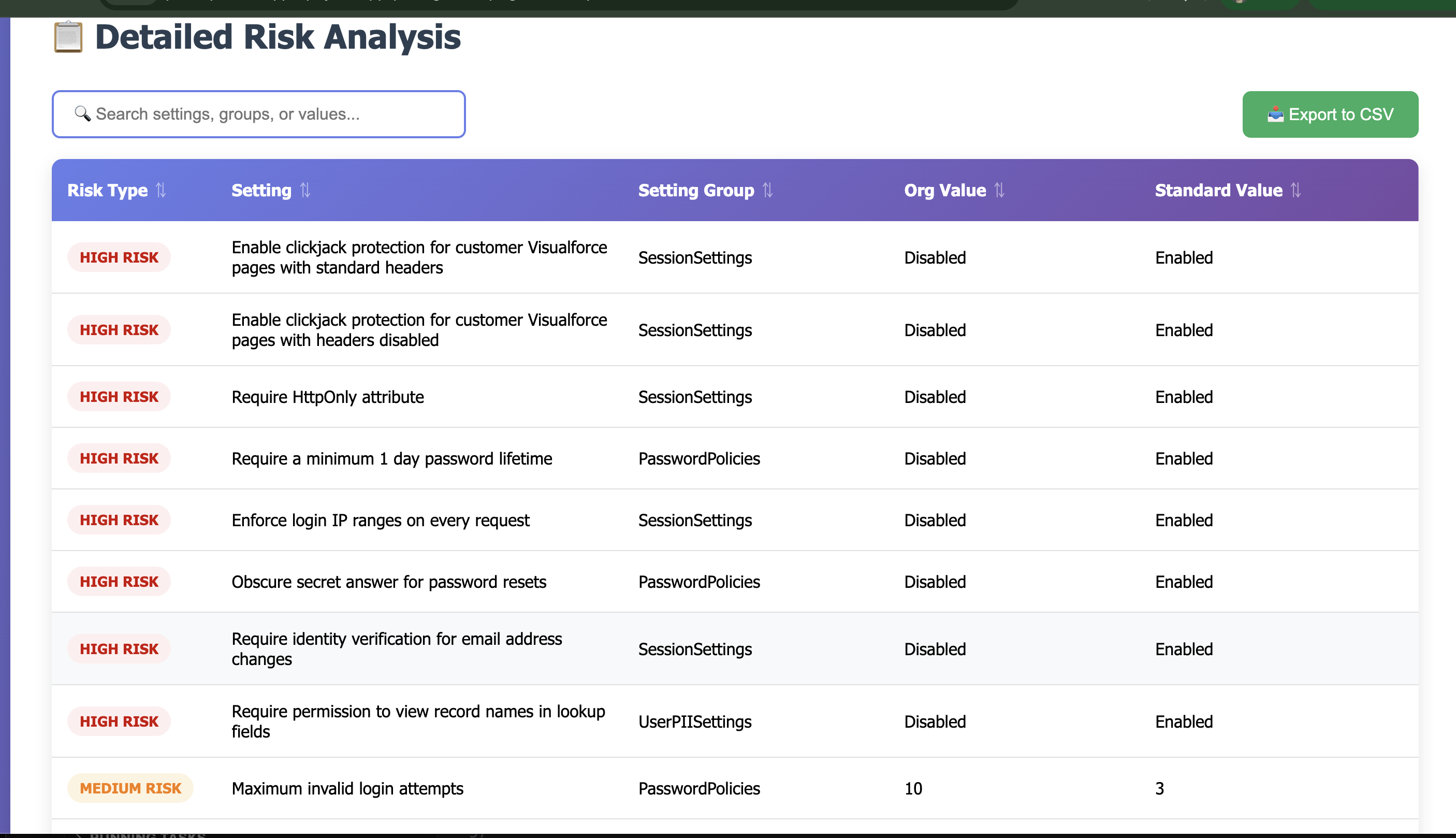
📋 Advanced Data Table
- Column Sorting - Click any column header to sort ascending/descending
- Search Functionality - Real-time search across all fields
- Pagination - Navigate through data with 20 rows per page
- CSV Export - Download complete data as CSV file
- Responsive Design - Works on desktop, tablet, and mobile
🎨 Beautiful Design
- Modern gradient UI with professional styling
- Responsive layout that adapts to any screen size
- Smooth animations and transitions
- Print-friendly design
- Color-coded risk badges for easy identification
Screenshots
📋 Prerequisites
- Node.js (v14 or higher)
- Salesforce CLI (sf CLI)
- Authenticated Salesforce org with Security Health Check enabled
🚀 Installation
npm install -g salesforce-org-health💻 Usage
Basic Usage
sfoh -o <your-org-username-or-alias>Specify Output File
sfoh -o [email protected] --output custom-report.htmlUsing org alias
sfoh -o ea11Command Line Options
| Option | Alias | Description | Required | Default |
|--------|-------|-------------|----------|---------|
| --org | -o | Salesforce org username or alias | ✅ Yes | - |
| --output | - | Output HTML file path | ❌ No | org-health-report.html |
| --version | -V | Show version number | ❌ No | - |
| --help | -h | Display help information | ❌ No | - |
📊 Data Sources
The tool queries the following Salesforce objects:
- SecurityHealthCheck - Overall org health score
- SecurityHealthCheckRisks - Detailed risk items filtered by:
- HIGH_RISK
- MEDIUM_RISK
- LOW_RISK
- MEETS_STANDARD
🎯 Example Output
The generated HTML report includes:
Header Section
- Organization name and report timestamp
- Quick summary statistics (High/Medium/Low/Compliant counts)
KPI Dashboard
- 4 beautiful KPI cards with gradient backgrounds
- Downloadable as image for presentations
Charts Section
- 3 interactive Chart.js visualizations
- Responsive and animated
Data Table
- Sortable columns
- Real-time search
- Pagination controls
- CSV export functionality
🔒 Security Considerations
- The tool uses Salesforce CLI authentication - ensure you're authenticated to the correct org
- No credentials are stored in the application
- All queries are read-only
- HTML reports are generated locally
🐛 Troubleshooting
"Command not found: sf"
Solution: Install Salesforce CLI from https://developer.salesforce.com/tools/salesforcecli
"No org configuration found"
Solution: Authenticate to your Salesforce org using:
sf org login web -a myorg"INVALID_FIELD: No such column 'Score'"
Solution: Enable Security Health Check in Setup → Security Health Check
Empty or missing data
Solution:
- Run Security Health Check in your Salesforce org first
- Ensure you have proper permissions to query SecurityHealthCheck objects
📖 API Reference
Salesforce Objects Used
SecurityHealthCheck
Score- Overall health score (0-100)
SecurityHealthCheckRisks
RiskType- Risk level (HIGH_RISK, MEDIUM_RISK, LOW_RISK, MEETS_STANDARD)Setting- Name of the security settingSettingGroup- Category/group of the settingOrgValue- Current value in your orgStandardValue- Recommended value by Salesforce
For complete documentation, see: https://developer.salesforce.com/docs/atlas.en-us.api_tooling.meta/api_tooling/tooling_api_objects_securityhealthcheckrisks.htm
🎓 Best Practices
- Run regularly - Generate reports monthly or after major configuration changes
- Address high-risk items first - Focus on critical security issues
- Track progress - Compare reports over time to measure improvement
- Share with stakeholders - Export KPI image for executive summaries
- Document remediation - Use CSV export to track remediation efforts
📄 License
MIT License (c) Mohan Chinnappan
🤝 Contributing
📞 Support
For issues related to:
- Salesforce CLI: Check Salesforce CLI documentation
- Security Health Check: Contact Salesforce Support
Made with ❤️ for the Salesforce Community