
saltcorn-flow
v0.3.1
Published
Asana-style project and task management plugin for Saltcorn

Maintainers
 satwikjambula
Readme
saltcorn-flow
Asana-style project and task management plugin for Saltcorn.
Adds six view templates to any table — kanban boards, task lists, zone buckets, 2-D matrices, monthly calendars, and Gantt timelines. All views share a common drag-and-drop interaction model powered by SortableJS.
Screenshots
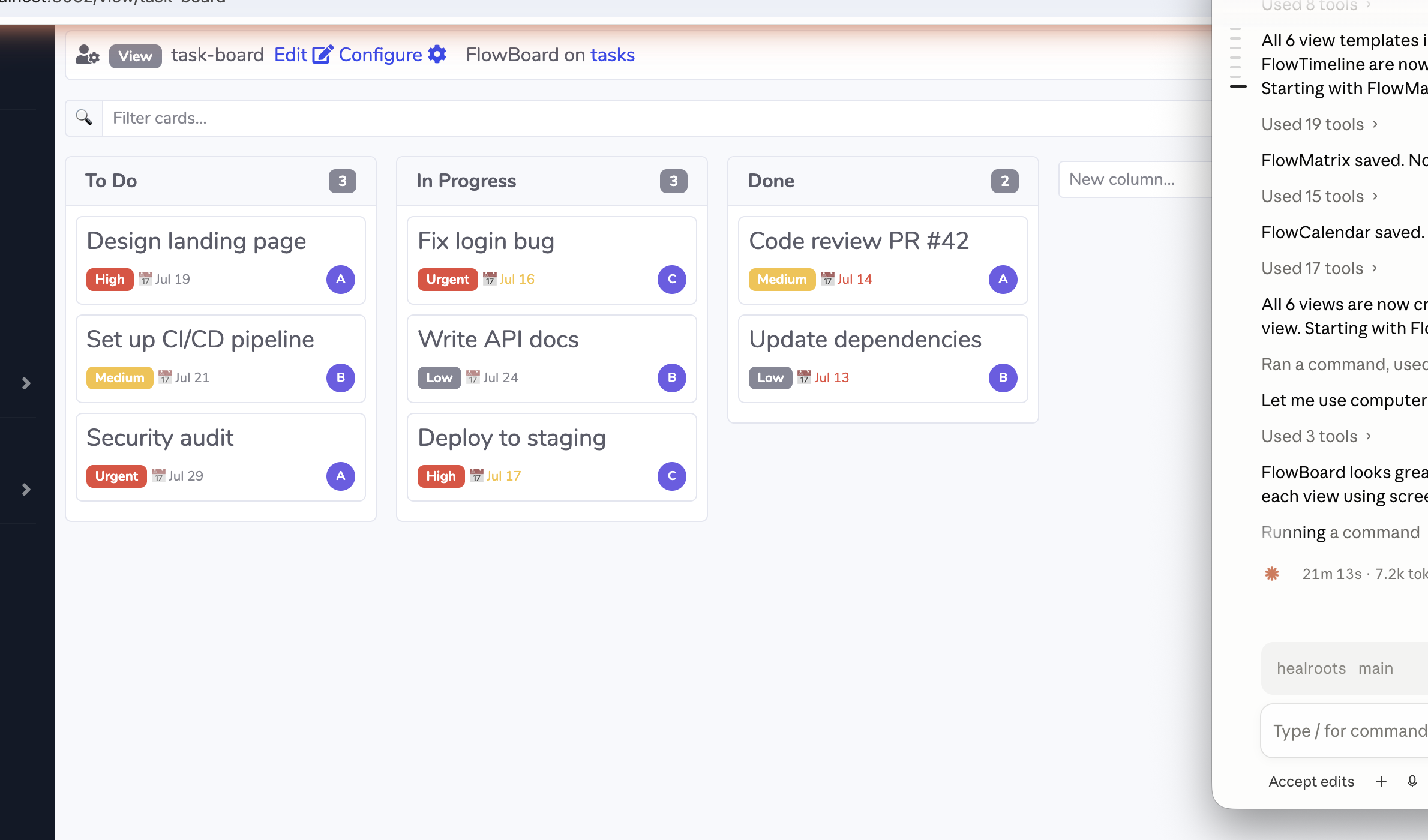
FlowBoard — Kanban Board
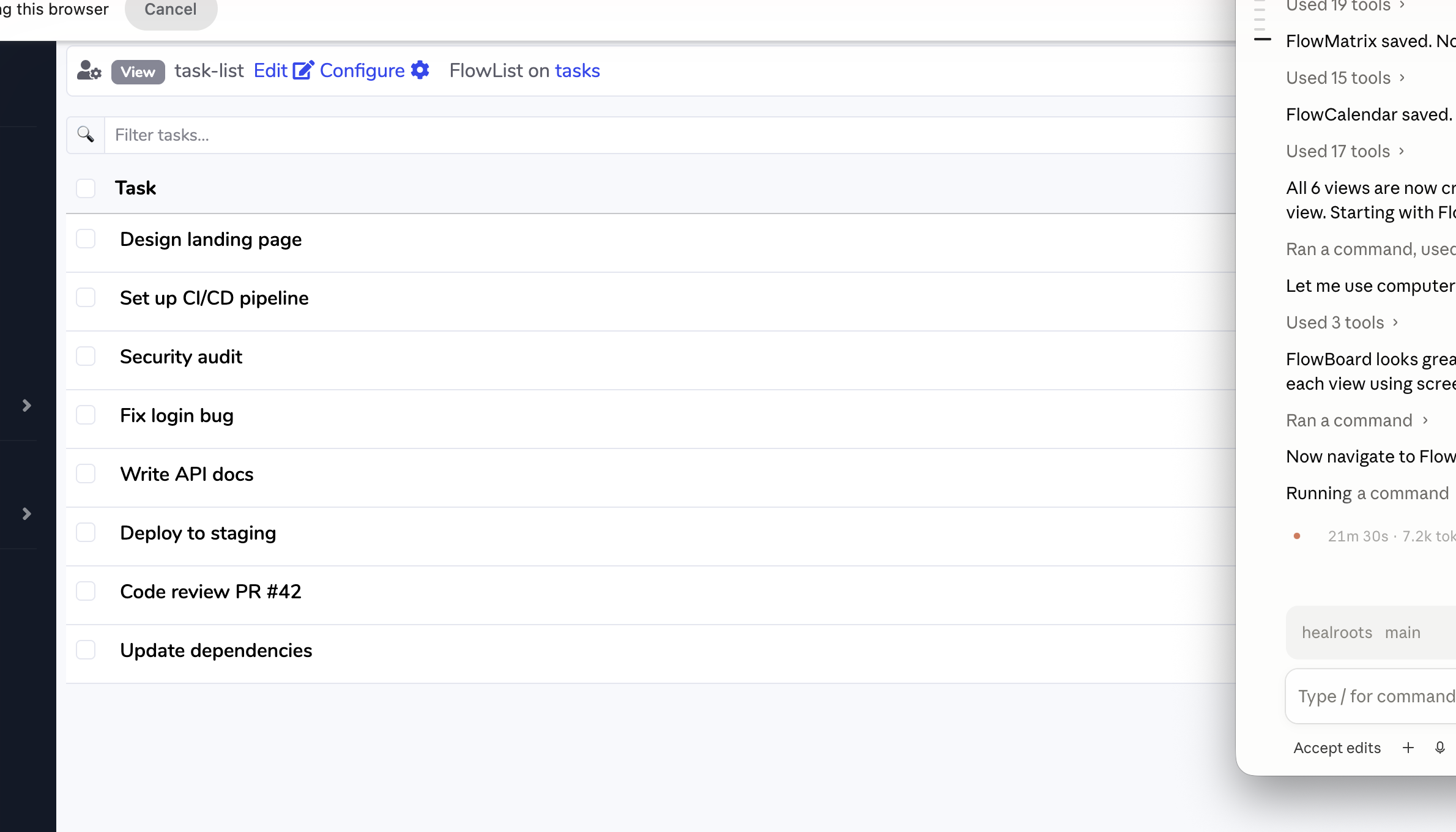
FlowList — Flat Task List
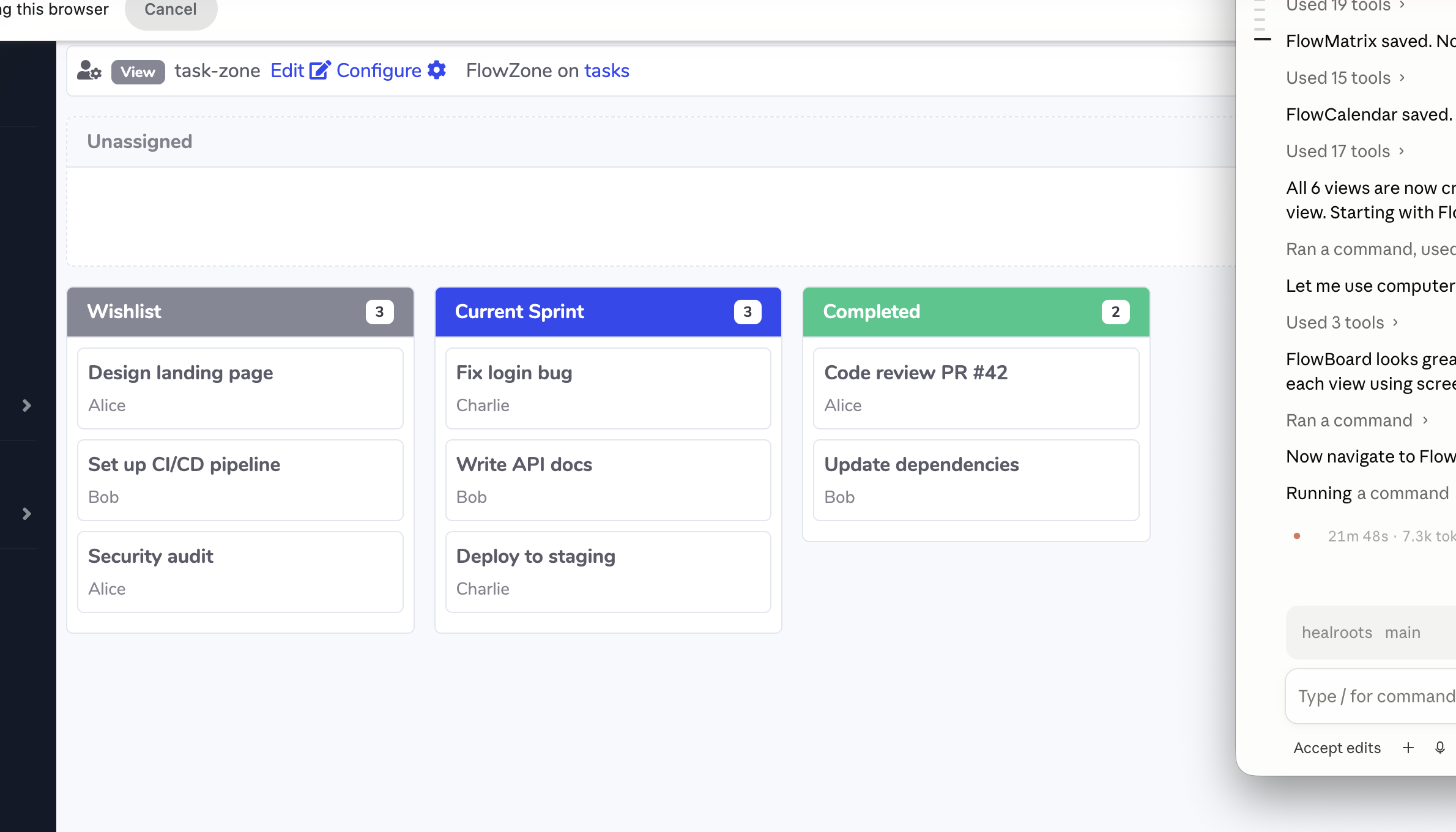
FlowZone — Drop Zone Board
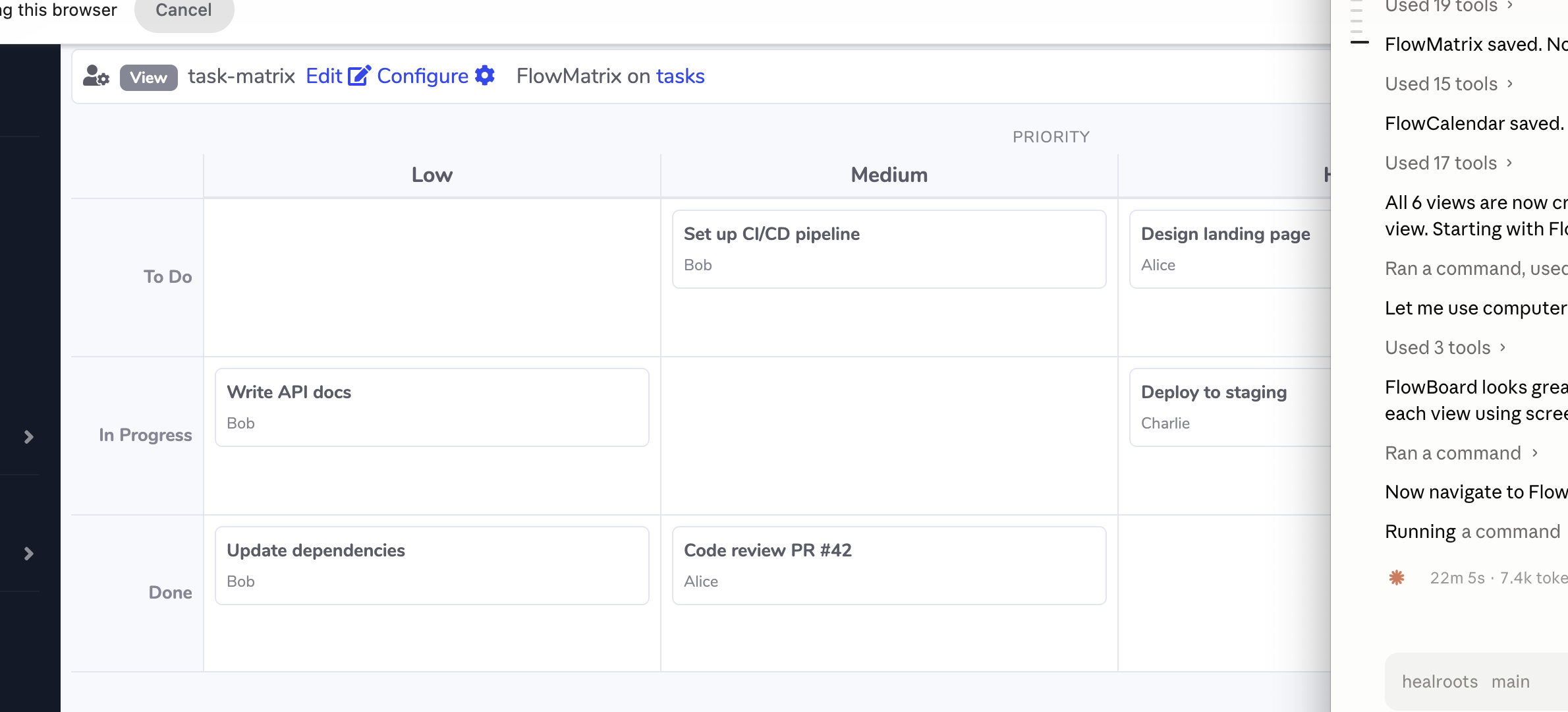
FlowMatrix — 2-D Grid
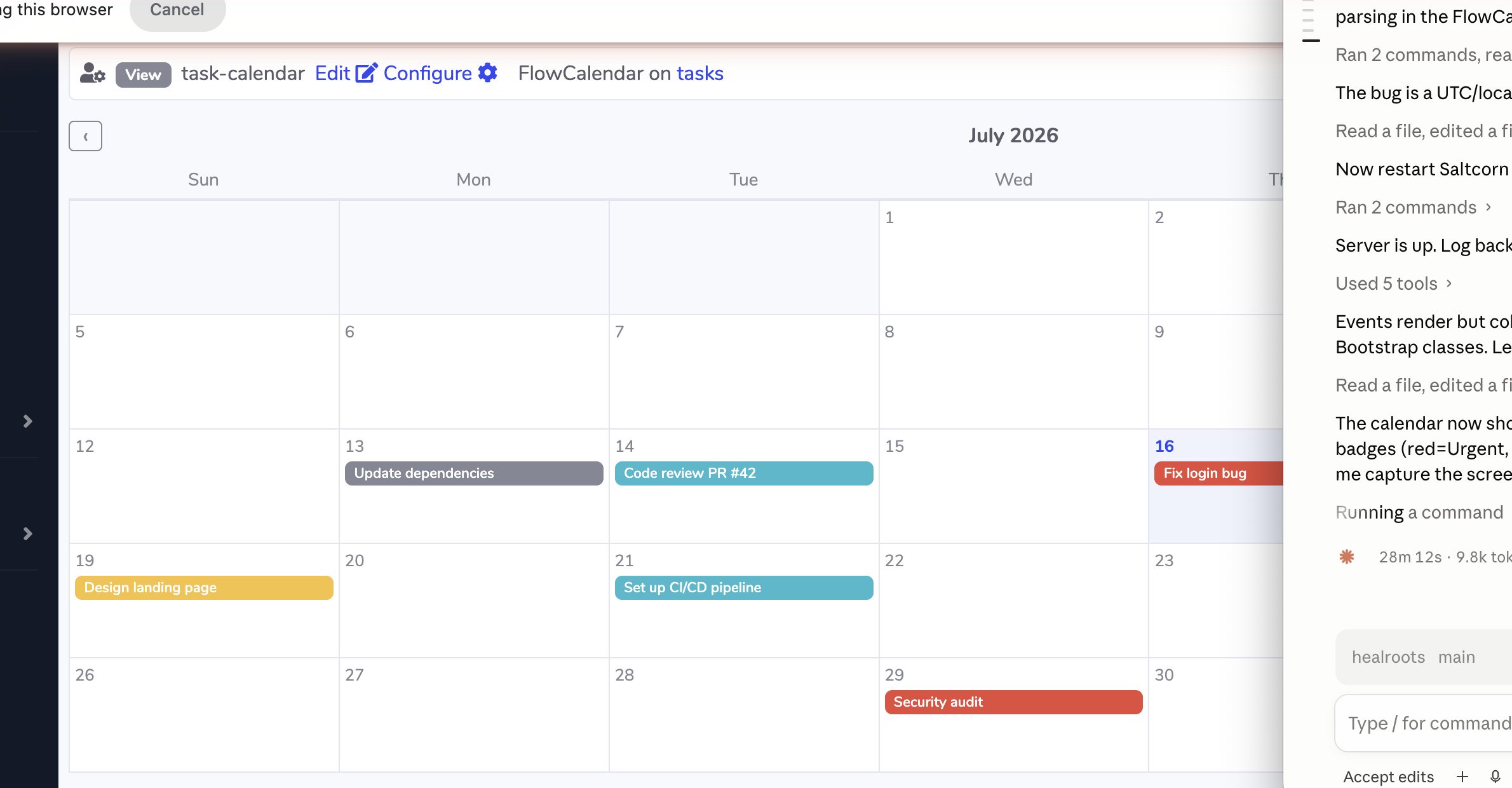
FlowCalendar — Monthly Calendar
FlowTimeline — Gantt Timeline
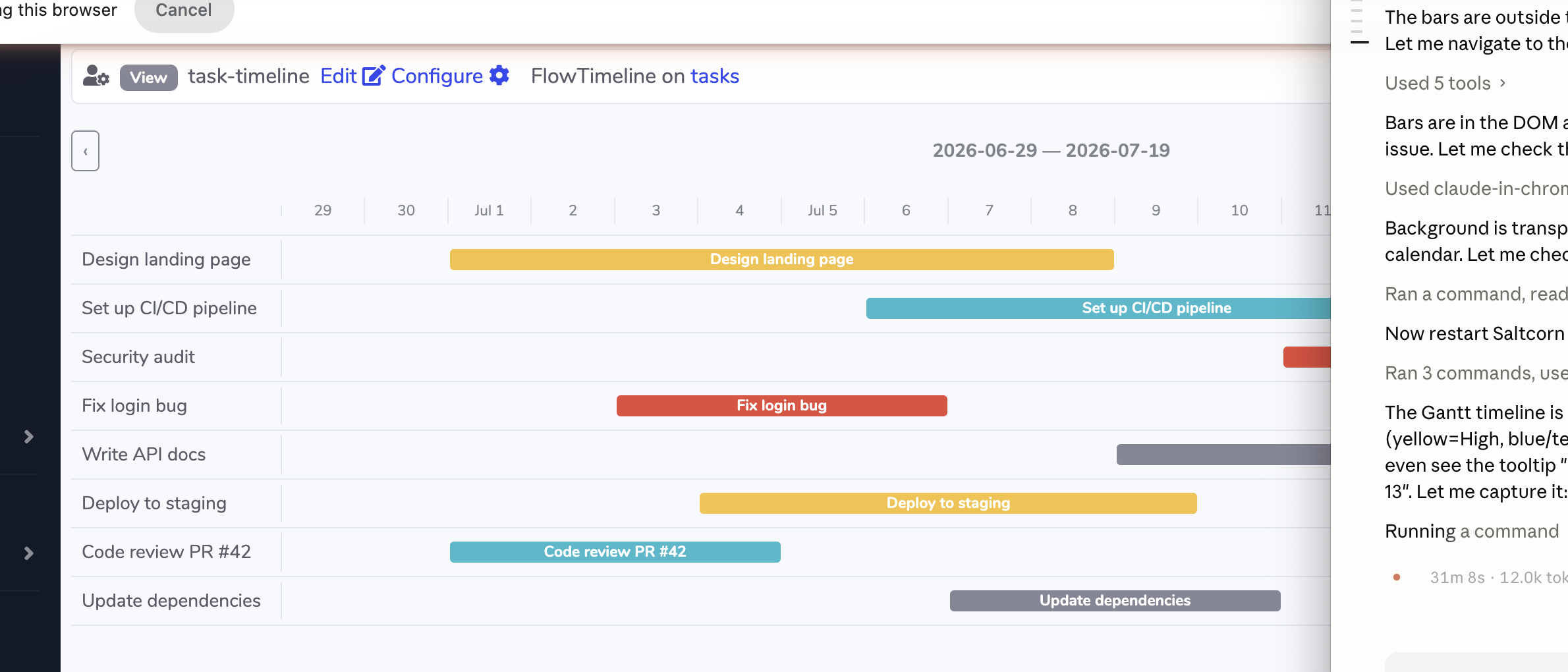
Table of Contents
- Requirements
- Installation
- FlowBoard
- FlowList
- FlowZone
- FlowMatrix
- FlowCalendar
- FlowTimeline
- Testing locally
- License
Requirements
- Saltcorn v1.0.0 or later
Installation
From the plugin store
- Go to Settings → Plugins → Plugin Store
- Search for
saltcorn-flow - Click Install
From npm
npm install saltcorn-flowThen in Saltcorn: Settings → Plugins → Install from npm → enter saltcorn-flow.
FlowBoard
A kanban board that groups rows into columns by any field value. Cards can be dragged between columns to update the database instantly.
Configuration
| Field | Required | Description |
|---|---|---|
| Group-by field | ✅ | String or Integer field whose value determines the column (e.g. status, stage) |
| Column order | — | Comma-separated list of column names in display order, e.g. To Do,In Progress,Done |
| Card title field | ✅ | Field shown as the card heading |
| Due date field | — | Date field — cards show a coloured due date badge (red if overdue, yellow if ≤ 3 days) |
| Assignee field | — | String field — shown as a circular avatar with the first two characters |
| Priority field | — | String field — values Urgent/High → danger badge; Medium → warning; Low → secondary |
| WIP limits | — | Comma-separated max card counts per column, e.g. 0,3,0 (0 = unlimited) |
| Position field | — | Integer field — enables within-column drag-to-reorder |
| Card detail view | — | Show view opened in a modal when a card is clicked |
| Use view to create | — | Create view linked from an Add card button at the bottom of each column |
| Minimum role to move cards | — | Lowest role that can drag cards (default: User) |
Features
- Drag cards between columns — group-by field updated immediately
- Within-column drag-to-reorder when position field is configured
- WIP limits — column header turns red when the limit is reached; drops are blocked server-side
- Card count badge per column
- Colour-coded due date badge, circular assignee avatar, priority badge
- Add column widget at the right end of the board — type a name and click + to append
- Search bar — live filter cards by title across all columns
- Optional card-click modal and per-column Add card button
Example table setup
| Field | Type | Used for |
|---|---|---|
| title | String | Card title field |
| status | String | Group-by field (values: To Do, In Progress, Done) |
| due_date | Date | Due date field |
| assignee | String | Assignee field (e.g. Alice, Bob) |
| priority | String | Priority field (values: Urgent, High, Medium, Low) |
| position | Integer | Position field (within-column order) |
FlowList
A flat, sortable task list displayed as a table. Status and priority can be edited inline. Bulk-edit lets you change a field on multiple rows at once. Rows can be dragged to reorder if a position field is configured.
Configuration
| Field | Required | Description |
|---|---|---|
| Title field | ✅ | Field shown in the first column as the task name |
| Status field | — | String field — rendered as an inline <select> dropdown |
| Status options | — | Comma-separated list of valid status values |
| Due date field | — | Date field — shown with colour coding (red if overdue, yellow if ≤ 3 days) |
| Assignee field | — | String field — shown as a circular avatar |
| Priority field | — | String field — rendered as an inline <select> with badge-coloured options |
| Editable fields | — | Comma-separated additional fields editable via bulk toolbar |
| Position field | — | Integer field — enables drag-to-reorder |
| Show view | — | Show view opened as a modal when the title is clicked |
| Minimum role to edit / reorder | — | Lowest role that can change fields or drag rows (default: User) |
Features
- Inline status and priority editing — saves to DB immediately without page refresh
- Bulk edit toolbar — select multiple rows with checkboxes, pick a field and value, click Apply
- Drag-to-reorder — drag handle column; positions saved in bulk when dropped
- Clickable title — optional Show view opens in a modal for full record details
- Inline title edit — click the title text to edit in place (press Enter to save, Escape to cancel)
- Search bar — live filter rows by title text
- Due date colour coding and assignee avatars consistent with FlowBoard
Example table setup
| Field | Type | Used for |
|---|---|---|
| title | String | Title field |
| status | String | Status field (values: Open, In Progress, Done) |
| priority | String | Priority field (values: Urgent, High, Medium, Low) |
| due_date | Date | Due date field |
| assignee | String | Assignee field |
| position | Integer | Position field (drag-to-reorder) |
FlowZone
A drag-and-drop zone board for categorising items into named buckets — e.g. a product wishlist, a shopping cart, or a pipeline stage view. Each zone gets a coloured header, item count badge, and optional max-item cap enforced on both client and server.
Configuration
| Field | Required | Description |
|---|---|---|
| Container field | ✅ | String or Integer field updated when an item is dropped into a zone |
| Zone names | ✅ | Comma-separated zone identifiers, e.g. wishlist,cart,purchased |
| Zone display labels | — | Comma-separated display names (same order), e.g. Wishlist,My Cart,Purchased |
| Zone colors | — | Comma-separated Bootstrap colour names per zone: primary, success, warning, danger, info, secondary |
| Max items per zone | — | Comma-separated max item counts (0 = unlimited), e.g. 0,5,1 |
| Position field | — | Integer field — enables drag-to-reorder within a zone |
| Card title field | ✅ | Field shown as the item label |
| Card subtitle field | — | Optional second line below the title |
| Card detail view | — | Clicking a card opens this view in a modal |
| Show unassigned bin | — | Show items with no container value above the grid (toggleable sidebar) |
| Clear zones | — | Comma-separated zone names that get a Clear button in the header |
| Zones with a Submit button | — | Comma-separated zone names that get a Submit button |
| Submit button label | — | Text on the Submit button (default: Submit) |
| Submit trigger name | — | Saltcorn trigger "When" name fired on submit; receives { zone, rows, count } |
| Minimum role to drag | — | Lowest role that can drag items (default: User) |
| Minimum role to submit | — | Lowest role that can click Submit |
Features
- Responsive CSS grid — zones reflow automatically
- Per-zone colour-coded headers with item count badges
- WIP limits — header turns red at cap; drops blocked client + server-side
- Within-zone reorder — drag rows up/down when position field is set
- Unassigned sidebar — collapsible panel showing unplaced items; opens with a toggle button
- Clear button — removes all items from the zone (sets container field to null)
- Submit zone — collects all rows in a zone and fires a named Saltcorn trigger; useful for order checkout, form submission, or approval flows
- Ghost card while dragging, smooth 150 ms animation
Submit zone — how it works
When Submit is clicked the plugin POSTs { zone } to the server, re-fetches every row in that zone (respecting row permissions), and fires the configured trigger:
{ "success": true, "zone": "cart", "count": 3, "rows": [ { "id": 1, ... }, ... ] }Create a Custom trigger on the table with When = <your trigger name> and attach a Webhook or JavaScript action.
Example table setup
| Field | Type | Used for |
|---|---|---|
| name | String | Card title field |
| description | String | Card subtitle field |
| zone | String | Container field (values: wishlist, cart, purchased) |
| position | Integer | Position field (within-zone order) |
FlowMatrix
A 2-D grid view that places cards at the intersection of two categorical field values — like an Eisenhower priority-vs-effort matrix or a status-by-assignee board. Cards can be dragged between cells to update both axis fields simultaneously.
Configuration
| Field | Required | Description |
|---|---|---|
| X axis field | ✅ | String or Integer field mapped to columns |
| X axis values | ✅ | Comma-separated column values left → right, e.g. Low,Medium,High,Urgent |
| X axis label | — | Header label shown above the columns |
| Y axis field | ✅ | String or Integer field mapped to rows |
| Y axis values | ✅ | Comma-separated row values top → bottom, e.g. To Do,In Progress,Done |
| Y axis label | — | Label shown to the left of the rows |
| Card title field | — | Field shown as the card heading inside each cell |
| Card subtitle field | — | Optional second line on each card |
| Card detail view | — | Clicking a card opens this view in a modal |
| Minimum role to drag cards | — | Lowest role that can drag cards (default: User) |
Features
- CSS Grid layout — columns auto-size to fill the available width
- Drag a card to any cell — both axis fields updated in a single DB write
- Cards with values outside the configured axis lists appear in the nearest cell
- Column and row count badges on each header
- Optional click-to-modal for full record details
Example table setup
| Field | Type | Used for |
|---|---|---|
| title | String | Card title field |
| priority | String | X axis field (values: Low, Medium, High, Urgent) |
| status | String | Y axis field (values: To Do, In Progress, Done) |
| assignee | String | Card subtitle field |
FlowCalendar
A monthly calendar view. Items appear as coloured chips on the day matching their date field. Chips can be dragged to a different day to reschedule — the date field is updated instantly.
Configuration
| Field | Required | Description |
|---|---|---|
| Date field | ✅ | Date field used to place items on the calendar |
| Event title field | ✅ | Field shown as the event label |
| Color field | — | String field — values Urgent/danger → red; High/warning → yellow; Medium/info → blue; Low/secondary → grey; Done/success → green |
| Event detail view | — | Clicking an event opens this view in a modal |
| Minimum role to drag events | — | Lowest role that can drag to reschedule (default: User) |
Navigation
Use the ‹ / › arrows to switch months, or pass ?_cal_year=2026&_cal_month=6 in the URL (month is 0-indexed).
Features
- Full month grid with Sun–Sat headers
- Today highlighted in the grid
- Colour-coded event chips (Bootstrap badge colours) —
Urgent→ danger,High→ warning,Medium→ info,Low→ secondary,Done→ success - Drag an event chip to any day cell to reschedule — server validates the date format before writing
- Optional click-to-modal for full record details
- Timezone-safe date matching — uses local calendar day, not UTC midnight
Example table setup
| Field | Type | Used for |
|---|---|---|
| title | String | Event title field |
| due_date | Date | Date field |
| priority | String | Color field (values: Urgent, High, Medium, Low) |
FlowTimeline
A Gantt-style horizontal timeline. Each row is a record; coloured bars span from the start date to the end date within a configurable day window. Bars can be dragged left or right to shift both dates simultaneously.
Configuration
| Field | Required | Description | |---|---|---| | Start date field | ✅ | Date field for the bar's left edge | | End date field | ✅ | Date field for the bar's right edge | | Label field | ✅ | Field shown to the left of the bar as the row label | | Color field | — | String field — same colour mapping as FlowCalendar | | Window (days) | — | Number of days to show in the grid (default: 21) | | Bar detail view | — | Clicking a bar opens this view in a modal | | Minimum role to drag bars | — | Lowest role that can drag to reschedule (default: User) |
Navigation
Click ‹ / › to shift the window by the configured number of days, or pass ?_tl_start=YYYY-MM-DD in the URL.
Features
- Horizontal bar spans
grid-column: colStart / colEnd— pure CSS, no canvas - Colour-coded bars — same mapping as FlowCalendar (
Urgent→ red,High→ yellow,Medium→ blue,Low→ grey) - Drag-to-reschedule — uses mouse events (not SortableJS) for horizontal pixel-to-day dragging; both start and end fields updated atomically
- Tooltip on hover shows task name, start → end dates
- Server validates
start < endand both date formats before writing - Today highlighted in the day header
- Window navigation arrows
Example table setup
| Field | Type | Used for |
|---|---|---|
| title | String | Label field |
| start_date | Date | Start date field |
| end_date | Date | End date field |
| priority | String | Color field (values: Urgent, High, Medium, Low) |
Testing locally
Prerequisites
- Node.js 18+
- Saltcorn installed globally:
npm install -g @saltcorn/cli
Step 1 — Clone the plugin
git clone https://github.com/satwikjambula/saltcorn-flow
cd saltcorn-flow
npm install
Step 2 — Register with your local Saltcorn instance
saltcorn install-plugin -d /absolute/path/to/saltcorn-flowIf the command silently fails, insert directly:
sqlite3 ~/Library/Application\ Support/saltcorn/scdb.sqlite \
  "INSERT OR REPLACE INTO _sc_plugins (name, source, location) \
   VALUES ('saltcorn-flow', 'local', '/absolute/path/to/saltcorn-flow');"
Step 3 — Start the server
saltcorn serveStep 4 — Create a test table
Go to Tables → Add table and create a table with these fields:
| Field | Type |
|---|---|
| title | String |
| status | String |
| priority | String |
| zone | String |
| assignee | String |
| due_date | Date |
| start_date | Date |
| end_date | Date |
| position | Integer |
Add a handful of rows with varied status, priority, and date values.
Step 5 — Create views
For each view template, go to Views → Add view, pick the table and template, configure the fields, and click Save. All six templates are available immediately after the plugin is installed:
| Template | Key fields to configure |
|---|---|
| FlowBoard | group-by = status, title = title |
| FlowList | title = title, status = status, position = position |
| FlowZone | container = zone, zones = wishlist,current,completed |
| FlowMatrix | x = priority (values Low,Medium,High,Urgent), y = status (values To Do,In Progress,Done) |
| FlowCalendar | date = due_date, title = title, color = priority |
| FlowTimeline | start = start_date, end = end_date, label = title, color = priority |
License
MIT