
saml-forward-proxy
v0.1.13
Published
Proxy SAML 2 Requests to another IdP
Downloads
87


Readme
SAML Forward Proxy Example for Tableau
Description
An example to demonstrate the use of the Passport-SAML Authentication provider as a SAML Proxy for a Tableau Server configured as a SAML Service Provider (SP).
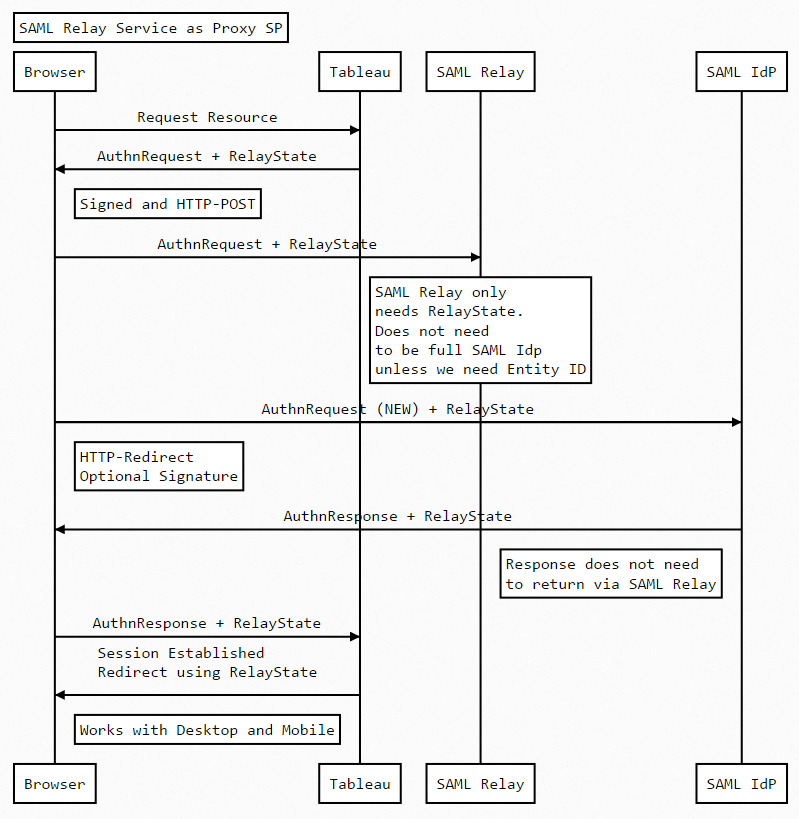
Tableau supports the HTTP-Post binding for SAML Requests and will always sign the requests. Some IdPs cannot be configured to support HTTP-POST but instead only support HTTP-Redirect. Also the IdP may not require a signed request. Usually signing the request in Tableau does not alter the ability of the IdP to process the request but sometimes it is beneficial to reduce the size of the request so that intermediate servers can store the request in a cookie.
This proxy runs as a web server on a port defined in config.js and will work with HTTP or HTTPS. It is effectively a one way proxy hence the term SAML Forward Proxy. This example does not proxy the SAML Response. The Response from the IdP is sent directly to the Tableau Server (via the user agent of course)
Web Sequence:
Usage
$ git clone https://github.com/geordielad/saml-forward-proxy.git
$ cd saml-forward-proxy
$ npm install
$ # Make changes to config/config.js as needed. Add SSL key/cert if needed. Add SAML private key if needed.
$ npm start
Examples
Run the proxy on localhost with http on port 3000. Use HTTP-Redirect to the original IdP and do not sign the request.
- Ensure that your IpP is working as expected.
- Stop the Tableau Server.
- Get a copy of the IdPs metadata. Note the HTTP-POST endpoint of the SingleSignOnService and change the Location attribute to http://localhost:3000/saml_proxy
- In config/config.js:
- Configure the protocol, ssOptions and port attributes to your requirements.
- Update the entryPoint attribute to the original HTTP-POST SingleSignOnService Location.
- Comment out the privateCert attribute. This will ensure that the Request is not signed.
- The example code will update the callbackUrl and issuer attributes from the Request sent by Tableau Server.
const fs = require('fs');

module.exports = {
  development: {
    app: {
      name: 'Passport SAML strategy example',
      protocol: process.env.PROTOCOL || 'http',  // http or https
      sslOptions: {
      //  key: fs.readFileSync('.ssl/yoursslkey.key', 'utf8'),
      //  cert: fs.readFileSync('.ssl/yoursslcert.crt', 'utf8')
      },
      port: process.env.PORT || 3000  // any available port
    },
    passport: {
      strategy: 'saml',
      saml: {
        path: '/',
        callbackUrl: 'https://yourSP.com/saml_callback', // DYNAMIC FROM ORIGINAL REQUEST - See routes.js
        entryPoint: process.env.SAML_ENTRY_POINT || 'https://youridp.com/entryPoint',
	      authnRequestBinding: process.env.SAML_AUTHN_REQUEST_BINDING || 'HTTP-Redirect', // Change to HTTP-POST if required
        issuer: 'https://saml_sp_entityid', // DYNAMIC FROM ORININAL REQUEST - See routes.js
        //skipRequestCompression: true, // Optional depending on IdP
        //acceptedClockSkewMs: -1, // Optional depending on IdP
        //disableRequestedAuthnContext: true, //Optional depending on IdP
        //privateCert: process.env.SAML_PRIVATE_CERT || fs.readFileSync('./tableau_ami_sp.key', 'utf-8'), //Uncomment if Request Signing is required.
        //cert: process.env.SAML_CERT || fs.readFileSync('./okta.cert', 'utf-8') // Not needed because we are not processing AuthnResponse
      }
    }
  }
};- Start the proxy if necessary. npm start.
- Restart Tableau Server and test the proxy by calling your Tableau Server in the Browser. Note that view URLs and any public pages (for example: sites and projects) will work as the proxy will forward the RelayState.
- You should test the SAML Forward proxy with Tableau Desktop and the Tableau Mobile App they should work as expected.
A more realistic example. Run the proxy on the same server as Tableau (Assume Tableau running on port 443 - https://tableau.example.com) Use https on port 8443 for the proxy. Use HTTP-Redirect to the original IdP and sign the request.
- Ensure that your IpP is working as expected.
- Stop the Tableau Server.
- Get a copy of the IdPs metadata. Note the HTTP-POST endpoint of the SingleSignOnService and change the Location attribute to https://tableau.example.com:8433/saml_proxy. Note that port 8443 may need to be opened on the firewall.
- In config/config.js:
- Configure the protocol, ssOptions and port attributes to your requirements.
- Update the entryPoint attribute to the original HTTP-POST SingleSignOnService Location.
- Comment out the privateCert attribute. This will ensure that the Request is not signed.
- The example code will update the callbackUrl and issuer attributes from the Request sent by Tableau Server.
const fs = require('fs');

module.exports = {
  development: {
    app: {
      name: 'Passport SAML strategy example',
      protocol: process.env.PROTOCOL || 'https',  // http or https
      sslOptions: {
        key: fs.readFileSync('.ssl/yoursslkey.key', 'utf8'),
        cert: fs.readFileSync('.ssl/yoursslcert.crt', 'utf8')
      },
      port: process.env.PORT || 8443  // any available port
    },
    passport: {
      strategy: 'saml',
      saml: {
        path: '/',
        callbackUrl: 'https://yourSP.com/saml_callback', // DYNAMIC FROM ORIGINAL REQUEST - See routes.js
        entryPoint: process.env.SAML_ENTRY_POINT || 'https://youridp.com/entryPoint',
	      authnRequestBinding: process.env.SAML_AUTHN_REQUEST_BINDING || 'HTTP-Redirect', // Change to HTTP-POST if required
        issuer: 'https://saml_sp_entityid', // DYNAMIC FROM ORININAL REQUEST - See routes.js
        //skipRequestCompression: true, // Optional depending on IdP
        //acceptedClockSkewMs: -1, // Optional depending on IdP
        //disableRequestedAuthnContext: true, //Optional depending on IdP
        privateCert: process.env.SAML_PRIVATE_CERT || fs.readFileSync('./tableau_saml_sp.key', 'utf-8'), //Uncomment if Request Signing is required.
        //cert: process.env.SAML_CERT || fs.readFileSync('./okta.cert', 'utf-8') // Not needed because we are not processing AuthnResponse
      }
    }
  }
};- Start the proxy if necessary. npm start.
- Restart Tableau Server and test the proxy by calling your Tableau Server in the Browser. Note that view URLs and any public pages (for example: sites and projects) will work as the proxy will forward the RelayState.
- You should test the SAML Forward proxy with Tableau Desktop and the Tableau Mobile App they should work as expected.
This example code has been tested with Okta and Azure AD.
Authors
|  |
|---|
| @geordielad |
|
|---|
| @geordielad |
Is SAML Forward Proxy supported?
SAML Forward Proxy is made available AS-IS with no support and no warranty whatsoever. The software is strictly “use at your own risk.”
The good news: You are free to modify it in any way to meet your needs, or use it as the basis for your own implementation.
License
Licensed under the MIT license
Note
Based on PassportJS SAML Example by Gerard Braad