
sandal-db
v1.0.8
Published
SANDAL - Safe Agentic Natural-language Database Access Layer. Production-grade agentic database assistant CLI using LangGraph and LLMs (Google Gemini, OpenAI, Anthropic)
Downloads
1,580

Maintainers
 ugulzar4512
Readme
SANDAL: Safe Agentic Natural-language Database Access Layer
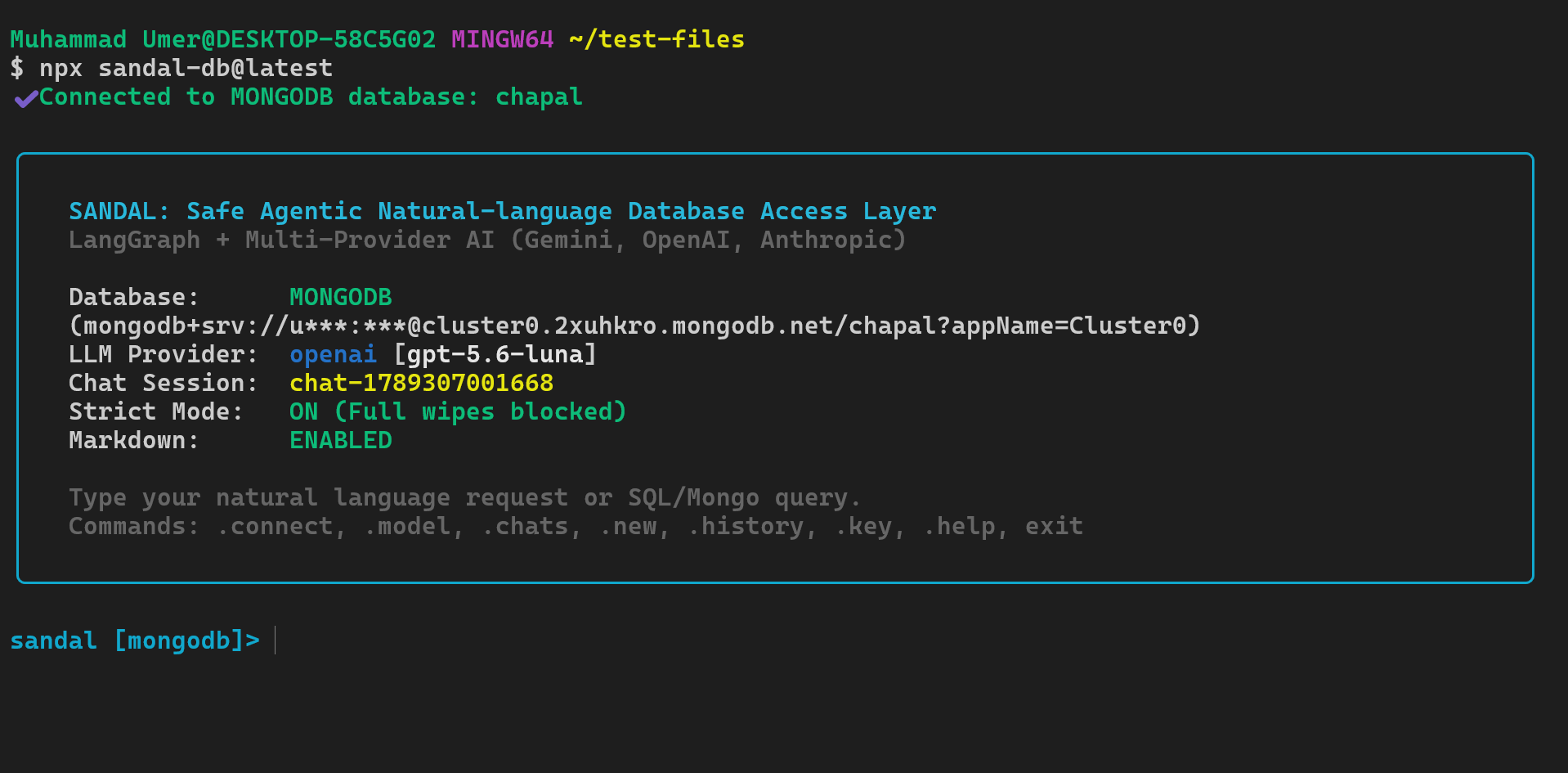
SANDAL is an agentic command-line interface that enables software engineers, data analysts, and site reliability engineers to query, inspect, and manage databases using natural language. Powered by LangGraph and multi-provider language models, SANDAL translates natural language prompts into parameterized database queries, displays execution previews and impact estimations, and enforces multi-layered guardrails before executing any mutating statements.
Key Features
- Direct Database Connectivity: Native support for PostgreSQL and MongoDB with automatic connection string parsing and schema introspection.
- Multi-Provider LLM Integration: Seamless switching between Google Gemini, OpenAI, and Anthropic Claude models.
- Multi-Stage LangGraph Pipeline: Deterministic orchestration spanning schema introspection, query generation, static safety classification, dry-run row estimation, and post-execution statistical analysis.
- Multi-Tier Guardrails: Automatic refusal of non-database requests, dry-run affected row count previews, explicit confirmations for destructive mutations, and hard blocking against unauthorized table or database wipes.
- Local Credential Security: Secure local storage in user home directory with restricted permissions, runtime credential masking, and zero telemetry.
Prerequisites
- Node.js 18.0.0 or higher
- Network access to a running database instance:
- PostgreSQL 12 or newer
- MongoDB 5.0 or newer
- An API key from at least one supported provider:
- Google AI Studio (Gemini)
- OpenAI
- Anthropic
Getting Started
Running Without Installation (Recommended)
Run the latest version directly using npx:
npx sandal-db@latestPass a database connection URL directly as an argument:
npx sandal-db@latest postgresql://postgres:secret@localhost:5432/analytics_dbGlobal Installation
To install SANDAL globally on your system:
npm install -g sandal-dbOnce installed, invoke the CLI using sandal-db:
sandal-dbConfiguration and Authentication
SANDAL resolves database connection strings and LLM API credentials through a four-tier precedence hierarchy:
1. Command-Line Arguments (--key, --provider, [dbUrl])
   └── 2. Environment Variables (DATABASE_URL, GEMINI_API_KEY, ...)
         └── 3. Stored Configuration (~/.sandal/config.json)
               └── 4. Interactive Terminal Prompts
Method 1: Interactive Prompts
If you start SANDAL without flags or environment variables, the CLI interactively guides you through entering your connection string and API key. You will be prompted with the option to securely save these values to ~/.sandal/config.json for subsequent runs.
Method 2: Environment Variables
Set environment variables in your shell profile (~/.bashrc, ~/.zshrc) or local .env file:
# Database connection string (PostgreSQL or MongoDB)
export DATABASE_URL="postgresql://user:password@localhost:5432/my_database"

# Provide at least one provider API key:
export GEMINI_API_KEY="AIzaSy..."
export OPENAI_API_KEY="sk-proj-..."
export ANTHROPIC_API_KEY="sk-ant-..."
Method 3: Persistent Configuration CLI
Use the built-in config subcommand to store settings permanently in ~/.sandal/config.json (stored with restrictive user-only file permissions):
# Set default database URL
npx sandal-db@latest config --set-db "postgresql://user:password@localhost:5432/sales_db"

# Set provider API keys
npx sandal-db@latest config --set-gemini "AIzaSy..."
npx sandal-db@latest config --set-openai "sk-proj-..."
npx sandal-db@latest config --set-anthropic "sk-ant-..."

# Configure default provider and model
npx sandal-db@latest config --set-provider google
npx sandal-db@latest config --set-model gemini-2.5-flash

# Review saved configuration (all credentials are automatically masked)
npx sandal-db@latest config --show

# Print configuration file location
npx sandal-db@latest config --path
Command-Line Usage and Options
Synopsis
npx sandal-db@latest [options] [dbUrl]
npx sandal-db@latest config [options]
npx sandal-db@latest md [options] [fileOrText]
Global Options
| Option | Type | Description | Default |
| ----------------------- | --------- | ---------------------------------------------------------------------------------- | -------------------- |
| [dbUrl] | string | Connection URL (postgres://, postgresql://, mongodb://, mongodb+srv://). | None |
| -p, --provider <name> | string | Target LLM provider: google, openai, or anthropic. | google |
| -m, --model <name> | string | Model identifier (e.g., gemini-2.5-flash, gpt-4o, claude-3-5-sonnet-latest). | Provider default |
| -k, --key <key> | string | API key corresponding to the selected provider. | Environment / Config |
| --strict | boolean | Hard-blocks full database drops and bulk table truncations. | true |
| --no-strict | flag | Disables strict safety mode. | false |
| --allow-full-wipe | flag | Explicitly permits full database wipes and db admin tasks after interactive confirmation. | false |
| --threshold <number> | integer | Row count threshold above which updates are classified as dangerous operations. | 50 |
| --markdown | boolean | Formats and renders LLM responses as rich terminal markdown. | true |
| --no-markdown | flag | Disables terminal markdown rendering and outputs raw text. | false |
| -V, --version | flag | Output the version number. | |
| -h, --help | flag | Display command help and exit. | |
Default Models by Provider
| Provider | Default Model | Override Example |
| --------- | -------------------------- | ----------------------------------------- |
| Google | gemini-2.5-flash | -p google -m gemini-2.5-pro |
| OpenAI | gpt-4o | -p openai -m gpt-4o-mini |
| Anthropic | claude-3-5-sonnet-latest | -p anthropic -m claude-3-5-haiku-latest |
Interactive REPL Guide
Once connected, SANDAL initiates an interactive session with automatic schema inspection.
sandal [postgres]>Dot Commands
Dot commands provide direct utility functions without issuing requests to the LLM:
| Command | Description |
| --------------------------- | ----------------------------------------------------------------------------------------------------- |
| .tables or .collections | Lists all discovered database tables or MongoDB collections with current row counts. |
| .schema [name] | Displays column names, data types, nullability constraints, and primary keys for the specified table. |
| .connect or .switch | Shows saved database connections; select by number or enter a new URL (preserves chat memory). |
| .model [name] | Displays current model or switches to a new model on the fly. |
| .provider [name] | Switches active LLM provider (google, openai, or anthropic). |
| .key [remove \| set] | Displays active API key, removes it from config, or updates it live. |
| .chats | Lists all saved chat sessions with message counts and last active times. |
| .chat <id \| number> | Switches to a specific chat session and restores its conversation memory. |
| .new | Starts a fresh chat session with clean memory. |
| .history | Displays full conversation turn history for the active chat session. |
| .clear-chat | Clears message history for the current chat session. |
| .md [file\|text] | Renders markdown file or inline markdown text with syntax highlighting directly in the terminal. |
| .refresh | Invalidates cached schema metadata and re-introspects the live database. |
| .clear | Clears the terminal screen. |
| .help | Prints the interactive command reference and sample queries. |
| exit or quit | Closes active database connections and exits the CLI. |
Example Natural Language Prompts
Data Retrieval and Aggregation
sandal [postgres]> Show the top 5 customers by total order amount in 2025.
sandal [postgres]> What is the average resolution time for support tickets grouped by priority?
sandal [postgres]> Find users who signed up in the last 14 days and have not completed onboarding.
Analytical Insights
sandal [postgres]> Calculate standard deviation, median, and average order value across all completed orders.
sandal [mongodb]> Group active sessions by country code and calculate total duration per region.
Additive Structural DDL
sandal [postgres]> Add a concurrent index on orders(customer_id, created_at).
sandal [postgres]> Create a new table audit_events with id, event_name, payload jsonb, and created_at timestamp.
Mutation Requests
sandal [postgres]> Update users set status = 'dormant' where last_active_at < '2024-01-01'.
sandal [mongodb]> Delete error log documents created more than 90 days ago.
Terminal Markdown Rendering
SANDAL automatically parses and renders LLM answers with syntax-highlighted code blocks, formatted Unicode tables, bullet points, headers, and styled text directly inside your terminal:
sandal [postgres]> Show top customers and give me an analysis.
🤖 Answer:
# Customer Insights

Here is the breakdown of top revenue generators:

┌─────────────────┬──────────┬──────────────┐
│ Customer Name   │ Orders   │ Total Spent  │
├─────────────────┼──────────┼──────────────┤
│ Acme Corp       │ 34       │ $48,250.00   │
│ Initech LLC     │ 28       │ $36,120.00   │
└─────────────────┴──────────┴──────────────┘

Key Findings:
  * **Acme Corp** is the highest-value account with 34 completed orders.
  * Recommended index for faster queries:
    CREATE INDEX CONCURRENTLY idx_orders_customer ON orders(customer_id);
You can also view or render any markdown file or snippet directly from the command line:
# Render a markdown file in the terminal
npx sandal-db md README.md

# Pipe markdown from standard input
echo "# Hello Terminal" | npx sandal-db md

# Disable markdown rendering if plain text is desired
npx sandal-db --no-markdown postgresql://...
Connection History and Database Switching
SANDAL tracks your previous database connections automatically in ~/.sandal/config.json. Inside the interactive REPL, switch databases at any time without restarting your session:
sandal [postgres]> .connect

Database Connections:
  [1] postgresql://postgres:***@localhost:5432/analytics (Current)
  [2] mongodb://app_user:***@cluster0.mongodb.net/production
  [N] Enter a new connection URL
  [C] Cancel

Select a connection [number, N, C]: 2
When you switch databases, your conversation history and chat memory are preserved, allowing you to continue querying or comparing insights across databases.
From the command line:
# List all saved database connections
npx sandal-db config --connections

# Remove a connection from saved history
npx sandal-db config --remove-connection 2
Changing Models, Providers, and API Keys Live
Modify your AI configuration during an active session:
.model— View recommended models for your provider (e.g.gemini-2.5-flash,gpt-4o,claude-3-5-sonnet-latest) or type a custom model name..provider— Switch between Google Gemini, OpenAI, and Anthropic Claude..key— View masked key information..key remove— Remove the stored API key for the current provider from~/.sandal/config.json..key set <new-key>— Update your API key dynamically.
From the command line:
# Remove stored API key for a specific provider
npx sandal-db config --remove-key google

# Remove all stored API keys
npx sandal-db config --remove-key all
Per-Chat Memory and Multi-Turn Sessions
SANDAL provides persistent multi-turn chat memory stored per chat session in ~/.sandal/chats/:
- Multi-Turn Context: Resolves follow-up queries and pronouns (e.g.,
"Show top customers"followed by"Now count how many of them are active"). - Query Memory: Remembers previous queries and schema references within the chat session.
- Session Management:
.chats— Displays all saved chat sessions with message counts, titles, and dates..chat <id|num>— Switches to an existing chat session and reloads its memory..new— Starts a brand new chat session with clean memory..history— Reviews the conversation history of the current chat..clear-chat— Clears message memory for the current session.
Safety and Guardrail Architecture
SANDAL is designed from the ground up to prevent unintended data loss and operational incidents. Every prompt passes through multiple deterministic verification layers before any database command is executed.
1. Intent Pre-Processing Guard
SANDAL restricts its actions exclusively to database inspection, querying, data manipulation, and schema modification. Requests outside this scope (e.g., requests to write external code scripts, generate arbitrary essays, or execute shell commands) are rejected before reaching query planning:
+------------------------------------------------------------------------+
| GUARDRAIL ENFORCEMENT                                                  |
|                                                                        |
| I'm scoped to database operations on your connected DB only            |
| (schema inspection, queries, CRUD, analysis). I can't help with that.  |
|                                                                        |
| Reason: Matched out-of-scope pattern                                   |
+------------------------------------------------------------------------+
2. Read-Only Query Confirmation
Read queries (SELECT in PostgreSQL, find or aggregate in MongoDB) display the generated statement and await explicit confirmation:
+--------------------------------------------------------+
| READ QUERY                                             |
|                                                        |
| SELECT id, email, created_at FROM users LIMIT 10;      |
+--------------------------------------------------------+
? Execute read query? (Y/n)
3. Additive Structural DDL Review
When generating CREATE TABLE, CREATE INDEX, or ALTER TABLE ADD COLUMN statements, SANDAL reviews the statement for production safety and flags potential table-locking risks:
+------------------------------------------------------------------------+
| STRUCTURAL DDL OPERATION                                               |
|                                                                        |
| CREATE INDEX idx_orders_customer ON orders (customer_id);              |
|                                                                        |
| Effect: Creates an index on orders (may lock table during build).      |
|                                                                        |
| Recommendation:                                                        |
| CREATE INDEX CONCURRENTLY idx_orders_customer ON orders (customer_id); |
|                                                                        |
| - Index is not being created CONCURRENTLY. This will lock write        |
|   operations on the table during index creation.                       |
+------------------------------------------------------------------------+
? Apply this structural change? (Y/n)
4. Mutation Verification with Dry-Run Row Counting
Before running mutating statements (UPDATE, DELETE), SANDAL automatically performs a non-destructive dry-run to count the precise number of records that match the query filter:
+--------------------------------------------------------+
| DANGEROUS OPERATION                                    |
|                                                        |
| DELETE FROM users                                      |
| WHERE last_login < '2024-09-13';                       |
|                                                        |
| Affected rows: 14,821                                  |
|                                                        |
| - Mutates existing database records.                   |
+--------------------------------------------------------+
? Proceed with dangerous operation? (y/N)
5. Unbounded Mutation Keyword Verification
Any mutation query lacking a filter or WHERE clause poses extreme operational risk. SANDAL requires typing an explicit uppercase confirmation phrase before execution:
+--------------------------------------------------------+
| DANGEROUS OPERATION                                    |
|                                                        |
| DELETE FROM users;                                     |
|                                                        |
| Affected rows: 154,200                                 |
|                                                        |
| - No WHERE clause specified: EVERY row in the table    |
|   will be deleted!                                     |
+--------------------------------------------------------+
? Destructive operation with no filter. Type "DELETE ALL" to confirm:
6. Strict Mode, Full-Wipe, and Admin Tasks Guardrails
By default, --strict mode is enabled and --allow-full-wipe is disabled. Any operation that attempts to drop an entire database, drop all tables, or execute database administration tasks (e.g. user/role drops, privilege changes, maintenance locks, backend termination) is blocked unconditionally:
Operation blocked by --strict mode: database admin tasks are prohibited.
To allow this, start sandal-db with --allow-full-wipe.
To permit database-level destructions and administrative tasks, the user must explicitly supply --allow-full-wipe at startup and subsequently confirm the operation during interactive execution.
Security Architecture
- Credential Isolation: Passwords, tokens, and secret keys are stripped and masked across all console logs, prompts, and summaries.
- Local File Security: Configuration files written to
~/.sandal/config.jsonare assigned restrictive file mode permissions (0600on POSIX systems). - Direct Communication: Database traffic travels directly between your workstation and the target database over standard database protocols. Query prompts travel directly to the chosen LLM provider API endpoint.
- Zero Intermediate Proxies: SANDAL does not transmit telemetry, prompt data, or schema metadata to any third-party intermediary servers.
License
SANDAL is open-source software licensed under the MIT License.