
sanity-context
v0.1.2
Published
Sanity Studio plugin for managing studio-wide context (brand, locale, market, etc.)


Readme
sanity-context
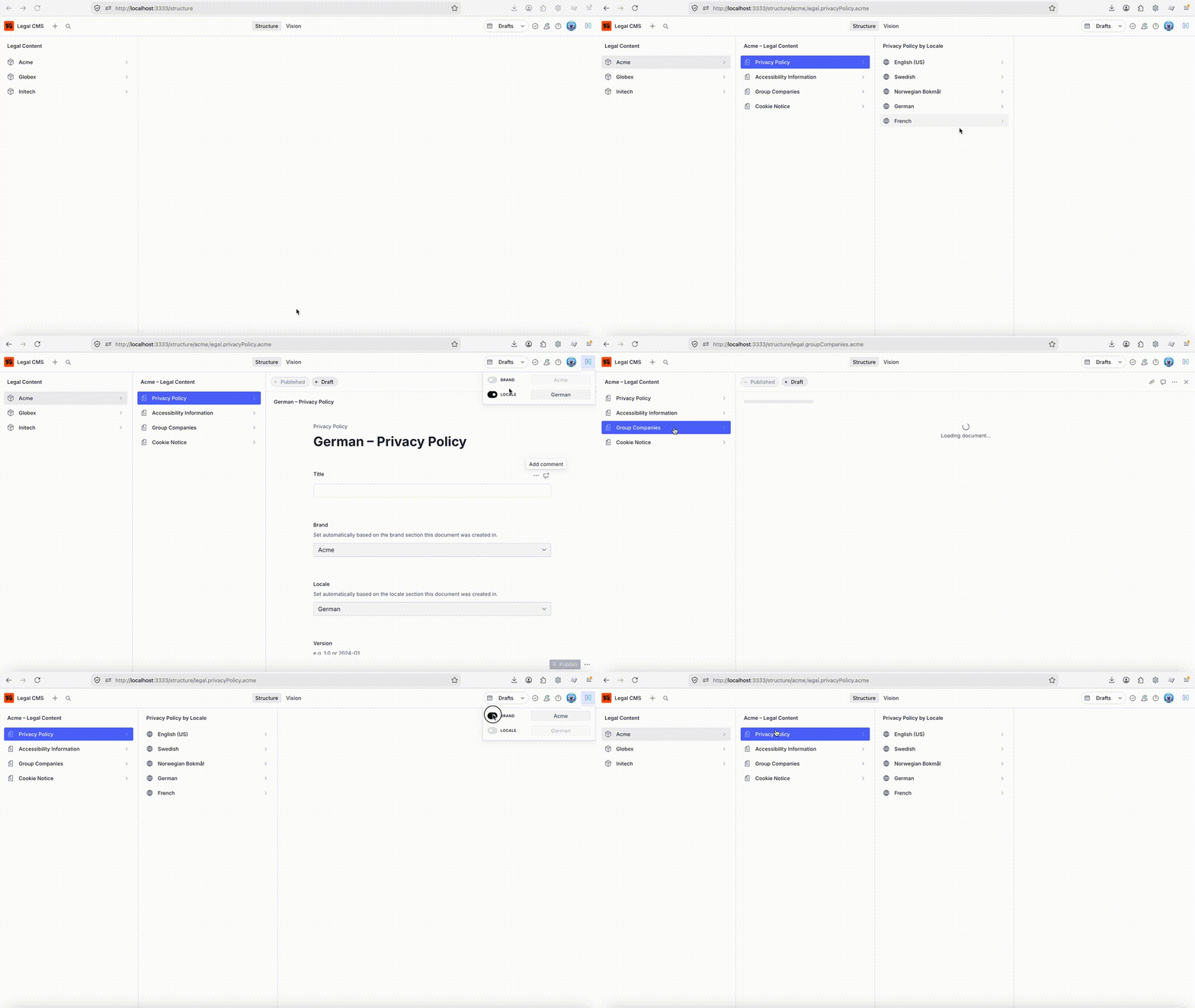
A Sanity Studio plugin that adds a persistent context switcher to the navbar — letting editors switch between dimensions like brand, locale, market, or environment without changing the URL or dataset.
The selected context is stored in localStorage and made available to any part of your Studio (document lists, previews, custom tools) via a simple subscription API.
Features
- Adds a toggle button to the Studio navbar
- Supports any number of named context dimensions (brand, locale, market, etc.)
- Each dimension has a list of options and can be independently enabled/toggled
- Selection persists across sessions via
localStorage - Resolver function API: derive available options from the current user's roles and workspace at runtime
- Subscribe to context changes from anywhere in your Studio
Installation
npm install sanity-contextBasic usage
Static options — all editors see the same choices:
// sanity.config.ts
import {defineConfig} from 'sanity'
import {contextPlugin} from 'sanity-context'

export default defineConfig({
  // ...
  plugins: [
    contextPlugin({
      contexts: [
        {
          id: 'brand',
          title: 'Brand',
          options: [
            {value: 'acme', title: 'Acme'},
            {value: 'globex', title: 'Globex'},
          ],
          defaultValue: 'acme',
        },
        {
          id: 'locale',
          title: 'Locale',
          options: [
            {value: 'en-US', title: 'English (US)'},
            {value: 'de-DE', title: 'German'},
            {value: 'fr-FR', title: 'French'},
          ],
          defaultValue: 'en-US',
        },
      ],
    }),
  ],
})
Role-based options
Pass a resolver function instead of a static array to derive options from the current user and workspace. The resolver is called once after the user authenticates.
import {contextPlugin} from 'sanity-context'
import type {ContextsResolver} from 'sanity-context'

const BRAND_ROLES: Record<string, string[]> = {
  acme: ['administrator', 'editor-acme'],
  globex: ['administrator', 'editor-globex'],
}

const resolver: ContextsResolver = ({currentUser}) => {
  const userRoles = currentUser?.roles.map((r) => r.name) ?? []

  const allowedBrands = Object.entries(BRAND_ROLES)
    .filter(([, roles]) => roles.some((r) => userRoles.includes(r)))
    .map(([brand]) => brand)

  return [
    {
      id: 'brand',
      title: 'Brand',
      options: allowedBrands.map((b) => ({value: b, title: b})),
      defaultValue: allowedBrands[0] ?? 'acme',
    },
  ]
}

export default defineConfig({
  plugins: [contextPlugin({contexts: resolver})],
})
The resolver receives { currentUser, workspace }:
| Property | Type | Description |
|---|---|---|
| currentUser | CurrentUser \| null | The authenticated Sanity user, including roles |
| workspace | Workspace | The active Studio workspace, including name, dataset, projectId |
Reading context in your Studio
Use getContext() and subscribeToContext() to read the current context from document views, custom components, or structure builders.
In a React component
import {useSyncExternalStore} from 'react'
import {getContext, subscribeToContext} from 'sanity-context'

function useStudioContext() {
  return useSyncExternalStore(subscribeToContext, getContext, getContext)
}

export function MyPreview() {
  const ctx = useStudioContext()

  if (!ctx.brand?.enabled) return <DefaultPreview />

  return <BrandPreview brand={ctx.brand.value} locale={ctx.locale?.value} />
}
In a structure builder
import {getContext} from 'sanity-context'

export function createStructure(S) {
  const ctx = getContext()
  const brand = ctx.brand?.enabled ? ctx.brand.value : null

  return S.list()
    .title('Content')
    .items(
      brand
        ? [S.documentTypeListItem('article').filter(`brand == "${brand}"`)]
        : S.documentTypeListItems()
    )
}
Note: structure builders run once on load. For reactive filtering, read context inside document list components instead.
ContextState shape
getContext() returns a Record<string, ContextEntry> keyed by context id:
interface ContextEntry {
  enabled: boolean  // whether the user has switched this context on
  value: string     // the selected option value
}
A context must be enabled to be considered active. This lets editors see the full unfiltered Studio when the toggle is off.
const ctx = getContext()

const brand = ctx.brand?.enabled ? ctx.brand.value : null
// null → show all content
// 'acme' → filter to Acme brand
Options
| Option | Type | Required | Description |
|---|---|---|---|
| contexts | ContextDefinition[] \| ContextsResolver | Yes | Static list or resolver function |
| storageKey | string | No | localStorage key (default: "sanity-context") |
Each ContextDefinition:
| Field | Type | Description |
|---|---|---|
| id | string | Unique identifier, used as the key in ContextState |
| title | string | Label shown in the navbar UI |
| options | ContextOption[] | Available choices ({value, title}) |
| defaultValue | string | Selected value when no stored preference exists |
License
MIT