
sanity-plugin-pte-interpolation
v1.5.0
Published
Sanity Studio plugin for interpolating values into Portable Text Editor fields
Downloads
453

Maintainers
 jordanl17
Readme
sanity-plugin-pte-interpolation

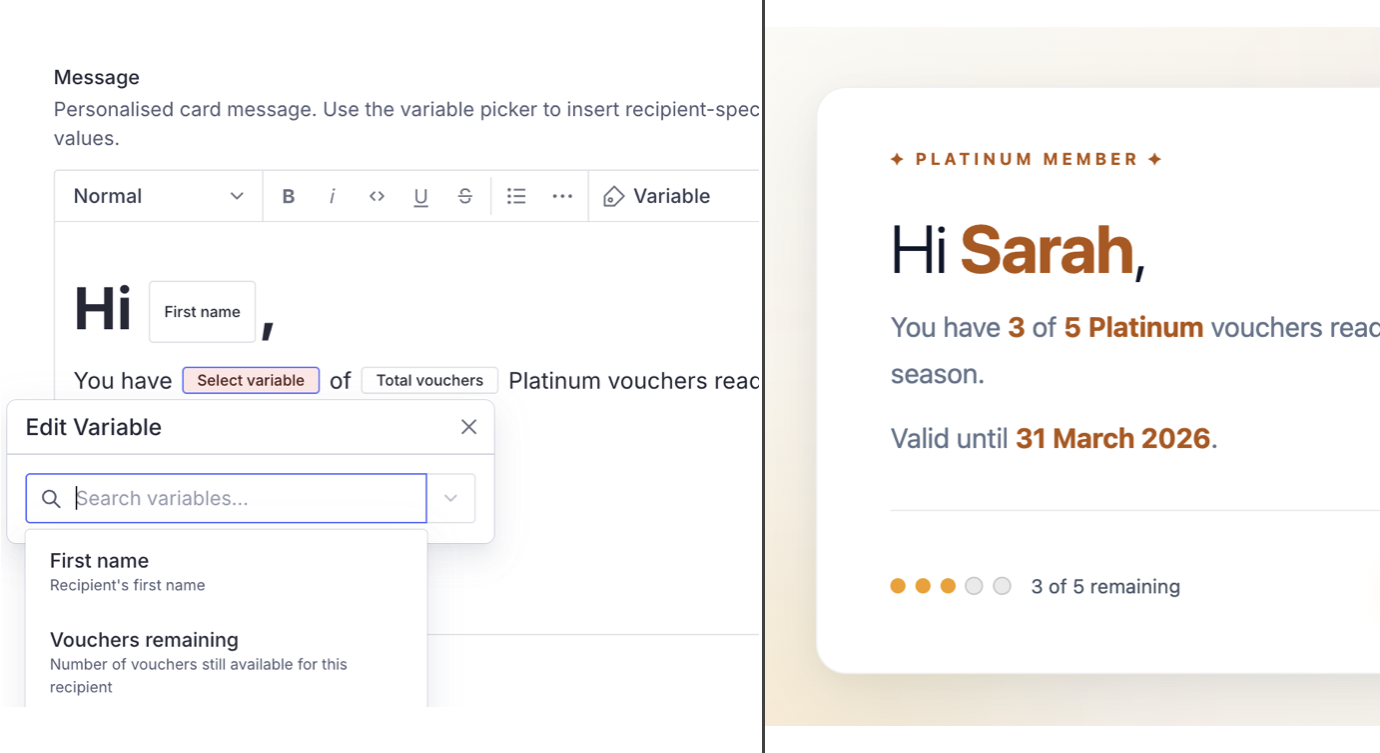
Sanity Studio schema helper that adds dynamic variable picker inline blocks to the Portable Text Editor. Editors can insert named variables (like {firstName} or {email}) directly into rich text content, which are then resolved to real values at render time.
Part of sanity-pte-interpolation. For rendering the variables in React, see pte-interpolation-react.
Install
npm install sanity-plugin-pte-interpolationPeer dependencies
sanity ^3.0.0 || ^4.0.0 || ^5.0.0 || ^6.0.0react ^18.0.0 || ^19.0.0@sanity/ui ^2.0.0 || ^3.0.0@sanity/icons ^3.0.0
When using sanity ^6, follow Sanity's runtime requirements (including Node.js >=22.12.0).
Usage
Call interpolationVariables() inside the of array of a Portable Text field. It returns a block array member augmented with the pteInterpolationVariable inline type.
import {defineType, defineField} from 'sanity'
import {interpolationVariables} from 'sanity-plugin-pte-interpolation'

export default defineType({
  name: 'promoCard',
  title: 'Promo card',
  type: 'document',
  fields: [
    defineField({
      name: 'message',
      title: 'Message',
      description:
        'Personalised card message. Use the variable picker to insert recipient-specific values.',
      type: 'array',
      of: [
        interpolationVariables([
          {id: 'firstName', name: 'First name', description: "Recipient's first name"},
          {
            id: 'vouchersRemaining',
            name: 'Vouchers remaining',
            description: 'Number of vouchers still available for this recipient',
          },
          {
            id: 'totalVouchers',
            name: 'Total vouchers',
            description: 'Total number of vouchers allocated',
          },
          {id: 'expiryDate', name: 'Expiry date', description: 'Date the vouchers expire'},
        ]),
      ],
    }),
  ],
})
Each variable requires an id (the lookup key used at render time) and a name (displayed in the Studio dropdown). The optional description appears as helper text below the picker when a variable is selected.
With a custom block definition
If you already have a customised block definition, pass it as the second argument and interpolationVariables appends the variable type to its existing of array:
import {defineArrayMember} from 'sanity'
import {interpolationVariables} from 'sanity-plugin-pte-interpolation'

const customBlock = defineArrayMember({
  type: 'block',
  styles: [{title: 'Normal', value: 'normal'}],
  marks: {
    decorators: [{title: 'Bold', value: 'strong'}],
  },
})

interpolationVariables([{id: 'firstName', name: 'First name'}], customBlock)
Stale variable detection
When a variable's id no longer exists in the variables array - for example after a developer renames or removes it from the schema config - the Studio surfaces warnings in three places:
- Inline block in the PTE editor - a warning icon and a "Stale" badge appear next to the variable name, and a tooltip explains the issue.
- Autocomplete input when editing the block - the autocomplete field shows a red border, and a caution card below it reads
Variable "..." is no longer defined. Please select a valid variable. - Document-level validation - the Studio raises a validation warning, not an error. Publishing is not blocked, since stale variables are typically caused by a developer schema change rather than an editor mistake.
Editors can resolve the warning by opening the variable block and selecting a currently defined variable from the picker.
How It Works
Think mail merge for rich text - an editor writes "Hello, {firstName}!" and the frontend substitutes the actual value at runtime.
AUTHORING (Sanity Studio)                 RENDERING (React)
───────────────────────────               ─────────────────────────────────
Editor writes:                            App provides values:
"Hi [firstName], you have                 { firstName: "Sarah",
[vouchersRemaining] of                      vouchersRemaining: "3",
[totalVouchers] vouchers                    totalVouchers: "5",
remaining until [expiryDate]."              expiryDate: "30 Feb 2026" }

Stored as Portable Text with              Rendered as:
inline pteInterpolationVariable           "Hi Sarah, you have 3 of 5
objects containing variableKey            vouchers remaining until
                                          30 Feb 2026."
Related Packages
This package handles the authoring side. To resolve variables to actual values in your frontend, use pte-interpolation-react:
import {InterpolatedPortableText} from 'pte-interpolation-react'

function PromoCard({message, recipient}) {
  return (
    <InterpolatedPortableText
      value={message}
      interpolationValues={{
        firstName: recipient.firstName,
        vouchersRemaining: String(recipient.vouchersRemaining),
        totalVouchers: String(recipient.totalVouchers),
        expiryDate: recipient.expiryDate,
      }}
    />
  )
}
For framework-agnostic use cases - plain string output, variable key extraction, server-side rendering, or any non-React environment - use pte-interpolation-core directly:
import {
  interpolateToString,
  extractVariableKeys,
  getMissingVariableKeys,
} from 'pte-interpolation-core'

const keys = extractVariableKeys(blocks) // ['firstName', 'vouchersRemaining']
const missing = getMissingVariableKeys(blocks, {firstName: 'Sarah'}) // ['vouchersRemaining']
const text = interpolateToString(blocks, {firstName: 'Sarah', vouchersRemaining: '3'})
// "Hi, Sarah! You have 3 vouchers remaining."
Data Shape
Variables are stored as inline objects within Portable Text blocks:
{
  "_type": "block",
  "children": [
    {"_type": "span", "text": "Hi, "},
    {"_type": "pteInterpolationVariable", "variableKey": "firstName"},
    {"_type": "span", "text": ","}
  ]
}
The variableKey maps to the id you defined in interpolationVariables() and the key in the interpolationValues record on the rendering side.
API Reference
interpolationVariables(variables, block?)
| Parameter | Type | Description |
| ----------- | -------------------------------------- | --------------------------------------------- |
| variables | InterpolationVariable[] | Array of variable definitions |
| block | ReturnType<typeof defineArrayMember> | Optional existing block definition to augment |
Returns a block array member with the pteInterpolationVariable inline object type added.
InterpolationVariable
interface InterpolationVariable {
  id: string // Lookup key used at render time
  name: string // Display name shown in Studio
  description?: string // Helper text shown below the picker
}
VARIABLE_TYPE_PREFIX
The constant 'pteInterpolationVariable' - the _type string used for variable inline blocks in stored Portable Text. Exported for advanced use cases.
License
MIT