
sanity-plugin-seo
v1.4.6
Published
Complete SEO toolkit for Sanity Studio with live scoring, AI suggestions, team workflows, and 30+ structured data types. Free and AI tiers live. Pro coming soon.

Maintainers
 bhargav-patel
Readme
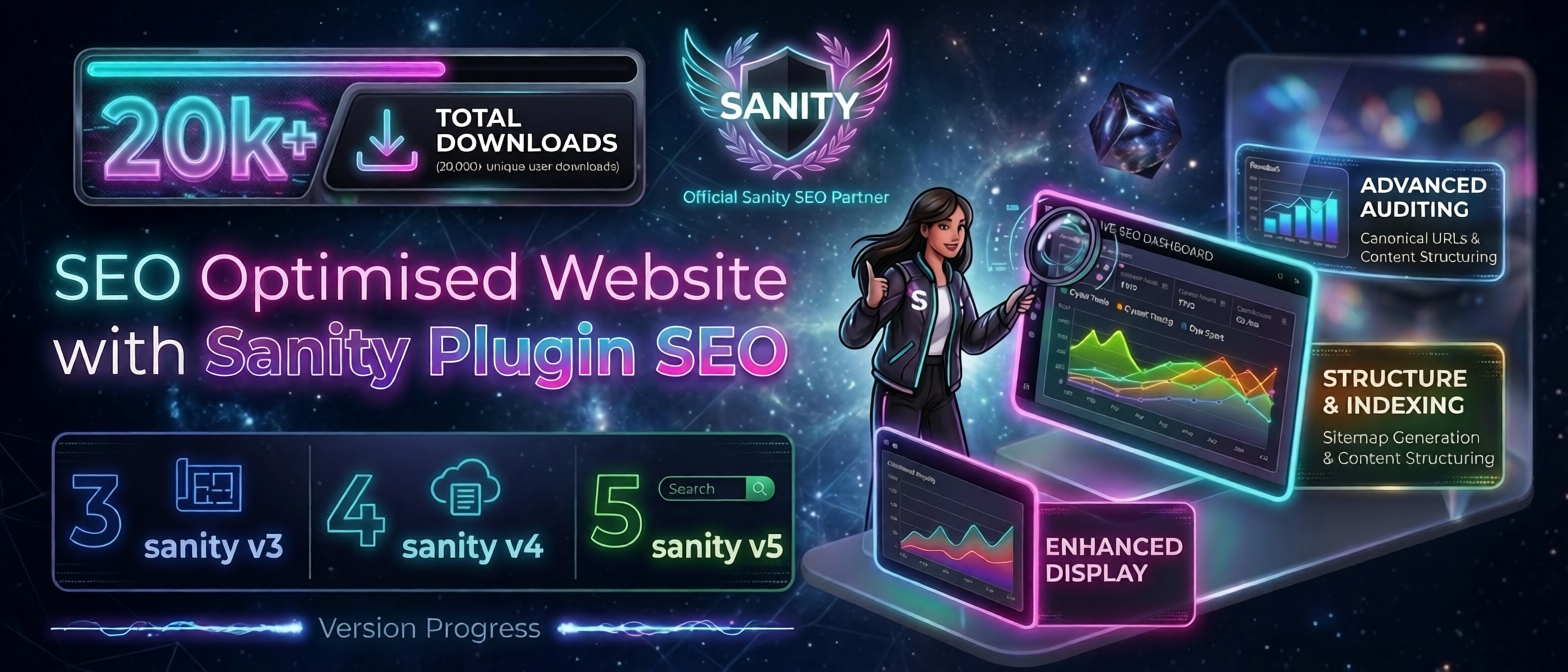
⚡ Sanity Plugin SEO



Sanity Studio Compatibility:



Framework Support:



The complete SEO toolkit for Sanity Studio. Empower your team with live SEO scoring, AI-powered content suggestions, team workflows, and comprehensive structured data support.
Production-Ready: Free and AI tiers live. Pro features coming soon with team workflows, bulk optimization, and schema management.
Demo Video
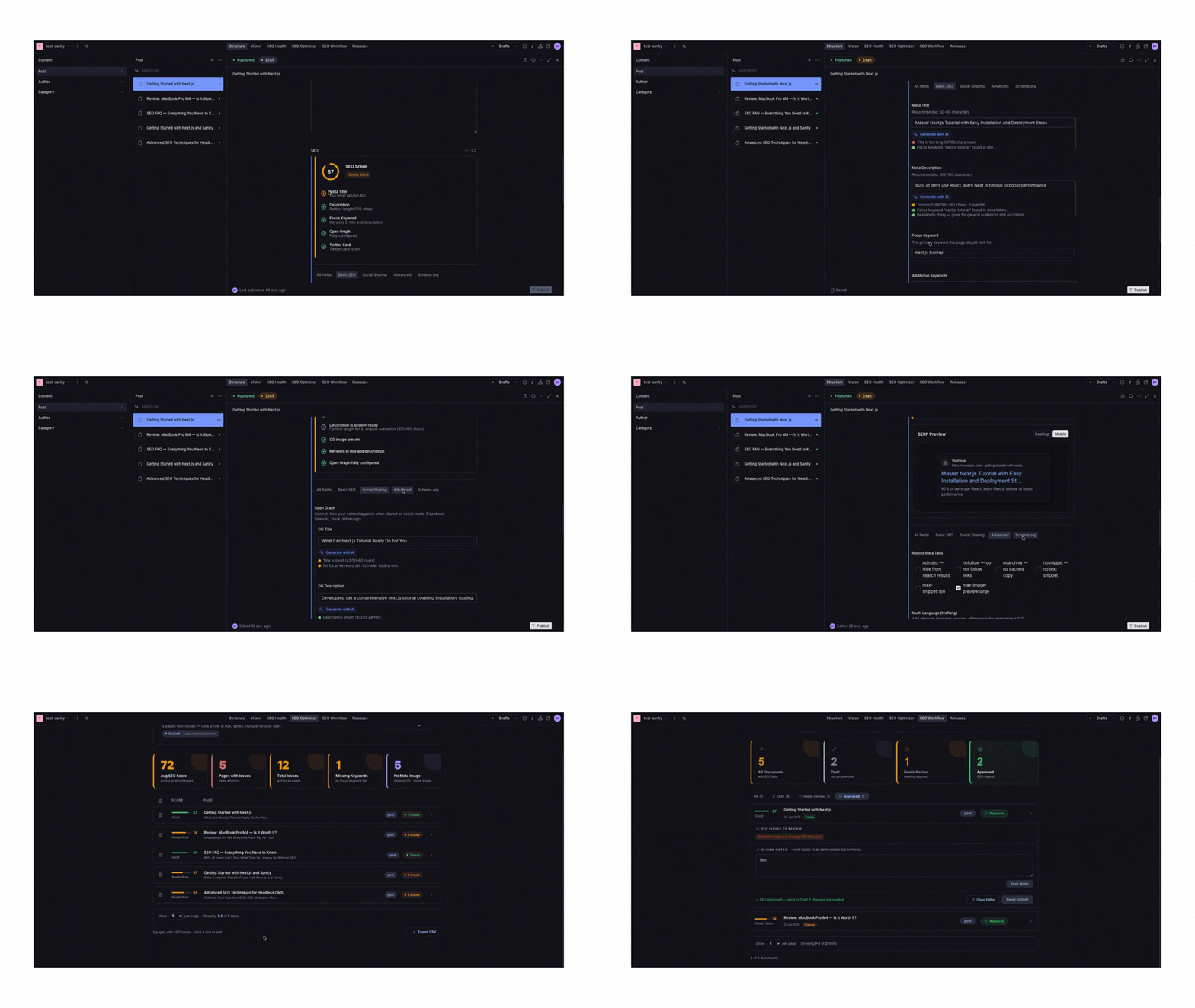
Complete Feature Set
Everything from basic SEO optimization to advanced team workflows.
| Feature | Free | AI | 🔜 Pro | | ---------------------------------------------------------------- | :--: | :-: | :----: | | Live SEO Score (0–100) | ✅ | ✅ | — | | GEO Checklist (AI Overview readiness) | ✅ | ✅ | — | | Meta Tags Preview + HTML snippet | ✅ | ✅ | — | | Social Preview Cards (X, Facebook, LinkedIn, WhatsApp) | ✅ | ✅ | — | | Focus Keyword tracking | ✅ | ✅ | — | | Robots Meta (noindex, nofollow, noarchive…) | ✅ | ✅ | — | | hreflang / multi-language targeting | ✅ | ✅ | — | | Open Graph & Twitter/X card fields | ✅ | ✅ | — | | Additional meta tags | ✅ | ✅ | — | | Frontend integration guides (Next.js, Astro, Vue) | ✅ | ✅ | — | | Readability score | ✅ | ✅ | — | | AI Keyword Suggestions | — | ✅ | — | | AI Meta Title & Description generation | — | ✅ | — | | SERP Preview (desktop + mobile) | — | — | 🔜 | | Schema.org Wizard (30+ structured data types) | — | — | 🔜 | | Live JSON-LD preview | — | — | 🔜 | | SEO Health Dashboard (site-wide scores) | — | — | 🔜 | | SEO Optimizer — inline bulk edit, type filter, CSV import/export | — | — | 🔜 | | Bulk Open Graph sync | — | — | 🔜 | | Advanced Validation (5 checks + auto-fix) | — | — | 🔜 | | Team Workflow (Draft → Review → Approved) | — | — | 🔜 | | Workflow Dashboard (site-wide status tracking) | — | — | 🔜 | | Duplicate meta title detection | — | — | 🔜 | | AI Bulk SEO Generation | — | — | 🔜 |
What Each Tier Includes
🎁 Free — Essential SEO tools built-in. Start optimizing immediately.
🤖 AI — Add AI-powered suggestions. Choose from OpenAI, Anthropic, or Groq (free tier available).
👥 Pro — Coming Soon. Team workflows, bulk optimization, advanced analytics, and schema management for enterprise teams.
Table of Contents
- Quick Start
- Configuration Options
- Framework Integration Guides
- GROQ Fragment & Types
- Pro Features — Coming Soon
- AI Provider Setup
- Upgrading from v1.3
Quick Start
1. Install the plugin
npm install sanity-plugin-seoOr with yarn/pnpm:
yarn add sanity-plugin-seo    # or
pnpm add sanity-plugin-seo
Compatibility: Sanity Studio v3, v4, and v5
2. Configure in Sanity Studio
Option A: Free features only
// sanity.config.ts
import { defineConfig } from "sanity";
import { seoMetaFields } from "sanity-plugin-seo";

export default defineConfig({
  plugins: [seoMetaFields()],
});
Option B: With AI (OpenAI, Anthropic, or Groq)
Add AI-powered suggestions for meta titles, descriptions, and keywords.
import { defineConfig } from "sanity";
import { seoMetaFields } from "sanity-plugin-seo";

export default defineConfig({
  plugins: [
    seoMetaFields({
      aiFeature: {
        provider: "openai", // 'openai' | 'anthropic' | 'groq'
        apiKey: process.env.SANITY_STUDIO_OPENAI_KEY!,
        model: "gpt-4o-mini", // optional
      },
      bodyFields: ["body"], // single field — or pass multiple, see bodyFields docs below
      slugField: "slug",
    }),
  ],
});
Option C: With Pro license (Coming Soon)
Unlock team workflows, bulk optimization, and advanced schema management.
seoMetaFields({
  proFeature: process.env.SANITY_STUDIO_SEO_LICENSE!,
  projectId: process.env.SANITY_STUDIO_PROJECT_ID!,
});
| Env variable | Value |
| --------------------------- | ------------------------------------------------------------------------------------------------- |
| SANITY_STUDIO_SEO_LICENSE | Your license key from Lemon Squeezy |
| SANITY_STUDIO_PROJECT_ID | Your Sanity project ID (find it in sanity.json or manage.sanity.io) |
Sanity Studio env vars must be prefixed with
SANITY_STUDIO_to be included in the browser bundle.
Complete Configuration
import { defineConfig } from "sanity";
import { seoMetaFields } from "sanity-plugin-seo";

export default defineConfig({
  plugins: [
    seoMetaFields({
      // AI provider (OpenAI, Anthropic, or Groq)
      aiFeature: {
        provider: "openai", // 'openai' | 'anthropic' | 'groq'
        apiKey: process.env.SANITY_STUDIO_OPENAI_KEY!,
        model: "gpt-4o-mini",
      },
      // Body content fields for AI analysis — string, string path, or Sanity path array
      bodyFields: [
        "body",                          // simple field
        "sections[].content",            // array traversal
        ["sections", "columns", "body"], // Sanity native path array
      ],
      slugField: "slug",
      // Show SEO Health + Optimizer in Studio toolbar (default: true)
      dashboard: true,
    }),
  ],
});
3. Add SEO to Your Documents
Add the seoMetaFields type to any document schema in your project:
// schemas/page.ts
export default {
  name: "page",
  type: "document",
  fields: [
    { name: "title", type: "string" },
    { name: "slug", type: "slug", options: { source: "title" } },
    { name: "body", type: "array", of: [{ type: "block" }] },
    { name: "seo", type: "seoMetaFields" },
  ],
};
This adds a fully-featured SEO panel with four tabs:
- Basic SEO — Meta title, description, keywords
- Social Sharing — Open Graph & Twitter cards
- Advanced — Robots meta, hreflang, custom tags
- Schema.org — 30+ structured data types (Pro)
Configuration Options
All options are optional. The plugin works great with zero configuration.
| Option | Type | Default | Description |
| -------------------- | ----------------------------------- | ---------------- | ----------------------------------------------------------------------------------------------------------------------------------- |
| Content Fields |
| bodyField | string | 'body' | Single body field name (legacy — prefer bodyFields) |
| bodyFields | Array<string \| string[]> | — | One or more body field paths; each item is a string path ('sections[].content') or a Sanity path array (['sections','content']) |
| slugField | string | 'slug' | Slug field for URL preview in SERP |
| AI Features |
| aiFeature | object | — | Enable AI keyword and content suggestions |
| aiFeature.provider | 'openai' \| 'anthropic' \| 'groq' | — | AI provider (OpenAI/Anthropic/Groq) |
| aiFeature.apiKey | string | — | API key from your provider |
| aiFeature.model | string | provider default | Model ID (e.g., gpt-4o-mini, claude-haiku-4-5-20251001) |
| Pro Features |
| proFeature | string | — | Your Lemon Squeezy license key |
| projectId | string | — | Your Sanity project ID — used for seat-binding (required for Pro) |
| UI |
| dashboard | boolean | true | Show SEO Health & Optimizer in Studio toolbar |
Framework Integration Guides
Choose your framework and follow the integration guide. All guides include complete examples.
Next.js Integration
1. Sanity client + GROQ fragment
npm install @sanity/client// lib/sanity.ts
import { createClient } from "@sanity/client";
export const client = createClient({
projectId: process.env.NEXT_PUBLIC_SANITY_PROJECT_ID!,
dataset: process.env.NEXT_PUBLIC_SANITY_DATASET || "production",
useCdn: false,
apiVersion: "2024-01-01",
});
export const SEO_GROQ = `seo {
metaTitle, metaDescription, focusKeyword,
nofollowAttributes, robotsMeta, seoKeywords,
seoStatus, seoReviewNotes,
metaImage { asset->{ url } },
openGraph { title, description, siteName, image { asset->{ url } } },
twitter { cardType, site, creator, handle },
hreflang[] { locale, url },
schemaOrg {
schemaType, name, description, url, author,
datePublished, dateModified,
price, priceCurrency, availability,
ratingValue, ratingCount,
startDate, endDate, location,
faqItems[] { question, answer }
}
}`;# .env.local
NEXT_PUBLIC_SANITY_PROJECT_ID=your-project-id
NEXT_PUBLIC_SANITY_DATASET=production
NEXT_PUBLIC_SITE_URL=https://your-site.com2. SEO helpers
// app/_seo.ts
import type { Metadata } from "next";

export type SeoField = {
  metaTitle?: string;
  metaDescription?: string;
  nofollowAttributes?: boolean;
  robotsMeta?: string[];
  seoKeywords?: string[];
  seoStatus?: "draft" | "review" | "approved";
  seoReviewNotes?: string;
  metaImage?: { asset?: { url?: string } };
  openGraph?: {
    title?: string;
    description?: string;
    siteName?: string;
    image?: { asset?: { url?: string } };
  };
  twitter?: { cardType?: string; site?: string; creator?: string; handle?: string };
  hreflang?: { locale: string; url: string }[];
  schemaOrg?: {
    schemaType?: string;
    name?: string;
    description?: string;
    url?: string;
    author?: string;
    datePublished?: string;
    dateModified?: string;
    faqItems?: { question: string; answer: string }[];
    [key: string]: unknown;
  };
};

export function buildMetadata(
  seo: SeoField | undefined,
  fallbackTitle: string | undefined,
  slug: string,
): Metadata {
  const s = seo ?? {};
  const canonical = `${process.env.NEXT_PUBLIC_SITE_URL ?? ""}/${slug}`;
  const ogImage = s.openGraph?.image?.asset?.url ?? s.metaImage?.asset?.url;
  const robots: string[] = [];
  if (s.nofollowAttributes) robots.push("noindex", "nofollow");
  s.robotsMeta?.forEach((r) => {
    if (!robots.includes(r)) robots.push(r);
  });
  const languages: Record<string, string> = {};
  s.hreflang?.forEach(({ locale, url }) => {
    languages[locale] = url;
  });

  return {
    title: s.metaTitle ?? fallbackTitle,
    description: s.metaDescription,
    ...(s.seoKeywords?.length && { keywords: s.seoKeywords.join(", ") }),
    ...(robots.length && { robots: robots.join(", ") }),
    alternates: {
      canonical,
      ...(Object.keys(languages).length && { languages }),
    },
    openGraph: {
      title: s.openGraph?.title ?? s.metaTitle ?? fallbackTitle,
      description: s.openGraph?.description ?? s.metaDescription,
      url: canonical,
      siteName: s.openGraph?.siteName,
      ...(ogImage && { images: [{ url: ogImage }] }),
    },
    twitter: {
      card: (s.twitter?.cardType as "summary" | "summary_large_image") ?? "summary_large_image",
      site: s.twitter?.site,
      creator: s.twitter?.creator ?? s.twitter?.handle,
    },
  };
}

export function buildJsonLd(seo: SeoField | undefined, fallbackTitle?: string): string {
  const schema = seo?.schemaOrg;
  if (!schema?.schemaType) {
    return JSON.stringify({
      "@context": "https://schema.org",
      "@type": "WebPage",
      name: seo?.metaTitle ?? fallbackTitle,
      description: seo?.metaDescription,
    });
  }
  if (schema.schemaType === "FAQPage" && schema.faqItems?.length) {
    return JSON.stringify({
      "@context": "https://schema.org",
      "@type": "FAQPage",
      mainEntity: schema.faqItems.map((item) => ({
        "@type": "Question",
        name: item.question,
        acceptedAnswer: { "@type": "Answer", text: item.answer },
      })),
    });
  }
  const { schemaType, faqItems, ...rest } = schema;
  return JSON.stringify({ "@context": "https://schema.org", "@type": schemaType, ...rest });
}
3. App Router
Next.js 15:
paramsis a Promise —awaitit first.
// app/[slug]/page.tsx
import type { Metadata } from "next";
import { client, SEO_GROQ } from "@/lib/sanity";
import { buildMetadata, buildJsonLd } from "@/app/_seo";

const query = `*[_type == "page" && slug.current == $slug][0]{ title, ${SEO_GROQ} }`;
type Props = { params: Promise<{ slug: string }> };

export async function generateMetadata({ params }: Props): Promise<Metadata> {
  const { slug } = await params;
  const page = await client.fetch(query, { slug });
  return buildMetadata(page?.seo, page?.title, slug);
}

export default async function Page({ params }: Props) {
  const { slug } = await params;
  const page = await client.fetch(query, { slug });
  if (!page)
    return (
      <main>
        <p>Page not found.</p>
      </main>
    );
  return (
    <>
      <script
        type="application/ld+json"
        dangerouslySetInnerHTML={{ __html: buildJsonLd(page.seo, page.title) }}
      />
      <main>
        <h1>{page.title}</h1>
      </main>
    </>
  );
}
Pages Router
npm install next-seo// pages/[slug].tsx
import { NextSeo } from "next-seo";
import { GetStaticProps } from "next";
import { client, SEO_GROQ } from "@/lib/sanity";
import type { SeoField } from "@/app/_seo";
type Props = { page: { title: string; slug: string; seo?: SeoField } };
export default function Page({ page }: Props) {
const seo = page?.seo ?? {};
const canonical = `${process.env.NEXT_PUBLIC_SITE_URL ?? ""}/${page.slug}`;
const ogImage = seo.openGraph?.image?.asset?.url ?? seo.metaImage?.asset?.url;
const schema = seo.schemaOrg;
let jsonLd: string | null = null;
if (schema?.schemaType === "FAQPage" && schema.faqItems?.length) {
jsonLd = JSON.stringify({
"@context": "https://schema.org",
"@type": "FAQPage",
mainEntity: schema.faqItems.map((i) => ({
"@type": "Question",
name: i.question,
acceptedAnswer: { "@type": "Answer", text: i.answer },
})),
});
} else if (schema?.schemaType) {
const { schemaType, faqItems, ...rest } = schema;
jsonLd = JSON.stringify({ "@context": "https://schema.org", "@type": schemaType, ...rest });
}
return (
<>
<NextSeo
title={seo.metaTitle}
description={seo.metaDescription}
canonical={canonical}
noindex={!!(seo.nofollowAttributes || seo.robotsMeta?.includes("noindex"))}
nofollow={!!(seo.nofollowAttributes || seo.robotsMeta?.includes("nofollow"))}
additionalMetaTags={
seo.seoKeywords?.length ? [{ name: "keywords", content: seo.seoKeywords.join(", ") }] : []
}
additionalLinkTags={
seo.hreflang?.map(({ locale, url }) => ({
rel: "alternate",
hrefLang: locale,
href: url,
})) ?? []
}
openGraph={{
title: seo.openGraph?.title ?? seo.metaTitle,
description: seo.openGraph?.description ?? seo.metaDescription,
url: canonical,
siteName: seo.openGraph?.siteName,
images: ogImage ? [{ url: ogImage }] : [],
}}
twitter={{
cardType: seo.twitter?.cardType ?? "summary_large_image",
site: seo.twitter?.site,
handle: seo.twitter?.handle ?? seo.twitter?.creator,
}}
/>
{jsonLd && <script type="application/ld+json" dangerouslySetInnerHTML={{ __html: jsonLd }} />}
<main>
<h1>{page.title}</h1>
</main>
</>
);
}
export const getStaticProps: GetStaticProps = async ({ params }) => {
const page = await client.fetch(
`*[_type == "page" && slug.current == $slug][0]{ title, "slug": slug.current, ${SEO_GROQ} }`,
{ slug: params?.slug },
);
return { props: { page }, revalidate: 60 };
};
export async function getStaticPaths() {
const slugs = await client.fetch(`*[_type == "page"].slug.current`);
return { paths: slugs.map((slug: string) => ({ params: { slug } })), fallback: "blocking" };
}Astro Integration
1. Install + configure
npm install @sanity/client astro-seo// astro.config.mjs
import { defineConfig } from "astro/config";
export default defineConfig({ output: "server" });# .env
PUBLIC_SANITY_PROJECT_ID=your-project-id
PUBLIC_SANITY_DATASET=production
PUBLIC_SITE_URL=https://your-site.com2. Sanity client
// src/lib/sanity.ts
import { createClient } from "@sanity/client";

export const client = createClient({
  projectId: import.meta.env.PUBLIC_SANITY_PROJECT_ID,
  dataset: import.meta.env.PUBLIC_SANITY_DATASET ?? "production",
  useCdn: false,
  apiVersion: "2024-01-01",
});

export const SEO_GROQ = `seo {
  metaTitle, metaDescription, focusKeyword,
  nofollowAttributes, robotsMeta, seoKeywords,
  seoStatus, seoReviewNotes,
  metaImage { asset->{ url } },
  openGraph { title, description, siteName, image { asset->{ url } } },
  twitter { cardType, site, creator, handle },
  hreflang[] { locale, url },
  schemaOrg {
    schemaType, name, description, url, author,
    datePublished, dateModified,
    price, priceCurrency, availability,
    ratingValue, ratingCount,
    startDate, endDate, location,
    faqItems[] { question, answer }
  }
}`;

export type SeoField = {
  metaTitle?: string;
  metaDescription?: string;
  nofollowAttributes?: boolean;
  robotsMeta?: string[];
  seoKeywords?: string[];
  seoStatus?: string;
  seoReviewNotes?: string;
  metaImage?: { asset?: { url?: string } };
  openGraph?: {
    title?: string;
    description?: string;
    siteName?: string;
    image?: { asset?: { url?: string } };
  };
  twitter?: { cardType?: string; site?: string; creator?: string; handle?: string };
  hreflang?: { locale: string; url: string }[];
  schemaOrg?: {
    schemaType?: string;
    faqItems?: { question: string; answer: string }[];
    [key: string]: unknown;
  };
};

export function buildJsonLd(
  schema: SeoField["schemaOrg"],
  fallbackTitle?: string,
  fallbackDesc?: string,
): string | null {
  if (!schema?.schemaType) {
    return JSON.stringify({
      "@context": "https://schema.org",
      "@type": "WebPage",
      name: fallbackTitle,
      description: fallbackDesc,
    });
  }
  if (schema.schemaType === "FAQPage" && schema.faqItems?.length) {
    return JSON.stringify({
      "@context": "https://schema.org",
      "@type": "FAQPage",
      mainEntity: schema.faqItems.map((item) => ({
        "@type": "Question",
        name: item.question,
        acceptedAnswer: { "@type": "Answer", text: item.answer },
      })),
    });
  }
  const { schemaType, faqItems, ...rest } = schema;
  return JSON.stringify({ "@context": "https://schema.org", "@type": schemaType, ...rest });
}
3. Page route
// src/pages/[slug].astro
import { SEO } from 'astro-seo'
import { client, SEO_GROQ, buildJsonLd } from '../lib/sanity'

export const prerender = false

const { slug } = Astro.params
const page = await client.fetch(
  `*[_type == "page" && slug.current == $slug][0]{ title, description, ${SEO_GROQ} }`,
  { slug },
)
if (!page) return Astro.redirect('/404')

const seo = page.seo ?? {}
const pageUrl = `${import.meta.env.PUBLIC_SITE_URL ?? ''}/${slug}`
const title = seo.metaTitle ?? page.title
const description = seo.metaDescription ?? page.description ?? ''
const ogImage = seo.openGraph?.image?.asset?.url ?? seo.metaImage?.asset?.url
const jsonLd = buildJsonLd(seo.schemaOrg, title, description)

<html lang="en">
  <head>
    <meta charset="UTF-8" />
    <meta name="viewport" content="width=device-width, initial-scale=1" />
    <SEO
      title={title}
      description={description}
      canonical={pageUrl}
      noindex={seo.robotsMeta?.includes('noindex') ?? false}
      nofollow={seo.nofollowAttributes ?? false}
      openGraph={{
        basic: { title: seo.openGraph?.title ?? title, type: 'website', image: ogImage ?? '', url: pageUrl },
        optional: { description: seo.openGraph?.description ?? description, siteName: seo.openGraph?.siteName },
      }}
      twitter={{
        card: (seo.twitter?.cardType ?? 'summary_large_image') as any,
        site: seo.twitter?.site,
        creator: seo.twitter?.creator ?? seo.twitter?.handle,
      }}
      extend={{
        meta: [
          { name: 'robots', content: seo.robotsMeta?.join(', ') ?? 'index,follow' },
          ...(seo.seoKeywords?.length ? [{ name: 'keywords', content: seo.seoKeywords.join(', ') }] : []),
        ],
        link: seo.hreflang?.map((h: { locale: string; url: string }) => ({ rel: 'alternate', hreflang: h.locale, href: h.url })) ?? [],
      }}
    />
    {jsonLd && <script type="application/ld+json" set:html={jsonLd} />}
  </head>
  <body>
    <main><h1>{page.title}</h1></main>
  </body>
</html>
import { client, SEO_GROQ, buildJsonLd } from '../lib/sanity'
export const prerender = false
const { slug } = Astro.params
const page = await client.fetch(
`*[_type == "page" && slug.current == $slug][0]{ title, description, ${SEO_GROQ} }`,
{ slug },
)
if (!page) return Astro.redirect('/404')
const seo = page.seo ?? {}
const pageUrl = `${import.meta.env.PUBLIC_SITE_URL ?? ''}/${slug}`
const title = seo.metaTitle ?? page.title
const description = seo.metaDescription ?? page.description ?? ''
const ogImage = seo.openGraph?.image?.asset?.url ?? seo.metaImage?.asset?.url
const jsonLd = buildJsonLd(seo.schemaOrg, title, description)
<html lang="en">
<head>
<meta charset="UTF-8" />
<title>{title}</title>
<meta name="description" content={description} />
<link rel="canonical" href={pageUrl} />
<meta name="robots" content={seo.robotsMeta?.join(', ') ?? 'index,follow'} />
{seo.seoKeywords?.length && <meta name="keywords" content={seo.seoKeywords.join(', ')} />}
<meta property="og:title" content={seo.openGraph?.title ?? title} />
<meta property="og:description" content={seo.openGraph?.description ?? description} />
<meta property="og:url" content={pageUrl} />
<meta property="og:type" content="website" />
{ogImage && <meta property="og:image" content={ogImage} />}
{seo.openGraph?.siteName && <meta property="og:site_name" content={seo.openGraph.siteName} />}
<meta name="twitter:card" content={seo.twitter?.cardType ?? 'summary_large_image'} />
{seo.twitter?.site && <meta name="twitter:site" content={seo.twitter.site} />}
{(seo.twitter?.creator ?? seo.twitter?.handle) && (
<meta name="twitter:creator" content={seo.twitter.creator ?? seo.twitter.handle} />
)}
{seo.hreflang?.map((h: { locale: string; url: string }) => (
<link rel="alternate" hreflang={h.locale} href={h.url} />
))}
{jsonLd && <script type="application/ld+json" set:html={jsonLd} />}
</head>
<body>
<main><h1>{page.title}</h1></main>
</body>
</html>Vue 3 / Nuxt Integration
Don't use
@nuxtjs/sanity— it pulls in React packages and breaks hydration. Use@sanity/clientdirectly.
Nuxt 3
npm install @sanity/client// nuxt.config.ts
export default defineNuxtConfig({
runtimeConfig: {
public: {
sanityProjectId: process.env.NUXT_PUBLIC_SANITY_PROJECT_ID ?? "",
sanityDataset: process.env.NUXT_PUBLIC_SANITY_DATASET ?? "production",
siteUrl: process.env.NUXT_PUBLIC_SITE_URL ?? "",
},
},
});# .env
NUXT_PUBLIC_SANITY_PROJECT_ID=your-project-id
NUXT_PUBLIC_SANITY_DATASET=production
NUXT_PUBLIC_SITE_URL=https://your-site.comIf you get CORS errors after client-side navigation, add
http://localhost:3000to your project's CORS settings at sanity.io/manage.
composables/useSanityFetch.ts
import { createClient } from "@sanity/client";

let _client: ReturnType<typeof createClient> | null = null;

function getSanityClient() {
  if (_client) return _client;
  const config = useRuntimeConfig();
  _client = createClient({
    projectId: config.public.sanityProjectId,
    dataset: config.public.sanityDataset,
    useCdn: false,
    apiVersion: "2024-01-01",
  });
  return _client;
}

export function useSanityFetch<T>(query: string, params?: Record<string, unknown>) {
  const key = query + (params ? JSON.stringify(params) : "");
  return useAsyncData<T>(key, () => getSanityClient().fetch<T>(query, params ?? {}));
}
composables/useSeo.ts
export type SeoField = {
  metaTitle?: string;
  metaDescription?: string;
  nofollowAttributes?: boolean;
  robotsMeta?: string[];
  seoKeywords?: string[];
  seoStatus?: string;
  seoReviewNotes?: string;
  metaImage?: { asset?: { url?: string } };
  openGraph?: {
    title?: string;
    description?: string;
    siteName?: string;
    image?: { asset?: { url?: string } };
  };
  twitter?: { cardType?: string; site?: string; creator?: string; handle?: string };
  hreflang?: { locale: string; url: string }[];
  schemaOrg?: {
    schemaType?: string;
    name?: string;
    description?: string;
    url?: string;
    author?: string;
    datePublished?: string;
    dateModified?: string;
    faqItems?: { question: string; answer: string }[];
    [key: string]: unknown;
  };
};

export const SEO_GROQ = `seo {
  metaTitle, metaDescription, focusKeyword,
  nofollowAttributes, robotsMeta, seoKeywords,
  seoStatus, seoReviewNotes,
  metaImage { asset->{ url } },
  openGraph { title, description, siteName, image { asset->{ url } } },
  twitter { cardType, site, creator, handle },
  hreflang[] { locale, url },
  schemaOrg {
    schemaType, name, description, url, author,
    datePublished, dateModified,
    price, priceCurrency, availability,
    ratingValue, ratingCount,
    startDate, endDate, location,
    faqItems[] { question, answer }
  }
}`;

export function buildJsonLd(
  schema: SeoField["schemaOrg"],
  fallbackTitle?: string,
  fallbackDesc?: string,
): string | null {
  if (!schema?.schemaType) {
    return JSON.stringify({
      "@context": "https://schema.org",
      "@type": "WebPage",
      name: fallbackTitle,
      description: fallbackDesc,
    });
  }
  if (schema.schemaType === "FAQPage" && schema.faqItems?.length) {
    return JSON.stringify({
      "@context": "https://schema.org",
      "@type": "FAQPage",
      mainEntity: schema.faqItems.map((item) => ({
        "@type": "Question",
        name: item.question,
        acceptedAnswer: { "@type": "Answer", text: item.answer },
      })),
    });
  }
  const { schemaType, faqItems, ...rest } = schema;
  return JSON.stringify({ "@context": "https://schema.org", "@type": schemaType, ...rest });
}
pages/[slug].vue
<script setup lang="ts">
import { SEO_GROQ, buildJsonLd, type SeoField } from "~/composables/useSeo";

const route = useRoute();
const slug = route.params.slug as string;
const siteUrl = useRuntimeConfig().public.siteUrl;

type Page = { title: string; slug: string; description?: string; seo?: SeoField };

const { data: page } = await useSanityFetch<Page | null>(
  `*[_type == "page" && slug.current == $slug][0]{ title, "slug": slug.current, description, ${SEO_GROQ} }`,
  { slug },
);

if (!page.value) throw createError({ statusCode: 404, statusMessage: "Page not found" });

const seo = computed(() => page.value?.seo);
const pageUrl = `${siteUrl}/${slug}`;
const title = computed(() => seo.value?.metaTitle ?? page.value?.title ?? "");
const description = computed(() => seo.value?.metaDescription ?? page.value?.description ?? "");
const ogImage = computed(
  () => seo.value?.openGraph?.image?.asset?.url ?? seo.value?.metaImage?.asset?.url,
);
const jsonLd = computed(() => buildJsonLd(seo.value?.schemaOrg, title.value, description.value));

useHead({
  title: title.value,
  meta: [
    { name: "description", content: description.value },
    { name: "robots", content: seo.value?.robotsMeta?.join(", ") ?? "index,follow" },
    ...(seo.value?.seoKeywords?.length
      ? [{ name: "keywords", content: seo.value.seoKeywords.join(", ") }]
      : []),
    { property: "og:title", content: seo.value?.openGraph?.title ?? title.value },
    { property: "og:description", content: seo.value?.openGraph?.description ?? description.value },
    { property: "og:type", content: "article" },
    { property: "og:url", content: pageUrl },
    ...(ogImage.value ? [{ property: "og:image", content: ogImage.value }] : []),
    ...(seo.value?.openGraph?.siteName
      ? [{ property: "og:site_name", content: seo.value.openGraph.siteName }]
      : []),
    { name: "twitter:card", content: seo.value?.twitter?.cardType ?? "summary_large_image" },
    ...(seo.value?.twitter?.site
      ? [{ name: "twitter:site", content: seo.value.twitter.site }]
      : []),
    ...(seo.value?.twitter?.creator ?? seo.value?.twitter?.handle
      ? [
          {
            name: "twitter:creator",
            content: seo.value?.twitter?.creator ?? seo.value?.twitter?.handle ?? "",
          },
        ]
      : []),
  ],
  link: [
    { rel: "canonical", href: pageUrl },
    ...(seo.value?.hreflang?.map(({ locale, url }) => ({
      rel: "alternate",
      hreflang: locale,
      href: url,
    })) ?? []),
  ],
  script: jsonLd.value ? [{ type: "application/ld+json", innerHTML: jsonLd.value }] : [],
});
</script>

<template>
  <main>
    <h1>{{ page?.title }}</h1>
  </main>
</template>
Vue 3 standalone (Vite + @unhead/vue)
npm install @sanity/client @unhead/vue// src/composables/useSeo.ts
import { createClient } from "@sanity/client";
import { useHead } from "@unhead/vue";
const client = createClient({
projectId: import.meta.env.VITE_SANITY_PROJECT_ID,
dataset: import.meta.env.VITE_SANITY_DATASET ?? "production",
useCdn: false,
apiVersion: "2024-01-01",
});
type SeoField = {
metaTitle?: string;
metaDescription?: string;
nofollowAttributes?: boolean;
robotsMeta?: string[];
seoKeywords?: string[];
metaImage?: { asset?: { url?: string } };
openGraph?: {
title?: string;
description?: string;
siteName?: string;
image?: { asset?: { url?: string } };
};
twitter?: { cardType?: string; site?: string; creator?: string; handle?: string };
hreflang?: { locale: string; url: string }[];
schemaOrg?: {
schemaType?: string;
faqItems?: { question: string; answer: string }[];
[key: string]: unknown;
};
};
export async function useSanityPage(slug: string) {
const page = await client.fetch<{ title: string; seo?: SeoField } | null>(
`*[_type == "page" && slug.current == $slug][0]{
title,
seo {
metaTitle, metaDescription, nofollowAttributes, robotsMeta, seoKeywords,
metaImage { asset->{ url } },
openGraph { title, description, siteName, image { asset->{ url } } },
twitter { cardType, site, creator, handle },
hreflang[] { locale, url },
schemaOrg { schemaType, name, description, url, faqItems[] { question, answer } }
}
}`,
{ slug },
);
const seo = page?.seo ?? {};
const canonical = `${import.meta.env.VITE_SITE_URL ?? ""}/${slug}`;
const ogImage = seo.openGraph?.image?.asset?.url ?? seo.metaImage?.asset?.url;
let jsonLd: string | null = null;
const schema = seo.schemaOrg;
if (schema?.schemaType === "FAQPage" && schema.faqItems?.length) {
jsonLd = JSON.stringify({
"@context": "https://schema.org",
"@type": "FAQPage",
mainEntity: schema.faqItems.map((i) => ({
"@type": "Question",
name: i.question,
acceptedAnswer: { "@type": "Answer", text: i.answer },
})),
});
} else if (schema?.schemaType) {
const { schemaType, faqItems, ...rest } = schema;
jsonLd = JSON.stringify({ "@context": "https://schema.org", "@type": schemaType, ...rest });
}
useHead({
title: seo.metaTitle,
meta: [
{ name: "description", content: seo.metaDescription },
{ name: "robots", content: seo.robotsMeta?.join(", ") ?? "index,follow" },
...(seo.seoKeywords?.length
? [{ name: "keywords", content: seo.seoKeywords.join(", ") }]
: []),
{ property: "og:title", content: seo.openGraph?.title ?? seo.metaTitle },
{ property: "og:description", content: seo.openGraph?.description ?? seo.metaDescription },
{ property: "og:url", content: canonical },
...(seo.openGraph?.siteName
? [{ property: "og:site_name", content: seo.openGraph.siteName }]
: []),
...(ogImage ? [{ property: "og:image", content: ogImage }] : []),
{ name: "twitter:card", content: seo.twitter?.cardType ?? "summary_large_image" },
...(seo.twitter?.site ? [{ name: "twitter:site", content: seo.twitter.site }] : []),
...(seo.twitter?.creator ?? seo.twitter?.handle
? [{ name: "twitter:creator", content: seo.twitter.creator ?? seo.twitter.handle }]
: []),
],
link: [
{ rel: "canonical", href: canonical },
...(seo.hreflang?.map(({ locale, url }) => ({
rel: "alternate",
hreflang: locale,
href: url,
})) ?? []),
],
script: jsonLd ? [{ type: "application/ld+json", innerHTML: jsonLd }] : [],
});
return { page };
}GROQ Fragment & Types
Copy and use this GROQ fragment to fetch all SEO fields from your documents:
const pageQuery = groq`*[_type == "page" && slug.current == $slug][0]{
  title,
  seo {
    metaTitle, metaDescription, focusKeyword, seoKeywords,
    nofollowAttributes, robotsMeta,
    metaImage { asset->{ url } },
    openGraph { title, description, siteName, image { asset->{ url } } },
    twitter { cardType, site, creator, handle },
    hreflang[] { locale, url },
    schemaOrg {
      schemaType, name, description, url, author,
      datePublished, dateModified,
      price, priceCurrency, availability,
      ratingValue, ratingCount,
      startDate, endDate, location,
      faqItems[] { question, answer }
    },
    seoStatus, seoReviewNotes
  }
}`;
| Field | Type | Notes |
| --------------------------- | ---------- | --------------------------------- |
| metaTitle | string | Page title for search engines |
| metaDescription | string | Page description |
| focusKeyword | string | Primary keyword |
| seoKeywords | string[] | Additional keywords |
| nofollowAttributes | boolean | Noindex toggle |
| robotsMeta | string[] | e.g. ['noindex', 'nofollow'] |
| metaImage.asset.url | string | Fallback OG/Twitter image |
| openGraph.title | string | OG title |
| openGraph.description | string | OG description |
| openGraph.siteName | string | OG site name |
| openGraph.image.asset.url | string | OG image |
| twitter.cardType | string | e.g. summary_large_image |
| twitter.site | string | Twitter @account |
| twitter.creator | string | Twitter @author |
| hreflang[].locale | string | BCP 47 locale code |
| hreflang[].url | string | Alternate URL for that locale |
| schemaOrg.schemaType | string | Schema.org type |
| seoStatus | string | draft | review | approved |
| seoReviewNotes | string | Reviewer notes |
Body Fields (bodyFields)
bodyFields accepts an array where each item is either a string path or a Sanity path array:
seoMetaFields({
  bodyFields: [
    "body", // simple field
    "excerpt", // plain string or Portable Text
    "sections[].content", // string with '[]. ' array traversal
    "sections[].columns[].body", // nested array traversal
    ["sections", "columns", "content"], // Sanity native path array
  ],
});
Path formats
| Item | Resolves to |
| --------------------------------- | ------------------------------------------------------------ |
| "body" | document.body |
| "sections[].content" | .content from every item in document.sections |
| "sections[].columns[].body" | nested array traversal |
| ["sections", "columns", "body"] | document.sections.columns.body (direct path, no iteration) |
Fields are resolved in order — earlier fields are higher priority when the AI prompt trims to 2000 characters.
bodyField: "body"(single string) still works and is kept for backwards compatibility.bodyFieldstakes precedence when both are set.
Free Features
Readability Score
Calculates a Flesch-Kincaid Grade Level for your content and shows it with color-coded feedback directly beneath the body field.
| Grade | Meaning | | ----- | ------------------------------------------ | | 1–6 | Very easy — general public | | 7–8 | Easy — ideal for most blog posts | | 9–12 | Average — acceptable for technical content | | 13+ | Difficult — academic/specialist |
Green = Grade ≤ 8, Amber = 9–12, Red = 13+.
Pro Features (Coming Soon)
Advanced team workflows, bulk optimization, and analytics for enterprise teams. All features are in development and launching soon.
Get notified when Pro launches: Star the GitHub repo or watch the npm package
SERP Preview
Desktop and mobile Google search mockup with pixel-accurate title/description truncation.
Schema.org Wizard
Guided form for 30 structured data types. Fills out only the fields relevant to the selected type and shows a live JSON-LD preview as you type.
Supported types: Article, Blog Post, Product, FAQ Page, Local Business, Event, Organization, Web Page, Video, Recipe, Person, Course, Job Posting, Breadcrumb, News Article, How-To Guide, Review, Software/App, Book, Movie, Service, Professional Service, Medical Condition, Dataset, Podcast, Podcast Episode, Tourist Attraction, Accommodation, Sports Team, Collection Page, About Page.
Advanced Validation
5 checks with one-click fixes where possible:
| Check | Auto-fixable | | --------------------------------------- | :---------------------: | | Unique meta title (GROQ query) | — | | Open Graph image present | — | | Open Graph title set | ✅ Copy from meta title | | Focus keyword in meta title | — | | Meta description length (100–160 chars) | — |
Progress bar + "Fix all" button. Each auto-fix shows a 2.5-second inline confirmation.
Team Workflow
Three-status pipeline: Draft → Needs SEO Review → SEO Approved
- Click any step to jump to it
- Quick-action buttons (Request Review / Mark Approved / Reset to Draft)
- Review Notes field for feedback between team members
seoStatusandseoReviewNotesstored on the document, queryable via GROQ
SEO Health Dashboard
Site-wide score overview for all documents.
- Stat cards with average score, issue counts, pages missing OG
- Filter by score range (Poor / Needs Work / Good) or issue type
- Paginated list with score bar, type badge, and last-updated date
- Click any row to open the document
SEO Optimizer
Fix queue for all documents with SEO issues.
- Inline editing — expand a row to edit meta title, description, focus keyword, OG title, OG description
- Type filter dropdown
- Sync Open Graph bulk action — copies meta title/description to OG fields for selected pages
- Import/Export CSV — edit in a spreadsheet and re-import
- Inline result log after every bulk operation
Workflow Dashboard
Top-level tool that shows every document's review status in one place.
- Stat cards (All / Draft / Needs Review / Approved) — click to filter
- Inline status actions per row — no need to open the document
- Expand a row to see SEO issues and add review notes
- Direct link to open any document in the editor
AI Bulk SEO Generation — Coming Soon
Generate meta titles and descriptions for every page using your configured AI provider. Pick a target field in the SEO Optimizer, select pages, and let it run.
Pro License Setup
- Purchase a license at sanity-seo-plugin.bkpatel.com
- Add all three values to your
.envfile:
SANITY_STUDIO_SEO_LICENSE=XXXX-XXXX-XXXX-XXXX
SANITY_STUDIO_PROJECT_ID=your-sanity-project-id- Pass them to the plugin in a single config object:
// sanity.config.ts
import { defineConfig } from "sanity";
import { seoMetaFields } from "sanity-plugin-seo";

export default defineConfig({
  plugins: [
    seoMetaFields({
      proFeature: process.env.SANITY_STUDIO_SEO_LICENSE!,
      projectId: process.env.SANITY_STUDIO_PROJECT_ID!,
    }),
  ],
});
Where to find your Sanity project ID: open sanity.json in your Studio root, or go to manage.sanity.io → your project → Settings.
Sanity Studio env vars must be prefixed with
SANITY_STUDIO_to be included in the browser bundle.
AI Provider Setup
Three AI providers supported. Choose based on your needs and budget.
OpenAI (Paid)
seoMetaFields({
  aiFeature: {
    provider: "openai",
    apiKey: process.env.SANITY_STUDIO_OPENAI_KEY!,
    model: "gpt-4o-mini",
  },
  bodyFields: ["body"],
});
Recommended: gpt-4o-mini (fast), gpt-4o (better quality)
Anthropic (Paid)
seoMetaFields({
  aiFeature: {
    provider: "anthropic",
    apiKey: process.env.SANITY_STUDIO_ANTHROPIC_KEY!,
    model: "claude-haiku-4-5-20251001",
  },
  bodyFields: ["body"],
});
Recommended models: claude-haiku-4-5-20251001 (fast & cheap), claude-sonnet-4-6 (best quality)
Groq (Free)
seoMetaFields({
  aiFeature: {
    provider: "groq",
    apiKey: process.env.SANITY_STUDIO_GROQ_KEY!,
    model: "llama-3.3-70b-versatile",
  },
  bodyFields: ["body"],
});
Free API: Sign up at console.groq.com
Recommended models: llama-3.3-70b-versatile, mixtral-8x7b-32768
⚠️ Security Note: API keys are bundled in the browser. Always use restricted API keys with minimal permissions, and prefix env vars with
SANITY_STUDIO_.
Upgrading from v1.3 to v1.4
Good news: No schema migrations needed. All existing SEO fields continue to work. Just update your config.
What Changed
The basic setup works exactly the same:
// v1.3 and v1.4 — no changes needed
plugins: [seoMetaFields()];
New in v1.4: AI and Pro features are now available with renamed config keys:
| Feature | Config Key (v1.4) |
| -------------- | ----------------- |
| AI suggestions | aiFeature |
| Pro license | proFeature |
See AI Provider Setup and Pro License Setup for configuration examples.
New Fields in v1.4
These new schema fields are optional and automatically included:
| Field | Type | Purpose |
| -------------------- | ---------- | ---------------------------------------------------------- |
| focusKeyword | string | Primary target keyword for tracking |
| robotsMeta | string[] | Indexing control (noindex, nofollow, noarchive, nosnippet) |
| hreflang | array | Alternate language/regional URLs |
| additionalMetaTags | array | Custom name/content meta tag pairs |
| schemaOrg | object | Schema.org structured data (Pro feature) |
| seoStatus | string | Workflow status: draft, review, approved (Pro feature) |
| seoReviewNotes | string | Reviewer feedback and notes (Pro feature) |
Existing documents work fine without these new fields — they're completely optional.
Free Features Deep Dive
Everything you need to optimize your content for search engines without leaving Sanity Studio.
- Live SEO Score — Real-time scoring (0-100) with detailed breakdown of what's missing or needs improvement
- GEO Checklist — Validates content structure for Google's AI Overview eligibility
- Meta Tags Preview — See exactly how your page appears in Google search results
- Social Preview Cards — X, Facebook, LinkedIn, and WhatsApp preview rendering
- Readability Score — Flesch-Kincaid grade level analysis with color-coded feedback
- Robots Meta Control — Set noindex, nofollow, noarchive, and nosnippet flags
- hreflang / Multi-language — Target alternate versions for different locales
- Additional Meta Tags — Add custom meta tags for any use case
- Frontend Integration Guides — Ready-to-use code for Next.js, Astro, Vue, and Nuxt
TypeScript Types
interface SeoData {
  metaTitle?: string;
  metaDescription?: string;
  focusKeyword?: string;
  seoKeywords?: string[];
  nofollowAttributes?: boolean;
  robotsMeta?: string[];
  metaImage?: { asset: { url: string } };
  openGraph?: {
    title?: string;
    description?: string;
    siteName?: string;
    image?: { asset: { url: string } };
  };
  twitter?: {
    cardType?: string;
    site?: string;
    creator?: string;
    handle?: string;
  };
  hreflang?: { locale: string; url: string }[];
  schemaOrg?: {
    schemaType?: string;
    name?: string;
    description?: string;
    url?: string;
    author?: string;
    datePublished?: string;
    dateModified?: string;
    price?: string;
    priceCurrency?: string;
    availability?: string;
    ratingValue?: string;
    ratingCount?: string;
    startDate?: string;
    endDate?: string;
    location?: string;
    faqItems?: { question: string; answer: string }[];
  };
  seoStatus?: "draft" | "review" | "approved";
  seoReviewNotes?: string;
}
Support & Community
- Bug Reports: GitHub Issues
- NPM Package: sanity-plugin-seo
Creator
Built by Bhargav Patel
License
MIT — Free and AI features are open source. Pro coming soon.