
satoru-render
v1.0.15
Published
High-fidelity HTML/CSS to SVG/PNG/PDF converter running in WebAssembly

Maintainers
 sora_kumo
Readme
Satoru Render: High-Performance HTML to Image/PDF Engine






Satoru Render is a high-fidelity HTML-to-Image/PDF conversion engine built with WebAssembly. It generates high-quality visuals and documents across Node.js, Cloudflare Workers, Deno, and Web Browsers without requiring a headless browser or system-level rendering service.
By combining the Skia graphics engine with a custom litehtml layout core, Satoru performs all layout and drawing operations entirely within WASM, eliminating the need for headless browsers or system-level dependencies.
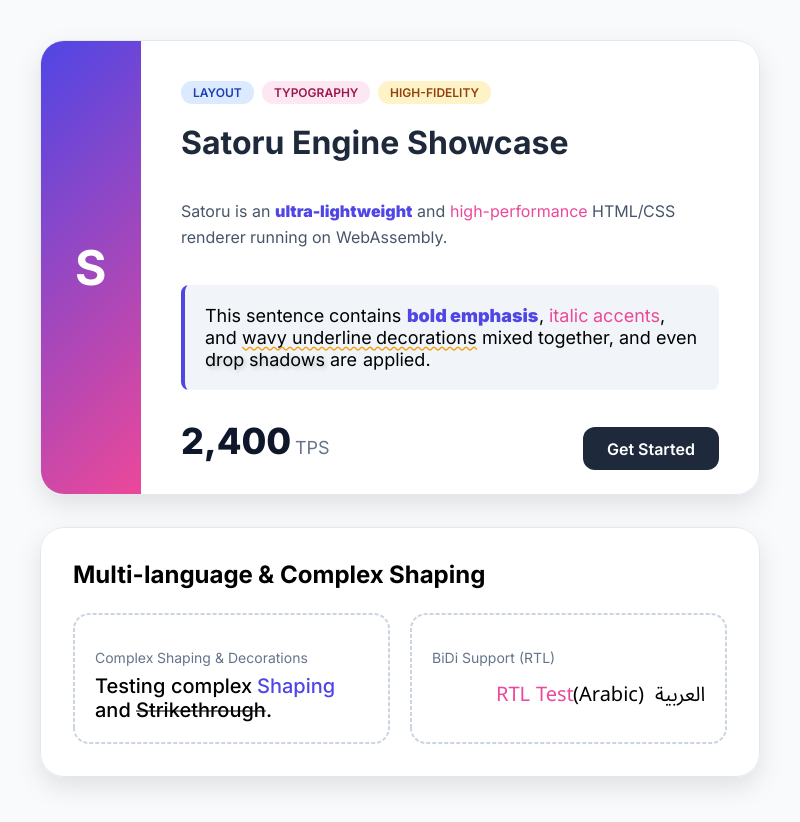
Example
- Cloudflare Workers
https://github.com/SoraKumo001/satoru-cloudflare-ogp - Deno Deploy
https://github.com/SoraKumo001/satoru-deno-ogp-image - Next.js(Vercel)
https://github.com/SoraKumo001/next-satoru
📋 Tested CSS Feature Coverage
Satoru supports and tests a broad subset of modern CSS. The list below highlights the main feature areas covered by the renderer and visual test suite. For detailed status and known differences, see the compatibility evidence.
Box Model, Layout & Logical Properties
display(block, inline, flex, grid, list-item, table, etc.)position(static, relative, absolute, fixed)float,clear,visibility,z-index,overflow,box-sizing,aspect-ratiowidth,height,min-width,min-height,max-width,max-heightmargin,padding,border(Width, Style, Color)- Logical Properties:
inline-size,block-size,margin-inline,margin-block,padding-inline,padding-block,border-inline,border-block(Start/End)
Typography & Text
color,font-family,font-size,font-weight,font-style,line-heighttext-align,vertical-align,text-decoration(Underline, Overline, Line-through, Wavy)text-transform,text-indent,text-overflow(Ellipsis),white-space,line-clamptext-shadow,direction,writing-mode(horizontal-tb, vertical-rl, vertical-lr)
Backgrounds, Borders & Shadows
background(Color, Image, Position, Size, Repeat, Clip, Origin)border-radius,box-shadow(Outer & Inset)border-image(Source, Slice, Width, Outset, Repeat)
Flexbox & Grid
display: flex,flex-direction,flex-wrap,justify-content,align-items,align-content,align-self,flex-grow,flex-shrink,flex-basis,gap,orderdisplay: grid,grid-template-columns,grid-template-rows,grid-column,grid-row,gap
Effects, Shapes & Functions
clip-path(circle, ellipse, inset, polygon, path)filter,backdrop-filter,opacity- Gradients:
linear-gradient,radial-gradient,conic-gradient - Modern Functions:
calc(),min(),max(),clamp(),oklch(),oklab(),color-mix(),light-dark(),env(),var() - Container Queries:
@container,container-type,container-name - Masking:
mask,-webkit-mask content,appearance
📦 Installation
npm install satoru-render🚀 Quick Start
Basic Usage (TypeScript)
The render function is the primary entry point. It handles WASM instantiation, resource resolution, and conversion in a single call.
import { render } from "satoru-render";

const html = `
  <div style="padding: 40px; background: #f8f9fa; border-radius: 12px; border: 2px solid #dee2e6;">
    <h1 style="color: #007bff; font-family: sans-serif;">Hello Satoru!</h1>
    <p style="color: #495057;">This document was rendered entirely in WebAssembly.</p>
  </div>
`;

// Render to PNG
const png = await render({
  value: html,
  width: 600,
  format: "png",
});
🛠️ Advanced Usage
1. Dynamic Resource Resolution & Caching
Satoru can automatically fetch missing fonts, images, or external CSS via a resolveResource callback. You can also implement high-performance caching using the browser's CacheStorage API.
const pdf = await render({
  value: html,
  width: 800,
  format: "pdf",
  baseUrl: "https://example.com/assets/",
  resolveResource: async (resource, defaultResolver) => {
    // 1. Open Cache storage
    const cache = await caches.open("satoru-resource-cache");
    const cachedResponse = await cache.match(resource.url);

    // 2. Return cached data if available
    if (cachedResponse) {
      const buf = await cachedResponse.arrayBuffer();
      return new Uint8Array(buf);
    }

    // 3. Fetch using default resolver and save to cache
    const data = await defaultResolver(resource);
    if (data?.length) {
      await cache.put(resource.url, new Response(data));
    }

    return data;
  },
});
2. Avoiding CORS Issues with Proxy
If you encounter CORS errors when fetching images or fonts from other domains, you can use a proxy service within the resolveResource callback.
const png = await render({
  value: html,
  width: 800,
  format: "png",
  resolveResource: async (resource, defaultResolver) => {
    // Intercept external images to avoid CORS issues
    if (resource.type === "image" && !resource.url.startsWith("data:")) {
      const proxyUrl = `https://your-proxy-service.com/?url=${encodeURIComponent(resource.url)}`;
      try {
        const resp = await fetch(proxyUrl);
        if (resp.ok) {
          const buf = await resp.arrayBuffer();
          return new Uint8Array(buf);
        }
      } catch (e) {
        console.warn(`Failed to fetch via proxy: ${resource.url}`, e);
      }
    }

    // Fallback to default resolver for other resources
    return defaultResolver(resource);
  },
});
3. Multi-page PDF Generation
Generate complex documents by passing an array of HTML strings. Each element in the array becomes a new page.
const pdf = await render({
  value: ["<h1>Page One</h1>", "<h1>Page Two</h1>", "<h1>Page Three</h1>"],
  width: 595, // A4 width in points
  format: "pdf",
});
4. Edge/Cloudflare Workers
Use the specialized workerd export for serverless environments.
import { render } from "satoru-render/workerd";

export default {
  async fetch(request) {
    const png = await render({
      value: "<h1>Edge Generated Image</h1>",
      width: 800,
      format: "png",
    });

    return new Response(png, { headers: { "Content-Type": "image/png" } });
  },
};
5. Multi-threaded Rendering (Worker Proxy)
Distribute rendering tasks across multiple background workers for high-throughput applications.
import { createSatoruWorker } from "satoru-render/workers";

const satoru = createSatoruWorker({ maxParallel: 4 });

const png = await satoru.render({
  value: "<h1>Parallel Task</h1>",
  width: 800,
  format: "png",
});
6. preact + tailwind
- install
pnpm add preact preact-render-to-string @unocss/preset-wind4 satoru-render- code
/** @jsx h */
import { h, toHtml } from "satoru-render/preact";
import { createCSS } from "satoru-render/tailwind";
import { render } from "satoru-render";

// 1. Define your layout with Tailwind classes
const html = toHtml(
  <div className="w-[1200px] h-[630px] flex items-center justify-center bg-slate-900">
    <h1 className="text-6xl text-white font-bold">Hello World</h1>
  </div>,
);

// 2. Generate CSS from the HTML
const css = await createCSS(html);

// 3. Render to PNG
const png = await render({
  value: html,
  css,
  width: 1200,
  height: 630,
  format: "png",
});- tsconfig.json
{
  "compilerOptions": {
    "jsx": "preserve"
  }
}
7. JSDOM Hydration (For Next.js / SPAs)
For complex client-side applications (like Next.js) that require full Javascript evaluation and DOM hydration before rendering, Satoru provides an optional jsdom helper.
Note: jsdom must be installed separately in your project (npm install jsdom).
import { render } from "satoru-render";
import { getHtml } from "satoru-render/jsdom";

// 1. Let JSDOM fetch the URL, execute scripts, and wait for network/hydration
const hydratedHtml = await getHtml({
  src: "https://example.com/",
  waitUntil: "networkidle", // Wait until Next.js finishes loading chunks
  beforeParse: (window) => {
    // Provide polyfills if the target site requires them
    window.matchMedia = () => ({ matches: false, addListener: () => {} });
    window.IntersectionObserver = class {
      observe() {}
      unobserve() {}
      disconnect() {}
    };
  },
});

// 2. Render the fully constructed DOM in Satoru (at native speed)
const pngBytes = await render({
  value: hydratedHtml,
  baseUrl: "https://example.com/",
  width: 1200,
  format: "png",
});
8. DOM Capture (html2canvas alternative)
Satoru can capture live DOM elements directly in the browser, preserving computed styles, pseudo-elements (::before/::after), canvas contents, and form states.
import { Satoru } from "satoru-render";
import createSatoruModule from "satoru-render/satoru.js";

const satoru = await Satoru.create(createSatoruModule);
const element = document.getElementById("target-element");

// 1. Capture to HTMLCanvasElement (Direct html2canvas replacement)
const canvas = await satoru.capture(element, {
  format: "png",
});
document.body.appendChild(canvas);

// 2. Or render directly to binary (Uint8Array)
const png = await satoru.render({
  value: element, // Accepts HTMLElement directly
  width: 800,
  format: "png",
});
9. Rendering Diagnostics
Get detailed insights into the rendering process, including resource loading status, font resolution, and performance timings.
import { render } from "satoru-render";

const png = await render({
  value: "<h1>Hello World</h1>",
  width: 800,
  format: "png",
  diagnostics: true,
  onDiagnostics: (report) => {
    console.log(`Version: ${report.version}`);
    console.log(`Format: ${report.format}`);
    console.log("Resources:", report.resources);
    console.log("Fonts:", report.fonts);
    console.log("Timings:", report.timings);
  },
});
💻 CLI Tool
Convert files or URLs directly from your terminal.
# Local HTML to PNG (JSDOM hydration enabled by default)
npx satoru-render input.html -o output.png

# URL to PDF with specific width
npx satoru-render https://example.com -o site.pdf -w 1280

# Convert without JSDOM hydration
npx satoru-render https://example.com --no-jsdom -o example.pdf

# WebP conversion with verbose logs
npx satoru-render input.html -f webp --verbose

# Write rendering diagnostics to a JSON file
npx satoru-render input.html -o output.png --json-report report.json

# Restrict network access for safer server-side usage
npx satoru-render https://example.com -o output.png \
  --timeout 5000 \
  --max-resource-count 50 \
  --max-total-resource-bytes 10000000 \
  --allowed-protocols https:
📖 API Reference
Render Options
| Option | Type | Description |
| :---------------- | :----------------------------------------- | :------------------------------------------------------ |
| value | string \| string[] \| HTMLElement \| ... | HTML string, array of strings, or DOM element(s). |
| url | string | URL to fetch HTML from. |
| width | number | Required. Canvas width in pixels (used for layout). |
| height | number | Canvas height. Default: 0 (auto-calculate). |
| crop | { x, y, width, height } | Crop parameters to extract a specific region. |
| outputWidth | number | Output image width. Default: canvas/crop width. |
| outputHeight | number | Output image height. Default: canvas/crop height. |
| fit | "contain" \| "cover" \| "fill" | Fit strategy when canvas/crop size differs from output. |
| fitPosition | { x, y } | Alignment origin for contain/cover. Default: center. |
| backgroundColor | string | Background color for raster/PDF output. |
| format | "svg" \| "png" \| "webp" \| "pdf" | Output format. Default: "svg". |
| resolveResource | ResourceResolver | Async callback to fetch assets (fonts, images, CSS). |
| fonts | Object[] | Pre-load fonts: [{ name, data: Uint8Array }]. |
| fallbackFonts | Uint8Array[] | Font data used as fallback faces. |
| images | Object[] | Pre-load named images for resource resolution. |
| css | string | Extra CSS to inject into the document. |
| baseUrl | string | Base URL for relative path resolution. |
| userAgent | string | User agent used by the default resource resolver. |
| fontMap | Record<string, string> | Override font-family to remote font URL mapping. |
| logLevel | LogLevel | Verbosity: None, Error, Warning, Info, Debug. |
| mediaType | "screen" \| "print" | CSS media type for @media queries. Default: "screen". |
| limits | RenderLimits | Timeout, resource size, protocol, and host restrictions. |
| profile | boolean | Collect coarse render timings. |
| onProfile | (profile) => void | Callback that receives coarse render timings. |
| diagnostics | boolean | Enable detailed rendering diagnostics. |
| onDiagnostics | (report: RenderDiagnostics) => void | Callback that receives the full diagnostics report. |
| pdfTitle / pdfAuthor | string | PDF metadata fields. |
| pdfMargin | { top, right, bottom, left } | PDF page margins in pixels. |
| pdfHeader / pdfFooter | string | PDF header/footer HTML. Supports {{pageNumber}} and {{totalPages}}. |
For the full API surface, see the API Reference.
📝 Changelog
Please see CHANGELOG.md for a history of changes.
📖 Recipes
- Production OGP Generation: Caching, safety limits, and diagnostics for high-traffic services.
🔬 Compatibility Evidence
For a detailed breakdown of CSS feature support and visual test coverage, see the Compatibility Matrix.
📜 License
This project is licensed under the MIT License.