
scene-controls-kit
v3.0.1
Published
Pluggable Three.js modules: SceneControls (WASD fly, orbit on Q, height/FOV trackbars, cursor raycasting) and TransformGizmo (click to select an object, Enter to open a move/rotate gizmo, clipboard copy). Work in plain Three.js and in React Three Fiber vi

Maintainers
 lightyday
Readme
scene-controls-kit
Two pluggable modules for Three.js scenes. The core is written against the
plain Three.js API, doesn't create a renderer/scene/camera, and doesn't
run its own render loop — it works in vanilla Three.js as well as in React
Three Fiber (via the hooks in r3f.js).
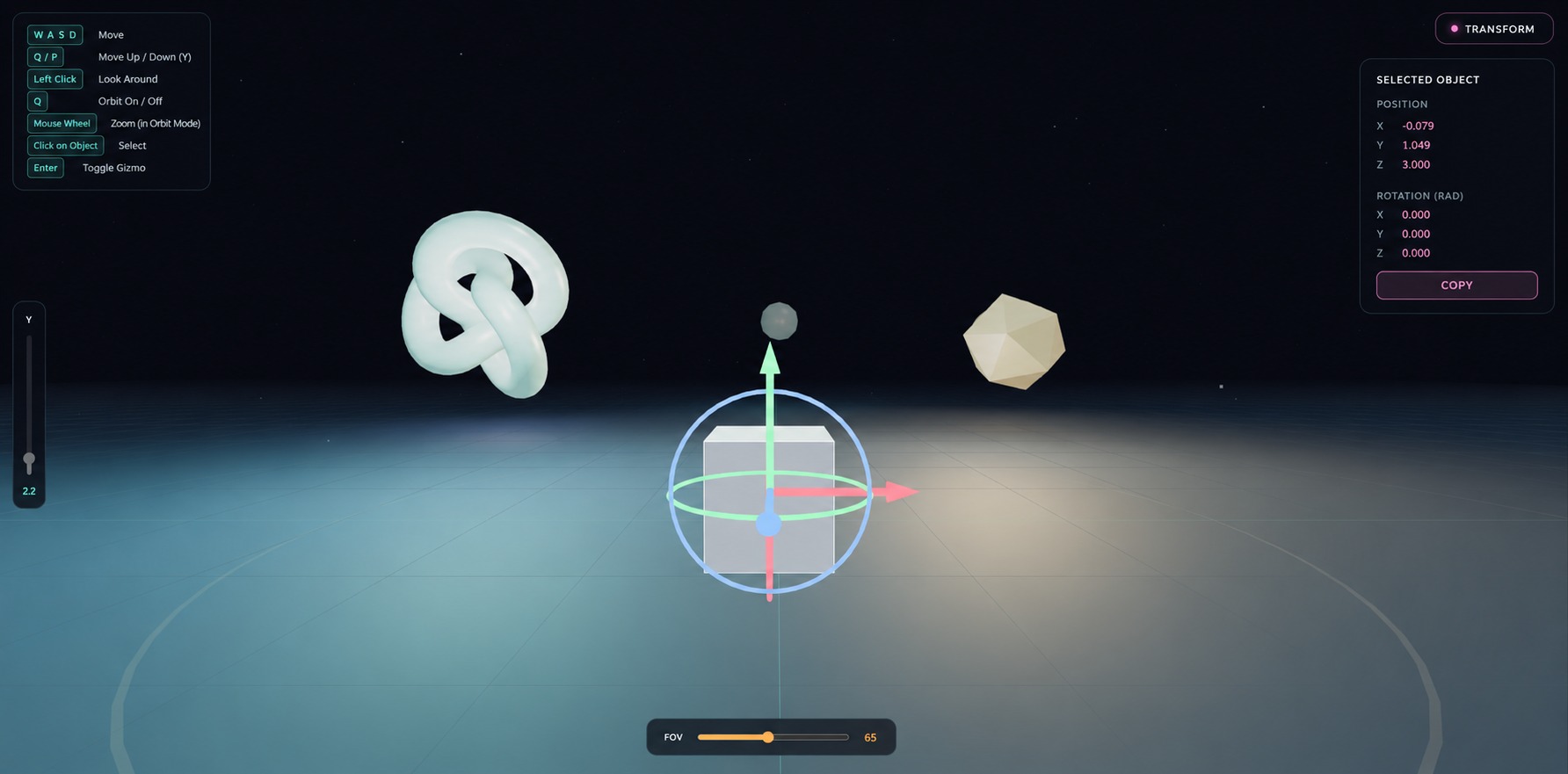
SceneControls — camera:
- WASD — horizontal movement relative to the look direction
- RMB + mouse — look around (Pointer Lock); left click stays free for object picking
- Q — toggle orbit around a point in front of the camera
- Height (Y) trackbar and FOV trackbar, built into the UI overlay
- O / P — height (Y) from the keyboard
- Hover — computes the world point under the cursor (X/Y/Z) in real time
- C — copy the cursor point to the clipboard
TransformGizmo — object picking and a reduced-scope TransformControls/PivotControls equivalent:
- Click an object — selects it (white outline)
- Enter — opens a gizmo: X/Y/Z arrows (translate) + X/Y/Z rings (rotate); Enter/Escape again — closes it
- Position/Rotation panel with clipboard copy (button or the
Ckey) - Automatically pauses
SceneControlswhile the gizmo is open
Install
npm install three
npm install react @react-three/fiber   # only if you need r3f.js
This package isn't published to npm — just copy the src folder into your project.
Quick start (both modules in one call)
import \* as THREE from 'three';
import { createControls } from 'scene-controls-kit';

const renderer = new THREE.WebGLRenderer({ antialias: true });
const scene = new THREE.Scene();
const camera = new THREE.PerspectiveCamera(65, innerWidth / innerHeight, 0.1, 200);
camera.position.set(0, 2.2, 8);

const material = new  THREE.MeshNormalMaterial({wireframe: true});
const mesh1 = new THREE.Mesh(new THREE.BoxGeometry(1, 1, 1), material);
scene.add(mesh1);

const controls = createControls(scene, camera, renderer.domElement, {
  gizmo: { objects: \[mesh1] }, // what can be picked by clicking
});

const clock = new THREE.Clock();
function animate() {
  requestAnimationFrame(animate);
  controls.update(clock.getDelta());
  renderer.render(scene, camera);
}
animate();

controls.dispose(); // when tearing down the scene
controls.camera is the SceneControls instance, controls.gizmo is the TransformGizmo instance. Only one of the two modules:
createControls(scene, camera, dom, { gizmo: false });                       // camera only
createControls(scene, camera, dom, { camera: false, gizmo: { objects } });  // gizmo only
React Three Fiber
Combined hook:
import { useRef, useEffect } from 'react';
import { useControls } from 'scene-controls-kit/r3f';

function ControlsBridge({ meshRef1, meshRef2 }) {
  const { gizmoRef } = useControls({ gizmo: { objects: \[] } });

  useEffect(() => {
    // reading .current inside useEffect — by this point React has already
    // attached the refs
    gizmoRef.current?.setObjects(\[meshRef1.current, meshRef2.current].filter(Boolean));
  }, \[]);

  return null;
}

export default function App() {
  const meshRef1 = useRef(null);
  const meshRef2 = useRef(null);

  return (
    <Canvas camera={{ position: \[0, 2.2, 8], fov: 65 }}>
      <ControlsBridge meshRef1={meshRef1} meshRef2={meshRef2} />
      <mesh ref={meshRef1} position={\[-2, 0.5, 0]}>
        <boxGeometry />
        <meshStandardMaterial color="orange" />
      </mesh>
      <mesh ref={meshRef2} position={\[2, 0.5, 0]}>
        <sphereGeometry />
        <meshStandardMaterial color="hotpink" />
      </mesh>
    </Canvas>
  );
}
If the object list doesn't change dynamically, you can pass it straight into
the options (useControls({ gizmo: { objects: \[...] } })), but .current
still needs to be read inside useEffect/a callback, not in the component
body (it's still null there).
For finer-grained control, use the hooks separately: useSceneControls(options)
and useTransformGizmo(options) — their signatures match the class constructors.
SceneControls options
new SceneControls(camera, domElement, {
  moveSpeed: 6,
  sprintMultiplier: 1.8,   // Shift
  heightMin: 0.6,
  heightMax: 20,
  heightKeySpeed: 4,       // O/P
  fovMin: 28,
  fovMax: 115,
  orbitDistance: 9,
  lookTrigger: 'right',    // 'right' — look on RMB (left click free for picking); 'left' — look on any click
  ui: true,                // built-in panel (hints + trackbars)
  raycast: { enabled: true, planeY: 0, objects: null, showUI: true }, // cursor-point coordinates
  theme: { accent: '#5eead4', accent2: '#ffb454', /\* ... \*/ },
  labels: { hintMove: 'move', modeFly: 'Fly', /\* ... \*/ },
});
SceneControls API
|Method|Description|
|-|-|
|update(delta)|Call every frame — moves the camera in fly mode|
|toggleMode()|Fly ↔ orbit (same as Q)|
|getMode()|'fly' | 'orbit'|
|getHeight() / setHeight(v)|Height Y|
|getFov() / setFov(v)|FOV|
|getCursorPoint() / getCursorObject()|World point/object under the cursor|
|setRaycastPlaneY(y) / setRaycastObjects(objs) / setRaycastEnabled(bool)|Configure the cursor-point raycast|
|copyCursorPoint()|Copy the cursor point to the clipboard as "x, y, z"|
|pause() / resume() / isPaused()|Pause the controls (used by TransformGizmo)|
|on(event, cb) / off(event, cb)|'modechange', 'heightchange', 'fovchange', 'cursorpoint', 'cursorcopy'|
|dispose()|Removes listeners, removes the UI, releases Pointer Lock|
TransformGizmo options
new TransformGizmo(scene, camera, domElement, {
  objects: \[],                  // THREE.Object3D\[] — what can be picked by clicking (null entries are safe)
  cameraControls: null,         // a SceneControls instance for auto pause()/resume()
  clickThreshold: 6,            // px — "click, not drag" threshold
  translateSensitivity: 0.0025,
  rotateSensitivity: 0.008,
  ui: true,                     // Position/Rotation panel + copy button
  theme: { /\* same keys as SceneControls, plus magenta \*/ },
  labels: { title: 'Selected object', copy: 'Copy', /\* ... \*/ },
});
TransformGizmo API
|Method|Description|
|-|-|
|update()|Call every frame — syncs the gizmo/outline/panel|
|setObjects(objects)|Change the list of pickable objects|
|select(object) / deselect()|Select/deselect programmatically|
|getSelected() / isActive()|Current object / whether the gizmo is open|
|enterTransform() / exitTransform() / toggleTransform()|Same as Enter|
|copyTransform()|Copy position/rotation to the clipboard, returns the text|
|on(event, cb) / off(event, cb)|'select', 'deselect', 'transformenter', 'transformexit', 'change', 'copy'|
|dispose()|Removes listeners, removes the gizmo/outline/panel|
Why camera look is on RMB, not on any click
With lookTrigger: 'left' (look on any click), a miss-click outside all
objects would engage Pointer Lock — the cursor gets captured for camera
look, and clicking to pick objects stops working until Escape. With the
default (lookTrigger: 'right') this can't happen: left click is entirely
reserved for TransformGizmo. Only switch to 'left' if TransformGizmo
isn't used at all.
If clicking an object ever seems to "do nothing" with no console errors —
check Escape (Pointer Lock may have engaged anyway) and make sure
.current is read inside useEffect, not in the component body.
License
MIT — see LICENSE.