
scimaster-cli
v0.3.15
Published
Scientific literature search CLI powered by SciMaster. Ships both a `sci` command and a `sci-mcp` Model Context Protocol (MCP) server for Claude Code / Cursor / other MCP clients.


Readme
scimaster-cli
命令行版的 SciMaster 文献检索工具。通过 PasaMaster 上游服务搜索学术论文,一行命令拿到论文清单 + BibTeX。
环境要求
- Node.js ≥ 20.3
安装
全局安装
npm install -g scimaster-cli
sci --help
安装 / 升级到最新版
npm install -g scimaster-cli@latest
sci --version    # 验证当前版本
直接通过 npx 运行(无需安装)
# 强制走最新版(避免命中 npx 缓存的旧版本)
npx -y scimaster-cli@latest search "CRISPR gene editing"
bin名为sci,包名为scimaster-cli。npx scimaster-cli会自动映射到sci入口。
快速开始
# 1. 配置 API Key(首次使用)
sci init

# 2. 选择 PasaMaster 搜索档位(影响是否扣费)
sci model              # 交互式选择
sci model low          # 或直接指定

# 3. 直接启动交互式欢迎界面(在终端输入查询词,回车即可搜索)
sci

# 4. 搜索论文
sci search "CRISPR gene editing 2024"                       # 用默认档位,结果写到当前目录
sci search "machine learning protein" --limit 20            # --limit: 返回篇数(默认 50,范围 1-50)
sci search "cancer immunotherapy" --mode mid --out ./papers # --mode: 本次临时覆盖档位(不改默认配置);--out: 输出目录(默认当前目录)
sci search "共青" --preference Chinese                       # 指定中文检索偏好(English / Chinese / default)

# 5. 深度审稿(提交后立即返回,异步跟进)
sci review submit paper.pdf --mode author  # 确认后提交,打印任务 UUID
sci review watch <uuid>         # 等待完成并自动下载产物
sci review list                 # 查看我的审稿任务

# 查看免费额度和剩余次数
sci usage
选项详解见下方
sci search一节;完整列表:--limit返回篇数、--mode临时档位、--preference检索语言偏好、--out输出目录、--prefix文件名前缀。
命令速查
sci(交互启动)
在终端直接运行 sci(不带任何参数)直接输入框输入你的查询方向:
sci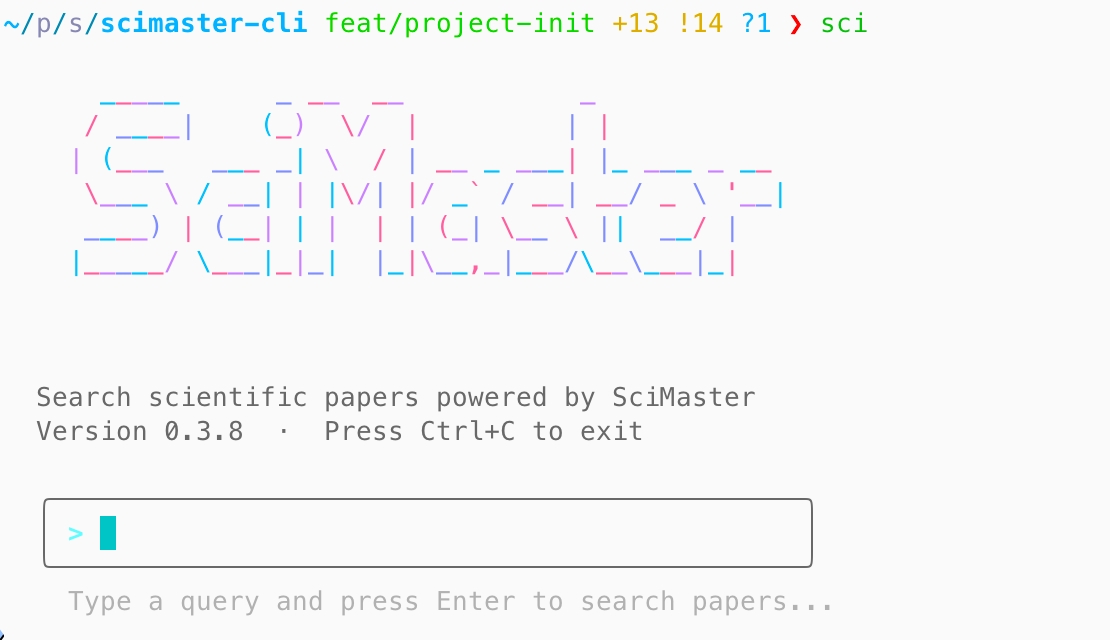
输入查询词后按 Enter,自动触发 sci search;按 Ctrl+C 退出。
仅在交互式终端(TTY)下生效。通过管道或脚本调用时,会退化为显示帮助信息。
sci init
交互式配置 API Key。已有 Key 会询问是否覆盖。
也可以走非交互直接写入:
sci --setApiKey <your-api-key>sci model [mode]
切换 PasaMaster 搜索档位:
| 档位 | 说明 |
|------|------|
| ultra_low | 极速档:只走 SN 检索,不调用 LLM,不扣费 |
| low | 基础档:触发 LLM 排序,按 token 扣费(默认推荐) |
| mid | 增强档:深度 LLM 评估,扣费更高 |
| high | 极致档:最重模式,扣费最高 |
sci model            # 交互式选择
sci model mid        # 直接切到 mid
sci model --show     # 查看当前档位
sci search <query> [options]
搜索论文,结果输出为卡片 + 写盘 .json / .bib。
sci search "<query>" \
  --limit 50 \             # 返回篇数,默认 50,最多 50(超出自动截断并提示)
  --mode <pasa-mode> \     # 临时覆盖档位,不写盘
  --preference English \   # 检索语言偏好:English / Chinese / default,默认 English
  --out ./papers \         # 输出目录,默认 .
  --prefix search-results  # 输出文件名前缀,默认 search-results
--preference 控制 PasaMaster 的检索语言偏好,取值必须精确为 English、Chinese 或 default:
sci search "AI for agent" --preference English
sci search "共青" --preference Chinese
sci search "共青" --preference default
输出文件名会自动追加本地时间戳,形如
search-results-20260529-191700.json/.bib,多次搜索不会互相覆盖。
sci search 走异步轮询:先短请求拿 task_id,然后每 3s 轮询服务端状态。运行中会同行刷新进度,例如:
ℹ 正在检索: "machine learning protein" (最多 10 篇, 档位: mid)...
  ⏳ 已等待 9s(轮询 #3, task=tool-abc123456…)
按一次 Ctrl+C 让 CLI 在下一次轮询前优雅停止;连按两次会硬退出(进程退出码 130)。
整轮搜索最长等待 10 分钟,超时后会给出提示,可考虑切到更轻的档位重试。
sci review(深度审稿子命令组)
审稿是重负载长任务(约 30-80 分钟),一次运行产出报告、结构化问题卡、外部文献佐证、参考文献核验、快速速览等多类产物。子命令组默认异步:提交后立即退出,用 watch / status / pull 跟进。所有子命令支持 --json(stdout 输出纯 JSON,人类信息走 stderr)。
sci review submit paper.pdf [--mode author|reviewer] [--venue <name>] [--brief <text>] [--language <lang>] [--yes] [--watch] [--out <dir>]
sci review watch <uuid> [--out <dir>]
sci review status <uuid>
sci review list [--status <s>] [--limit <n>] [--offset <n>]
sci review pull <uuid> [--out <dir>] [--only <keys>] [--all] [--format md|pdf|docx]submit:上传前显示摘要并要求确认(默认 N);--yes/-y 跳过确认;非交互环境(CI/管道)必须显式 --yes,否则报错退出(防止脚本静默提交长任务)。创建成功打印 UUID 后立即退出;--watch 则继续等待(--out 仅与 --watch 连用有意义)。--language 为自由字符串,默认 en。
--mode 只接受 author 或 reviewer,默认 author;--venue 是可选目标期刊或会议,去除首尾空白后必须为 1-255 个字符。mode 提交后不可修改,并影响 review-web 中的后续 Revision 权限:author 只能进行 Card 对话且不能写回正式 Card,reviewer 可以进入更新与决定流程。venue 会进入完整评审,但不进入快速速览。
只有最终创建任务的 POST 发生网络超时或断连时,CLI 才进入创建结果找回,并且不会重复发送 POST。它会先等待 15s 查询最近同 mode 任务,未命中再等待 45s 查询一次;找回任务后返回服务端实际 UUID、mode 和 venue。presign 或 OSS PUT 失败会立即返回,不会错误等待或从列表认领其他任务。
watch:轮询直到终态,进度行显示各审稿角色状态;快速速览一旦生成会立即下载到任务目录。成功后自动执行一次默认 pull。按一次 Ctrl+C 优雅退出(用 sci review watch <uuid> 恢复),连按两次强退(退出码 130)。
pull:产物保存到 <out>/review-<pdf名>-<uuid前8>/,文件保留产物原名。默认下载报告 + 问题卡 + 外部文献 + 参考文献核验 + 速览(若已生成);--all 追加原稿回传与自校验;--only 用逗号列表精选(report / cards / evidence / refs / fast / manuscript / validation)。Markdown、PDF、DOCX 报告都从服务端 /report.md|pdf|docx 官方投影端点下载;CLI 不再依赖 review_report artifact,也不在本地解析 Card V2 生成报告。报告尚不可用时记入 missing 并继续下载其他产物,鉴权、网络和其他服务错误仍会中断。任务未完成时报错并显示当前状态(退出码 3)。
status:一次性查询并显示 mode 与可选 venue。退出码即状态:0 已成功、3 排队/进行中、1 失败或超时,方便脚本轮询。list 的人类表格包含 MODE 列,--json 同时保留 mode 与 venue。
sci usage
查看当前 OpenAPI 免费额度和按搜索档位估算的剩余调用次数。
sci usage输出示例:
ℹ 当前免费额度: 985.0000000000000000

剩余次数(按当前余额估算):
  * low          65 次  基础档:触发 LLM 排序,按 token 扣费(默认推荐)
    mid          10 次  增强档:深度 LLM 评估,扣费更高
实际扣费由服务端按 PasaMaster 返回的 LLM + SN 成本计算,剩余次数仅用于调用前估算。
sci update
检查是否有新版本并自动更新。
sci updateCLI 每次运行时会在后台静默检查一次版本(每 24 小时最多一次)。如果有新版本,会在命令执行完后提示:
  Update available: 0.3.5 → 0.3.6
  Run: npm install -g scimaster-cli@latest
也可以运行 sci update 主动触发检查并一键更新。
MCP 集成(Claude Code / Cursor)
scimaster-cli 还内置了 Model Context Protocol (MCP) stdio server:sci-mcp。装好包后,可直接让 Claude Code / Cursor 等 MCP 客户端通过 tool-call 调用论文检索,无需走 shell 解析输出。
注册到 Claude Code
claude mcp add --transport stdio scimaster -- npx -y scimaster-cli或者手工编辑 ~/.claude/settings.json:
{
  "mcpServers": {
    "scimaster": {
      "command": "npx",
      "args": ["-y", "scimaster-cli"]
    }
  }
}
如果已全局安装:
{
  "mcpServers": {
    "scimaster": {
      "command": "sci-mcp"
    }
  }
}
注册到 Cursor
.cursor/mcp.json(项目级)或 ~/.cursor/mcp.json(用户级):
{
  "mcpServers": {
    "scimaster": {
      "command": "sci-mcp"
    }
  }
}
暴露的 Tool
| Tool | 说明 |
|------|------|
| search_papers | 输入 query / limit / mode / preference(English / Chinese / default),返回结构化论文清单(与 CLI sci search 共享同一份业务逻辑) |
返回结构(structured content):
{
  "query": "CRISPR gene editing",
  "limit": 10,
  "mode": "low",
  "preference": "English",
  "count": 10,
  "papers": [
    { "id": "arxiv:...", "title": "...", "authors": ["..."], "year": 2024,
      "abstract": "...", "doi": "...", "url": "...", "bib": "@article{...}" }
  ]
}
前置要求
sci-mcp 读取 ~/.scimaster/config.json 拿 API Key,所以首次使用前必须先在终端跑过:
sci init
sci model low        # 或其他档位
之后 MCP server 拿着这份本地配置去调服务,跟你在终端跑 sci search 走同一份配置。
配置文件
~/.scimaster/config.json # 文件权限 0600,含 API Key字段:
{
  "version": 1,
  "apiKey": "<your-api-key>",
  "apiBaseUrl": "https://scimaster.bohrium.com",
  "defaults": {
    "limit": 10,
    "mode": "low"
  }
}
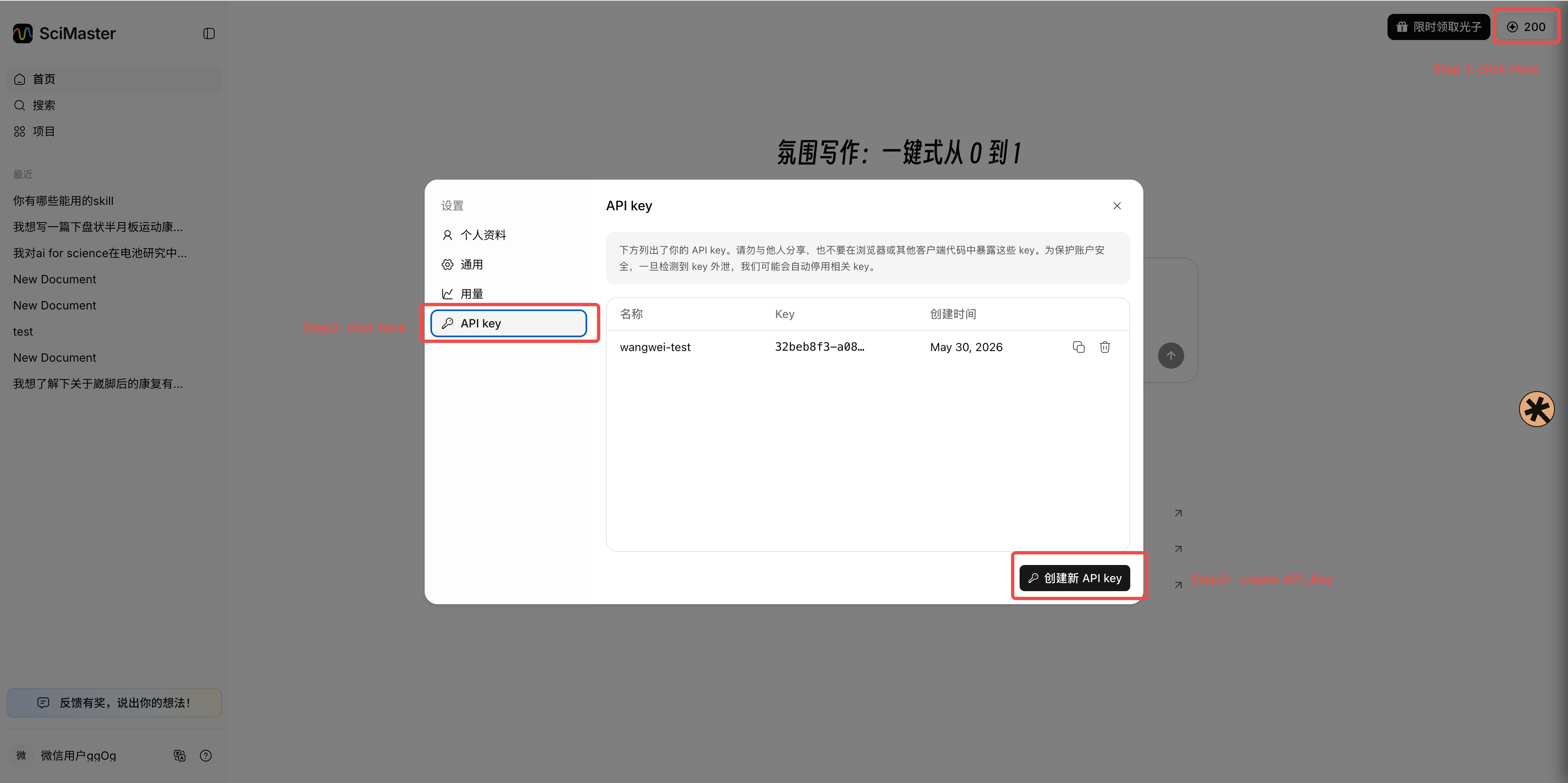
如何申请API_Key
- Step1: 访问 Scimaster氛围写作首页
- Step2: 点击右上角 光子数字
- Step3: 点击弹窗里API Key Tab
- Step4: 点击创建新的 API Key
错误处理
| 场景 | 提示 | 退出码 |
|------|------|--------|
| 未配置 API Key | 提示 sci init | 1 |
| API Key 无效 (401/403) | 提示重新 sci init | 1 |
| sci search 单次 HTTP 请求超时 (30s) | 提示检查网络 | 1 |
| sci search 整轮轮询超过 30min | 提示切到更低档位重试 | 1 |
| Ctrl+C 用户中止 | — | 130 |
| 服务端任务失败 | 透传服务端错误信息 | 1 |
| sci search Rate Limit (429) | 自动重试,最多 3 次 | — |
| sci review 创建配额 (429) | 透传服务端原因,不重复提交 | 1 |
| sci review 用法错误(非 TTY 未加 --yes、非法 mode/venue/产物键/格式/状态) | 列出允许值 | 2 |
| sci review 任务未就绪(pull 未完成 / status 进行中) | 显示当前状态 | 3 |
| 非法档位 | 列出允许值 | 1 |