
scoped-search-bar
v1.0.0
Published
A dependency-free TypeScript scoped search input with multi-select filters

Maintainers
 doberkofler
Readme
scoped-search-bar
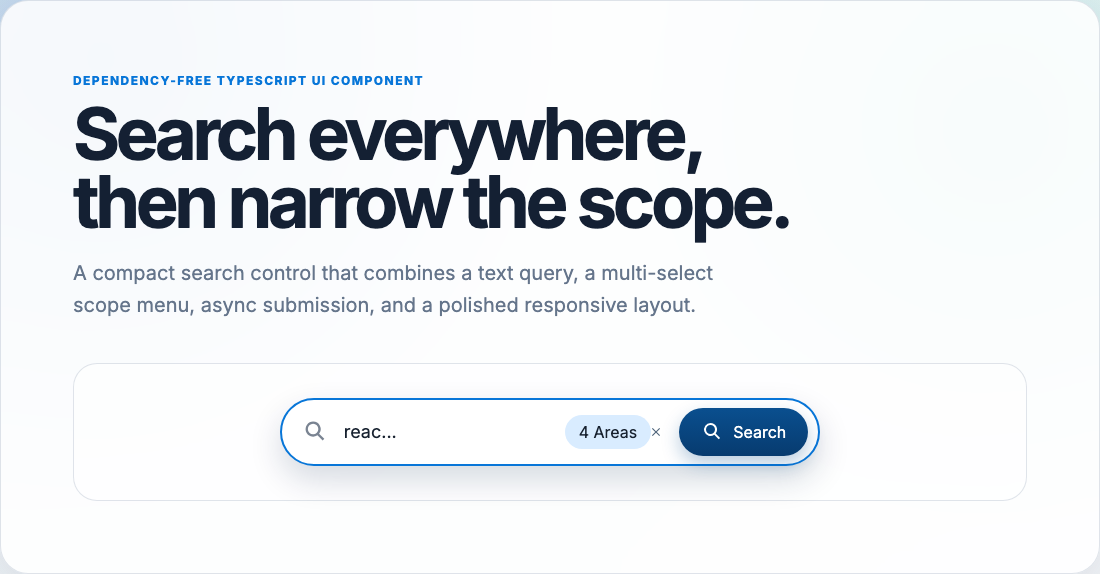
A dependency-free TypeScript search component that combines a text input, a multi-select scope dropdown, and async submit handling.
Features
- Native TypeScript, HTML, and CSS. No React, MUI, or runtime framework dependency.
- Strongly typed public API with an instance lifecycle.
- Multi-select scope menu with keyboard navigation and ARIA state.
- Async
onSearchsupport with built-in pending/disabled state. - Enter-key and button submission.
- Scoped CSS classes and custom properties for theming.
- Vite demo, Vitest browser tests, Playwright e2e tests, TypeDoc API docs, and screenshot generation.
Install
npm install scoped-search-barimport {ScopedSearchBar, type SearchScope} from 'scoped-search-bar';
import 'scoped-search-bar/styles.css';
const scopes: SearchScope[] = [
{id: 'west-coast', label: 'West Coast'},
{id: 'midwest', label: 'Midwest'},
{id: 'europe', label: 'Europe'},
];
const search = new ScopedSearchBar(document.querySelector('#search')!, {
scopes,
initialSelectedIds: ['west-coast', 'europe'],
initialSearchTerm: 'react',
onSearch: async (term, selectedScopeIds) => {
console.log(term, selectedScopeIds);
},
});React Usage
Use the React adapter from the dedicated subpath so vanilla consumers do not load React:
import {ScopedSearchBar} from 'scoped-search-bar/react';
import 'scoped-search-bar/styles.css';

const scopes = [
	{id: 'articles', label: 'Articles'},
	{id: 'users', label: 'Users'},
	{id: 'docs', label: 'Docs'},
];

export function Search() {
	return (
		<ScopedSearchBar
			scopes={scopes}
			initialSelectedIds={['articles']}
			initialSearchTerm="react"
			onSearch={async (term, selectedScopeIds) => {
				console.log(term, selectedScopeIds);
			}}
		/>
	);
}
The adapter creates the native component on mount and destroys it on unmount. Mount-time options mirror ScopedSearchBarOptions; scopes, disabled, searchTerm, and selectedIds are synchronized after mount through native setters.
API
export type SearchScope = {
	readonly id: string;
	readonly label: string;
};

export type ScopedSearchBarOptions = {
	readonly scopes: readonly SearchScope[];
	readonly initialSelectedIds?: readonly string[];
	readonly initialSearchTerm?: string;
	readonly onSearch: (term: string, selectedScopeIds: readonly string[]) => void | Promise<void>;
	readonly placeholder?: string;
	readonly inputLabel?: string;
	readonly searchButtonLabel?: string;
	readonly searchingButtonLabel?: string;
	readonly scopeSelectorLabel?: string;
	readonly clearScopesLabel?: string;
	readonly scopeLabel?: (context: {count: number; total: number; selectedIds: readonly string[]}) => string;
	readonly disabled?: boolean;
	readonly className?: string;
	readonly id?: string;
	readonly menuMaxHeight?: number;
};
Instance methods:
search()- submits the current term and selected scopes.openMenu()/closeMenu()- controls the scope menu.clearScopes()- clears all selected scopes.setScopes(scopes)- replaces available scopes and drops unknown selected IDs.setSearchTerm(term)- updates the input value.setSelectedIds(ids)- updates selected IDs after normalization.setDisabled(disabled)- enables/disables all controls.getSearchTerm()/getSelectedIds()- returns current state.destroy()- removes DOM and listeners. Later method calls throw.
Development
pnpm install
pnpm run dev
pnpm run ci
pnpm run integration-test
pnpm run screenshot
See docs/guide.md for full usage and customization details.