
scrible
v1.0.10
Published
Scrible - A powerful, customizable rich text editor built with Slate.js that outputs clean HTML

Maintainers
 ayushsinghal
Readme
Scrible ✍️
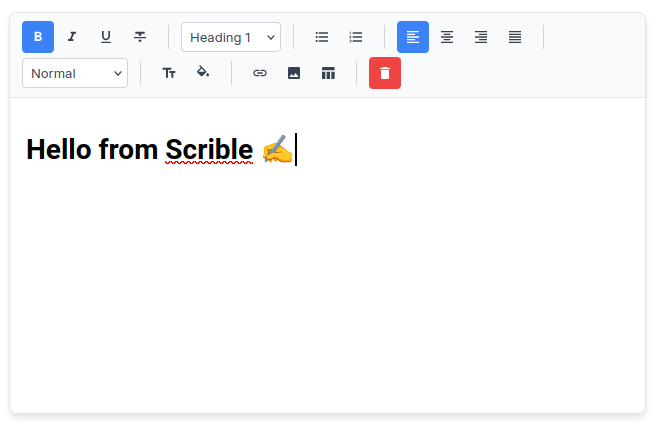
A powerful, customizable rich text editor for React - Built with Slate.js, outputs clean HTML, and offers Notion-like editing experience.


✨ Features
- 🎨 Fully Customizable - Choose which features to include
- 📝 Rich Text Formatting - Bold, italic, underline, strikethrough
- 🎨 Color Customization - Text and background color pickers with 24 preset colors
- 📑 Multiple Heading Levels - H1, H2, H3 with semantic markup
- 📋 Lists - Bulleted and numbered lists
- 📊 Tables - Full table support with easy insertion
- 🖼️ Images - Upload and resize images with drag handles
- 🔗 Links - Automatic link detection and manual insertion
- ↔️ Text Alignment - Left, center, right, justify
- 📏 Font Sizes - Multiple size options
- 💾 Clean HTML Output - Semantic HTML like Quill.js
- ⌨️ Keyboard Shortcuts - Standard shortcuts (Ctrl+B, Ctrl+I, etc.)
- 📱 Responsive - Works great on desktop and mobile
- 🎯 TypeScript Ready - Full type support
📦 Installation
npm install scrible slate slate-react slate-historyor
yarn add scrible slate slate-react slate-history🚀 Quick Start
import React, { useState } from 'react';
import ScribleEditor from 'scrible';
import 'scrible/dist/scrible.css';

function App() {
  const [content, setContent] = useState('');

  const handleChange = (htmlContent, slateValue) => {
    setContent(htmlContent);
  };

  return (
    <ScribleEditor
      onChange={handleChange}
      placeholder="Start writing..."
    />
  );
}
Important: Don't forget to import the CSS file!
🎛️ Customizable Toolbar
Choose which features to include in your editor:
import ScribleEditor from 'scrible';
import 'scrible/dist/scrible.css';

function CustomEditor() {
  const [content, setContent] = useState('');

  // Only include the features you need
  const features = [
    'bold',
    'italic',
    'underline',
    'headings',
    'lists',
    'link',
    'image'
  ];

  return (
    <ScribleEditor
      features={features}
      onChange={(html) => setContent(html)}
      placeholder="Minimal editor..."
    />
  );
}
Available Features
| Feature | Description |
|---------|-------------|
| bold | Bold text formatting |
| italic | Italic text formatting |
| underline | Underline text formatting |
| strikethrough | Strikethrough text formatting |
| headings | H1, H2, H3, blockquote |
| lists | Bulleted and numbered lists |
| alignment | Text alignment (left, center, right, justify) |
| fontSize | Font size options |
| textColor | Text color picker with presets and custom colors |
| backgroundColor | Background/highlight color picker |
| link | Insert and edit links |
| image | Upload and resize images |
| table | Insert and manage tables |
| clear | Clear all content button |
📖 Props
| Prop | Type | Default | Description |
|------|------|---------|-------------|
| value | Node[] | null | Controlled Slate.js value |
| onChange | (html: string, value: Node[]) => void | undefined | Called when content changes |
| placeholder | string | "Enter some text..." | Placeholder text |
| readOnly | boolean | false | Make editor read-only |
| className | string | "" | Additional CSS class |
| initialValue | string \| Node[] | null | Initial content (HTML string or Slate value) |
| features | string[] | All features | Array of features to include |
💡 Examples
Basic Editor
<ScribleEditor
  onChange={(html) => console.log(html)}
  placeholder="Start typing..."
/>
Minimal Editor (Only Basic Formatting)
<ScribleEditor
  features={['bold', 'italic', 'underline', 'clear']}
  onChange={(html) => console.log(html)}
  placeholder="Simple editor..."
/>
Blog Editor (No Tables)
<ScribleEditor
  features={[
    'bold', 'italic', 'underline', 'strikethrough',
    'headings', 'lists', 'alignment',
    'textColor', 'backgroundColor',
    'link', 'image', 'clear'
  ]}
  onChange={(html) => console.log(html)}
  placeholder="Write your blog post..."
/>
Editor with Color Highlighting
<ScribleEditor
  features={[
    'bold', 'italic', 'underline',
    'textColor', 'backgroundColor',
    'clear'
  ]}
  onChange={(html) => console.log(html)}
  placeholder="Highlight important text..."
/>
With Initial Content
const initialContent = `
  <h1>Welcome to Scrible</h1>
  <p>This is a <strong>powerful</strong> editor!</p>
`;

<ScribleEditor
  initialValue={initialContent}
  onChange={(html) => console.log(html)}
/>
Read-Only Mode
<ScribleEditor
  initialValue={articleContent}
  readOnly={true}
/>
Check if Empty
function MyEditor() {
  const [editorValue, setEditorValue] = useState([]);

  const handleChange = (html, slateValue) => {
    setEditorValue(slateValue);
  };

  const isEmpty = editorValue.length === 0;

  return (
    <div>
      <ScribleEditor onChange={handleChange} />
      {isEmpty && <p>Editor is empty!</p>}
    </div>
  );
}
🎨 Custom Styling
Scrible comes with default styles, but you can customize the appearance:
/* Customize the editor container */
.scrible-editor {
  border: 2px solid #3b82f6;
  border-radius: 12px;
}

/* Customize the toolbar */
.toolbar {
  background: linear-gradient(135deg, #667eea 0%, #764ba2 100%);
}

/* Customize the editing area */
.editor-content {
  min-height: 300px;
  font-family: 'Georgia', serif;
  font-size: 16px;
}
⌨️ Keyboard Shortcuts
Ctrl+B- BoldCtrl+I- ItalicCtrl+U- UnderlineCtrl+Z- UndoCtrl+Shift+Z- Redo
🔧 HTML Output
Scrible outputs clean, semantic HTML:
<h1>Heading</h1>
<p>This is a <strong>bold</strong> paragraph with <em>italic</em> text.</p>
<ul>
  <li>List item 1</li>
  <li>List item 2</li>
</ul>
<table border="1">
  <tr>
    <th>Header 1</th>
    <th>Header 2</th>
  </tr>
  <tr>
    <td>Cell 1</td>
    <td>Cell 2</td>
  </tr>
</table>
📄 License
MIT © Ayush Singhal