
npm package discovery and stats viewer.

Discover Tips

  • General search

    [free text search, go nuts!]

  • Package details

    pkg:[package-name]

  • User packages

    @[username]

Sponsor

Optimize Toolset

I’ve always been into building performant and accessible sites, but lately I’ve been taking it extremely seriously. So much so that I’ve been building a tool to help me optimize and monitor the sites that I build to make sure that I’m making an attempt to offer the best experience to those who visit them. If you’re into performant, accessible and SEO friendly sites, you might like it too! You can check it out at Optimize Toolset.

About

Hi, 👋, I’m Ryan Hefner  and I built this site for me, and you! The goal of this site was to provide an easy way for me to check the stats on my npm packages, both for prioritizing issues and updates, and to give me a little kick in the pants to keep up on stuff.

As I was building it, I realized that I was actually using the tool to build the tool, and figured I might as well put this out there and hopefully others will find it to be a fast and useful way to search and browse npm packages as I have.

If you’re interested in other things I’m working on, follow me on Twitter or check out the open source projects I’ve been publishing on GitHub.

I am also working on a Twitter bot for this site to tweet the most popular, newest, random packages from npm. Please follow that account now and it will start sending out packages soon–ish.

Open Software & Tools

This site wouldn’t be possible without the immense generosity and tireless efforts from the people who make contributions to the world and share their work via open source initiatives. Thank you 🙏

© 2026 – Pkg Stats / Ryan Hefner

scriptspect

v0.1.2

Published

Static analyzer for package.json scripts - catches shell-specific commands before they break Windows, macOS, or Linux builds.

Readme

English | 简体中文

Package 版本: [email protected] · source 6f439bb974b297d5a334cebe989b4b50d7483677

ScriptSpect 不运行 scripts,只对 package.json 做静态分析。它会精确指出在 POSIX shell、Windows cmd 与可选 PowerShell target 之间含义不同的结构。

30 秒开始

需要 Node.js 22 或更高版本。无需全局安装,直接运行这个准确版本:

npx --yes [email protected] .
pnpm dlx [email protected] .

存在 finding 时退出 1;clean scan 退出 0;无效输入、配置或 I/O 退出 2。应用经审查的修复前,请先使用 --fix-dry-run。

修复前、分析结果与修复后

{"scripts":{"build":"NODE_ENV=production vite build","clean":"rm -rf dist"}}
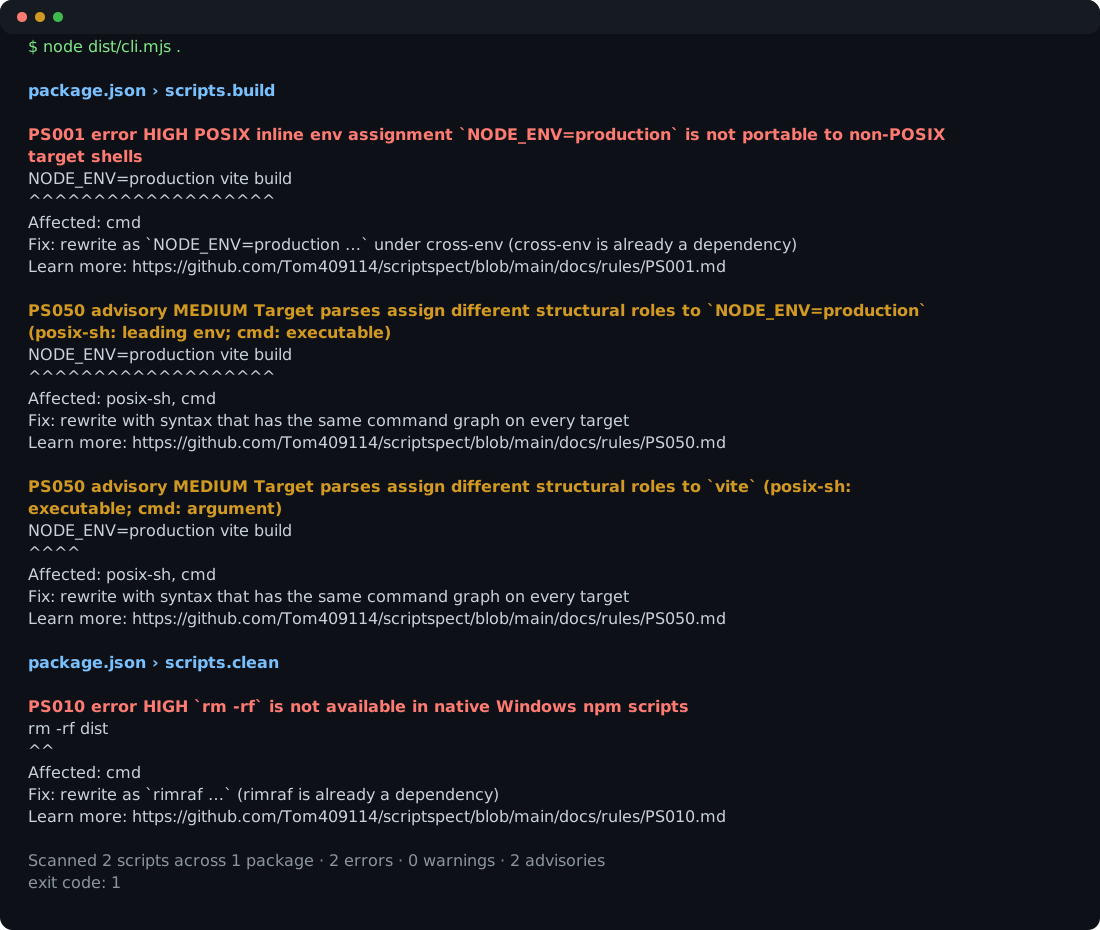
由版本化 demo fixture 生成的真实 ScriptSpect 输出

-"build": "NODE_ENV=production vite build"
-"clean": "rm -rf dist"
+"build": "cross-env NODE_ENV=production vite build"
+"clean": "rimraf dist"

这个 demo 只使用 fixture 已声明的 dependencies。歧义修改始终保持 manual;ScriptSpect 不会安装 dependencies,也不会改写 lockfile。

GitHub Actions

- uses: Tom409114/[email protected]
  with:
    path: .

若要获得最严格的供应链固定,请把 v0.1.2 替换为 6f439bb974b297d5a334cebe989b4b50d7483677。

规则列表 · 配置 Schema · 报告漏洞 · 源码