
seeclaudecode
v1.0.12
Published
Real-time visualization of repository structure - watch Claude Code edit your codebase

Maintainers
 ninatech
Readme
SeeClaudeCode
Real-time visualization of your repository structure while Claude Code edits your codebase.
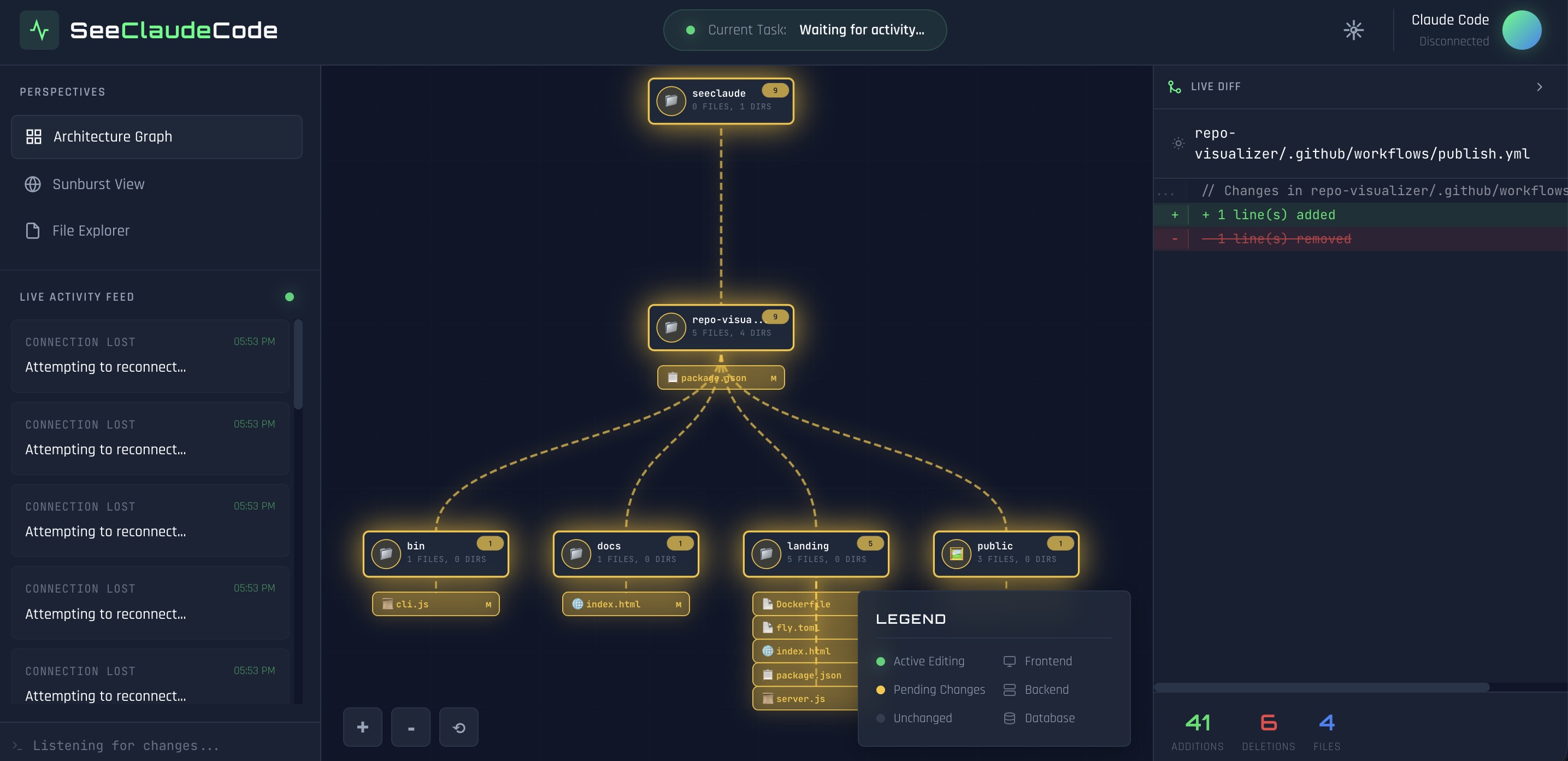
Features
- Architecture Graph - Interactive diagram showing your project's directory structure with pan/zoom
- Sunburst View - Radial visualization of your codebase hierarchy
- File Explorer - Traditional tree view with change tracking
- Real-time Git Diff - See exactly what changed in any file or directory
- Live Highlighting:
- Yellow pulse - Files with pending changes (git diff)
- Green pulse - Files currently being edited
Installation
npm install -g seeclaudecode
npx seeclaudecode
Claude Code Plugin
Install
/plugin marketplace add ninajlu/seeclaudecode
/plugin install seeclaudecode
Start Visualization
Once installed, start the visualization anytime with:
/seeclaudecode:startThis launches SeeClaudeCode in the background so you can watch Claude edit your codebase in real-time.
Standalone Skill (Shorter Command)
Want to use /seeclaudecode instead of /seeclaudecode:start? Install the standalone skill:
npx seeclaudecode --install-skillThis installs the skill to ~/.claude/skills/seeclaudecode/ so you can invoke it with just /seeclaudecode.
Usage
# Quick start with npx (no install needed)
npx seeclaudecode

# Interactive mode - prompts for directory selection
seeclaudecode

# Monitor specific directory
npx seeclaudecode ./my-project

# Monitor with absolute path
npx seeclaudecode /path/to/repo

# Use custom port
npx seeclaudecode . --port 4000

# Don't auto-open browser
npx seeclaudecode . --no-open
When started without a directory argument, you'll see an interactive menu:
Select a directory to monitor:

  1) Current directory
     /Users/you/projects
  2) my-app
     /Users/you/projects/my-app

  Or enter a custom path

📁 Directory:
Switching Directories
While running, you can switch to a different directory at any time:
- Type a new path and press Enter to switch
- Type
quitorexitto stop
Options
| Option | Description |
|--------|-------------|
| -p, --port <port> | Port to run server on (default: 3847) |
| -n, --no-open | Don't automatically open browser |
| --install-skill | Install standalone skill for /seeclaudecode command |
| -h, --help | Show help message |
| -v, --version | Show version number |
How It Works
- Start SeeClaudeCode (it will prompt for a directory or use the one you specify)
- Open the displayed URL in your browser
- Run Claude Code in the same directory
- Watch as files pulse and highlight when Claude makes changes
- Click on any file or directory to see the git diff
- Switch directories anytime by typing a new path
Views
Architecture Graph
An interactive node-based diagram showing your project structure. Changed files appear below their parent directories with pulsing yellow highlights.
Sunburst View
A radial visualization where each ring represents a directory level. Click on segments to see diffs for that directory.
File Explorer
A traditional tree view showing all files with color-coded change indicators.
Visual Indicators
| Indicator | Meaning | |-----------|---------| | Yellow pulsing | Pending changes (in git diff) | | Green pulsing | Currently being edited | | Purple nodes | Directories | | Green nodes | Code files (.js, .ts, .py, etc.) | | Pink nodes | Style files (.css, .scss) | | Orange nodes | Config files (.json, .yaml) | | Blue nodes | Documentation (.md, .txt) |
Requirements
- Node.js 18.0.0 or higher
- Git (for diff functionality)
Development
# Clone and install
git clone <repo-url>
cd seeclaudecode
npm install

# Run locally
npm start /path/to/repo

# Link for global testing
npm link
seeclaudecode /path/to/repo
Architecture
seeclaudecode/
├── .claude-plugin/
│   └── plugin.json    # Claude Code plugin manifest
├── skills/
│   └── start/
│       └── SKILL.md   # /seeclaudecode:start skill
├── bin/
│   └── cli.js         # CLI entry point
├── public/
│   ├── index.html     # Main HTML structure
│   ├── styles.css     # Styling and animations
│   └── app.js         # Frontend visualization logic
├── server.js          # Express server with WebSocket & file watching
└── package.json
License
MIT