
semantic-inspector
v0.3.0
Published
Dev-only React inspector: a hotkey highlights elements and click-copies their `Component — file:line` (or a PNG screenshot) for fast context handoff to AI coding assistants.

Maintainers
 v.kuznetsov
Readme
semantic-inspector


A dev-only React inspector for vibe-coding. Hit a hotkey to enter inspect mode: hovering highlights
the element under the cursor and shows its component name + file:line:col. Click copies that
text identifier to the clipboard; Shift+click copies a PNG screenshot of just that element.
Built for pasting precise UI context into an AI chat in seconds.
Stack: Vite + @vitejs/plugin-react + React 18/19. Designed to add no production runtime cost
when you gate and lazy-load it (see Mount it) —
modern-screenshot is loaded lazily and the source-stamping plugin runs only on the dev server.
Demo
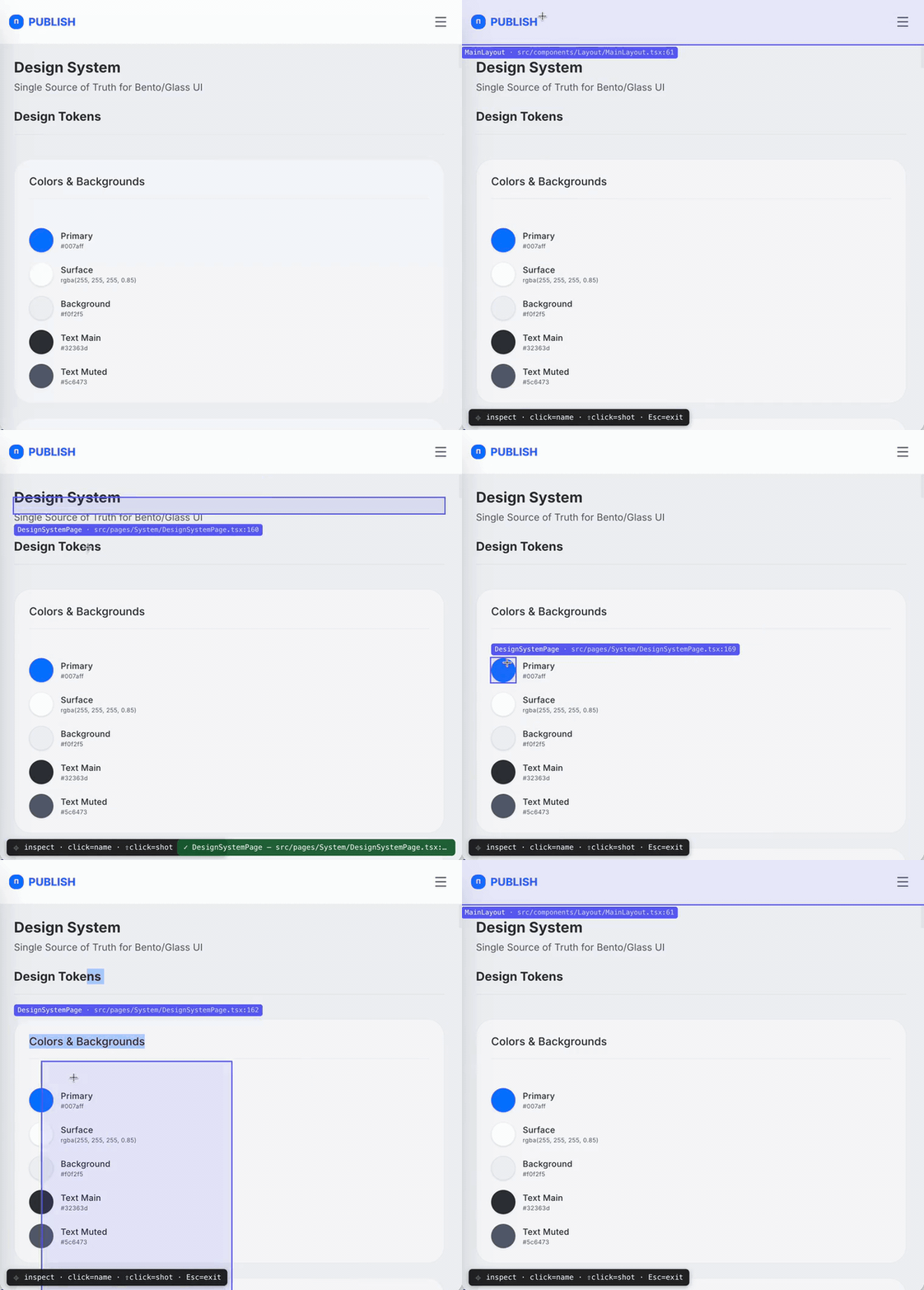
Click for the full-resolution video.
Try it locally: npm run dev:example runs a playground app (examples/playground) wired to the package source — inspect, screenshot, and annotate against a real page.
Install
npm i -D semantic-inspectorPeer dependencies:
react/react-dom(>=18) — required.vite(>=5) — optional, only forsemantic-inspector/vite.@babel/core(>=7.25) — optional, needed forsemantic-inspector/vite,semantic-inspector/babel, and thesemantic-inspector checkdrift CLI (it parses your source with Babel). Most Vite + React projects already have it; if not:
Pure-runtime consumers (npm i -D @babel/core<SemanticInspector/>only) don't need it.
How it works
Source locations come from a build-time stamp, not React internals. A Babel pass adds
data-loc="<path>:<line>:<col>" and data-comp="<Component>" to JSX host elements (div,
section, …). The runtime reads those DOM attributes, so it stays robust across React versions. If
a node isn't stamped (prod build, foreign node), it degrades gracefully: fiber displayName →
filename → tag name.
flowchart LR
  A[".tsx source"] -->|"Babel: stampLocVite / stampLocBabel<br/>(dev only)"| B["DOM with data-loc / data-comp"]
  B -->|"hover → elementFromPoint"| C["resolveTarget<br/>closest([data-loc])"]
  C --> D["Overlay highlight + tip"]
  C -->|"click"| E["clipboard: text"]
  C -->|"Shift+click"| F["clipboard: PNG (modern-screenshot)"]
Semantic payload (opt-in)
By default a click copies one line: Component — file:line:col. Pass semantic to copy a
self-describing block instead — handy so an AI knows which element you meant without extra
explanation:
<SemanticInspector semantic />Clicking the "Рубрики" item then copies:
NavItem — src/components/Navigation/Sidebar.tsx:93:15
text: "Рубрики"
index: 2/5
path: App › Sidebar › NavItem
testid: nav-rubrics
Fields are added only when meaningful (e.g. index is dropped for a lone element). The visible
text is whitespace-collapsed and capped at 160 chars; the component path keeps the 4 nearest
data-comp ancestors; attributes are limited to id, data-testid, name, href, type.
Everything is read at click time, so hover stays cheap and the overlay tip is unchanged. A custom
formatText receives the full SemanticInfo object when semantic is on.
Note: the block includes the element's visible text and its
href, and the whole thing is meant to be pasted into an AI chat. Avoidsemanticon screens showing secrets or PII (tokens in URLs, personal data in labels) — or strip those fields with a customformatText.
Annotate mode (opt-in)
Beyond copying a pointer, you can give an element a durable, human-friendly name so you and an AI
share the same vocabulary later — without re-inspecting. Enable it and press the annotate hotkey
(default Alt+Shift+A) to enter annotate mode; click an element to open an inline editor for a
name (+ optional tags and a note):
<SemanticInspector annotate onAnnotate={(a) => toast(`saved ${a.name}`)} />Saving POSTs to a dev-server endpoint that the Vite plugin adds (configureServer, dev only) and
writes two files at your project root:
.semantic-inspector/annotations.json— source of truth (upserted by name)..semantic-inspector/annotations.md— a regenerated, human/Graphify-readable mirror.
Each annotation is anchored on a durable descriptor — the same signals as the semantic payload
(component, visible text, sibling index, component path, and stable attributes such as
data-testid) — not on file:line:col. The line/file is kept only as a lastSeen hint. So when an
AI later needs "the пилюля," it reads the file and re-finds the element by grepping the stable
signals (testid → id → visible text + component), which survive refactors far better than a line
number.
Commit .semantic-inspector/ to share the vocabulary with your team and your AI.
Note (privacy): annotations store the element's visible text, your note, and stable attributes (including
href) in a repo file. Avoid annotating elements whose text/URL contains secrets or PII, and review.semantic-inspector/annotations.jsonbefore committing.
Note (security): the annotate endpoint is an unauthenticated POST that writes into your working tree, mounted only on the Vite dev server. It requires
Content-Type: application/jsonand rejects cross-origin requests (so a random page you visit can't drive-by-write your repo), but keep the dev server onlocalhostand don't expose it on an untrusted network (--host). The endpoint never exists in a production build.
Note (AI trust boundary):
annotations.mdis fed to an AI (Graphify) and committed, yet its field values (name,note,text, attributes) are untrusted free text. The mirror escapes Markdown and flags the values as untrusted, but that cannot stop semantic prompt injection — review entries before feeding the mirror to an automated agent, exactly as you would any other repo text an AI ingests.
How an AI resolves a name
Given a name (e.g. "пилюля"): read .semantic-inspector/annotations.json, find the entry, then grep
the live code in decreasing order of stability — data-testid → id/name/href → visible
text near the data-comp. Treat lastSeen.loc as a first guess only; verify it.
Drift detection (CI)
Annotations anchor on durable signals, but code still changes. semantic-inspector check re-resolves
every entry in .semantic-inspector/annotations.json against your current source (static Babel
analysis — no browser, no build) and reports drift, so CI can block a merge until the graph is
updated, and an AI agent can re-anchor what moved.
npx semantic-inspector check            # human table, exits 1 on drift
npx semantic-inspector check --json     # machine report for an AI agent
npx semantic-inspector check --fix      # relock entries that moved to a new, unique location
Each annotation gets a verdict:
| verdict | meaning | CI (default) | --fix |
| --- | --- | --- | --- |
| resolved | found at the recorded location | pass | relocks if the stored loc is stale/absent ¹ |
| moved | found, but at a new location (stale lastSeen.loc) | fail | relocks it |
| missing | no matching element — deleted or renamed | fail | re-anchor by hand/AI |
| ambiguous | several equally-good matches | fail | disambiguate by hand/AI |
| unverifiable | no statically-resolvable signal (all signals are dynamic in source) | pass (warn) | add any static signal ² |
¹ What --fix actually relocks: every entry whose anchor resolves to a single location that
differs from the stored lastSeen.loc — that is each moved entry, and a freshly-anchored entry
whose lastSeen.loc was never stamped (verdict resolved, old loc null). The anchor itself is
never changed; only lastSeen + updatedAt are. So --fix can write to the store even when the
headline reads 0 drifted (relocking a newly-found, previously-unstamped entry).
² What makes an element verifiable: any one of data-testid, id, name, href, or literal
element text is enough to resolve it statically — data-testid is simply the highest-weighted
signal, not a requirement. Only elements whose every signal is dynamic in source (e.g. href={url},
{interpolatedText} with no stable attribute) come back unverifiable.
Flags: --root <dir> (default cwd), --include <prefix> (repeatable scan filter), --allow-moved
(moved → warning), --strict (unverifiable → failure), --json (machine report), --fix (relock),
--help, --version. Exit codes: 0 = clean, 1 = drift (something to fix), 2 = error
(bad args, unreadable/malformed annotations.json). Requires @babel/core (already present if you
use the Vite/Babel stamp).
What is scanned
The check walks the tree under --root and parses every .ts / .tsx / .js / .jsx file,
skipping: node_modules/, dist/, any dotdir (.git, .semantic-inspector, …), test files
(*.test.*), and *.d.ts. --include <prefix> (repeatable) narrows the scan to paths under one or
more prefixes (e.g. --include src/components). A file larger than ~2 MB is skipped (Babel would
risk an out-of-memory crash on it) and counted in skipped; a file that fails to parse is likewise
skipped + counted. When skipped > 0 the scan was partial, so treat a missing verdict with caution
— the human report prints a warning line and the JSON report carries the count.
If an annotated element lives in a skipped location (a test file, a dotdir, an excluded prefix), it will report
missingeven though it exists. Add its directory to the scan with--include, or move the element out of an ignored path.
Machine report (--json)
--json is the AI-agent contract: a stable, machine-readable snapshot an agent reads to re-anchor
the graph. Shape:
{
  "drifted": 1,        // count of moved + missing + ambiguous (resolved + unverifiable excluded)
  "ok": 2,             // count of resolved entries
  "skipped": 0,        // source files not analyzed (too large / parse error); > 0 ⇒ partial scan
  "entries": [
    {
      "name": "save-button",          // the annotation name (key in annotations.json)
      "verdict": "moved",             // "resolved" | "moved" | "missing" | "ambiguous" | "unverifiable"
      "lastSeenLoc": "src/Form.tsx:12:5",  // stored loc snapshot, or null when never stamped
      "resolvedLoc": "src/Form.tsx:40:5",  // where it resolves now: same as lastSeenLoc when resolved,
                                            // the new loc when moved, else null (missing/ambiguous)
      "candidates": [                  // ranked matches, score desc then loc asc
        { "loc": "src/Form.tsx:40:5", "score": 100 }
      ]
    }
  ]
}
Field stability: the top-level keys (drifted, ok, skipped, entries) and the per-entry keys are
covered by semver — additive changes only within a major. score weights are an internal heuristic
and may change between minors; rank order (best first) is the stable signal, not the absolute number.
Agent recipe: run semantic-inspector check --json; for each entry where verdict === "moved",
the fix is resolvedLoc (apply with --fix); for missing / ambiguous, read candidates and the
source to re-anchor by hand; ignore resolved / unverifiable; if skipped > 0, the scan was
partial — don't trust missing without widening the scan.
Example CI step
Fail the job on drift; an agent then reads --json, relocks (--fix) or re-anchors, and re-runs to
green:
jobs:
  drift:
    runs-on: ubuntu-latest
    steps:
      - uses: actions/checkout@v4
      - uses: actions/setup-node@v4
        with:
          node-version: 20
      - run: npm ci
      - run: npx semantic-inspector check   # exit 1 on drift blocks the merge
npm ci is what makes @babel/core available to the check; if it isn't a (transitive) dependency,
add npm i -D @babel/core or install it as a dedicated CI step.
Entry points
Three import surfaces plus one executable:
| Surface | What it is |
| -------------------------- | ------------------------------------------------------------------ |
| semantic-inspector | <SemanticInspector/> + useInspector() — overlay/hotkey/clipboard runtime. |
| semantic-inspector/vite | stampLocVite() — Vite plugin that stamps data-loc / data-comp. |
| semantic-inspector/babel | { stampLocBabel } — raw Babel plugin, for the Babel variant of @vitejs/plugin-react. |
| semantic-inspector (bin) | the check drift CLI — npx semantic-inspector check (see Drift detection). |
The import surfaces are browser/dev-server code; the check bin is node-only (it reads the
filesystem and parses with Babel) and never enters the browser bundle.
Usage
1. Stamp source locations (Vite plugin)
@vitejs/plugin-react v6 transpiles via oxc (no Babel hook), so stamp with a separate pre
plugin. This is the recommended path. The plugin runs only on the dev server (apply: 'serve'),
so data-loc / data-comp never reach a production build.
import react from '@vitejs/plugin-react';
import { stampLocVite } from 'semantic-inspector/vite';
import { defineConfig } from 'vite';

export default defineConfig({
  // stampLocVite first (enforce: 'pre'), then react()
  plugins: [stampLocVite({ rootDir: process.cwd() }), react()]
});
On the Babel variant of plugin-react you can skip the separate pre-pass by adding the plugin to plugin-react's Babel options instead. Use one approach, not both. Note this forces plugin-react onto Babel for all files (slower than the oxc + pre-pass above), so prefer option 1 unless you're already on the Babel variant. Gate it to development so stamps stay out of production:
import react from '@vitejs/plugin-react';
import { stampLocBabel } from 'semantic-inspector/babel';

export default defineConfig(({ command }) => ({
  plugins: [
    react({
      babel: {
        plugins: command === 'serve' ? [[stampLocBabel, { rootDir: process.cwd() }]] : []
      }
    })
  ]
}));
2. Mount it (behind your own dev flag, ideally lazy)
import { lazy, Suspense } from 'react';

const SemanticInspector = lazy(() =>
  import('semantic-inspector').then((m) => ({ default: m.SemanticInspector }))
);

{
  import.meta.env.DEV && (
    <Suspense fallback={null}>
      <SemanticInspector onCopy={(kind) => toast(`${kind} copied`)} />
    </Suspense>
  );
}
API
<SemanticInspector> props
| prop | default | purpose |
| ------------ | ------------------------ | ----------------------------------------- |
| hotkey | 'Alt+Shift+S' | toggle inspect mode (Esc always exits) |
| semantic | false | enrich the copied text with visible label, sibling index, component path, and key attributes (see Semantic payload) |
| annotate | false | enable annotate mode: a hotkey opens an inline editor to name an element; the annotation is persisted to .semantic-inspector/ via the dev plugin (see Annotate mode) |
| annotateHotkey | 'Alt+Shift+A' | hotkey that toggles annotate mode |
| annotateEndpoint | '/__semantic_inspector/annotations' | override the POST endpoint path |
| onAnnotate | — | called with the saved annotation after a successful save |
| formatText | `${comp} — ${loc}` | format of the text copied on click; receives SemanticInfo (the extra fields are populated only when semantic is on; loc may be null) |
| onCopy | — | called after a successful copy |
| onError | — | called on a clipboard/screenshot failure |
useInspector(props) is also exported for building a custom overlay; it returns
{ active, mode, target, draft, closeDraft } — mode is 'off' | 'inspect' | 'annotate', draft
is non-null while the annotation editor should be open (with the captured anchor/lastSeen), and
closeDraft() dismisses it. active is kept as a back-compat alias for mode !== 'off'. Note: used
raw (not via <SemanticInspector>), it has no default onError, so failures only surface via
console.warn unless you pass one.
Callback payloads
onCopy('text', payload)—payloadis the copied string.onCopy('screenshot', payload)—payloadis the component name (the PNG goes to the clipboard, not to the callback).onError(kind, err)—erris the underlying error (unknown).
Plugin options (stampLocVite / stampLocBabel)
| option | default | applies to | purpose |
| ---------- | ---------------- | ------------ | ---------------------------------------------- |
| rootDir | process.cwd() | both | base for the relative path written into data-loc |
| include | /\.[jt]sx$/ | /vite only | which module ids get stamped |
| annotateEndpoint | '/__semantic_inspector/annotations' | /vite only | path the annotate middleware listens on; must match the <SemanticInspector annotateEndpoint> prop |
| applyOnBuild | false | /vite | Also stamp during vite build. Embeds source paths in the bundle — keep off for public production. |
| attrLoc | 'data-loc' | both | attribute name for path:line:col |
| attrComp | 'data-comp' | both | attribute name for the component name |
Files outside rootDir degrade to their basename, so an absolute filesystem path never leaks into
the stamped DOM.
Hotkey format
Modifier+...+Key. Modifiers: Alt, Shift, Ctrl (or Control), Meta (or Cmd). The final
token is the key. Matching is case-insensitive and also matches the physical event.code, so
layout-shifted glyphs work (e.g. Ctrl+Shift+/ matches even though Shift produces ?). Digit and
punctuation keys are supported (Alt+1, Ctrl+/). Esc always exits inspect mode.
Troubleshooting
| Symptom | Cause | Fix |
| --- | --- | --- |
| Nothing copies, no error | navigator.clipboard needs a secure context | Use localhost or https://, not http://192.168.x.x |
| Screenshot is blank/partial | CORS-tainted canvas / unsupported CSS | Serve images with CORS headers; some CSS (cross-origin <img>, exotic filters) won't rasterize |
| loc shows no source / name is minified | Node wasn't stamped (prod build, or plugin not registered) | Register the stamper (Usage 1) and confirm it isn't gated out in dev. For a built staging app also set applyOnBuild: true. |
| Hotkey does nothing | Focus is in an input, or a typo in the combo | Use a Modifier+Key combo (see above); try the default Alt+Shift+S |
Browser support
Works in current Chromium, Edge, Firefox, and Safari. Image-clipboard (Shift+click screenshot)
requires a ClipboardItem-capable browser; text copy works everywhere with a secure context.
Contributing
See CONTRIBUTING.md. In short: npm ci, then
npm run lint && npm run typecheck && npm test && npm run build. dist/ is generated — build once
after cloning before npm link.
License
MIT © ghost-vk