
senangwebs-deck
v1.0.3
Published
A modern, lightweight JavaScript library for creating beautiful web-based presentations with multiple input formats (HTML, Markdown, JSON)

Maintainers
 a-hakim
Readme
SenangWebs Deck (SWD)
A modern, lightweight JavaScript library for creating beautiful web-based presentations with multiple input formats (HTML, Markdown, JSON).

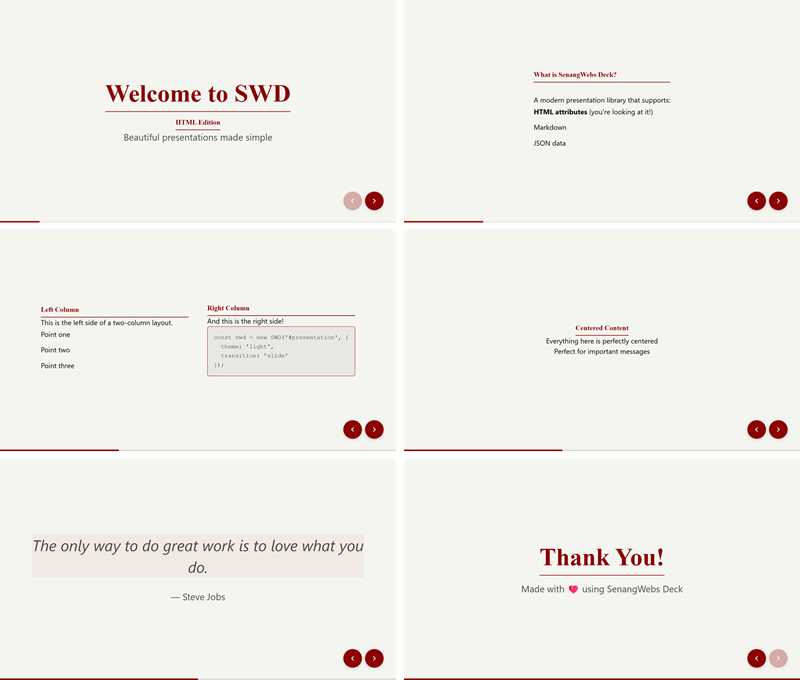
Features
- Multiple Input Formats: Create slides using HTML attributes, Markdown, or JSON
- 10+ Built-in Layouts: Cover, two-column, center, quote, image layouts, and more
- 10 Beautiful Themes: Light, dark, gradient, minimal, corporate, creative, academic, ocean, forest, and mono
- Smooth Transitions: Slide, fade, zoom, flip animations
- Keyboard & Touch Navigation: Full keyboard shortcuts and swipe gestures
- Export Options: Export to PDF, HTML, or JSON
- Responsive Design: Works on desktop, tablet, and mobile
- Accessibility: WCAG 2.1 compliant with full keyboard navigation
Installation
Via NPM
npm install senangwebs-deckVia CDN
<link
    rel="stylesheet"
    href="https://cdn.jsdelivr.net/npm/senangwebs-deck/dist/swd.css"
/>
<script src="https://cdn.jsdelivr.net/npm/senangwebs-deck/dist/swd.js"></script>
Quick Start
HTML Attributes
<!DOCTYPE html>
<html>
    <head>
        <link
            rel="stylesheet"
            href="https://cdn.jsdelivr.net/npm/senangwebs-deck/dist/swd.css"
        />
    </head>
    <body>
        <div id="presentation">
            <div
                data-swd-page
                data-swd-layout="cover"
                data-swd-background="gradient-blue"
            >
                <h1>Welcome to SWD</h1>
                <p>Beautiful presentations made easy</p>
            </div>

            <div data-swd-page data-swd-layout="default">
                <h2>Getting Started</h2>
                <p>Create amazing slides with minimal effort.</p>
            </div>
        </div>

        <script src="https://cdn.jsdelivr.net/npm/senangwebs-deck/dist/swd.js"></script>
        <script>
            const deck = new SWD('#presentation', {
                theme: 'light',
                transition: 'slide',
            });
        </script>
    </body>
</html>
Markdown
<div id="presentation" data-swd-source="markdown"></div>

<script>
    const deck = new SWD('#presentation', {
        source: 'markdown',
        markdownUrl: './slides.md',
        theme: 'light',
    });
</script>
slides.md:
<!-- slide: cover -->
<!-- background: gradient-blue -->

# Welcome to SWD

Beautiful presentations made easy

---

<!-- slide: default -->

## Getting Started

Create amazing slides with minimal effort.
JSON
const slides = {
    slides: [
        {
            layout: 'cover',
            title: 'Welcome to SWD',
            subtitle: 'Beautiful presentations made easy',
            background: 'gradient-blue',
        },
        {
            layout: 'default',
            title: 'Getting Started',
            content: 'Create amazing slides with minimal effort.',
        },
    ],
};

const deck = new SWD('#presentation', {
    source: 'json',
    data: slides,
});
Configuration & HTML Data Attributes
Initialize slide configurations directly on the presentation container element using standard HTML attributes:
| HTML Data Attribute | Config Option | Description & Options |
| :--- | :--- | :--- |
| data-swd-theme | theme | light, dark, gradient, minimal, corporate, creative, academic, ocean, forest, mono |
| data-swd-transition | transition | slide, fade, zoom, flip, none |
| data-swd-transition-speed | transitionSpeed | fast (300ms), normal (500ms), slow (800ms), or a custom speed in ms |
| data-swd-keyboard | keyboard | true or false to toggle keyboard shortcuts |
| data-swd-controls | controls | true or false to toggle navigation UI controls |
| data-swd-progress | progress | true or false to toggle progress bar UI |
| data-swd-loop | loop | true or false to loop from last to first slide |
| data-swd-autoplay | autoplay | true or false to auto-play presentation |
| data-swd-autoplay-delay | autoplayDelay | Delay between slides in milliseconds (default: 3000) |
| data-swd-source | source | Source format: html, markdown, or json |
| data-swd-markdown-url | markdownUrl| Path to external markdown slides file |
| data-swd-json-url | jsonUrl | Path to external JSON slides file |
Example:
<div
  data-swd-id="presentation"
  data-swd-theme="dark"
  data-swd-transition="zoom"
  data-swd-transition-speed="650"
  data-swd-controls="true"
  data-swd-progress="true"
>
  <!-- slides go here -->
</div>
Named transition speeds and custom millisecond values work in both JavaScript options and HTML data attributes. For example, transitionSpeed: 'slow' and data-swd-transition-speed="800" both resolve to an 800ms transition.
Documentation
Available Layouts
cover- Full-screen title slidedefault- Single column contentcenter- Centered contenttwo-cols- Split left/right columnsthree-cols- Three equal columnssection- Section dividerquote- Large quote displayimage-right- Content left, image rightimage-left- Image left, content rightfull-image- Full-screen image with overlay
Available Themes
light- Clean, bright themedark- Dark modegradient- Colorful gradientsminimal- Ultra-minimalcorporate- Professional businesscreative- Bold and artisticacademic- Traditional scholarlyocean- Cool, polished blue-green gradientsforest- Calm natural palette for grounded contentmono- High-contrast monochrome for technical decks
Keyboard Shortcuts
→/↓/Space/PageDown- Next slide (or next fragment)←/↑/PageUp- Previous slide (or previous fragment)Home- First slideEnd- Last slideF/f- Toggle fullscreenO/o- Toggle overview modeP/p- Pause/resume auto-slideEsc- Exit fullscreen or overview mode
Contributing
Contributions are welcome! Please feel free to submit a Pull Request.
License
MIT License - see the LICENSE file for details.