
senangwebs-herd
v1.0.1
Published
A lightweight web library for managing multiple HTML files within a single page using tabs and lazy-loaded iframes
Downloads
24

Maintainers
 a-hakim
Readme
SenangWebs Herd (SWH)
A lightweight web library for managing multiple HTML files within a single page using tabs and lazy-loaded iframes.

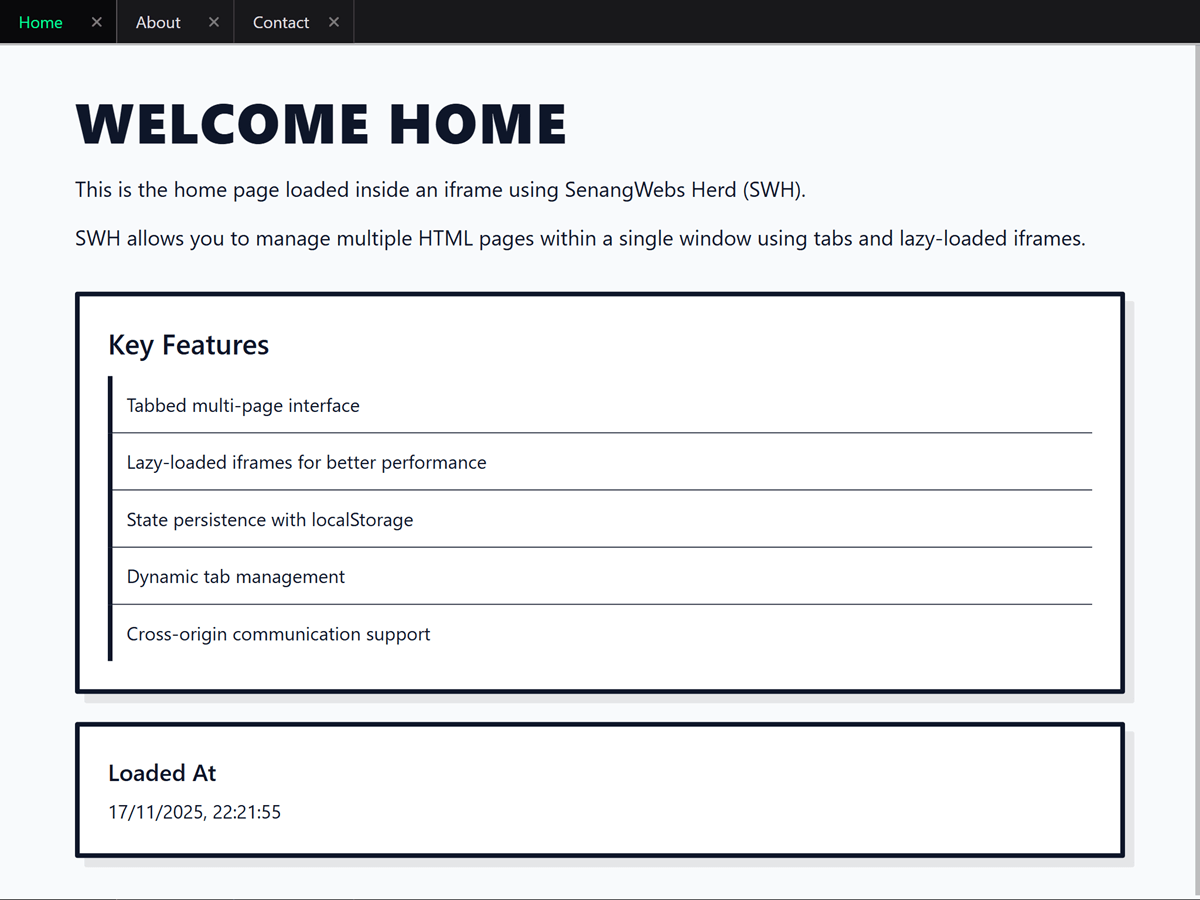
Features
- Tabbed multi-page interface - Manage multiple HTML screens in one window
- Lazy-loaded iframes - Iframe loads only when first activated
- State persistence - Open tabs and active tab preserved after refresh
- Dynamic tab management - Open and close tabs during runtime
- Accessible keyboard navigation - Navigate tabs with arrow, Home, End, and Delete keys
- Cross-origin communication support - Use
window.postMessagefor secure data exchange
Installation
Direct Include
<link rel="stylesheet" href="https://unpkg.com/senangwebs-herd@latest/dist/swh.min.css">
<script src="https://unpkg.com/senangwebs-herd@latest/dist/swh.min.js"></script>
The script exposes the constructor as window.SWH. The UMD bundle also
supports CommonJS and AMD loaders.
Build from Source
# Install dependencies
npm install

# Build for production
npm run build

# Build for development (with source maps)
npm run build:dev

# Watch mode for development
npm run watch
Quick Start
HTML Attribute Initialization
<link rel="stylesheet" href="https://unpkg.com/senangwebs-herd@latest/dist/swh.min.css">
<div data-swh
     data-swh-storage-key="my-app-tabs"
     data-swh-default-tab="home"
     data-swh-allow-close
     data-swh-max-tabs="5">

    <div data-swh-tabs>
        <button data-swh-tab="home">Home</button>
        <button data-swh-tab="about">About</button>
    </div>

    <div data-swh-content>
        <iframe data-swh-iframe="home" data-url="home.html"></iframe>
        <iframe data-swh-iframe="about" data-url="about.html"></iframe>
    </div>
</div>

<script src="https://unpkg.com/senangwebs-herd@latest/dist/swh.min.js"></script>
JavaScript Initialization
<link rel="stylesheet" href="https://unpkg.com/senangwebs-herd@latest/dist/swh.min.css">

<div id="my-swh">
    <div id="swh-tabs"></div>
    <div id="swh-content"></div>
</div>

<script src="https://unpkg.com/senangwebs-herd@latest/dist/swh.min.js"></script>
<script>
document.addEventListener("DOMContentLoaded", function() {
    const swh = new SWH({
        container: document.querySelector('#my-swh'),
        tabsContainer: document.querySelector('#swh-tabs'),
        contentContainer: document.querySelector('#swh-content'),
        presetTabs: [
            { id: "home", title: "Home", url: "home.html" },
            { id: "about", title: "About", url: "about.html" }
        ],
        storageKey: "my-app-tabs",
        defaultTab: "home",
        allowClose: true,
        maxTabs: 5
    });
});
</script>
API Reference
Methods
| Method | Description |
|--------|-------------|
| openTab(id, title, url) | Opens a new tab with the specified ID, title, and URL |
| closeTab(id) | Closes the tab with the specified ID |
| switchTab(id) | Switches to the tab with the specified ID |
| getOpenTabs() | Returns an array of currently open tabs |
| getActiveTab() | Returns the currently active tab ID |
| clearTabs() | Closes all tabs and clears state from localStorage |
| reloadTab(id) | Reloads the iframe content of the specified tab |
| persistState() | Saves the current tab state to localStorage |
| restoreState() | Restores tab state from localStorage |
| on(event, callback) | Registers an event listener |
| off(event, callback) | Unregisters an event listener |
Events
| Event | Description |
|-------|-------------|
| tabOpened | Fired when a new tab is created |
| tabClosed | Fired when a tab is removed |
| tabSwitched | Fired when the active tab changes |
| tabLoaded | Fired when an iframe finishes loading |
| maxTabsReached | Fired when trying to exceed maxTabs limit |
Keyboard Controls
When focus is on a tab:
| Key | Action |
|-----|--------|
| ArrowLeft / ArrowRight | Activate and focus the previous or next tab |
| Home / End | Activate and focus the first or last tab |
| Delete | Close the focused tab when allowClose is enabled |
SWH automatically applies tablist, tab, and tabpanel roles with the
corresponding ARIA state and relationships.
Configuration Options
| Option | Type | Default | Description |
|--------|------|---------|-------------|
| container | HTMLElement | required | The container element for SWH |
| tabsContainer | HTMLElement | required | Element to hold tab buttons |
| contentContainer | HTMLElement | required | Element to hold iframe content |
| presetTabs | Array | [] | Initial tabs to create on load |
| storageKey | string | "swh-tabs" | LocalStorage key for tab state |
| defaultTab | string | null | Tab to activate if no previous state exists |
| allowClose | boolean | false | Enable UI to close tabs |
| maxTabs | number | Infinity | Maximum open tabs at once |
Examples
Check the examples/ directory for working demonstrations:
- basic-html-attribute.html - Simple HTML-based initialization
- javascript-init.html - Programmatic initialization with dynamic controls
- event-handling.html - Event system demonstration with monitoring
Use Cases
Best
- Dashboards
- Admin panels
- Internal tools
- Modular web applications
Not suitable for
- SEO landing pages
- Content websites
- Public-facing marketing sites
Browser Compatibility
- Chrome/Edge (latest)
- Firefox (latest)
- Safari (latest)
- Opera (latest)
Requires ES6+ support.
Development
Build Commands
npm run build       # Production build (minified)
npm run build:dev   # Development build (with source maps)
npm run watch       # Watch mode for development
License
MIT License - see LICENSE.md for details
Contributing
Contributions are welcome! Please feel free to submit issues or pull requests.
Note: SWH is designed for internal applications and is not optimized for SEO or search engine indexing.