
senangwebs-index
v1.0.2
Published
A lightweight JavaScript library for transforming JSON data into searchable and paginated HTML views

Maintainers
 a-hakim
Readme
SenangWebs Index (SWI)
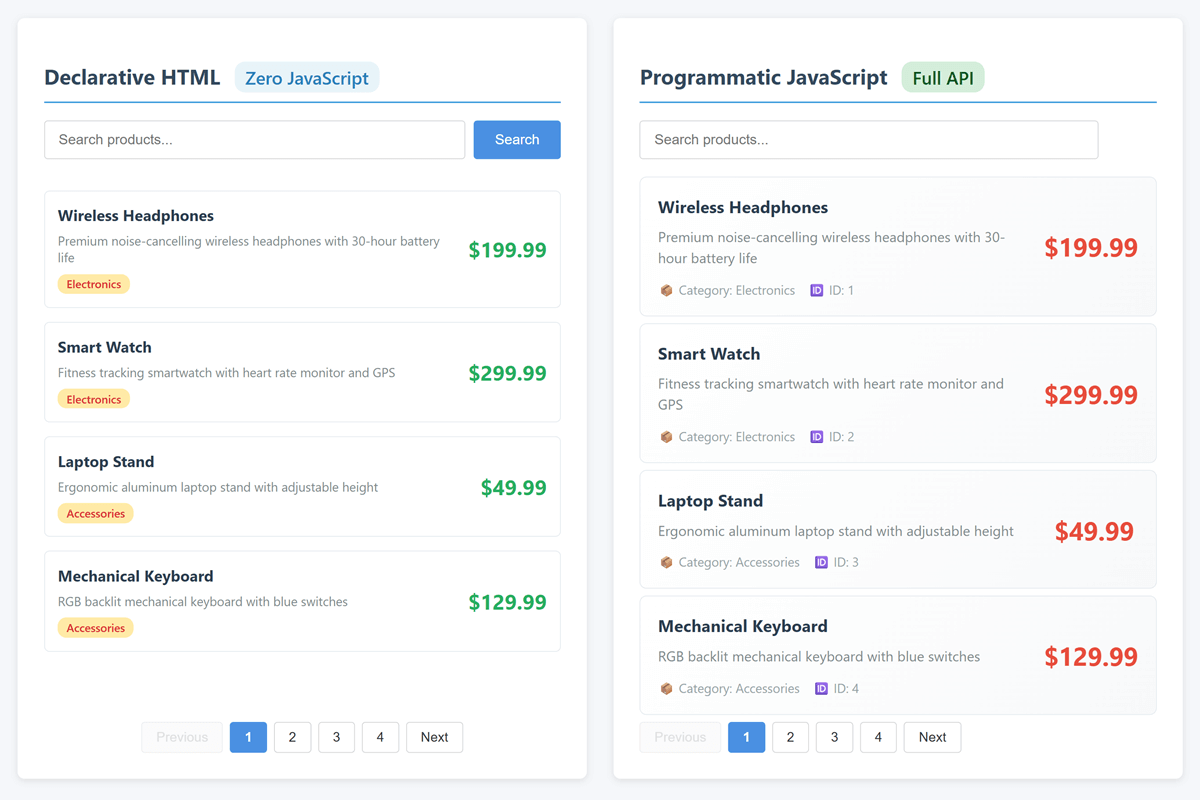
A lightweight JavaScript library for transforming JSON data into searchable, paginated HTML views.

Features
- Dual initialization: HTML attributes or JavaScript API
- Multi-field search: Search across multiple properties with 300ms debouncing
- Smart pagination: Automatic handling of large datasets
- Loading states: Built-in loading, empty, and error states
- Responsive: Mobile-friendly design
- Zero dependencies: Pure ES6+ JavaScript
- Easy styling: All CSS classes prefixed with
swi-
Installation
NPM:
npm install senangwebs-indexDirect include:
<link
  rel="stylesheet"
  href="https://unpkg.com/senangwebs-index@latest/dist/swi.css"
/>
<script src="https://unpkg.com/senangwebs-index@latest/dist/swi.js"></script>
Quick Start
Declarative (HTML Only)
<div
  data-swi-id="products"
  data-swi-source="./data.json"
  data-swi-page-size="10"
  data-swi-search-key="name"
>
  <input type="text" data-swi-search-input placeholder="Search..." />

  <div class="swi-item-container">
    <div data-swi-template="item" style="display: none;">
      <h3 data-swi-value="item.name"></h3>
      <p data-swi-value="item.description"></p>
    </div>
  </div>

  <div data-swi-pagination></div>
</div>

<script src="https://unpkg.com/senangwebs-index@latest/dist/swi.js"></script>
Programmatic (JavaScript)
const swi = new SenangWebsIndex({
  container: "#my-container",
  data: "./data.json",
  itemTemplate: (item) => `
    <div class="swi-item">
      <h3>${item.name}</h3>
      <p>${item.description}</p>
    </div>
  `,
  search: { enabled: true, searchKey: "name" },
  pagination: { enabled: true, itemsPerPage: 10 },
});
API Reference
Options
| Option | Type | Required | Description |
| -------------- | ------------ | -------- | ------------------------------------- |
| container | String | Yes | CSS selector for container |
| data | Array/String | Yes | Data array or JSON URL |
| itemTemplate | Function | Yes | Function returning HTML for each item |
| search | Object | No | Search configuration |
| pagination | Object | No | Pagination configuration |
Methods
| Method | Description |
| -------------------------- | ---------------------------------------------- |
| search(query, searchKey) | Search data (searchKey can be string or array) |
| goToPage(page) | Navigate to specific page |
| render() | Re-render current data |
| destroy() | Clean up event listeners |
| showLoading() | Show loading spinner |
| hideLoading() | Hide loading spinner |
| showError(msg, details) | Display error message |
HTML Attributes
| Attribute | Required | Description |
| ---------------------------- | -------- | ---------------------------------------------- |
| data-swi-id | Yes | Unique identifier |
| data-swi-source | Yes | JSON data URL |
| data-swi-page-size | No | Items per page (default: 10) |
| data-swi-search-key | No | Search field(s) - comma-separated for multiple |
| data-swi-template="item" | Yes | Template element |
| data-swi-value="item.prop" | Yes | Data binding |
| data-swi-search-input | No | Search input |
| data-swi-pagination | No | Pagination container |
Key Features
Multi-field Search
Search across multiple properties. Arrays and comma-separated strings are both supported; surrounding whitespace and empty entries are ignored:
// JavaScript API
search: {
  enabled: true,
  searchKey: ['name', 'category', 'description']
}

// HTML attribute
data-swi-search-key="name,category,description"
You can also override the configured fields for a single search:
swi.search("electronics", ["name", "category"]);Debounced Search
Search automatically debounces with 300ms delay - no configuration needed.
Loading & Error States
Loading states display automatically during data fetch. Manual control available:
swi.showLoading();
swi.hideLoading();
swi.showError("Failed to load", "Details here");
Empty states display automatically when no data or search results found.
Examples
Product Catalog
<div
  data-swi-id="catalog"
  data-swi-source="./products.json"
  data-swi-search-key="name,category"
>
  <input type="text" data-swi-search-input placeholder="Search..." />

  <div class="swi-item-container swi-grid">
    <div data-swi-template="item" style="display: none;">
      <h3 data-swi-value="item.name"></h3>
      <p data-swi-value="item.price"></p>
    </div>
  </div>

  <div data-swi-pagination></div>
</div>
Data Table
const table = new SenangWebsIndex({
  container: "#users",
  data: [
    { name: "John", email: "[email protected]", role: "Admin" },
    { name: "Jane", email: "[email protected]", role: "User" },
  ],
  searchKey: ["name", "email", "role"],
  itemTemplate: (item) => `
    <tr class="swi-item">
      <td>${item.name}</td>
      <td>${item.email}</td>
      <td>${item.role}</td>
    </tr>
  `,
});
Styling
All CSS classes use the swi- prefix:
Main classes:
.swi-item- Individual items.swi-item-container- Items wrapper.swi-grid- Grid layout modifier.swi-search-input- Search field.swi-pagination-btn- Pagination buttons.swi-active- Active state.swi-loading- Loading container.swi-spinner- Loading spinner.swi-empty-state- Empty data message.swi-error- Error message
Example customization:
.swi-item {
  background: #f5f5f5;
  padding: 1rem;
  border-radius: 4px;
}

.swi-pagination-btn {
  background: #007bff;
  color: white;
}
Browser Support
- Chrome, Firefox, Safari, Edge (latest versions)
- ES6+ required (no IE11 support)
Development
# Install
npm install

# Development (watch mode)
npm run dev

# Production build
npm run build

# Build and run the test suite
npm test
License
MIT License - see LICENSE file for details
Contributing
Contributions are welcome! Please feel free to submit a Pull Request.
Support
For issues and questions, please open an issue on GitHub.