
senangwebs-kiln
v1.0.2
Published
A lightweight, responsive 3D modeling editor library


Readme
SenangWebs Kiln (SWK)
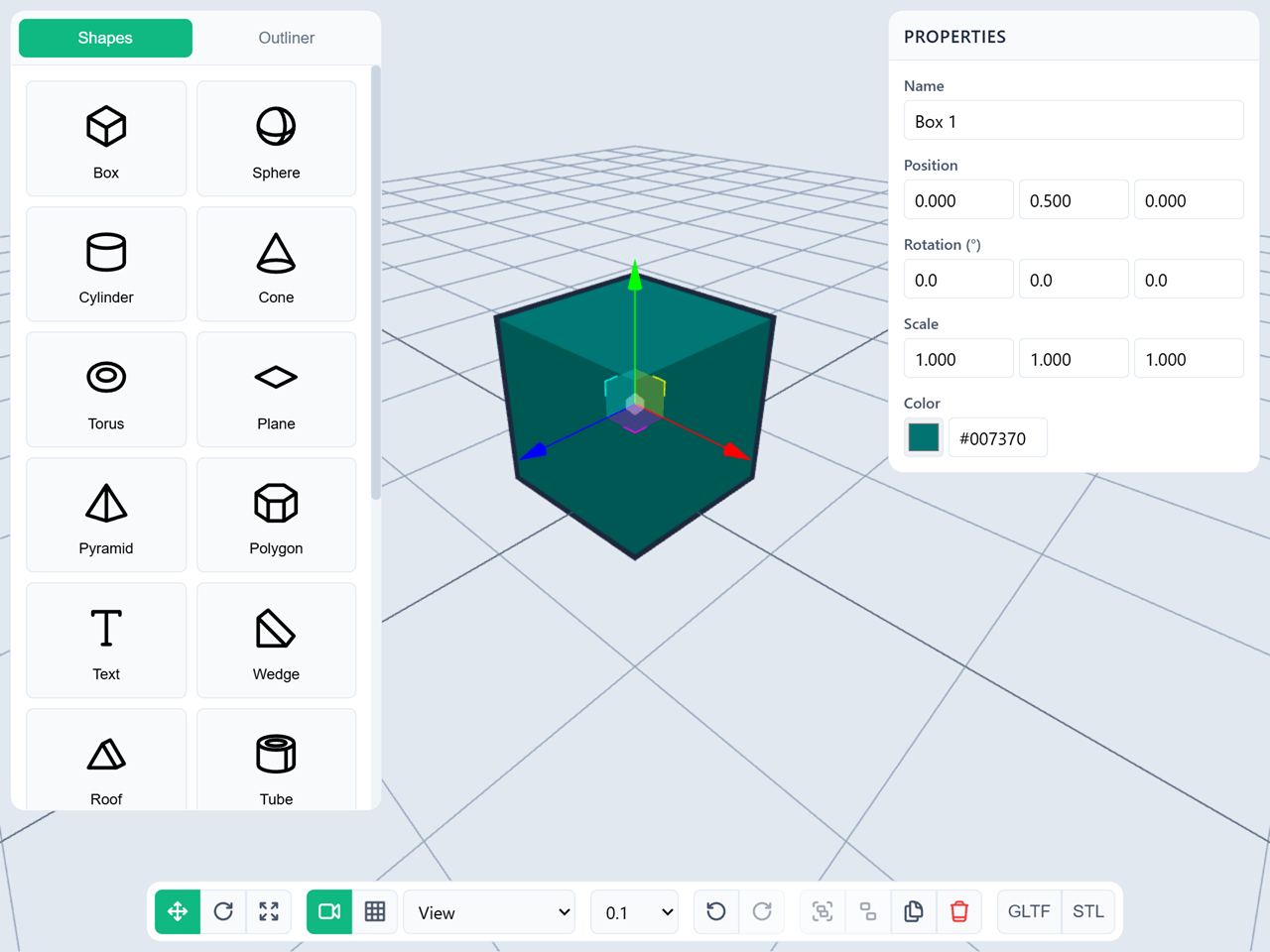
A lightweight, powerful 3D modeling editor library built on Three.js. Create interactive 3D modeling experiences in your web applications with minimal code.



Features
- 13 Built-in Shapes: Box, Sphere, Cylinder, Cone, Torus, Plane, Pyramid, Torus Knot, and Platonic solids (Tetrahedron, Octahedron, Icosahedron, Dodecahedron)
- Text Support: 3D text with multiple fonts (Sans, Serif, Monospace)
- Selection System: Single and multi-select with visual outlining
- Transform Controls: Translate, rotate, and scale with snapping
- Grouping: Organize multiple objects into hierarchical groups
- Undo/Redo: Full history system with 50 action stack
- Complete UI: Optional panels for shapes, properties, outliner, and controls
- Export: GLTF, GLB, STL, and JSON (save/load) format support
- Dual Camera Modes: Perspective and orthographic views
- Keyboard Shortcuts: T/R/S for transform modes, Ctrl+Z/Y for undo/redo
- Responsive: Works on desktop and mobile devices
- Customizable: Extensive configuration options
- Lightweight: Approximately 90KB gzipped (production build)
Installation
Via CDN (Easiest)
<!-- SWK Library (includes Three.js and all dependencies) -->
<link
  rel="stylesheet"
  href="https://unpkg.com/senangwebs-kiln@latest/dist/swk.min.css"
/>
<script src="https://unpkg.com/senangwebs-kiln@latest/dist/swk.min.js"></script>
Via NPM (Coming Soon)
npm install senangwebs-kilnQuick Start
Method 1: JavaScript API (Headless Mode)
Perfect for integrating into existing applications with custom UI.
<!DOCTYPE html>
<html>
  <head>
    <style>
      #editor {
        width: 100vw;
        height: 100vh;
      }
    </style>
    <link
      rel="stylesheet"
      href="https://unpkg.com/senangwebs-kiln@latest/dist/swk.min.css"
    />
  </head>
  <body>
    <div id="editor"></div>

    <!-- Load SWK (includes all Three.js dependencies) -->
    <script src="https://unpkg.com/senangwebs-kiln@latest/dist/swk.min.js"></script>

    <script>
      // Initialize editor
      const editor = new SWK('#editor', {
          viewportBackground: '#e2e8f0',
          grid: { show: true },
          camera: {
              mode: 'perspective',
              position: [5, 5, 5]
          }
      });

      // Add shapes
      const box = editor.addShape('box');
      editor.selectObject(box);

      // Listen to events
      editor.on('selectionChanged', (selected) => {
          console.log('Selected:', selected.length, 'objects');
      });

      // Transform controls
      editor.setTransformMode('translate'); // or 'rotate', 'scale'

      // Undo/Redo
      editor.undo();
      editor.redo();

      // Export
      await editor.exportGLTF();
    </script>
  </body>
</html>
Method 2: HTML Attributes (Full UI Mode)
Perfect for quick prototyping or standalone 3D modeling tools.
<!DOCTYPE html>
<html>
  <head>
    <link
      rel="stylesheet"
      href="https://unpkg.com/senangwebs-kiln@latest/dist/swk.min.css"
    />
  </head>
  <body>
    <!-- Container with HTML attributes -->
    <div
      id="editor"
      data-swk-init="true"
      data-swk-viewport-background="#e2e8f0"
      data-swk-grid-show="true"
      data-swk-camera-mode="perspective"
      data-swk-camera-position="5,5,5"
      data-swk-ui-enabled="true"
      data-swk-history-enabled="true"
    ></div>

    <!-- Load SWK (includes all Three.js dependencies) -->
    <script src="https://unpkg.com/senangwebs-kiln@latest/dist/swk.min.js"></script>

    <script>
      // Auto-initialize on page load
      const editors = SWK.autoInit();
      console.log("Initialized:", editors.length, "editors");
    </script>
  </body>
</html>
Examples
See the examples/ folder for complete working examples:
js-init.html- JavaScript API initialization (headless mode)html-init.html- HTML attributes initialization (full UI mode)
Core Concepts
Shapes
Create any of the 13 built-in shapes:
const box = editor.addShape("box", { width: 2, height: 2, depth: 2 });
const sphere = editor.addShape("sphere", { radius: 1 });
const text = editor.addShape("text", { text: "Hello", fontSize: 1 });
Selection
Select objects to transform or edit:
// Single selection
editor.selectObject(box);

// Multi-selection (Ctrl+Click in UI)
editor.addToSelection(sphere);

// Get selected objects
const selected = editor.getSelectedObjects();

// Deselect all
editor.deselectAll();
Transforms
Move, rotate, and scale objects:
// Set transform mode
editor.setTransformMode("translate"); // 'rotate', 'scale'

// Set transform space
editor.setTransformSpace("local"); // or 'world'

// Enable snapping
editor.setSnapUnit(0.5); // Snap to 0.5 units
Grouping
Organize multiple objects:
// Group selected objects
const group = editor.groupSelected();

// Ungroup
editor.ungroupSelected();

// Check if object is a group
editor.isGroupContainer(object);
History
Undo and redo actions:
editor.undo();
editor.redo();

// Check availability
if (editor.canUndo()) {
  editor.undo();
}
Export
Export to industry-standard formats:
// Export entire scene as GLTF
await editor.exportGLTF();

// Export as binary GLB
await editor.exportGLB();

// Export as STL
await editor.exportSTL();

// Export selected objects only
await editor.exportSelected('gltf');

// Export scene as JSON (save file)
await editor.exportJSON({ filename: 'my-scene' });

// Import scene from JSON (load file)
// From a File object (e.g., from <input type="file">)
const fileInput = document.getElementById('file-input');
fileInput.addEventListener('change', async (e) => {
    const file = e.target.files[0];
    await editor.importJSON(file);
});

// From a JSON string or object
const saveData = { ... };
await editor.importJSON(saveData);
Keyboard Shortcuts
- T - Translate mode
- R - Rotate mode
- S - Scale mode
- Delete/Backspace - Delete selected objects
- Ctrl+Z - Undo
- Ctrl+Y or Ctrl+Shift+Z - Redo
- Ctrl+Click - Multi-select (add to selection)
Configuration
Full configuration options:
const editor = new SWK("#editor", {
  // Container & Sizing
  width: "100%",
  height: "100%",

  // Viewport
  viewportBackground: "#e2e8f0",
  outlineColor: "#10b981",

  // Grid
  grid: {
    show: true,
    size: 20,
    divisions: 20,
    centerColor: "#888888",
    linesColor: "#cccccc",
  },

  // Camera
  camera: {
    mode: "perspective", // 'perspective' or 'orthographic'
    fov: 75,
    near: 0.1,
    far: 1000,
    position: [5, 5, 5],
  },

  // Transform
  transform: {
    mode: "translate", // 'translate', 'rotate', 'scale'
    space: "local", // 'local' or 'world'
    snapUnit: 0.1,
  },

  // UI
  ui: {
    enabled: false, // Enable full UI panels
    panels: {
      shapes: true, // Shape creation panel
      properties: true, // Property editor panel
      outliner: true, // Scene hierarchy panel
      controls: true, // Bottom toolbar
    },
  },

  // History
  history: {
    enabled: true,
    maxSize: 50, // Maximum undo stack size
  },

  // Features
  features: {
    grouping: true,
    undo: true,
    export: true,
  },
});
API Reference
See API.md for complete API documentation.
Core Methods
addShape(type, options)- Create a shapedeleteObject(mesh)- Delete an objectduplicateObject(mesh)- Duplicate an objectselectObject(mesh)- Select an objectdeselectAll()- Clear selectiongetSelectedObjects()- Get selected objectsgetAllObjects()- Get all objects in scene
Transform Methods
setTransformMode(mode)- Set transform modesetTransformSpace(space)- Set transform spacesetSnapUnit(value)- Set snap unit
Group Methods
groupSelected()- Group selected objectsungroupSelected()- Ungroup selected groupisGroupContainer(object)- Check if object is a group
History Methods
undo()- Undo last actionredo()- Redo last undone actioncanUndo()- Check if undo is availablecanRedo()- Check if redo is available
Export Methods
exportGLTF(options)- Export as GLTFexportGLB(options)- Export as GLBexportSTL(options)- Export as STLexportSelected(format, options)- Export selected onlyexportJSON(options)- Export scene as JSON (save file)importJSON(source)- Import scene from JSON (load file)
Camera Methods
setCameraMode(mode)- Set camera moderesetCamera()- Reset camera position
Events
editor.on("initialized", () => {});
editor.on("objectAdded", (object) => {});
editor.on("objectRemoved", (object) => {});
editor.on("selectionChanged", (selected, deselected) => {});
editor.on("transformModeChanged", (mode) => {});
editor.on("groupCreated", (group) => {});
editor.on("historyChanged", (data) => {});
editor.on("exportComplete", (data) => {});
Development
Build from Source
# Install dependencies
npm install

# Development build
npm run build:dev

# Production build
npm run build:prod

# Watch mode
npm run watch
Contributing
Contributions are welcome! Please feel free to submit a Pull Request.
License
MIT License - see LICENSE.md for details
Contributing
Contributions are welcome! Please feel free to submit issues and pull requests.