
senangwebs-quiz
v1.0.2
Published
Lightweight JavaScript library that lets you create interactive quizzes with various question types and feedback modes.
Downloads
44


Readme
SenangWebs Quiz (SWQ)
A lightweight, flexible JavaScript library for creating interactive quizzes with multiple question types, configurable feedback modes, and built-in UI generation.

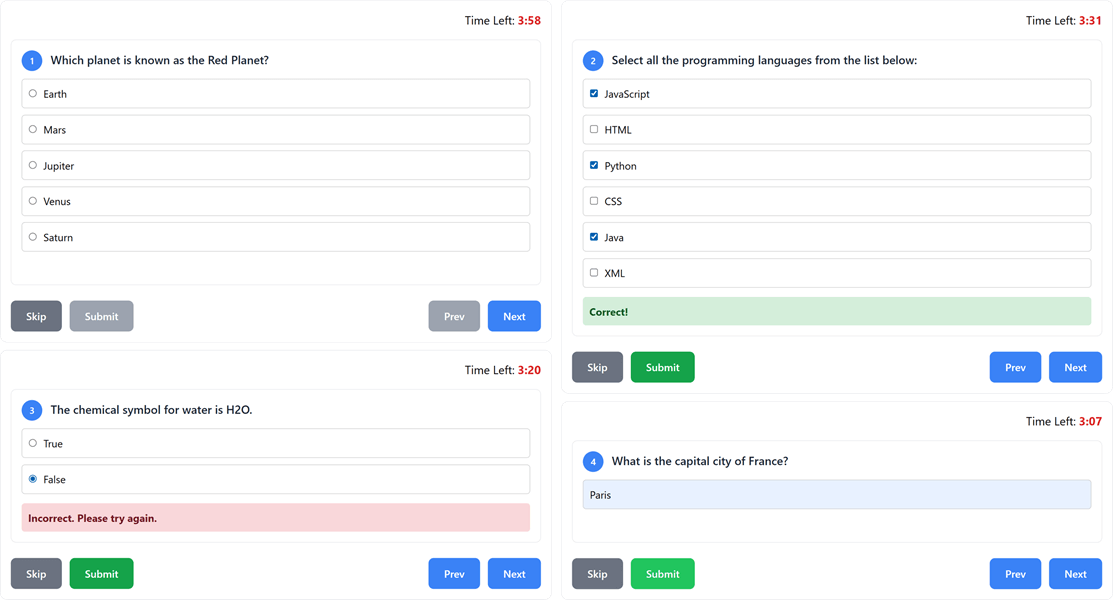
Features
- Multiple Question Types: Choice (single select), multiple select, true/false (or
boolean), text input, and number input - Three Feedback Modes:
- Standard - Show all feedback at quiz completion
- Immediate - Show feedback after each question with automatic progression
- Retry - Allow users to retry incorrect answers until they get them right
- Built-in Timer: Optional countdown timer with automatic quiz termination
- Navigation Controls: Configurable back/previous navigation and question skipping
- Automatic UI Generation: Creates complete question interfaces from simple data attributes
- Fallback Controls: Automatically generates form-safe navigation buttons, timer display, and results container when not provided
- Flexible Integration: Works with existing HTML structures or generates everything automatically
- Modern Styling: Clean, responsive CSS with customizable classes
- Smart Answer Validation: Case-insensitive text matching, numeric comparison, and flexible multiple choice handling
- Comprehensive Results: Detailed scoring with percentage calculation and completion reason tracking
- Quiz Lifecycle:
reset()to retake a quiz anddestroy()for proper cleanup - CSP Compatible: No inline event handlers - works under Content Security Policy
Quick Start
- Include the files:
<!-- Unminified (development) -->
<link rel="stylesheet" href="dist/swq.css">
<script src="dist/swq.js"></script>

<!-- Minified (production) -->
<link rel="stylesheet" href="dist/swq.min.css">
<script src="dist/swq.min.js"></script>- Create a minimal quiz:
<div data-swq-quiz data-swq-feedback-mode="immediate">
    <div data-swq-question-id="q1">
        <p>What is 2 + 2?</p>
        <div data-swq-type="choice" data-swq-answer="4"
             data-swq-options='["2", "3", "4", "5"]'></div>
    </div>
</div>
The library automatically initializes on page load and generates all necessary UI elements.
Installation & Build
Using CDN (Quickest Start)
<!DOCTYPE html>
<html>
<head>
    <title>My Quiz</title>
    <link rel="stylesheet" href="https://cdn.jsdelivr.net/npm/senangwebs-quiz@latest/dist/swq.min.css">
</head>
<body>
    <div data-swq-quiz data-swq-feedback-mode="immediate" data-swq-timer="120">
        <div data-swq-question-id="q1">
            <p>What is the capital of France?</p>
            <div data-swq-type="text" data-swq-answer="Paris"></div>
        </div>

        <div data-swq-question-id="q2">
            <p>Which planet is known as the Red Planet?</p>
            <div data-swq-type="choice"
                 data-swq-answer="Mars"
                 data-swq-options='["Earth", "Mars", "Jupiter", "Venus"]'></div>
        </div>
    </div>

    <script src="https://cdn.jsdelivr.net/npm/senangwebs-quiz@latest/dist/swq.min.js"></script>
</body>
</html>
Alternative CDNs:
<!-- unpkg CDN -->
<link rel="stylesheet" href="https://unpkg.com/senangwebs-quiz@latest/dist/swq.min.css">
<script src="https://unpkg.com/senangwebs-quiz@latest/dist/swq.min.js"></script>
Local Build
npm install
npm run build
npm test
Outputs all four files to dist/:
swq.js/swq.css-- unminified with source maps (development)swq.min.js/swq.min.css-- minified (production)
Quiz Configuration
Configure quiz behavior using data attributes on the main container:
| Attribute | Values | Default | Description |
| ------------------------ | -------------------------------- | ---------- | ----------------------------------- |
| data-swq-quiz | -- | required | Marks the quiz container |
| data-swq-feedback-mode | standard, immediate, retry | standard | When to show feedback |
| data-swq-allow-back | true, false | false | Enable previous question navigation |
| data-swq-allow-skip | true, false | false | Allow skipping questions |
| data-swq-timer | number (seconds) | 0 | Quiz time limit (0 = no timer) |
<div data-swq-quiz
     data-swq-feedback-mode="retry"
     data-swq-allow-back="true"
     data-swq-allow-skip="true"
     data-swq-timer="300">
    <!-- Questions here -->
</div>
Question Types
1. Multiple Choice (Single Answer)
<div data-swq-question-id="unique-id">
    <p>Which planet is closest to the Sun?</p>
    <div data-swq-type="choice"
         data-swq-answer="Mercury"
         data-swq-options='["Mercury", "Venus", "Earth", "Mars"]'></div>
</div>
2. Multiple Select (Multiple Answers)
Answer can be comma-separated or a JSON array:
<div data-swq-question-id="colors">
    <p>Select all primary colors:</p>
    <div data-swq-type="select-multiple"
         data-swq-answer='["Red","Blue","Yellow"]'
         data-swq-options='["Red", "Green", "Blue", "Yellow", "Purple"]'></div>
</div>
3. True/False
Use true/false or the boolean alias:
<div data-swq-question-id="boolean">
    <p>JavaScript is a compiled language.</p>
    <div data-swq-type="true/false" data-swq-answer="False"></div>
</div>
4. Text Input (Case-Insensitive)
<div data-swq-question-id="capital">
    <p>What is the capital of Japan?</p>
    <div data-swq-type="text" data-swq-answer="Tokyo"></div>
</div>
5. Number Input
<div data-swq-question-id="math">
    <p>What is 12 × 8?</p>
    <div data-swq-type="number" data-swq-answer="96"></div>
</div>
Feedback Modes Explained
Standard Mode (Default)
- No feedback shown during quiz
- All results displayed at completion
- Questions marked as correct/incorrect at the end
Immediate Mode
- Feedback shown after each answer submission
- Automatic progression to next question
- Inputs disabled after answering
Retry Mode
- Feedback shown immediately
- Incorrect answers can be retried
- Must get correct answer to proceed
Custom UI Elements
SWQ automatically generates missing UI elements, but you can provide custom ones:
<div data-swq-quiz>
    <!-- Custom timer display -->
    <div data-swq-timer class="my-timer">5:00</div>

    <!-- Questions here -->

    <!-- Custom controls -->
    <button type="button" data-swq-previous>Back</button>
    <button type="button" data-swq-check-answer>Submit</button>
    <button type="button" data-swq-skip-question>Skip</button>
    <button type="button" data-swq-next>Next</button>

    <!-- Custom results container (hidden by default via .swq-hidden) -->
    <div data-swq-results class="my-results"></div>
</div>
Generated controls use type="button", so a quiz can be embedded inside a
form without navigation clicks submitting the form. Use the same type for
custom controls.
JavaScript API
Programmatic Initialization
// Basic initialization (auto-finds [data-swq-quiz] elements)
// Returns array of newly created quiz instances
var quizzes = SWQ.init('[data-swq-quiz]');

// With custom options
var quiz = SWQ.init('#my-quiz', {
    settings: {
        feedbackMode: 'immediate',
        allowBack: true,
        timer: 180,
        onStart: function() {
            console.log('Quiz started!');
        },
        onQuestionChange: function(question, index) {
            console.log('Question ' + (index + 1) + ': ' + question.text);
        },
        onComplete: function(results) {
            console.log('Score: ' + results.score + '/' + results.total + ' (' + results.percentage + '%)');
        }
    }
})[0];
Pass Questions Programmatically
var quiz = SWQ.init('#container', {
    questions: [
        {
            id: 'q1',
            text: 'What is 2+2?',
            type: 'choice',
            answer: '4',
            options: ['2', '3', '4', '5']
        },
        {
            id: 'q2',
            text: 'Enter your name:',
            type: 'text',
            answer: 'Expected Answer'
        }
    ]
})[0];
Instance Methods
// Access a quiz instance
var quiz = document.querySelector('#my-quiz').swq;

// Reset and retake the quiz
quiz.reset();

// Clean up: remove listeners, clear timer, free memory
quiz.destroy();
Event Callbacks
| Callback | Parameters | Description |
| ------------------ | ------------------- | ---------------------------- |
| onStart | -- | Called when quiz begins |
| onQuestionChange | question, index | Called when question changes |
| onComplete | results | Called when quiz ends |
Results object structure:
{
    score: 8,           // Number of correct answers
    total: 10,          // Total questions
    percentage: 80,     // Score percentage
    reason: 'completed' // 'completed' or 'time_up'
}
Styling & Customization
Key CSS Classes
| Class | Description |
| ------------------------ | ---------------------------------- |
| .swq-quiz-container | Optional container for scoped styling |
| .swq-question | Individual question container |
| .swq-question-text | Question text styling |
| .swq-options-container | Container for answer options |
| .swq-option | Individual option (radio/checkbox) |
| .swq-input | Text/number input fields |
| .swq-feedback | Feedback message area |
| .swq-correct | Applied to correct answers |
| .swq-incorrect | Applied to incorrect answers |
| .swq-active | Currently visible question |
| .swq-hidden | Hides an element (display: none) |
| .swq-controls-default | Default button container |
| .swq-results-default | Default results display |
| .swq-result-summary | Results summary card |
Custom Styling Example
.swq-question {
    border: 2px solid #e2e8f0;
    border-radius: 12px;
    padding: 24px;
    margin-bottom: 20px;
}

.swq-option:hover {
    background-color: #f7fafc;
    border-color: #4299e1;
}

.swq-correct {
    border-color: #48bb78;
    background-color: #f0fff4;
}

.swq-incorrect {
    border-color: #f56565;
    background-color: #fff5f5;
}
Answer Validation Logic
| Type | Validation |
| --------------- | ------------------------------------------------------- |
| choice | Exact string match on selected value |
| true/false | Exact string match ("True" / "False") |
| boolean | Alias for true/false |
| select-multiple | Order-independent array comparison; supports comma-separated or JSON array answers |
| text | Case-insensitive match with whitespace trimming |
| number | Numeric comparison via parseFloat (e.g., "10" = "10.0" = 10) |
Examples
Check the examples/ directory for complete implementations:
| File | Mode | Features Showcased |
| ---- | ---- | ------------------ |
| minimal.html | Retry + Timer | Bare-minimum setup, auto-generated UI |
| custom-ui.html | Retry | All question types, Tailwind CSS, custom buttons |
| timed-quiz.html | Standard + Timer | Countdown pressure, skip allowed, Malaysia trivia |
| js-api.html | Immediate | Full JavaScript API, event callbacks, live event log, boolean type, JSON array answers |
| education-quiz.html | Standard + Timer | Exam simulation (no back/skip), SPM Sejarah questions |
| food-culture.html | Retry + Back + Skip | reset() & destroy() demo, boolean type, custom styled |
Browser Support
Works in all modern browsers. The distributed bundle is transpiled to ES5-compatible JavaScript with no external dependencies.
License
MIT License - see LICENSE file for details.
Contributing
Contributions are welcome! Please feel free to submit a Pull Request.