
senangwebs-tour
v1.0.19
Published
VR 360° virtual tour system with visual editor and viewer library

Maintainers
 a-hakim
Readme
SenangWebs Tour (SWT)
A powerful, data-driven 360° virtual tour system built on A-Frame WebVR. Create immersive virtual tours with a visual editor, or integrate the lightweight viewer library into your own projects.



| viewer | editor |
| ------------------------------------------------------------------------------------------------------------- | ------------------------------------------------------------------------------------------------------------- |
| 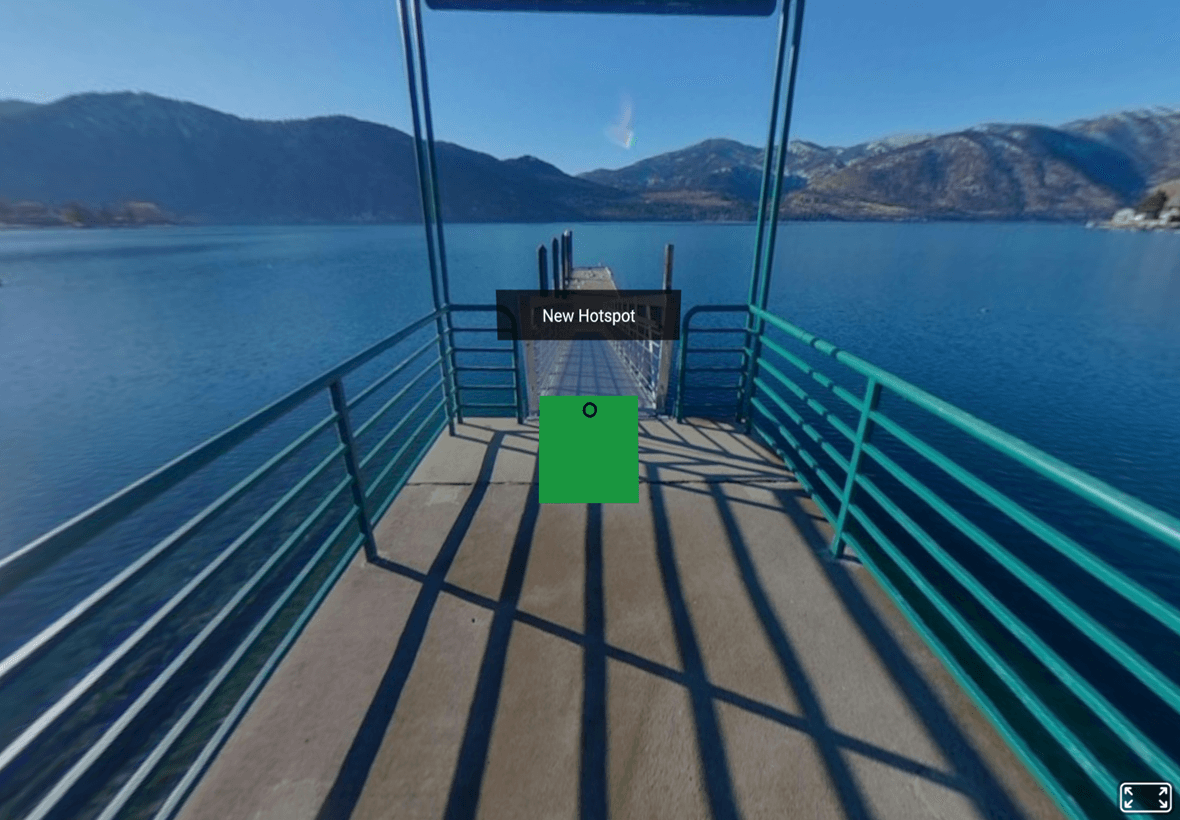 |
| 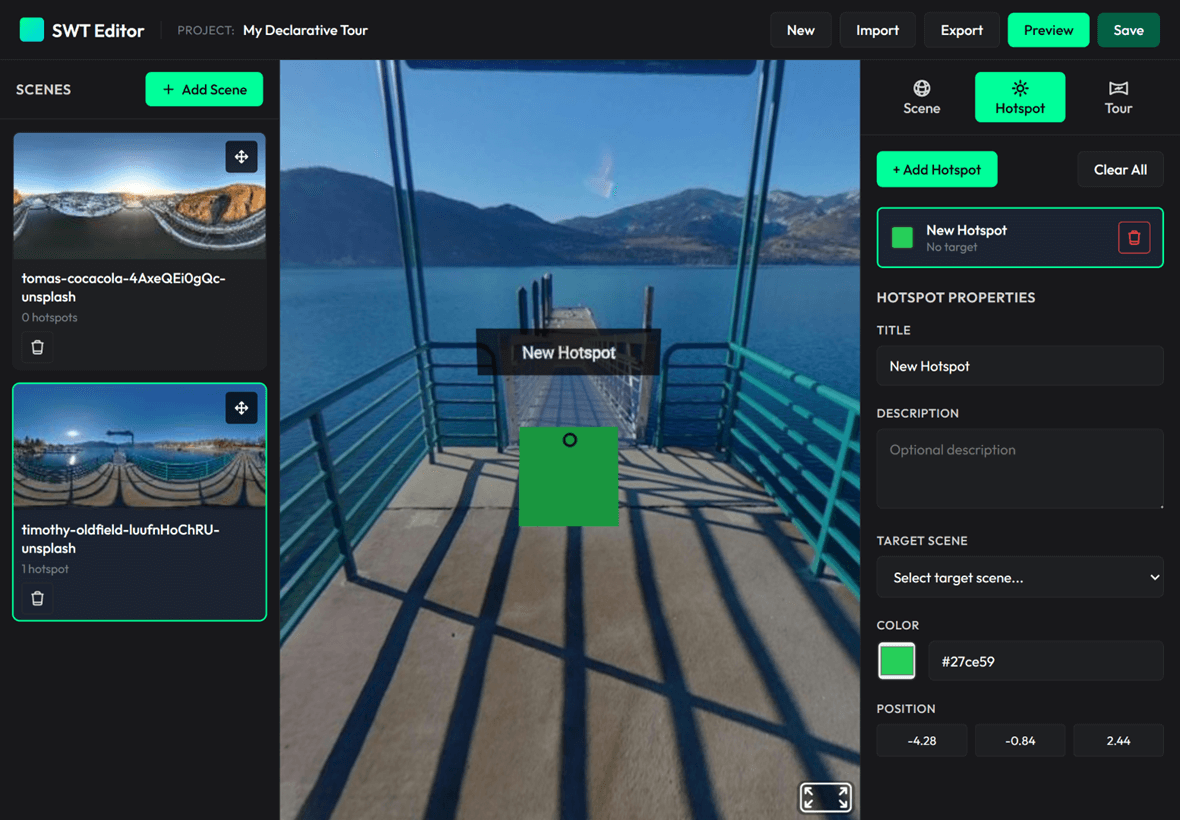 |
|
Table of Contents
- Features
- Quick Start
- Custom Editor Integration
- Building from Source
- API Documentation
- Editor Features
- Browser Compatibility
- Documentation
- Contributing
- License
Features
Core Capabilities
- Visual Editor - No-code tour builder with click-to-place hotspot interface
- Viewer Library - Lightweight (12KB minified) JavaScript library for embedding tours
- Standalone Viewer - Self-contained HTML viewer with drag-and-drop JSON support
- Mobile & VR Ready - Full touch, mouse, and VR headset support
- Customizable Hotspots - Custom colors, scales, and tooltip text
- Multiple Export Formats - JSON configuration or standalone HTML files
Developer-Friendly
- Two Integration Modes - Declarative (HTML attributes) or Programmatic (JavaScript API)
- Modular Architecture - Six-controller editor pattern with clear separation of concerns
- Event System - React to scene loads, hotspot clicks, and navigation events
- Data-Driven - Pure JSON configuration, no internal state management
- Built with Rollup - Modern ES6+ modules with sourcemaps for debugging
Quick Start
Using the Visual Editor (No Coding Required)
Start Local Server:
npm install
npm run dev
Open Editor: Navigate to
http://localhost:8080/examples/editor.htmlCreate Your Tour:
- Click "Add Scene" and upload 360° panorama images (JPG/PNG)
- Click "Add Hotspot" then click on the preview to place navigation points
- Configure hotspot properties: color, scale, tooltip text, target scene
- See changes instantly in the live A-Frame preview
Export Your Tour:
- JSON Export → Portable config file for library integration
- Viewer Export → Self-contained HTML file (no dependencies needed)
Test Standalone Viewer: Open
http://localhost:8080/examples/viewer.htmland drag-and-drop your exported JSON
Integrating with Code (Viewer Library)
Minimal Example (see examples/example-simple.html):
<!DOCTYPE html>
<html>
  <head>
    <script src="https://unpkg.com/senangwebs-tour@latest/dist/swt.min.js"></script>
  </head>
  <body>
    <a-scene id="tour-scene">
      <a-camera><a-cursor></a-cursor></a-camera>
    </a-scene>

    <script>
      const config = {
        initialScene: "room1",
        scenes: {
          room1: {
            name: "Living Room",
            panorama: "path/to/panorama1.jpg",
            hotspots: [
              {
                position: { x: 5, y: 0, z: -5 },
                action: { type: "navigateTo", target: "room2" },
                appearance: { color: "#FF6B6B", scale: 1.5 },
                tooltip: { text: "Go to Kitchen" },
              },
            ],
          },
          room2: {
            name: "Kitchen",
            panorama: "path/to/panorama2.jpg",
            hotspots: [
              {
                position: { x: -5, y: 0, z: 5 },
                action: { type: "navigateTo", target: "room1" },
                appearance: { color: "#4ECDC4", scale: 1.5 },
                tooltip: { text: "Back to Living Room" },
              },
            ],
          },
        },
      };

      const scene = document.querySelector("#tour-scene");
      scene.addEventListener("loaded", () => {
        const tour = new SWT.Tour(scene, config);
        tour.addEventListener("scene-loaded", (e) => {
          console.log("Now viewing:", e.detail.sceneId);
        });
        tour.start();
      });
    </script>
  </body>
</html>
Custom Editor Integration
Build your own tour editor using the swt-editor.js bundle. Two initialization modes are supported:
Option 1: Declarative Mode (HTML Attributes)
Zero JavaScript - perfect for quick prototypes:
<!DOCTYPE html>
<html>
  <head>
    <script src="https://unpkg.com/senangwebs-tour@latest/dist/swt.js"></script>
    <script src="https://unpkg.com/senangwebs-tour@latest/dist/swt-editor.js"></script>
    <link
      rel="stylesheet"
      href="https://unpkg.com/senangwebs-tour@latest/dist/swt-editor.css"
    />
  </head>
  <body>
    <!-- Auto-initializes on page load -->
    <div
      data-swt-editor
      data-swt-auto-init="true"
      data-swt-project-name="My Virtual Tour"
    >
      <div data-swt-scene-list></div>
      <div data-swt-preview-area></div>
      <div data-swt-properties-panel></div>
    </div>
  </body>
</html>
Supported HTML Attributes:
| Attribute | Description | Default |
|-----------|-------------|---------|
| data-swt-editor | Marks the editor container (required) | - |
| data-swt-auto-init | Auto-initialize on DOMContentLoaded | false |
| data-swt-project-name | Initial project name | "Untitled Tour" |
| data-swt-auto-save | Enable LocalStorage auto-save | false |
| data-swt-auto-save-interval | Auto-save interval (milliseconds) | 30000 |
| data-swt-scene-list | Scene list panel container | - |
| data-swt-preview-area | A-Frame preview container | - |
| data-swt-properties-panel | Hotspot properties panel | - |
Example: examples/editor-declarative.html
Option 2: Programmatic Mode (JavaScript API)
Full control - for custom workflows and advanced integrations:
<!DOCTYPE html>
<html>
  <head>
    <script src="https://unpkg.com/senangwebs-tour@latest/dist/swt.js"></script>
    <script src="https://unpkg.com/senangwebs-tour@latest/dist/swt-editor.js"></script>
    <link
      rel="stylesheet"
      href="https://unpkg.com/senangwebs-tour@latest/dist/swt-editor.css"
    />
  </head>
  <body>
    <div id="editor-container">
      <div id="scenes"></div>
      <div id="preview"></div>
      <div id="properties"></div>
    </div>

    <script>
      // Create editor instance with custom config
      const editor = new TourEditor({
        projectName: "My Custom Tour",
        autoSave: true,
        autoSaveInterval: 30000,
      });

      // Initialize with DOM elements
      editor.init({
        sceneListElement: document.getElementById("scenes"),
        previewElement: document.getElementById("preview"),
        propertiesElement: document.getElementById("properties"),
      });

      // Access editor programmatically
      editor.addEventListener("scene-added", (scene) => {
        console.log("New scene:", scene.name);
      });

      // Export tour configuration
      const config = editor.exportJSON();
    </script>
  </body>
</html>
Available Classes (all attached to window after loading swt-editor.js):
TourEditor- Main coordinator, orchestrates all managersSceneManagerEditor- Scene CRUD operationsHotspotEditor- Hotspot placement and editingPreviewController- A-Frame preview renderingUIController- DOM rendering and updatesProjectStorageManager- LocalStorage persistenceExportManager- JSON and HTML export
Examples:
examples/editor-declarative.html- Declarative HTML-only modeexamples/editor.html- Full-featured programmatic editor
Building from Source
Installation & Build
# Install dependencies
npm install

# Build all bundles (viewer + editor)
npm run build

# Development mode (watch for changes)
npm run dev
API Documentation
Viewer Library API
Constructor
new SWT.Tour(aframeSceneElement, tourConfiguration);Parameters:
aframeSceneElement(HTMLElement) - A-Frame<a-scene>DOM elementtourConfiguration(Object) - Tour config (see structure below)
Returns: Tour instance
Configuration Structure
Both the editor and viewer use the same data format. Scenes are stored as an array:
{
  initialScene: "scene-id",       // Required: Starting scene ID
  cursor: ".custom-cursor",        // Optional: Cursor selector or false to disable
  scenes: [                        // Required: Array of scenes
    {
      id: "scene-id",              // Required: Scene identifier
      name: "Scene Name",          // Required: Display name
      panorama: "url-or-dataurl",  // Required: Image URL or base64
      thumbnail: "url",            // Optional: Thumbnail for editor
      startingPosition: {          // Optional: Initial camera orientation
        pitch: 0.1,                // Vertical angle (radians)
        yaw: 1.5                   // Horizontal angle (radians)
      },
      hotspots: [                  // Optional: Array of hotspots
        {
          id: "hotspot-1",         // Optional: Auto-generated if omitted
          position: {              // Required: 3D coordinates
            x: 10,
            y: 1.5,
            z: -3
          },
          action: {                // Required: Hotspot action
            type: "navigateTo",    // Required: Action type
            target: "scene-id-2"   // Required: Target scene ID
          },
          appearance: {            // Optional: Visual customization
            color: "#00ff00",      // Default: "#00ff00"
            scale: "1 1 1",        // Default: "1 1 1"
            icon: "arrow"          // Optional: Icon name or URL
          },
          tooltip: {               // Optional: Hover/focus text
            text: "Click here",    // Tooltip title
            description: "Details" // Optional: Extended description
          },
          cameraOrientation: {     // Optional: Camera direction when created
            pitch: -0.02,          // Vertical angle (radians)
            yaw: 2.06              // Horizontal angle (radians)
          }
        }
      ]
    }
  ]
}
Important Notes:
scenesis an array (not an object)- The library also accepts
scenesas an object keyed by ID for backward compatibility - Hotspot
positionis in 3D space (typically on 10-unit sphere surface)
Methods
tour.start()
Initialize and start the tour. Loads the initial scene and sets up internal event
listeners. Calling it again restarts the tour from initialScene; it also works
after tour.destroy().
Returns: Promise<void>
Example:
const tour = new SWT.Tour(sceneElement, config);
tour.start();
tour.navigateTo(sceneId)
Navigate to a specific scene by ID.
Parameters:
sceneId(String) - Target scene ID (must exist inscenesobject)
Returns: Promise<void>
Example:
tour.navigateTo("bedroom"); // Loads scene with id "bedroom"tour.getCurrentSceneId()
Get the ID of the currently active scene.
Returns: String - Current scene ID
Example:
const currentScene = tour.getCurrentSceneId();
console.log("Viewing:", currentScene); // "living-room"
tour.destroy()
Clean up and remove the tour. Removes all hotspots, internal event listeners, and
managed assets, then resets the current scene. It is safe to call more than once.
The same instance can be started again with tour.start().
Returns: void
Example:
tour.destroy(); // Cleanup before removing from DOMtour.addEventListener(eventName, callback)
Listen to tour events. Custom event system (not DOM events).
Parameters:
eventName(String) - Event name (see Events section)callback(Function) - Handler function receiving event object
Returns: void
Example:
tour.addEventListener("scene-loaded", (event) => {
  console.log("Scene:", event.detail.sceneId);
});
Events
All events include a detail object with event-specific data.
tour-started
Fired when tour.start() is called.
Detail:
{
  sceneId: String; // Initial scene ID
}
scene-loading
Fired before a scene begins loading.
Detail:
{
  sceneId: String; // ID of scene being loaded
}
scene-loaded
Fired after a scene is fully loaded and rendered.
Detail:
{
  sceneId: String; // ID of loaded scene
}
hotspot-activated
Fired when a hotspot is clicked/activated.
Detail:
{
  hotspotData: Object, // Full hotspot configuration
  sceneId: String;     // Current scene ID
}
Usage Example
const scene = document.querySelector("#vr-scene");
const tour = new SWT.Tour(scene, {
  initialScene: "room1",
  scenes: {
    room1: {
      name: "Living Room",
      panorama: "360-living-room.jpg",
      hotspots: [
        {
          position: { x: 5, y: 0, z: -5 },
          action: { type: "navigateTo", target: "room2" },
          appearance: { color: "#FF6B6B" },
          tooltip: { text: "Kitchen" },
        },
      ],
    },
    room2: {
      name: "Kitchen",
      panorama: "360-kitchen.jpg",
      hotspots: [],
    },
  },
});

// Listen to events
tour.addEventListener("tour-started", (e) => {
  console.log("Tour started at:", e.detail.sceneId);
});

tour.addEventListener("scene-loading", (e) => {
  console.log("Loading scene:", e.detail.sceneId);
  // Show loading indicator
});

tour.addEventListener("scene-loaded", (e) => {
  console.log("Loaded:", e.detail.sceneId);
  // Hide loading indicator
});

tour.addEventListener("hotspot-activated", (e) => {
  console.log("Hotspot clicked:", e.detail.hotspotData.id);
  console.log("Navigating to:", e.detail.hotspotData.action.target);
});

// Start the tour
tour.start();

// Programmatic navigation
setTimeout(() => {
  tour.navigateTo("room2");
}, 5000);

// Cleanup
// tour.destroy();
Editor Features
Visual Tour Creation
- Click-to-Place Hotspots - Raycast-based placement on panorama sphere
- Real-Time Preview - Instant A-Frame rendering as you edit
- Scene Management - Add, remove, reorder scenes with thumbnails
- Camera Control - Auto-point camera to selected hotspot with animation
- Position Validation - Hotspots clamped to 10-unit sphere radius
Hotspot Configuration
- 3D Position - Click-to-place or manual X/Y/Z coordinate input
- Navigation Target - Link to any scene in the tour
- Visual Customization - Color picker and scale slider
- Tooltips - Custom hover text for each hotspot
Data Management
- LocalStorage Persistence - Auto-save projects (configurable interval)
- Import/Export - Load and save tour JSON configurations
- Data URLs - Panoramas embedded as base64 (no external files needed)
- Thumbnail Generation - Auto-generated scene previews (100x50px)
Export Options
JSON Export - Portable configuration file for library integration
- Converts editor's
imageUrlto library'spanoramaformat - Compatible with
SWT.Tourviewer library - Use in custom integrations or standalone viewer
- Converts editor's
Viewer Export - Self-contained HTML file
- Embeds minified
swt.min.jslibrary - Includes full tour JSON configuration
- No external dependencies - works offline
- Drag-and-drop ready for distribution
- Embeds minified
Developer Tools
- ES6 Module Architecture - Six-controller pattern with clear separation
- Sourcemaps - Debug original ES6 source in browser DevTools
- Two Init Modes - Declarative (HTML) or Programmatic (JS API)
- Comprehensive Event System - 30+ events including unified
changeevent for any modification - Load/Export API -
generateJSON()andloadJSON()for round-trip data management - Global Access - All classes attached to
windowfor console debugging
Browser Compatibility
| Browser | Version | Notes | | ------------- | ----------- | ------------------------------ | | Chrome | 90+ | Recommended - best performance | | Firefox | 88+ | Full support | | Safari | 14+ | WebGL support required | | Edge | 90+ | Chromium-based | | Mobile Safari | iOS 14+ | Touch and gyroscope support | | Chrome Mobile | Android 90+ | Touch and gyroscope support |
Requirements:
- WebGL 1.0 or higher
- ES6 module support (for editor)
- LocalStorage (for editor persistence)
VR Headsets:
- Oculus Quest 1/2/3
- Meta Quest Pro
- HTC Vive
- Valve Index
- Any WebXR-compatible headset
Documentation
- EDITOR.md - Complete guide to building custom editors
- .github/copilot-instructions.md - AI agent development instructions
- examples/ - Live code examples and demos
Contributing
Contributions are welcome! Here's how you can help:
- Report Bugs - Open an issue with reproduction steps
- Suggest Features - Share your ideas in GitHub Issues
- Submit PRs - Fork, create a feature branch, and submit a pull request
- Improve Docs - Help make documentation clearer and more comprehensive
License
MIT License - see LICENSE.md for details.