
senangwebs-unfold
v1.0.3
Published
An advanced, interactive JavaScript library for visualizing and editing JSON data.

Maintainers
 a-hakim
Readme
SenangWebs Unfold (SWU)
An advanced, interactive JavaScript library for visualizing and editing JSON data as an interactive flowchart-style graph.

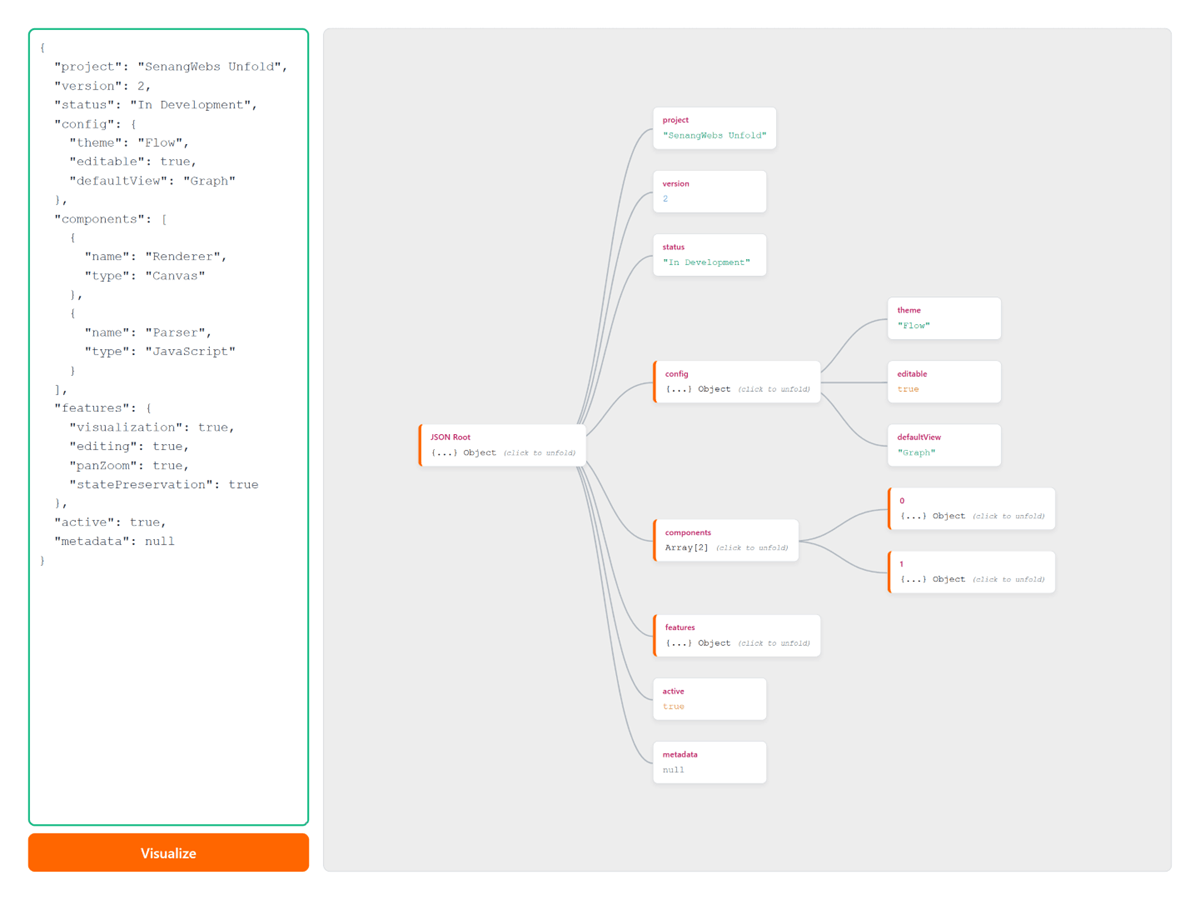
Features
- Visual JSON Editing - Interactive, flowchart-style representation of JSON data
- Two-Way Sync - Real-time synchronization between visual graph and raw JSON text
- In-Place Editing - Edit keys and values directly in the visual interface
- Pan & Zoom - Navigate large JSON structures with smooth pan and zoom controls
- Zero Dependencies - Pure vanilla JavaScript, no external libraries required
- Theming Support - Built-in light and dark themes with customizable colors
- State Preservation - Remembers which nodes are expanded across edits
- Dual Initialization - Use declarative HTML attributes or JavaScript API
- Clean Teardown - Removes DOM and library event listeners when an instance is destroyed
Installation
Via NPM
npm install senangwebs-unfoldManual Installation
- Clone or download this repository
- Run
npm installto install dependencies - Run
npm run buildto generate the distribution files - Include the CSS and JS files in your HTML:
<link
  rel="stylesheet"
  href="https://unpkg.com/senangwebs-unfold@latest/dist/swu.css"
/>
<script src="https://unpkg.com/senangwebs-unfold@latest/dist/swu.js"></script>
Quick Start
Method 1: Declarative HTML
<div
  data-swu
  data-swu-canvas-background="#ededed"
  data-swu-accent-color="#ff6600"
  data-swu-theme="light"
  data-swu-direction="horizontal"
>
  <div data-input-wrapper></div>
  <div data-swu-viewer-container></div>
</div>

<script src="https://unpkg.com/senangwebs-unfold@latest/dist/swu.js"></script>
The library will automatically initialize on page load.
Method 2: JavaScript API
<div id="demo"></div>

<script src="https://unpkg.com/senangwebs-unfold@latest/dist/swu.js"></script>
<script>
  const editor = new SWU(document.getElementById("demo"), {
    canvasBackground: "#f0f0f0",
    accentColor: "#9333ea",
    theme: "light",
    json: {
      name: "My App",
      version: "1.0.0",
      features: ["editing", "visualization"],
    },
  });
</script>
API Reference
Constructor
new SWU(containerElement, options);Parameters:
containerElement(HTMLElement) - The DOM element where SWU will be renderedoptions(Object) - Configuration options:json(String | Object) - Initial JSON datainputJSON(String | Object) - Alias forjsontextarea(HTMLTextAreaElement) - External textarea for two-way bindingcanvasBackground(String) - Background color for the canvas (default:#e9ecef)accentColor(String) - Accent color for UI elements (default:#3b82f6)theme(String) - Theme:'light'or'dark'(default:'light')direction(String) - Layout direction:'horizontal'(left-to-right) or'vertical'(top-to-bottom) (default:'horizontal')
Public Methods
.render(json)
Renders or updates the visualization with new JSON data.
editor.render({ name: "New Data" });.getJson()
Returns the current JSON data as a JavaScript object.
const currentData = editor.getJson();.destroy()
Cleans up DOM elements, registered event listeners, and pending input updates. Calling it more than once is safe.
editor.destroy();Events
Subscribe with .on(event, callback). It returns an unsubscribe function:
const unsubscribe = editor.on("onChange", (jsonData) => {
  console.log("Data changed:", jsonData);
});

unsubscribe();
You can also remove a specific callback, or all callbacks for an event, with .off():
editor.off("onChange", callback);
editor.off("onChange");
onChange
Emitted when JSON data is modified through the UI.
editor.on("onChange", (jsonData) => {
  console.log("Data changed:", jsonData);
});
onError
Emitted when invalid JSON is entered in the textarea.
editor.on("onError", (error) => {
  console.error("JSON error:", error);
});
Usage Guide
Navigating the Graph
- Pan: Click and drag the background to move around
- Zoom: Use mouse wheel to zoom in/out
- Unfold/Collapse: Click on expandable nodes (Objects/Arrays) to toggle visibility
Editing Data
- Edit Values: Double-click on any primitive value (string, number, boolean, null) to edit
- Edit Keys: Double-click on object keys to rename them (array indices cannot be edited)
- Commit Changes: Press
Enteror click outside the input field - Cancel Edit: Press
Escapeto cancel
Data Types
The library automatically color-codes different data types:
- Keys: Pink/Rose
- Strings: Green
- Numbers: Blue
- Booleans: Orange
- Null: Gray
Examples
See the included demo files:
demo-declarative.html- Declarative HTML initializationdemo-api.html- JavaScript API initializationdemo-dark.html- Dark theme exampledemo-vertical.html- Vertical direction (top-to-bottom) example
Building from Source
# Install dependencies
npm install

# Build for production
npm run build

# Build for development with watch mode
npm run dev

# Run the dependency-free lifecycle tests
npm test
Contributing
Contributions are welcome! Please feel free to submit issues or pull requests.
License
MIT License