
serialconsole
v1.0.1
Published
Cross-platform serial port monitor and console with TUI interface, auto-reconnect, and hex viewer. Ideal for embedded systems debugging.

Maintainers
 sigmakib2
Readme
🚀 SerialConsole





A powerful cross-platform serial port monitor with interactive TUI interface, auto-reconnect, and hex viewer. Perfect for embedded systems development, Arduino programming, and hardware debugging.
🎉 Now Published on npm! Install globally with
npm install -g serialconsole
✨ Features
- 📊 Interactive Port Selection - List and select ports with baud rate configuration
- 🖥️ Responsive TUI Interface - Professional terminal UI with real-time statistics
- 🔄 Auto-Reconnect - Intelligent reconnection with exponential backoff
- 🔍 Hex Viewer - Toggle between ASCII and hex display modes
- ⚡ Multiple Baud Rates - Support for all common rates plus custom values
- 🎮 Nano-style Controls - Familiar keyboard shortcuts (Ctrl+Q, Ctrl+I, etc.)
- 📱 Cross-Platform - Works on Windows, macOS, and Linux
- 🎯 Message Filtering - Filter incoming data in real-time
- 📝 Multiple Modes - Read-only, write-only, interactive, and full monitor modes
🚀 Installation
NPM (Recommended - Published Package!)
# Install globally from npm
npm install -g serialconsole

# Alternative with short alias
npm install -g serialconsole && alias sc=serialconsole

# Verify installation
serialconsole --version
Binary Downloads
Download pre-built binaries from Releases:
- Windows:
serialconsole-win.exe - macOS:
serialconsole-macos - Linux:
serialconsole-linux
Package Managers
# NPM (Global)
npm install -g serialconsole

# NPX (No installation required)
npx serialconsole list

# Yarn (Global)
yarn global add serialconsole
📖 Quick Start
Interactive Mode (Recommended)
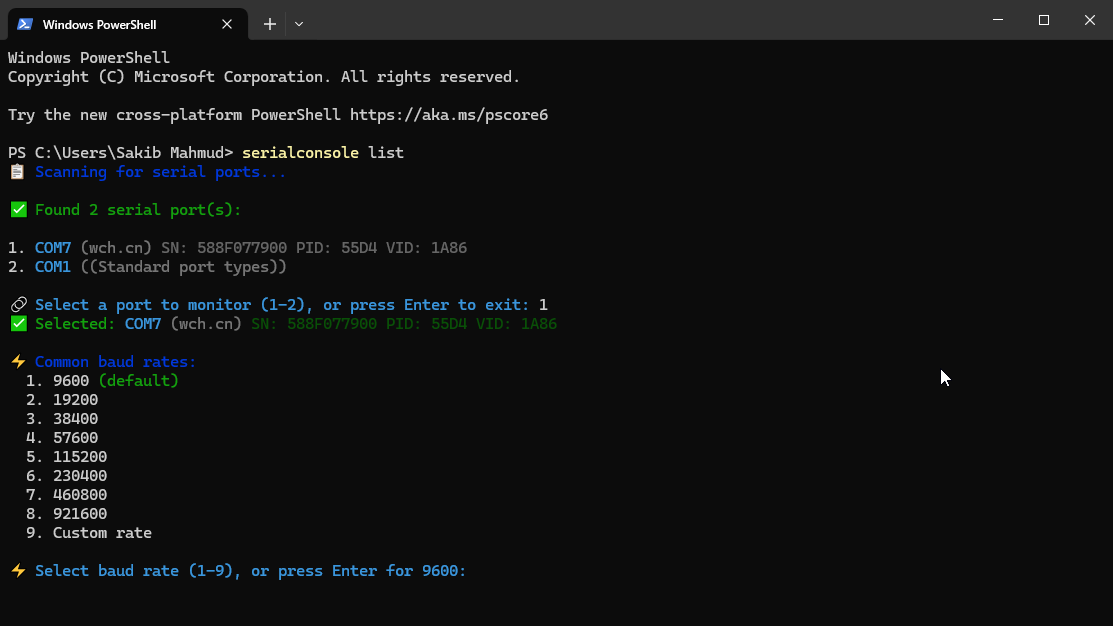
# List ports and select interactively
serialconsole list
# or use short alias
sc list
What this does:
- 📋 Shows all available serial ports with details
- 🎯 Let you select a port by number
- ⚡ Choose baud rate from common options or custom
- 🚀 Launches the TUI monitor automatically
Direct Commands
# Full TUI monitor
serialconsole monitor /dev/ttyUSB0 -b 115200

# Simple read mode
serialconsole read /dev/ttyACM0

# Send data
serialconsole write /dev/ttyUSB0 "Hello Arduino" --newline

# Interactive chat mode
serialconsole interactive COM3 -b 9600
Usage Examples
# Arduino development workflow
serialconsole list                           # Select Arduino port
serialconsole monitor /dev/ttyACM0 -b 9600   # Monitor Arduino output

# ESP32 debugging
serialconsole monitor COM4 -b 115200         # Monitor ESP32 with auto-reconnect

# Quick data sending
serialconsole write /dev/ttyUSB0 "AT+GMR"    # Send AT command
🎮 TUI Controls
| Key | Action | Description |
|-----|--------|-------------|
| Ctrl+Q | Exit | Close the application |
| Ctrl+I | Send message | Open input dialog to send data |
| Ctrl+H | Toggle hex viewer | Switch between ASCII and hex display |
| Ctrl+S | Toggle statistics | Show/hide detailed statistics panel |
| Ctrl+P | Pause/resume | Pause or resume data logging |
| Ctrl+C | Clear screen | Clear all displayed messages |
| Ctrl+F | Set filter | Filter messages by text content |
| Ctrl+E | Toggle echo | Show/hide sent messages |
| Ctrl+L | Line endings | Cycle through LF/CR/CRLF |
| Ctrl+R | Auto-reconnect | Toggle automatic reconnection |
🛠️ Use Cases
- 🔧 Arduino Development - Monitor serial output and send commands during coding
- 📡 ESP32/ESP8266 Projects - Debug IoT devices with intelligent auto-reconnect
- ⚙️ Embedded Systems - Professional monitoring for production debugging
- 🧪 Hardware Testing - Validate serial communication protocols
- 📚 Educational - Learn serial communication with visual real-time feedback
- 🥧 Raspberry Pi - Monitor UART communication with sensors and peripherals
- 🏭 Industrial IoT - Monitor industrial devices and sensors
- 🤖 Robotics - Debug robot communication and sensor data
📊 Interface Overview
┌─────────────────────────────────────────────────────────────────────────────┐
│ 🚀 ByteStream Monitor - /dev/ttyUSB0                                          │
├─────────────────────────────────────────────────────────────────────────────┤
│ 📡 Port: /dev/ttyUSB0 @ 115200 | 🟢 Connected | ⏱️ 00:05:23 | 📊 1,247 msgs │
│ 📥 RX: 15.2KB (51.3 B/s) | 📤 TX: 2.1KB (7.1 B/s) | ▶️ | 🔍 | 🔄           │
├─────────────────────────────────────────────────────────────────────────────┤
│ [14:30:25.123] ← Temperature: 23.5°C, Humidity: 45%                          │
│ [14:30:26.089] ← Sensor reading complete                                     │
│ [14:30:27.156] → status                                                      │
│ [14:30:27.201] ← System OK - All sensors operational                         │
├─────────────────────────────────────────────────────────────────────────────┤
│ ^Q Exit     ^I Send Msg   ^H Hex View   ^S Statistics   ^P Pause     ^C Clear│
│ ^F Filter     ^E Echo Mode  ^L Line End   ^R Auto-Reconnect                  │
└─────────────────────────────────────────────────────────────────────────────┘
⚙️ Configuration
Supported Baud Rates
- 9600 (default) - Standard for many devices
- 19200, 38400, 57600 - Legacy systems
- 115200 - Arduino Uno/Nano standard
- 230400, 460800, 921600 - High-speed communication
- Custom rates - Any valid baud rate supported
Line Ending Options
- LF (
\n) - Linux/macOS standard - CR (
\r) - Classic Mac format - CRLF (
\r\n) - Windows standard
Advanced Features
- 🎯 Real-time Filtering - Show only messages containing specific text
- 🔄 Smart Auto-Reconnect - Handles device resets and power cycles
- 📊 Live Statistics - Bytes sent/received, message count, uptime
- 🔍 Hex Display - View raw data in hexadecimal format
- ⏸️ Pause/Resume - Pause logging without disconnecting
🔧 Advanced Usage
Filtering Messages
# Start monitoring, then press Ctrl+F
# Enter "error" to show only error messages
# Enter "temp" to show only temperature readings
# Leave empty to disable filtering
Auto-Reconnect Workflow
Perfect for development where devices reset frequently:
- ✅ Automatically detects disconnections
- ⏱️ Exponential backoff prevents connection spam
- 🔄 Visual countdown shows next reconnection attempt
- 🛡️ Gracefully handles permission errors
- 🎯 Continues where you left off
Hex Viewer Usage
ASCII View:                    Hex View:
← Temperature: 23.5°C         ← [14:30:25] 54 65 6D 70 65 72 61 74 75 72 65 3A 20 32 33 2E 35 C2 B0 43
← Sensor OK                   ← [14:30:26] 53 65 6E 73 6F 72 20 4F 4B
🚧 Development
Building from Source
# Clone repository
git clone https://github.com/Sigmakib2/serialconsole.git
cd serialconsole

# Install dependencies
npm install

# Run directly
node index.js list

# Test all commands
npm test
Building Binaries
# Build for all platforms
npm run build:all

# Build for specific platform
npx pkg . --targets node18-win-x64 --compress GZip
npx pkg . --targets node18-linux-x64 --compress GZip
npx pkg . --targets node18-macos-x64 --compress GZip

# Outputs to dist/ directory
ls dist/
Project Structure
serialconsole/
├── index.js          # Main application
├── package.json      # Package configuration
├── README.md         # Documentation
├── LICENSE           # MIT license
├── CHANGELOG.md      # Version history
└── dist/            # Built binaries (after build)
    ├── serialconsole-win.exe
    ├── serialconsole-linux
    └── serialconsole-macos
🤝 Contributing
We welcome contributions! Here's how to get started:
- 🍴 Fork the repository
- 🌿 Create a feature branch:
git checkout -b feature-awesome-addition - 💻 Make your changes with tests
- ✅ Commit changes:
git commit -am 'feat: add awesome feature' - 🚀 Push to branch:
git push origin feature-awesome-addition - 📝 Submit a Pull Request
Development Guidelines
- Follow existing code style and patterns
- Add tests for new features
- Update documentation as needed
- Use conventional commit messages
📦 Package Information
- 📋 Package Name:
serialconsole - 🏷️ Current Version: 1.0.0
- 📄 License: MIT
- 🔧 Node.js: >= 18.0.0
- 💻 Platforms: Windows, macOS, Linux (x64, ARM64)
📝 License
MIT License - see LICENSE file for details.
🙏 Acknowledgments
- SerialPort - Cross-platform serial communication
- Blessed - Terminal UI framework
- Commander.js - CLI argument parsing
- Chalk - Terminal color styling
🐛 Issues & Support
📈 Statistics
Check out the package stats:
- 📦 npm Package - Downloads and version info
- 📊 npm Trends - Usage statistics
- ⭐ GitHub Stats - Stars and forks
⭐ Star this repository if SerialConsole helps with your projects!
🚀 Install now: npm install -g serialconsole