
seshmux
v0.1.9
Published
Local-first mission control for AI coding agents (Claude Code + Codex)

Maintainers
 bstagner
Readme
seshmux
Local-first mission control for your AI coding agents. One command, npx seshmux, opens a browser app that browses and searches every Claude Code and Codex session on your machine, runs live agent sessions in embedded terminals, spins up isolated git-worktree workspaces for parallel agents, and bridges the two agents together — all served from your own laptop, with zero hosting.
seshmux works with ✳ Claude Code and ⬡ Codex. It reads the sessions they already write to disk; you don't change how you use either tool.
seshmux is an independent project, not affiliated with or endorsed by Anthropic or OpenAI.
Table of contents
- Why
- Quickstart
- Feature guide
- Session archive
- Live terminals
- Agents view — mission control board
- Subagent viewer
- Customizations browser
- Layout — hide projects, resize panes
- Workspaces — parallel agents via git worktrees
- Status system — working / waiting / done
- Deep agent integration (status hooks)
- Notifications
- The cross-agent bridge
- Detection manifests (add or fix an agent without a rebuild)
- Status explain (debugging the dot)
- Architecture
- Updates that never kill a session
- Security model
- HTTP API
- Configuration
- Development
- Troubleshooting
- Compared to cmux
- License
Why
Agent sessions pile up as scattered .jsonl files you can't search, across two tools that don't talk to each other. Running two agents on one repo means they stomp each other's working tree. And nothing tells you which of your five running agents needs you right now.
seshmux is the archive-and-orchestration half of agent tooling: it gives your session history a home, keeps live sessions alive through restarts and updates, isolates parallel agents in worktrees, and lets the two agents collaborate — without sending anything off your machine.
Quickstart
npx seshmuxOpens http://127.0.0.1:4700 in your browser. No account, no config, no server to host.
Commands
seshmux                    # start (reuses a running instance if there is one)
seshmux --port 4800        # bind a different port ($PORT works too)
seshmux --no-open          # don't open a browser

seshmux update             # check npm for a newer release and install it
seshmux update --check     # just tell me, don't install
seshmux --version

seshmux --restart-daemon   # replace the session daemon (see below)
Updating also upgrades the session daemon, but only when nothing would be lost — see Updates that never kill a session.
Requirements
| Dependency | Required? | What it unlocks |
| --- | --- | --- |
| Node ≥ 20 + npm | required | everything |
| claude CLI (Claude Code) | required | if no agent CLI is found, seshmux shows a setup screen |
| codex CLI | optional | Codex sessions + the cross-agent bridge |
| tmux | optional | tier-2 persistence: sessions survive even a daemon restart |
| git | optional | Workspaces (worktree isolation) |
| rg (ripgrep) | optional | faster full-text search (falls back to a built-in scan) |
Feature guide
Session archive
Every session from ~/.claude and ~/.codex, in one place.
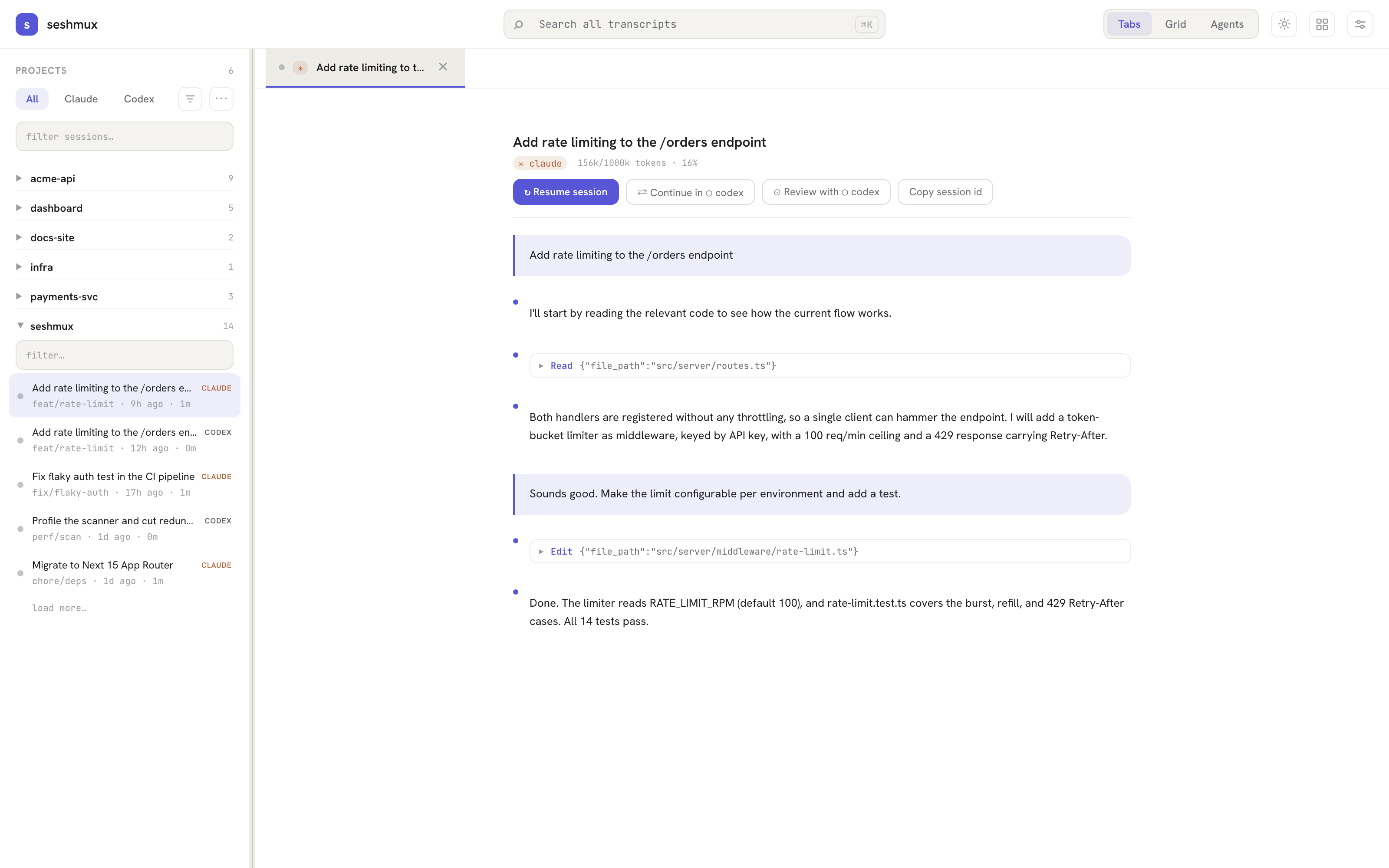
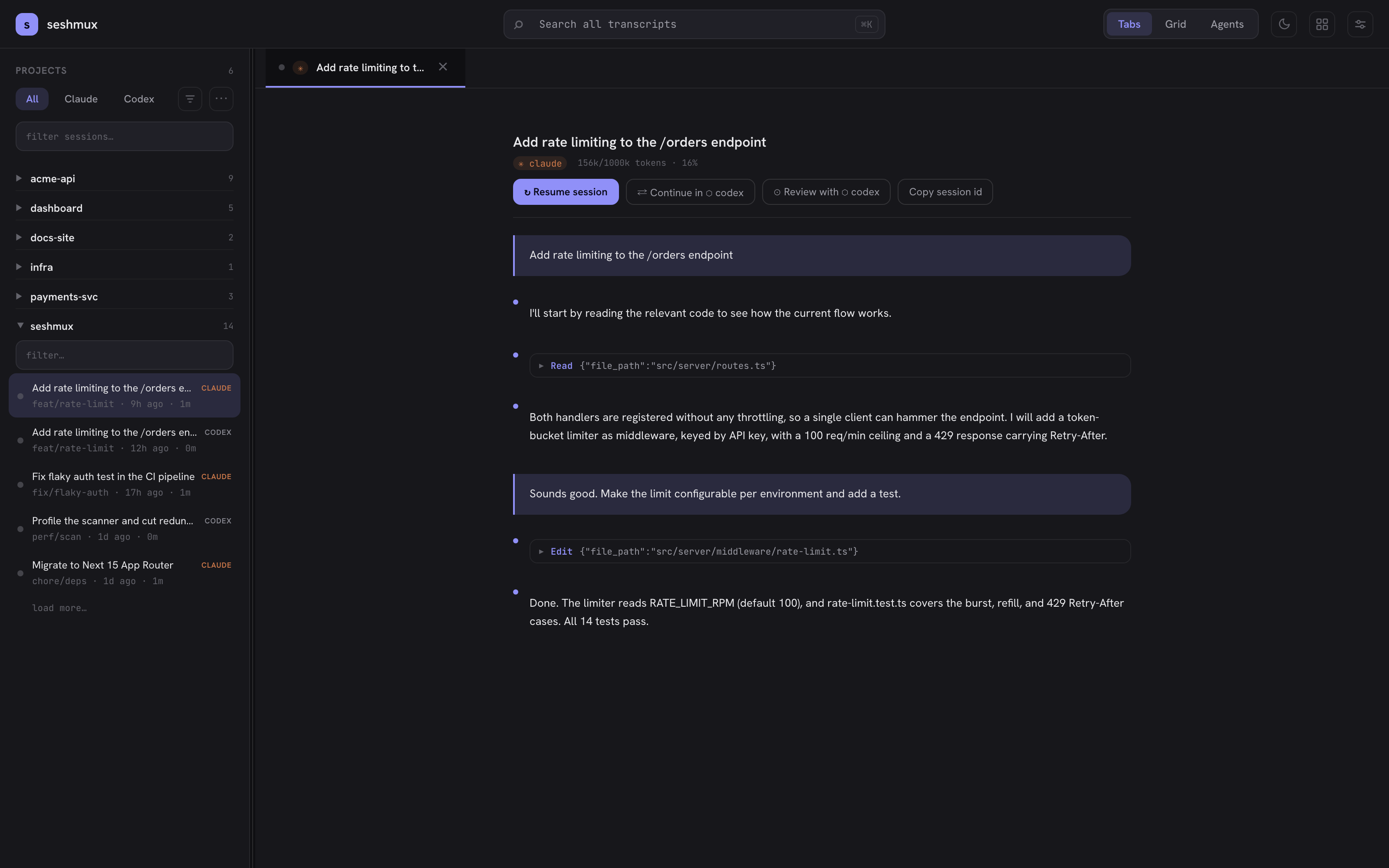
- Projects rail — sessions are grouped into projects by repo working directory. Sessions from both agents in the same repo appear under one project, with per-provider counts. Pin projects to keep them on top; the filter/sort menu narrows by provider, recency, or name. Projects whose repo directory no longer exists are hidden automatically.
- Full-text search — search months of history across both agents' transcripts (ripgrep-accelerated when available).
- Transcript view — read any past session: user/assistant turns, tool calls, and a context-window meter showing how full the session's context was at each point.
- Context meters — live sessions show a ticking context meter in the rail and status bar, computed from the provider's own transcript data. Window sizes are model-aware: 1M-context models (Opus 4.5+, Fable/Mythos 5) are measured against 1M, others against 200k — so the percentage matches what the agent's own TUI reports.
- Resume from anywhere — any archived session can be resumed (
claude --resume/codex resume) into a live terminal with one click.
Live terminals
Start, continue, or resume sessions in embedded xterm.js terminals.
- Tabs and grid — run sessions in a tab strip or a multi-pane grid view. Multiple browser windows can attach to the same session (last resize wins on size, by design).
- Detach-safe — terminals are owned by the
seshmuxddaemon, not the server or the browser. Refresh the page, restart the server, update seshmux: the agent keeps running and your terminal reattaches with scrollback intact. - Two persistence tiers:
- Tier 1 (always on): the daemon holds a per-session scrollback ring buffer. Survives any browser/server restart.
- Tier 2 (
tmuxinstalled): sessions run inside tmux (seshmux-<repo>-<n>), so even a daemon restart survives — the daemon re-adopts sessions by name on startup, and you cantmux attachfrom any terminal. Sessions are stamped with their owning config dir (a@seshmux-configtmux option), so a second seshmux instance on the same machine never hijacks them.
Agents view — mission control board
A third view (next to Tabs and Grid) that answers "what are all my agents doing?" at a glance.
- Kanban board over live sessions — four columns: needs input · working · done · idle, each card showing title, provider, branch, age, and duration. Click a done card to jump to its tab (and drain the Done column).
- Four-state counter in the top nav — the same rollup as a compact segmented counter, visible from every view; zero segments hide themselves. Counter and board share one selector, so they can never disagree.
- Status truth comes from the same classifier as the rail dots — including the guarantee that viewing a finished agent never flips it back to "working" (repaints don't count as activity; only real output does).
Subagent viewer
When a session spawns subagents (Task/Explore agents, workflow fleets), a ◦ N agents chip appears in its status bar. Click it:
- Tree + detail split beside the terminal — every subagent the session spawned (including nested forks and workflow runs), with status, label, model, token usage, and duration.
- Select an agent to read its full transcript: the prompt it was given, its tool activity, and its final outcome.
- Live: the chip count and tree update as agents spawn and finish, no reload.
Customizations browser
Browse the agent-side configuration that shapes your sessions — skills, agents, instructions (CLAUDE.md), hooks, and MCP servers — for both providers, global and per-project, in one modal. The Projects panel doubles as the show/hide control for the rail (below).
Layout — hide projects, resize panes
- Hide projects — the ⋯ button at the end of the rail's filter row opens a Projects modal: toggle any project off to hide it from the rail (persisted server-side, shared with the Customizations browser's Projects panel).
- Resizable rail — drag the rail's right edge (floor = default width, so it never collapses); double-click resets.
- Resizable split — with the subagent viewer open, drag the divider between terminal and viewer; the terminal live-refits as you drag. Double-click resets to 50/50. Both sizes persist across reloads.
Workspaces — parallel agents via git worktrees
One click gives an agent its own isolated checkout. Two agents can work the same repo simultaneously without touching each other's files.
Creating:
- Hover a project row in the rail → click ⊕ (next to pin / scratchpad / +). No dialog: seshmux creates a branch
agent/<adjective>-<noun>-<n>(e.g.agent/quiet-otter-1) off the default branch's HEAD, adds a git worktree under~/.config/seshmux/worktrees/<repo>/, and spawns a new agent session with its cwd inside it. Provider and spawn mode default to the project's usual ones. - The New session modal has a "New workspace" option if you want to pick the provider/mode explicitly.
While it runs:
- Workspace sessions list under their parent project (not as a separate project), marked with ⑃ next to the branch name.
- The terminal status bar shows a workspace chip:
workspace · agent/quiet-otter-1 · N files changed(dirty count refreshes lazily on focus).
Finishing — close the workspace tab (or hit ⌫ on the chip) and pick one of three:
| Option | What happens |
| --- | --- |
| Merge | git merge --no-ff <branch> into the default branch, then the worktree is removed. Refused (nothing changed) if the worktree has uncommitted edits to tracked files, or if the branch has no commits to merge — in both cases a merge would move nothing and the cleanup would eat the work. On conflict the parent is restored to its pre-merge HEAD and the error is surfaced. |
| Keep branch | Worktree is removed, the branch survives for a later manual merge/PR. |
| Discard | Worktree force-removed and branch deleted. If the tree is dirty, you must type discard to confirm — uncommitted work is never silently destroyed. |
Gitignored files are preserved, not judged. An agent working in a worktree creates files git never tracks: a .env, a dev.sqlite it migrated, a terraform.tfstate. git worktree remove deletes those, even without --force. So on merge and keep, every ignored file is moved to <repo>/.seshmux/leftovers/<workspace>/ first and the path is reported back to you. Ignored directories (node_modules/, dist/, .next/) are discarded — they are rebuildable and expensive to copy. Nothing tries to guess which filenames "matter"; that guess is unwinnable, so it isn't made.
Details worth knowing:
- All git operations run via
execFilewith argument arrays — no shell interpolation, repo paths validated against known projects. - On boot the server reconciles its workspace records against
git worktree list, pruning orphans from crashes on either side. - A fresh worktree has no
node_modules— the agent can install, or you can. Noted in the create toast. - Codex note: every new worktree is an untrusted directory to codex, so its folder-trust dialog appears first.
- Branch-name collisions bump the
-<n>counter; nothing is ever force-created.
Status system — working / waiting / done
Every live session carries a status dot, rolled up to its project row so the rail answers "which project needs me?"
| Status | Meaning | How it's detected | | --- | --- | --- | | working | agent is actively generating | live output activity (spinners, ticking counters) | | waiting | agent is blocked on your input | prompt/option-list chrome in the latest frame, or a status hook | | done (unviewed) | agent finished while you weren't looking | client-side: a working→idle transition on an unfocused tab | | idle | quiet, nothing pending | ≳20s of silence with no prompt on screen |
- Rollup precedence on a project row: waiting > done-unviewed > working > idle — the most actionable state wins.
- The done-unviewed marker clears the moment you focus the tab.
- Heuristic detection strips ANSI and matches against per-provider pattern manifests (see Detection manifests); "working" always beats "waiting" because a live agent redraws continuously while a blocked one draws its prompt once and goes silent.
Deep agent integration (status hooks)
Heuristics are good; hooks are exact. Settings → Deep agent integration installs real Claude Code lifecycle hooks (Notification / Stop / permission-request) that report status the instant it changes — a permission prompt flips the dot to waiting in under a second, no pattern matching involved.
- Opt-in, default OFF — it modifies
~/.claude/settings.json, so seshmux never does it silently. Install and uninstall are one click; uninstall restores your settings file exactly (only seshmux's own hook entry is ever touched, written atomically). - Hook-reported status overrides heuristics while fresh (~30s); heuristics remain the fallback for hook-less agents and stale files.
- Versioned: if seshmux ships a newer hook script, it reinstalls on drift automatically.
- Codex has no hook mechanism in current releases, so it stays heuristics-only (the Settings panel shows per-provider availability).
Prefer wiring it yourself? The hook contract is just a file: write { "status": "waiting" } (working | waiting | idle) to ~/.config/seshmux/status/<ptyId>.json — the spawned process finds its own id in $SESHMUX_PTY_ID. seshmux watches the directory and picks changes up in under a second.
Notifications
macOS notifications fire when a session in a hidden tab:
- needs input (the original behavior), or
- finishes — new; toggle with Settings → notifyOnDone (default on).
Both respect the macNotifications master toggle. Delivered via osascript with argument-array binding (a malicious session title can't inject AppleScript). No-op on non-macOS.
The cross-agent bridge
The bridge is what makes two agents a team instead of two tabs.
- Handoff — send a session from one agent to the other with an auto-composed brief of what's been done and what's left.
- Cross-review — have the other agent adversarially review your current diff.
- Plan-off — both agents plan the same task read-only, side by side; you pick the winner.
- Shared scratchpad — a per-repo
.seshmux/handoff.mdboth agents can read/write, live-refreshed in the UI. - MCP bridge — registers an MCP server with both CLIs so a running agent can call, mid-session:
| MCP tool | What it does |
| --- | --- |
| ask_claude / ask_codex | ask the other agent a question, get the answer inline |
| wait_for_status | block until another session reaches waiting or idle — event-driven (no polling), capped at 600s, timeout returned as data ({status:"timeout"}), never throws |
| read_terminal | read the last N lines (≤500) of another session's terminal, ANSI-stripped; refuses the caller's own session |
wait_for_status + read_terminal turn the bridge into a coordination layer: "hand this to codex, wait until it's idle, read its terminal, and summarize what it did."
Guard rails on everything: a hop budget (bridged calls can't ping-pong forever), a loop guard (A-waits-B-waits-A is refused), and an optional approval flow — each cross-agent call pops an approval toast in the UI before it runs.
Detection manifests (add or fix an agent without a rebuild)
The needs-input heuristics' "waiting" patterns are data, not code. Each provider ships a manifest:
server/lib/providers/manifests/claude.json
server/lib/providers/manifests/codex.json
— a list of regex sources compiled with the i flag at boot. To override, drop a whole-file replacement at:
~/.config/seshmux/manifests/<provider>.jsonMissing or malformed override → seshmux logs a warning and falls back to the shipped manifest. When an agent TUI update changes its prompt chrome, you can hot-patch detection yourself without waiting for a release.
Adding a whole new agent = a provider module (server/lib/providers/<agent>.ts: store paths, transcript parsing, spawn/resume commands) plus a manifest. Nothing outside server/lib/providers/ knows any agent's binary name or on-disk layout — that's an enforced architectural rule, so the rest of the app needs zero edits.
Status explain (debugging the dot)
When a status dot looks wrong, ask the classifier to show its work:
curl -H "x-seshmux-token: <token>" "http://127.0.0.1:4700/api/term/<ptyId>/status-explain"Returns the current status plus evidence: which manifest pattern matched, which precedence branch decided (activity / prompt-frame / silence), milliseconds since last output, whether a hook override beat the heuristics (and the hook file's age), and the last ~20 ANSI-stripped lines that were classified.
Architecture
Three pieces ship in one npm package; bin/seshmux.js supervises all of them.
┌────────────────────────── your machine ──────────────────────────┐
│                                                                   │
│  browser (Next.js UI + xterm.js)                                  │
│      │  HTTP + WebSockets (token-authed)                          │
│  server (Fastify) ── stateless, safe to restart/update            │
│      │  JSON-RPC over unix socket (protocol v1, frozen)           │
│  seshmuxd daemon ── owns every agent PTY, survives everything     │
│      │                                                            │
│  agent processes (claude / codex), optionally inside tmux         │
│                                                                   │
│  ~/.claude  ~/.codex ── read-only session stores (the archive)    │
└───────────────────────────────────────────────────────────────────┘daemon/— seshmuxd. Plain Node, zero build step, one dependency (node-pty). Owns every agent child process, keeps per-PTY scrollback ring buffers, speaks a deliberately frozen JSON-RPC protocol over a unix socket. Deliberately boring so it almost never needs to change — which is what lets everything else update freely.server/— Fastify. Serves the built UI, the REST API, and WebSockets bridging xterm.js to the daemon. Completely stateless: kill it, update it,kill -9it — sessions don't notice. Also hosts the events hub (status classification, context meters, approval toasts, scratchpad watches) and the bridge (including two auxiliary unix sockets,approval.sockandwait.sock, that the MCP bridge process dials — both self-heal if a crashed server leaves them stale).app/,components/,lib/client/— Next.js 15 UI. App Router, SCSS modules, a strict three-layer style system (design tokens → typography mixins → UI primitives) enforced by a lint gate.
Session data flows one way: providers parse ~/.claude and ~/.codex on demand; seshmux never writes to either store.
Updates that never kill a session
When a new version ships, seshmux updates the server only. The server exits with a sentinel code, the supervisor relaunches it on the new version, the browser reconnects automatically — and the daemon, with every live agent session it holds, keeps running straight through. A crash-loop guard stops relaunching (with rollback instructions) if a bad update restarts more than 3× in 60s.
- Installed globally (
npm i -g seshmux) → in-app update button. - Run via
npx→ the npx cache is per-invocation; runnpx seshmux@latestnext time.
This invariant — nothing may kill daemon-owned PTYs during a server update — is tested by a dedicated session-survival gate before every release.
Security model
seshmux serves a web app that can spawn shells, so localhost binding alone is not treated as a boundary. Two layers guard every API call and WebSocket upgrade:
- Origin check — every state-changing request and every WS upgrade must originate from
http://127.0.0.1:<port>(orlocalhost); cross-site requests are rejected. - Per-process token — a random 32-byte token is generated at launch, embedded in the served page, and required on every
/api/*call and WS upgrade. Never written to disk.
Other postures:
- All git and
osascriptinvocations useexecFilewith argument arrays — no shell, no string interpolation of user/agent-derived values. - Cross-agent MCP calls can require in-UI approval before executing.
- Everything stays on your machine. The only outbound call is an optional 6-hour version check against the npm registry (offline-safe — never blocks or fails the app).
HTTP API
All endpoints require the per-process token. The interesting ones:
| Endpoint | Purpose |
| --- | --- |
| GET /api/projects | merged project list (both providers), session counts, missing-repo flags |
| GET /api/term/:ptyId/status-explain | classifier evidence for a live session's status |
| POST /api/workspaces | create worktree + branch + spawn a session in it |
| GET /api/workspaces?project= | list a project's workspaces with dirty counts |
| DELETE /api/workspaces | finish a workspace (mode: merge \| keep \| discard, force for dirty discard) |
| POST /api/bridge/wait | REST twin of the wait_for_status MCP tool |
| GET /api/bridge/peek | REST twin of read_terminal |
| GET /api/env | detected CLIs, bridge registration status, per-provider spawn-command previews |
| GET /api/hooks/status · POST /api/hooks/install · uninstall | status-hook integration management |
Configuration
| Variable | Default | Notes |
| --- | --- | --- |
| PORT | 4700 | server port |
| SESHMUX_CONFIG_DIR | ~/.config/seshmux | holds daemon/bridge sockets, workspace records, manifest overrides, status files. Keep it short — macOS caps unix-socket paths at ~104 chars |
In-app Settings cover theme (light/dark), macOS notifications, notify-on-done, and the status-hook integration.
Development
npm run dev          # dev server (tsx). A predev hook ensures the daemon is up first.
npm test             # style-lint gate, then the full vitest suite
npm run lint:styles  # bans raw font properties outside the typography layer
npm run build # Next.js standalone bundle via scripts/build-standalone.sh- Tests are hermetic: real temp git repos (never mocked git), real daemon spawns, injected dependencies — and the whole suite runs against a private tmux server (
TMUX_TMPDIR) so test daemons can never touch your real sessions. - Architectural rules enforced in review/CI: all session spawning flows through one seam (
server/session-start.ts); the daemon protocol is frozen at v1 (additive changes only); no agent binary name or store path outsideserver/lib/providers/; all text styling through typography mixins. - Domain deep-dives live in
.claude/skills/(style-system, provider-abstraction, daemon-protocol, agent-bridge).
Troubleshooting
Terminals show "disabled" / live sessions won't start. The daemon and bridge speak over unix sockets in the config dir, and macOS caps a socket path at 104 characters. A long SESHMUX_CONFIG_DIR makes the daemon fail to bind (EINVAL) and seshmux degrades to browse-only. Keep the config dir path short — the default is well within the limit.
A status dot looks wrong. GET /api/term/<ptyId>/status-explain shows exactly which pattern or hook produced it. If an agent update changed its TUI, drop a manifest override (see Detection manifests).
MCP approval/wait stopped responding after a crash. Fixed in current versions — the server now detects and reclaims stale approval.sock/wait.sock files on boot. If you're on an older version, delete the two .sock files in the config dir and restart.
Compared to cmux
cmux (by manaflow) is a native macOS terminal for running agents in parallel — a different product solving a different problem. seshmux is a browser app focused on the archive + orchestration side: cross-agent session history, search, context meters, workspaces, handoff, review, and plan-off. They are not affiliated; if you want a native parallel-agent terminal, cmux is worth a look.
Screenshots
| Light | Dark |
| --- | --- |
|  |
|  |
|
License
MIT — see LICENSE.
Provider marks (✳ Claude Code, ⬡ Codex) are generic glyphs, not official logos. Product names are used descriptively for interoperability only.