
session-steward
v0.12.0
Published
Codex and Claude Code session manager - browse and delete old sessions. Browser UI + CLI + MCP

Maintainers
 mallikcheripally
Readme
Session Steward


Session Steward is a local session manager for Codex and Claude Code. It helps you find old or large sessions across workspaces, decide what is worth keeping, and clean up the related records it recognizes. You can use it with browser UI or terminal CLI, or through MCP with ChatGPT or Claude.
Codex can delete a session, and Claude Code can purge a project. Built-in deletion works when you already know what should go. Session Steward helps when the hard part is reviewing many sessions across both tools.
- Find inactive or large sessions across workspaces. Switch between Codex and Claude Code, then filter by archive status, name, or session ID.
- Open a session before deciding. See a distilled timeline of recent messages, file changes, commands, and command results, plus recognized storage and token use.
- Clean selected sessions using a plan you review first, with a local backup, verification afterward, and recovery when cleanup needs attention.
Try Session Steward locally
Try the browser app for one run without installing it globally:
Session Steward requires Node.js 24.15 or newer.
npx session-steward@latestThe browser app listens only on 127.0.0.1 and does not upload session contents.
For ongoing use, install it globally:
npm install --global session-stewardThe global install provides four commands:
| Command | Use it for |
| --- | --- |
| session-steward | Browser interface |
| session-steward-cli | Interactive terminal and JSON output |
| session-steward-mcp | MCP session management |
| session-steward-scheduler | Automatic session cleanup |
Session Steward supports macOS, Linux, and Windows. Run session-steward to open the browser interface. Leave its terminal open while you use it; press Ctrl+C to stop it.
Find old and large Codex and Claude Code sessions
Session Steward reads the local session folders already used by Codex and Claude Code. It looks for ~/.codex and ~/.claude by default and lets you switch providers from the same interface.
You can:
- filter by inactivity, exact workspace, active or archived status, name, or session ID;
- see recognized session-owned storage by session and workspace, then sort by size;
- browse session timeline of recent messages, file changes, commands, and command results;
- inspect fresh input, cached input, cache writes, output, and recorded reasoning tokens;
- mark a session or workspace Keep so manual and scheduled cleanup skip it.
A workspace Keep covers that folder, its descendants, and future sessions there. Keep affects Session Steward cleanup only. Codex or Claude Code can still remove their own data.
Why not just delete sessions one at a time?
The native delete commands are useful when you already know what should go. They do not cover the same cross-workspace review and cleanup job.
A session can have more than its transcript. Depending on the provider and storage version, it may also have history or registry entries, logs, checkpoints, and other linked records. Removing a JSONL file by hand can leave those records behind.
Session Steward starts from the session instead of a file path. It finds supported related records, shows them in one cleanup plan, and leaves storage it does not recognize alone. You can review several candidates together without treating every old session as safe to delete.
Use the browser, CLI, or MCP
Browser
Run:
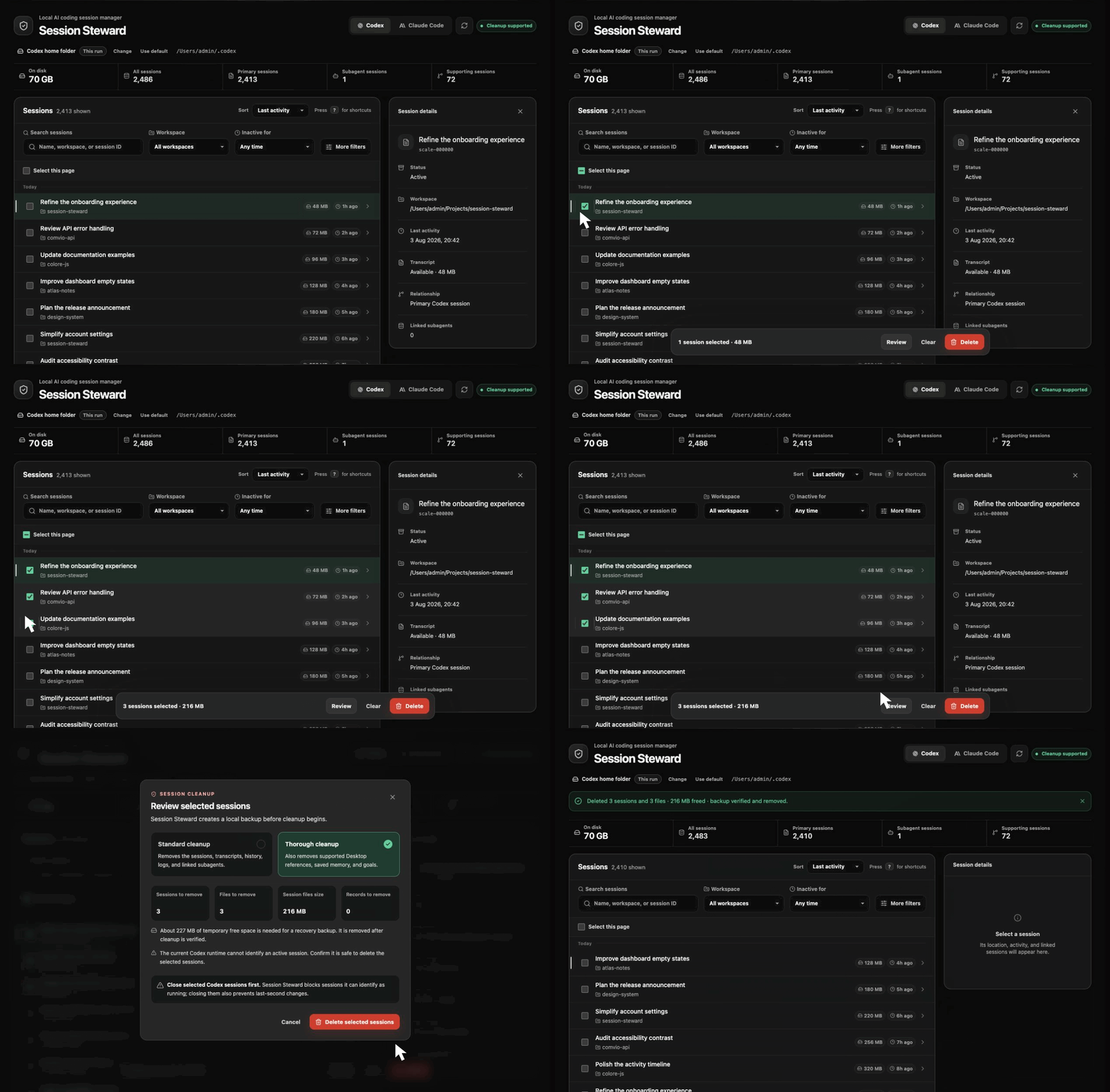
session-stewardChoose Codex or Claude Code, filter or search the list, and open sessions you are unsure about. When you select sessions for cleanup, the browser shows the affected records before asking for confirmation.
Use session-steward --no-open to start without opening a browser automatically. Open the local address printed in the terminal.
Terminal CLI
Start the interactive terminal:
session-steward-cliUse Claude Code instead of Codex, or return a limited JSON result for another tool:
session-steward-cli --provider claude-code
session-steward-cli --json --limit 10
Filter with options such as --inactive-days 60, --archive-status archived, or --workspace /path/to/project. Use --events for the timeline, --tokens for token use, and --sort size for the largest sessions first. Run session-steward-cli --help for every option.
MCP with ChatGPT, Codex, or Claude Code
Connect the local MCP server once:
codex mcp add session-steward -- session-steward-mcpOr connect it to Claude Code:
claude mcp add --scope user session-steward -- session-steward-mcpRegistry installers can start the same server without a global install using npx session-steward@latest mcp.
You can then ask your client to find inactive sessions, compare recognized session storage between Codex and Claude Code, inspect a session, keep a workspace, clean exact sessions, restore a backup, or manage a cleanup schedule.
Session Steward marks cleanup, restore, and schedule management as destructive MCP actions so the client can apply its configured approval policy.
Automatic cleanup continues in the background after you close the client. Create and manage schedules through MCP or the browser. Before uninstalling Session Steward, stop the scheduler:
session-steward-scheduler --stopFor another MCP client, configure a local stdio server named session-steward with the command session-steward-mcp.
The MCP process uses Session Steward's saved provider folders or the defaults when none are saved. Its server command can set startup folders with --codex-home or --claude-home, and its manage_settings tool can change the saved folders. A one-time browser or CLI override does not carry into a later MCP process.
The MCP server runs locally, but session details can contain messages, commands, file names, and workspace paths. Your MCP client may send that information to its AI provider.
Review what will be deleted first
For a manual cleanup:
- Select the sessions.
- Close any selected sessions that may still be active.
- Review the cleanup plan Session Steward builds.
- Confirm the plan.
- Session Steward creates a local recovery backup.
- It removes only supported records in the reviewed plan.
- It checks whether those records are gone.
Every interface revalidates the selected sessions before changing data. If Session Steward can detect that a selected session is active, preflight or cleanup stops. When detection is unavailable, it warns you to confirm that the selected sessions are closed.
Standard and thorough cleanup
Standard cleanup removes supported transcripts, history, registry entries, logs, and linked artifacts belonging to the selected sessions. It is the routine option.
Thorough cleanup also removes additional recognized session-owned data. For Codex, that can include supported Desktop references, memory outputs, and goal records. For Claude Code, it includes recognized file checkpoints.
Thorough cleanup is unavailable when the detected storage layout is not supported. Standard cleanup can still remove records that Session Steward can identify safely.
Recovery backups are stored under session-steward-backups/ inside the active provider folder.
If cleanup from the browser or interactive terminal needs attention, the backup is kept until you decide whether to restore it. The browser offers Restore, and the terminal reports the backup for the restore command. MCP and scheduled cleanup try to restore automatically.
After successful cleanup, Session Steward removes the recovery backup when it can. A restore first creates a temporary safety backup of the current files, then tries to remove both backups if the restore succeeds. If a restore or backup removal cannot complete, recovery data remains and Session Steward reports it.
What cleanup leaves alone
- Sign-in data and saved API credentials
- Configuration, plugins, caches, and custom prompt files
- Project files, Git repositories, and worktrees
- Sessions outside the reviewed cleanup plan
- Conversations stored in your ChatGPT or Claude account
- Claude Code worktrees, branches, repositories, remote sessions, SSH sessions, and Cowork data
Provider folders and platform support
The browser shows the active provider folder. Select Change to choose another existing folder and save it for later browser, terminal, and MCP sessions.
For a one-time browser override:
session-steward --codex-home /path/to/.codex
session-steward --claude-home /path/to/.claude
The CLI and MCP commands accept the same flags. An override applies only to that process and does not replace the saved folder.
Codex and Claude Code CLI sessions are supported on macOS, Linux, and Windows. Local Claude Desktop sessions are also supported on macOS and Windows. On Windows, the default provider folders are %USERPROFILE%\.codex and %USERPROFILE%\.claude; both standalone and Microsoft Store Claude Desktop data locations are detected.
Inside WSL, Session Steward uses the Linux home folder. Run it from Windows to manage sessions in your Windows profile.
Archiving a Claude Desktop session does not delete it. It remains available until it is explicitly included in cleanup. Session Steward does not remove Claude worktrees.
Update or uninstall
session-steward update
npm uninstall --global session-steward
If npm needs root access, the update command asks before retrying with sudo.
Uninstalling does not remove provider sessions, recovery backups, or saved folder preferences.
Troubleshooting
- The browser did not open: Run
session-steward --no-open, then open the local address printed in the terminal. - No sessions were found: Check the selected provider and displayed home folder. Use Change or pass a one-time home-folder override.
- Thorough cleanup is unavailable: Unrecognized storage stays unchanged, while standard cleanup may still be available.
- Your Node.js version is too old: Install Node.js 24.15 or newer and run Session Steward again.
Benchmarks
Current benchmarks on an arm64 Mac with Node.js 24.15.0:
| Scenario | Scale | Time | Measured memory growth | | --- | ---: | ---: | ---: | | Paginated session listing | 50,003 sessions | 26 ms | 0.16 MB heap | | Session size index | 20,003 sessions | 85 ms cold, 9.7 ms warm | 30 MB peak RSS | | Transcript-only discovery | 5,003 sessions | 662 ms | 4.02 MB heap |
Run the scale benchmarks with:
npm run benchmark:scale
npm run benchmark:overview
npm run benchmark:size
npm run benchmark:discovery
npm run benchmark:transcripts
Results vary with hardware, disk speed, and session layout. Tests and benchmarks use temporary synthetic data and do not read or modify your local sessions.
Support
Use GitHub Issues to report a bug, request a provider, or share a storage format that Session Steward does not recognize. See the changelog for release history.
Session Steward is an independent project and is not affiliated with or endorsed by OpenAI or Anthropic.