
set-prompt
v0.8.3
Published
One repo. Every AI coding tool. Always in sync.

Maintainers
 juncha9
Readme
Set Prompt






One repo. Every AI coding tool. Always in sync.
Your skills, commands, and agents live in git. One command syncs them into every AI coding tool you use — so the prompts you built stay with you no matter which tool you're in.
Quick Start
From zero to linked in under a minute:
npm install -g set-prompt
sppt install https://github.com/you/my-prompts   # or: sppt scaffold .
sppt link                                        # interactive checkbox — pick your tools
That's it. Your prompts are now live in every AI tool you selected.
Installation
# global install (recommended)
npm install -g set-prompt

# one-off run without installing
npx set-prompt <command>
Both set-prompt and the short alias sppt are registered — use whichever you prefer:
sppt install <url>        # connect an existing repo
sppt link                 # link to AI agents
sppt repo pull            # pull latest changes
sppt repo save -m "…"     # commit + push local edits
Workflow
Step 1 — Connect your prompt repository
Point set-prompt at a git repo containing your prompts. It clones it to ~/.set-prompt/repo/ and registers it as your prompt source.
set-prompt install https://github.com/you/my-promptsDon't have a repo yet? Scaffold one first:
mkdir my-prompts && cd my-prompts && git init
set-prompt scaffold .
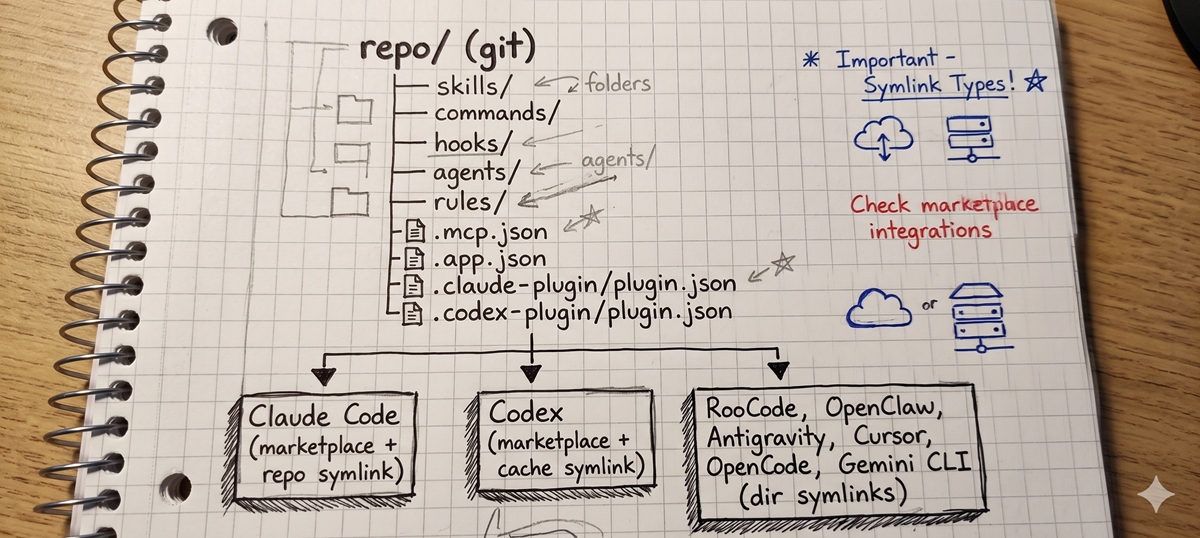
This creates the expected directory structure with plugin manifests:
my-prompts/
├── skills/
├── commands/
├── hooks/
├── agents/
├── rules/
├── .mcp.json
├── .app.json
├── .claude-plugin/plugin.json
├── .codex-plugin/plugin.json
└── SET_PROMPT_GUIDE.md          (optional reference doc)
Re-run safety:
scaffoldnever overwrites existing plugin manifests. On re-run, it validates them against required fields and preserves your customizations (customname,version,description, etc.). Invalid files trigger a warning but stay untouched.
Step 2 — Link to AI agents
set-prompt link              # interactive checkbox — select agents to link
set-prompt link claudecode   # link Claude Code only
set-prompt link roocode      # link RooCode only
set-prompt link openclaw     # link OpenClaw only
set-prompt link codex        # link Codex only
set-prompt link antigravity  # link Antigravity only
set-prompt link cursor       # link Cursor only
set-prompt link opencode     # link OpenCode only
set-prompt link geminicli    # link Gemini CLI only
set-prompt link hermes       # link Hermes only
The interactive mode shows all agents with their current state. Check to link, uncheck to unlink — existing directories are backed up before being replaced.
| Agent | Method | What gets linked |
|---|---|---|
| Claude Code | marketplace + repo symlink | repo via ~/.set-prompt/claude-code/plugins/sppt |
| Codex | marketplace + cache symlink | repo via ~/.agents/plugins/ + ~/.codex/plugins/cache/ |
| RooCode | dir symlinks into ~/.roo/ | skills/, commands/ |
| OpenClaw | dir symlinks into ~/.openclaw/workspace/ | skills/ |
| Antigravity | dir symlinks into ~/.gemini/antigravity/ | skills/ |
| Cursor | dir symlinks into ~/.cursor/ | skills/, agents/, commands/, hooks/, mcp.json (hardlink) |
| OpenCode | dir symlinks into ~/.config/opencode/ | skills/, commands/, agents/ |
| Gemini CLI | dir symlinks into ~/.gemini/ | skills/, commands/, agents/ |
| Hermes | Python plugin adapter at ~/.hermes/plugins/sppt/ | skills/, commands/, hooks/hooks.json (read directly from repo at startup) |
Note on Claude Code: Operates as a plugin. Restart Claude Code after linking for the plugin to be recognized.
Note on Codex: Operates as a plugin. Restart Codex after linking — you may need to restart twice before the plugin is fully recognized.
Note on RooCode: Skill directory names must use hyphens only —
my_skill(underscore) silently fails to be recognized, whilemy-skillworks. Hyphens work on every platform, so default to them.
Note on Cursor: Does not load
rules/from symlinked directories. Use.cursor/rules/within each project instead, or manage rules via Cursor Settings.
Note on OpenCode: Linked at
~/.config/opencode/— OpenCode's default config directory, so no env var setup required.
Note on Gemini CLI: Skills follow the standard
skills/<name>/SKILL.mdpattern. Commands use.tomlformat (not.md) and agents use.mdwith YAML frontmatter. Files in your repo'scommands/must be TOML for Gemini CLI to recognize them. Agents have strict frontmatter validation — unknown keys (e.g.allowed-tools,color,modefrom other platforms) cause Gemini CLI to reject the agent. SeeSET_PROMPT_GUIDE.mdfor the allowed keys.
Note on Hermes: Hermes plugins must register skills/commands/hooks programmatically — directory drop-ins are not auto-discovered. set-prompt generates a small Python adapter (
~/.hermes/plugins/sppt/__init__.py) with the repo's absolute path baked in, so no symlinks are needed. Restart Hermes afterlink(or after adding/removing a skill in your repo) —register()runs only once at Hermes startup. Activation requiresspptlisted underplugins.enabledin~/.hermes/config.yaml— set-prompt writes this entry automatically (creating the file when absent, or appending to the existing list while preserving other entries and comments via AST-based YAML editing with backup/rollback). Plugin skills don't appear in/skills list(Hermes policy — plugin skills are opt-in explicit loads, not part of the auto-listedavailable_skillsindex). Load them with the qualified namespace:skill_view("sppt:<name>")— e.g.skill_view("sppt:dev-base"). Hooks are observation-only on the Hermes side: the samehooks/hooks.jsonis reused, but Hermes events (pre_tool_call,on_session_start, etc.) are picked up while Claude/Cursor keys are ignored. Hook scripts can reference${SET_PROMPT_REPO}.
Step 3 — Keep in sync
Primary flow — pull incoming, save outgoing:
set-prompt repo pull                  # fetch + pull latest changes from remote
set-prompt repo save -m "message"     # stage + commit + push in one step
set-prompt repo save                  # same, but auto-generates message from changed files
Additional commands:
set-prompt repo status                # show branch, ahead/behind, changed files
set-prompt repo commit -m "message"   # commit locally without pushing
set-prompt repo push                  # push existing local commits
set-prompt repo path                  # print repo location (e.g. cd "$(sppt repo path)")
set-prompt repo open                  # open repo in OS file manager (--code VSCode, --stree Sourcetree)
Symlink-based agents (Claude Code, Codex, RooCode, OpenClaw, Antigravity, OpenCode, Gemini CLI) reflect changes immediately after pull. Cursor's mcp.json is a hardlink to repo's .mcp.json, so edits to either side are reflected automatically. Hermes is the exception — its Python adapter only re-scans the repo at process startup, so restart Hermes after pulling new content.
Step 4 — Uninstall
Removes all set-prompt data, reverts symlinks, and restores any backed-up directories.
set-prompt uninstallCommands
| Command | Description |
|---------|-------------|
| install <url> | Clone remote git repo and register as prompt source |
| link [agent] | Link/unlink agents interactively, or target one directly |
| repo status | Show VCS status: branch, ahead/behind, changed files |
| repo pull | Fetch and pull latest changes from remote repo |
| repo commit [-m <msg>] | Stage all changes and commit locally (auto-generates message from changed files if omitted) |
| repo push | Push local commits to remote |
| repo save [-m <msg>] | Stage + commit + push in one step (macro) |
| repo path | Print the repo path to stdout (e.g. cd $(sppt repo path)) |
| repo open | Open the repo in the OS file manager (--code for VSCode, --stree for Sourcetree) |
| status | Show current repo and linked agents |
| scaffold [path] | Create or validate directories and plugin manifests (existing files are preserved) |
| uninstall | Remove all set-prompt data and restore backups |
What Gets Created
~/.set-prompt/
├── config.json
├── repo/                    # cloned prompt repository
│   ├── skills/
│   ├── commands/
│   ├── hooks/
│   ├── agents/
│   ├── rules/
│   ├── .mcp.json
│   ├── .app.json
│   ├── .claude-plugin/plugin.json
│   └── .codex-plugin/plugin.json
└── claude-code/             # Claude Code marketplace
    ├── .claude-plugin/marketplace.json
    └── plugins/sppt → repo  (symlink)

~/.roo/                      # RooCode (dir symlinks)
├── SET_PROMPT_BACKUP/
├── skills/ → repo/skills
└── commands/ → repo/commands

~/.openclaw/workspace/       # OpenClaw (dir symlinks)
├── SET_PROMPT_BACKUP/
└── skills/ → repo/skills

~/.gemini/antigravity/       # Antigravity (dir symlinks)
├── SET_PROMPT_BACKUP/
└── skills/ → repo/skills

~/.agents/plugins/           # Codex marketplace
└── marketplace.json

~/.codex/
├── config.toml              # plugin enabled
└── plugins/cache/local-repo/sppt/1.0.0 → repo  (symlink)

~/.cursor/                   # Cursor (dir symlinks)
├── SET_PROMPT_BACKUP/
├── skills/ → repo/skills
├── agents/ → repo/agents
├── commands/ → repo/commands
├── hooks/ → repo/hooks
└── mcp.json ⇔ repo/.mcp.json  (hardlink)

~/.config/opencode/          # OpenCode (dir symlinks)
├── SET_PROMPT_BACKUP/
├── skills/ → repo/skills
├── commands/ → repo/commands
└── agents/ → repo/agents

~/.gemini/                   # Gemini CLI (dir symlinks)
├── SET_PROMPT_BACKUP/
├── skills/ → repo/skills       (Gemini reads SKILL.md)
├── commands/ → repo/commands   (Gemini reads *.toml)
├── agents/ → repo/agents       (Gemini reads *.md)
└── antigravity/                (Antigravity's own subtree, unrelated)

~/.hermes/                   # Hermes (Python plugin adapter, no symlinks)
├── config.yaml              # plugins.enabled: [sppt]  (created if absent)
└── plugins/sppt/
    ├── plugin.yaml          # Hermes manifest
    └── __init__.py          # REPO_DIR baked in; reads <repo>/{skills,commands,hooks/hooks.json} at startup
Warning
set-prompt modifies configuration files managed by third-party AI agent applications:
- Claude Code — writes to
~/.claude/settings.jsonand~/.claude/plugins/installed_plugins.json - Codex — writes to
~/.agents/plugins/marketplace.jsonand~/.codex/config.toml - RooCode — replaces directories in
~/.roo/ - OpenClaw — replaces directories in
~/.openclaw/workspace/ - Antigravity — replaces directories in
~/.gemini/antigravity/ - Cursor — replaces directories and
mcp.jsonin~/.cursor/ - OpenCode — replaces directories in
~/.config/opencode/ - Gemini CLI — replaces directories in
~/.gemini/(antigravity/subtree untouched) - Hermes — generates
~/.hermes/plugins/sppt/{plugin.yaml, __init__.py}and addsspptto~/.hermes/config.yamlunderplugins.enabled(creates the file when absent; appends to the existing list while preserving other entries and comments)
Before making any changes, set-prompt creates a backup and rolls back automatically on failure. However, you should be aware that:
- Modifying these files may conflict with future updates to the target agent
- If a rollback also fails, the backup path is printed — you can restore manually
Use set-prompt uninstall to cleanly revert all changes.
Requirements
- Node.js 18+
- Git (must be available in
PATHforset-prompt install) - Windows only: symlink creation requires Developer Mode enabled or running as Administrator (Linux/macOS work out of the box)
Support
set-prompt is a solo side project. Your support genuinely makes a difference.
- Star this repo
- Report bugs — open an issue with steps to reproduce
- Request features — share ideas via issues
- Sponsor on GitHub if the project saves you time
Dev Commands
npx tsx src/index.ts <command>   # Run without building
npm run build                    # tsup build
npm link                         # Register as global CLI
npm unlink -g set-prompt         # Remove global CLI
npm test                         # Run tests with vitest
License
This project is licensed under the MIT License. (c) 2026 juncha9