
sf-apex-codegen
v1.0.2
Published
Salesforce Metadata CLI with beautiful HTML visualizations
Downloads
20

Maintainers
 mohanchinnappan
Readme
🚀 Salesfore Apex Codegen
A beautiful, modern CLI tool for Salesforce Apex Codegen with interactive HTML visualizations


Transform your Salesforce ApexCode and AI prompt generation into a delightful visual experience! This CLI combines powerful Salesforce Tooling API queries with elegant, interactive HTML interfaces.
✨ Features
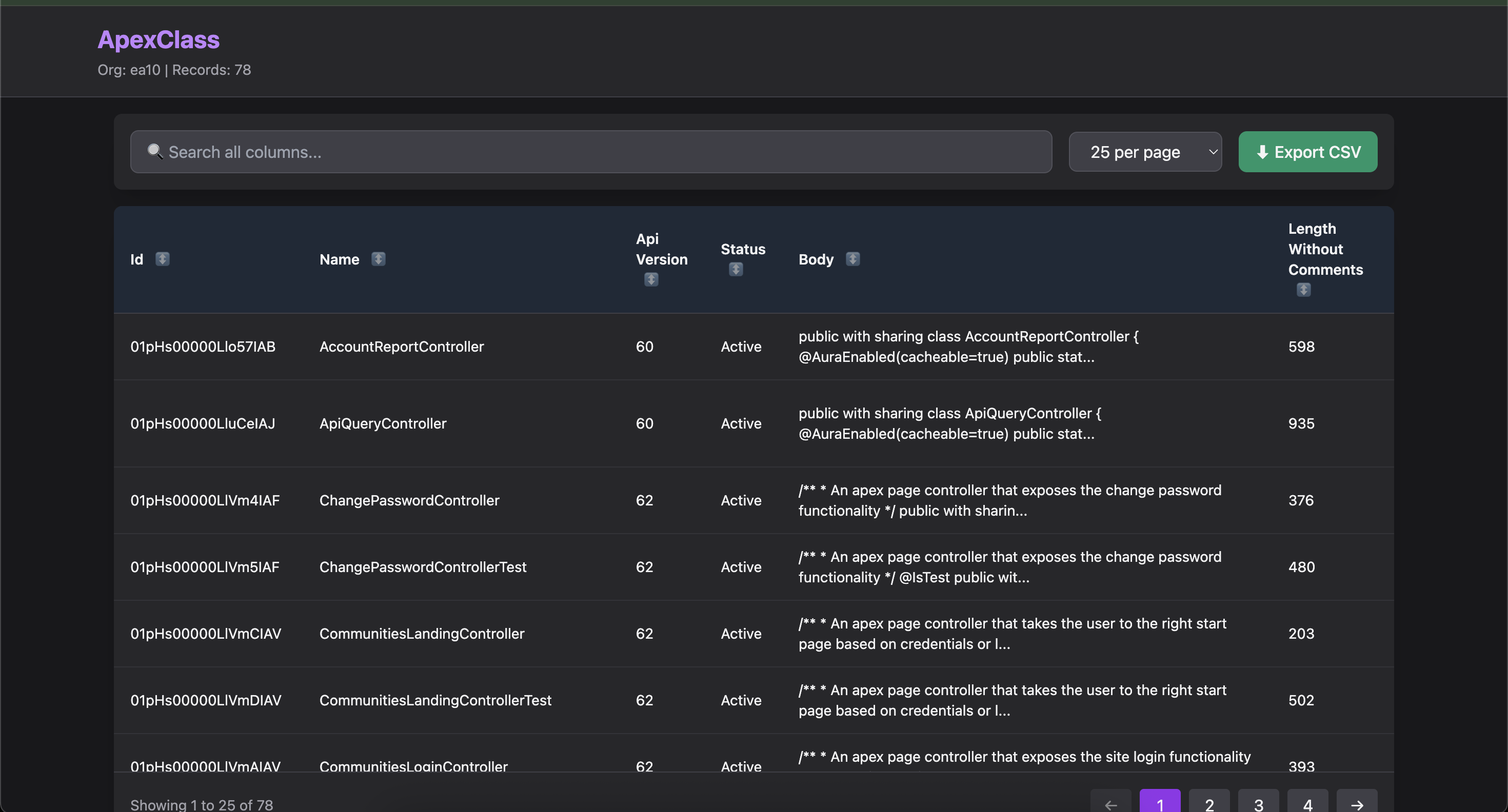
📊 Interactive Metadata Browser
- Dark-themed data tables with Tailwind CSS
- Real-time search across all columns
- Smart column sorting (click any header)
- Flexible pagination (10/25/50/100/All records)
- CSV export of filtered results
- Responsive design that works on any screen
- Zero external libraries - pure vanilla JavaScript
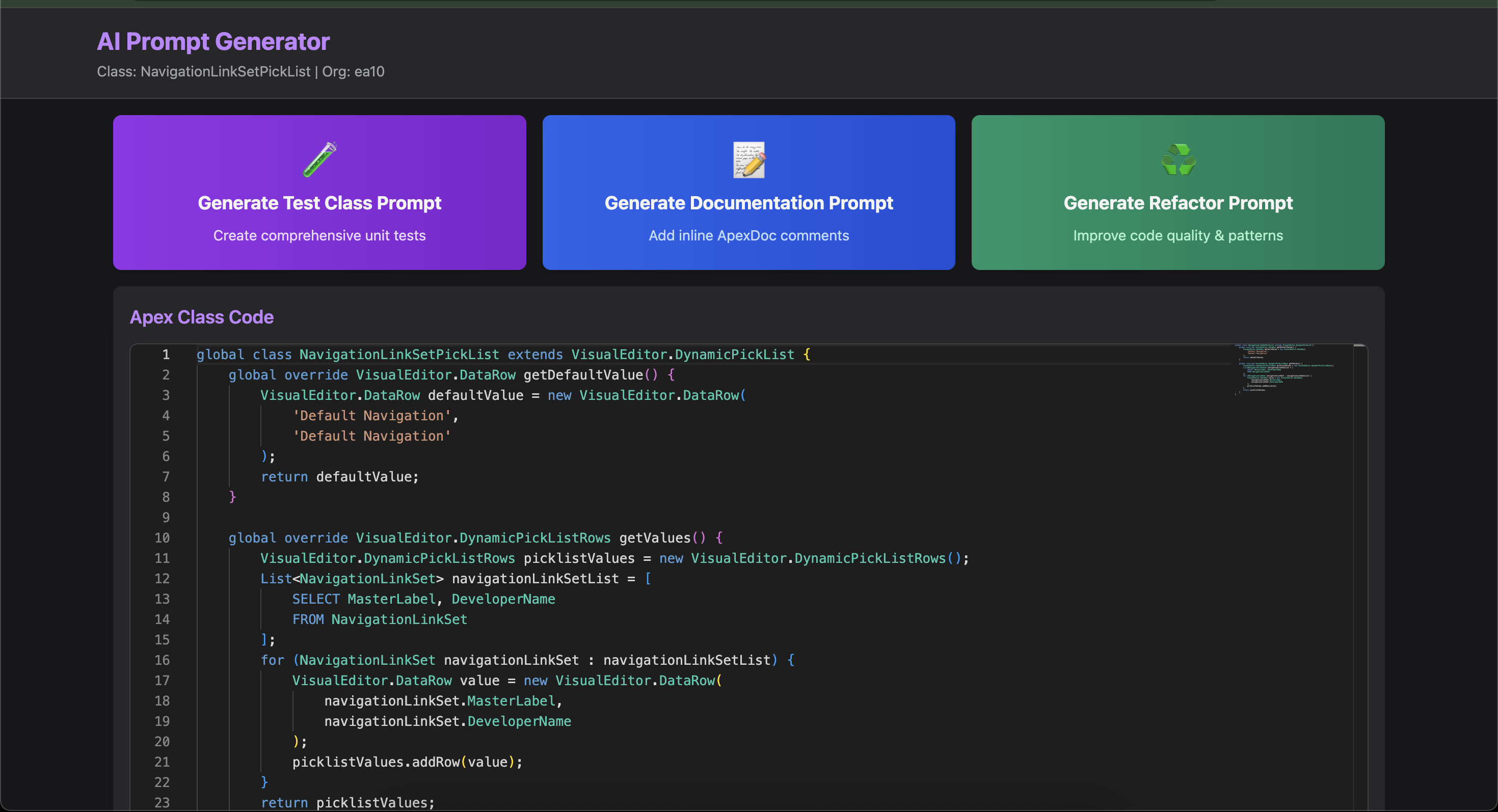
🤖 AI Prompt Generator
- Monaco Editor with Apex syntax highlighting
- Three prompt types:
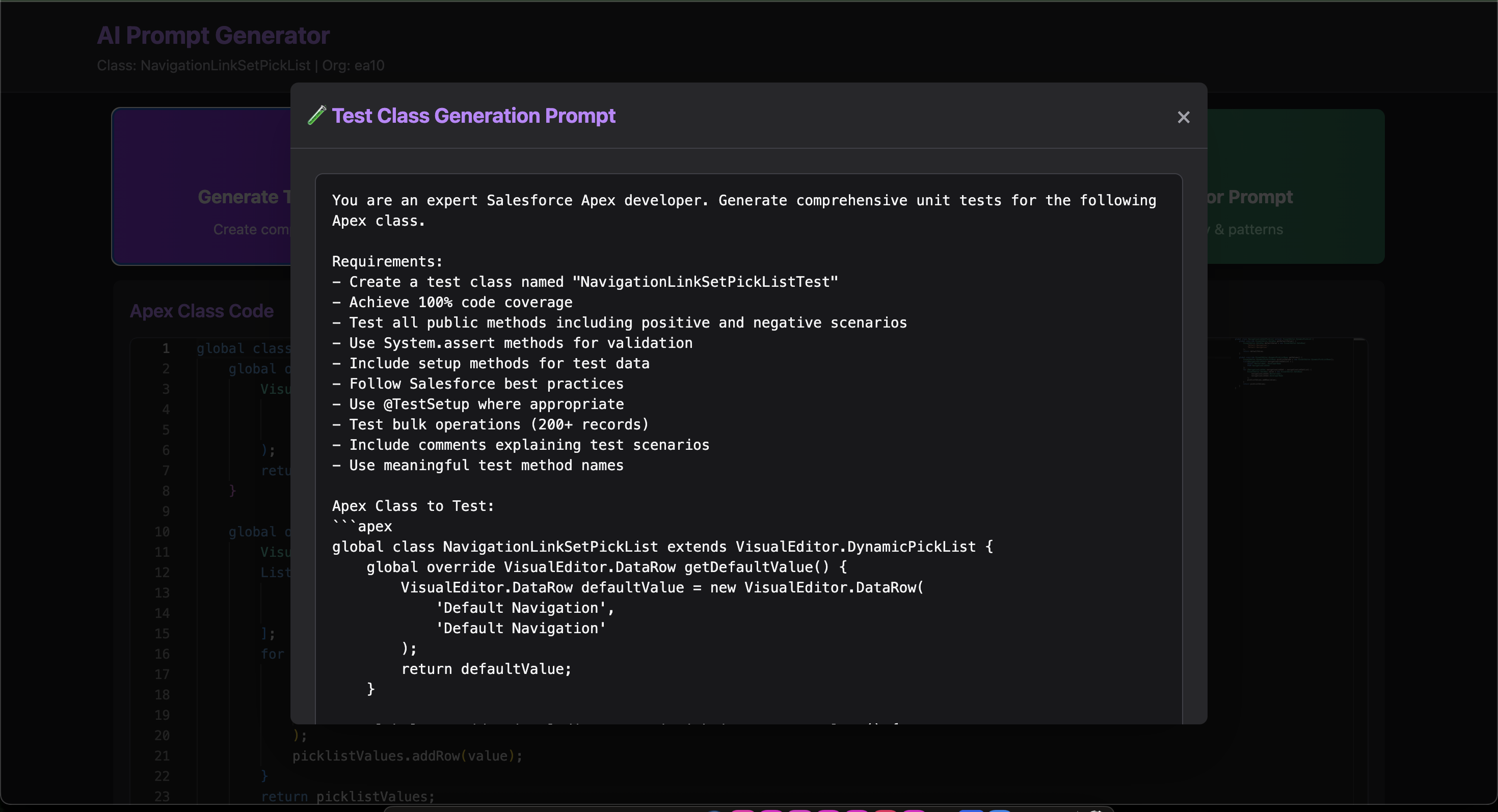
- 🧪 Test Class Generation - Comprehensive unit test requirements
- 📝 Documentation - ApexDoc inline comment standards
- ♻️ Code Refactoring - Quality improvement guidelines
- Modal dialogs with beautiful UI
- One-click copy to clipboard
- Keyboard shortcuts for efficiency
Demo
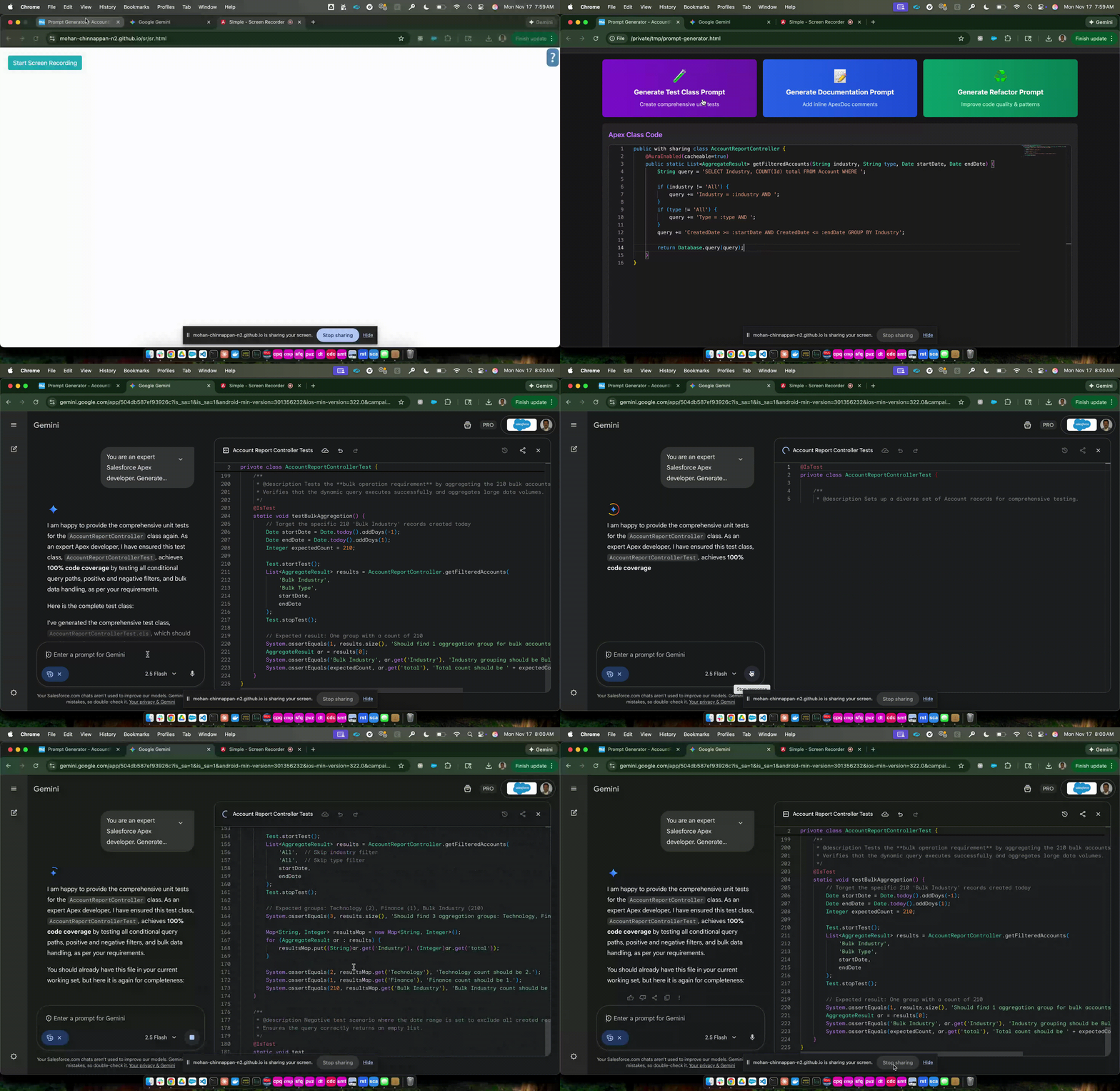
📸 Screenshots
📦 Installation
Prerequisites
- Node.js >= 18.0.0
- Salesforce CLI (
sforsfdx) - Authenticated Salesforce org
Install
npm install -g sf-apex-codegen
🎯 Usage
Command: list - Browse Metadata
List any Salesforce metadata type in a beautiful, interactive table.
sf-apex-codegen list -m <metadataType> -o <orgUsername> [options]Options
-m, --metadata <type>- Metadata type (required)-o, --org <username>- Salesforce org username or alias (required)--out <path>- Output HTML file (default: metadata-list.html)--open- Open HTML in browser automatically
Examples
# List all Apex Classes
sf-apex-codegen list -m ApexClass -o prod

# List Apex Triggers with auto-open
sf-apex-codegen list -m ApexTrigger -o mydevorg --open

# List Lightning Web Components
sf-apex-codegen list -m LightningComponentBundle -o dev --out lwc-list.html

# List Apex Pages with custom output
sf-apex-codegen list -m ApexPage -o sandbox --out pages.html --open
Supported Metadata Types
ApexClass- Apex classes with code metrics
Command: gen-prompt - Generate AI Prompts
Generate AI prompts for Apex code analysis with inline code viewer.
sf-apex-codegen gen-prompt -m <className> -o <orgUsername> [options]Options
-m, --metadata <name>- Apex class name (required)-o, --org <username>- Salesforce org username or alias (required)-t, --type <type>- Metadata type (default: ApexClass)--out <path>- Output HTML file (default: prompt-generator.html)--open- Open HTML in browser automatically
Examples
# Generate prompts for AccountController
sf-apex-codegen gen-prompt -m AccountController -o prod --open

# Generate prompts for OpportunityTriggerHandler
sf-apex-codegen gen-prompt -m OpportunityTriggerHandler -o dev

# Custom output location
sf-apex-codegen gen-prompt -m ContactService -o sandbox --out ~/prompts/contact.html
Available Prompt Types
🧪 Test Class Generation
- Comprehensive unit test requirements
- 100% code coverage guidelines
- Bulk operation testing (200+ records)
- Positive and negative test scenarios
- Best practices and assertions
📝 Inline Documentation
- ApexDoc comment standards
- Method parameter documentation
- Return value descriptions
- Exception documentation
- Usage examples
♻️ Code Refactoring
- SOLID principles analysis
- Governor limits optimization
- Bulkification improvements
- Security (CRUD/FLS) checks
- Design pattern recommendations
🎨 Interactive Features
Metadata List View
| Feature | Description | |---------|-------------| | Search | Type in the search box to filter across all columns instantly | | Sort | Click any column header to sort ascending/descending | | Pagination | Choose 10, 25, 50, 100 or view all records | | Export | Download filtered results as CSV | | Responsive | Sticky headers and mobile-friendly design |
Prompt Generator View
| Feature | Description | |---------|-------------| | Code Editor | Syntax-highlighted, read-only Monaco editor | | Modal Dialogs | Beautiful prompts displayed in modal windows | | Copy Button | One-click copy to clipboard with confirmation | | Keyboard Shortcuts | ESC to close modals, Ctrl+C to copy |
🔧 Configuration
Salesforce Authentication
Ensure you're authenticated with the Salesforce CLI:
# Login to org
sf org login web -a myorg

# Verify authentication
sf org display -o myorg

# List all authenticated orgs
sf org list
API Version
The tool automatically uses the API version from your org. Default fallback is v59.0.
#x
🎯 Use Cases
For Developers
- Quickly browse all Apex classes, triggers, and components
- Search and filter metadata by name, status, or date
- Generate AI prompts for code review and improvement
- Export metadata lists for documentation
For Architects
- Audit code quality across orgs
- Identify refactoring opportunities
- Document systems with AI-generated docs
- Track metadata growth over time
For AI-Assisted Development
- Generate test classes using Claude/ChatGPT
- Create inline documentation automatically
- Refactor legacy code with AI guidance
- Standardize coding practices
📝 Roadmap
- [ ] Add support for custom objects and fields
- [ ] Implement metadata comparison between orgs
- [ ] Add Flow and Process Builder visualization
- [ ] Export to multiple formats (JSON, Excel)
- [ ] Dependency graph visualization
- [ ] Code complexity metrics
- [ ] Integration with VS Code extension
🐛 Troubleshooting
"sf command not found"
Ensure Salesforce CLI is installed:
npm install -g @salesforce/cli"Failed to fetch org info"
Verify authentication:
sf org display -o yourorg"No records found"
Check metadata type spelling and org permissions.
📄 License
This project is licensed under the MIT License - see the LICENSE file for details.
🙏 Acknowledgments
- Inspired by modern developer tools
- Built with ❤️ for the Salesforce community
- Powered by the Salesforce Tooling API
Made with ☁️ by Salesforce Developers, for Salesforce Developers