
sf-bulk-delete
v1.0.9
Published
Salesforce Bulk Delete Tool with Web UI

Maintainers
 mohanchinnappan
Readme
Salesforce Bulk Delete Tool
A powerful Node.js CLI tool with a beautiful web interface for bulk deleting Salesforce records using the Salesforce CLI.
Features
- 🎨 Beautiful Dark/Light Theme UI with Tailwind CSS
- 📊 Three-Panel Layout with resizable splitters
- 🔍 Advanced Data Table with search, sorting, and pagination
- 📁 Multiple Object Support via load-plan.json
- ✅ Bulk Selection with checkbox management
- 📥 CSV Export functionality
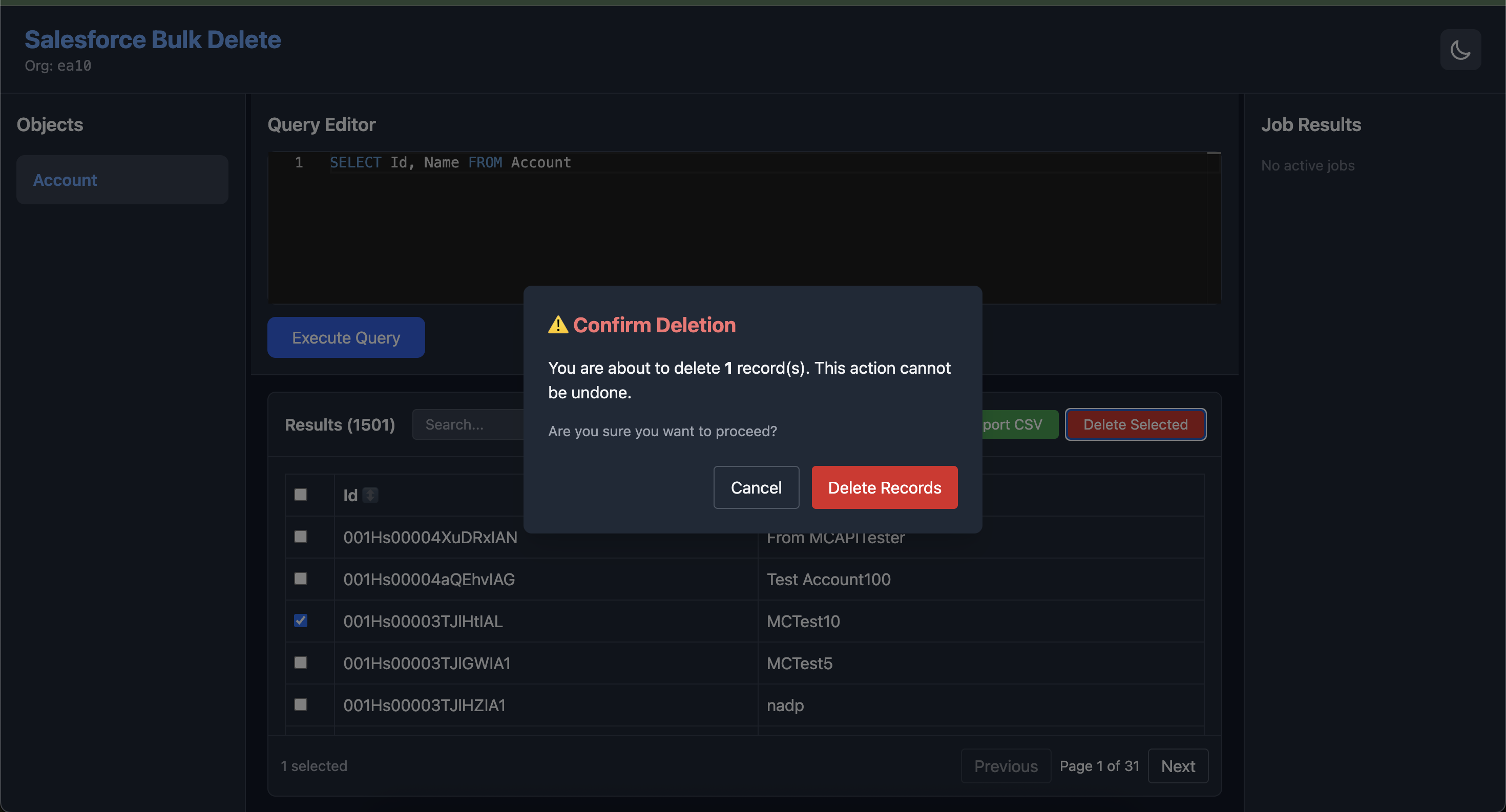
- ⚠️ Safe Deletion with confirmation dialogs
- 📈 Real-time Job Monitoring with success/failure reports
- 🔄 Auto-refresh job status polling
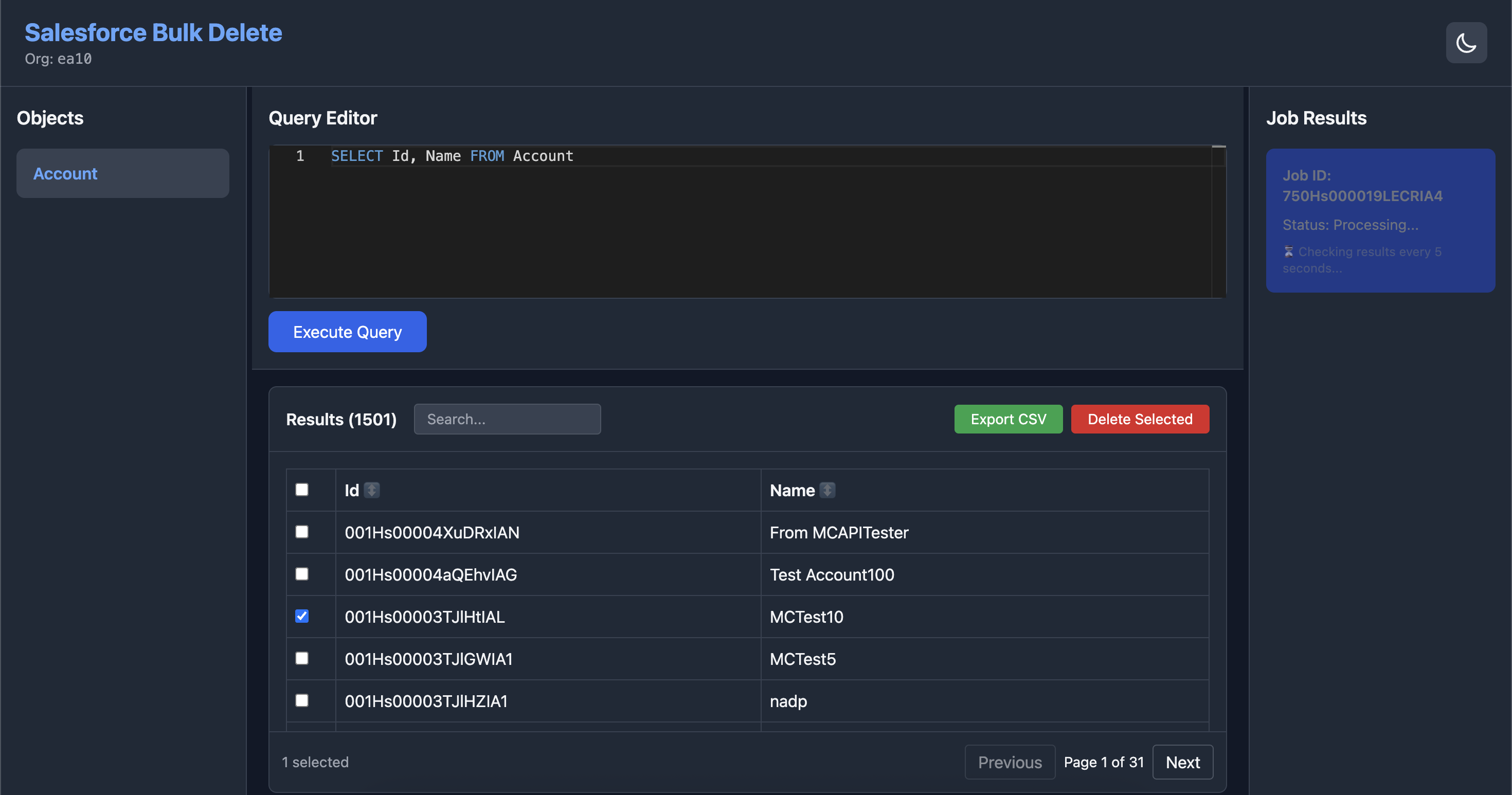
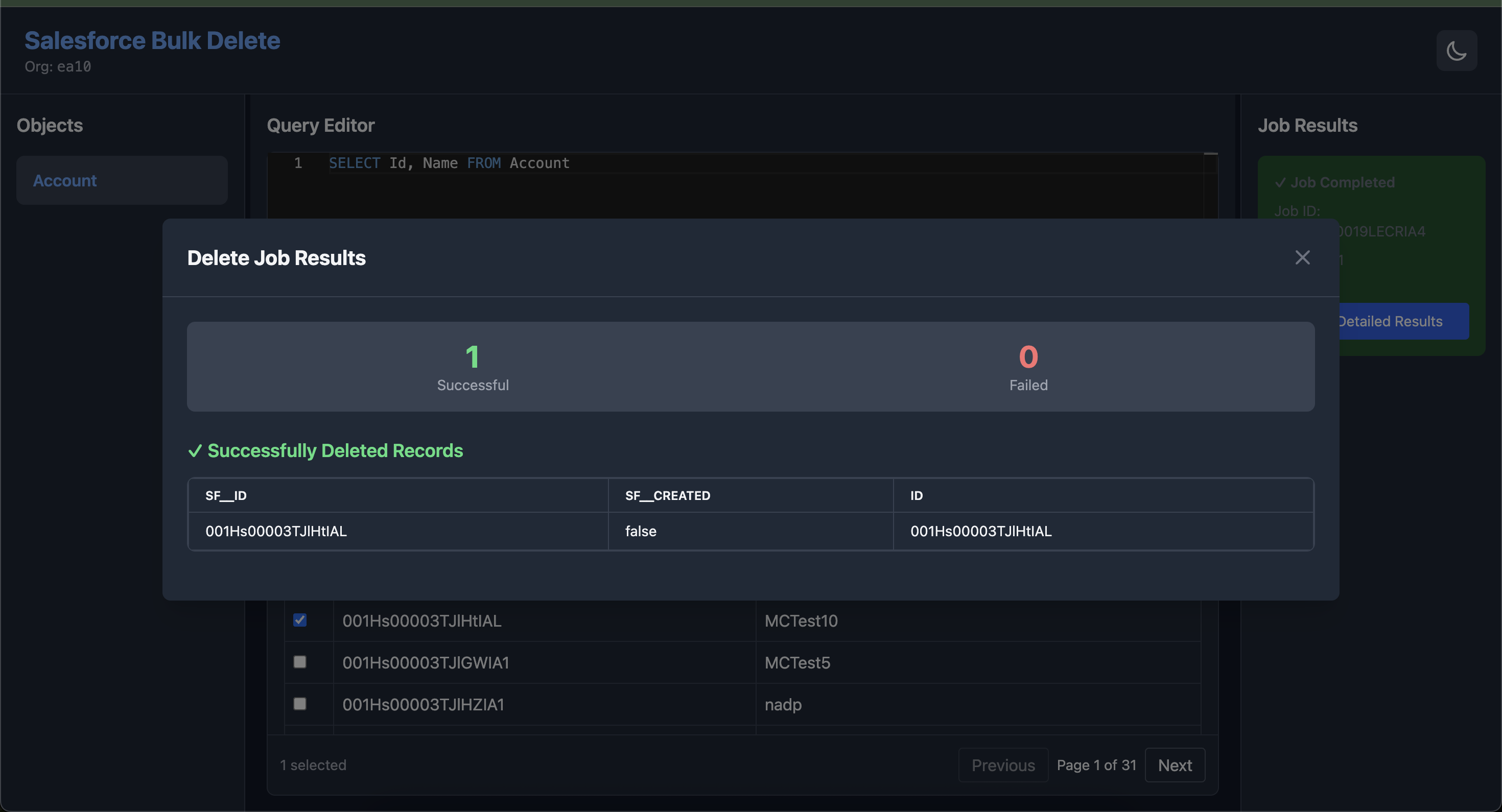
Screenshots
Prerequisites
- Node.js 14.x or higher
- Salesforce CLI (
sf) installed and configured - Authenticated Salesforce org
Installation
npm install -g sf-bulk-delete Usage
Start the Web Server
sf-bulk-delete start -o [email protected]  \
-p 7070 \
-l ./load-plans/load-plan-account.json
Command Options
-o, --org <username>- Required: Salesforce org username or alias-p, --port <number>- Port number for web server (default: 3000)-l, --load-plan <file>- Path to load-plan.json (default: load-plan.json)
Example
Load Plan Configuration
The load-plan.json file defines the Salesforce objects and queries for deletion. Here's the format:
[
  {
    "object": "Account",
    "compositeKeys": [
      "Id"
    ],
    "query": "SELECT  Name FROM Account",
    "fieldMappings": {
      "Name": "Name",
      "Id": "Id"
    }
  }
]
Another exmple:
[
  {
    "object": "Fruit__c",
    "compositeKeys": [
      "External_Id__c"
    ],
    "query": "SELECT Name, Qty__c,External_Id__c FROM Fruit__c",
    "fieldMappings": {
      "Name": "Name",
      "Qty__c": "Qty__c",
      "External_Id__c": "External_Id__c"
    }
  }
]
Load Plan Structure
Web Interface Guide
Left Panel - Objects List
- Displays all objects from load-plan.json
- Click an object to load its query
- Active object is highlighted
Center Panel - Query & Results
- Query Editor: View and edit SOQL queries, auto-completes with fields for the selected object
- Execute Button: Run the query (inserts Id field if not provided)
- Search Box: Filter results in real-time
- Data Table:
- Click column headers to sort
- Select records with checkboxes
- Hover for row highlighting
- Pagination Controls: Navigate through large result sets
- Export CSV: Download filtered results
- Delete Selected: Initiate bulk delete operation
Right Panel - Job Results
- Shows active and completed deletion jobs
- Real-time status updates
- Success/failure record lists
- Detailed job information
Deletion Workflow
- Select Object: Click an object in the left panel
- Execute Query: Click "Execute Query" to fetch records
- Filter/Search: Optionally filter records
- Select Records: Use checkboxes to select records for deletion
- Initiate Delete: Click "Delete Selected"
- Confirm: Review and confirm the deletion warning
- Monitor: Watch the job progress in the right panel
- Review Results: Check success/failure reports
API Endpoints
The tool exposes the following REST API endpoints:
GET /api/objects- Get all objects from load-planPOST /api/query- Execute SOQL queryPOST /api/delete- Delete recordsGET /api/results/:jobId- Get job results
Safety Features
- ⚠️ Confirmation Dialog: Always prompts before deletion
- 🔍 Record Preview: Shows exactly what will be deleted
- 📊 Job Tracking: Monitor deletion progress
- 📝 Result Reports: Detailed success/failure logs
- 🛡️ Error Handling: Graceful error messages
Technical Details
Bulk Delete Process
- Tool creates a CSV file with record IDs
- Executes:
sf data delete bulk --sobject <object> --file <csv> --wait 20 --target-org <org> - Polls job status every 5 seconds
- Retrieves success/failure CSV files
- Displays results in UI
Troubleshooting
"Command not found: sf"
- Install Salesforce CLI:
npm install -g @salesforce/cli
"No default org found"
- Authenticate:
sf org login web -a myorg - Specify org with
-oflag
Port already in use
- Use a different port:
-p 8080
Records not appearing
- Check org authentication
- Review query filters
License
MIT (c) Mohan Chinnappan
⚠️ Warning: This tool performs permanent deletions. Always verify your selection before confirming deletion operations.