
sf-bulk-upsert-uuid
v1.0.5
Published
Salesforce Bulk upsert with generated uuid CLI with Beautiful HTML Reports

Maintainers
 mohanchinnappan
Readme
🚀 Salesforce Bulk Update with Generated UUID CLI
A powerful and beautiful command-line tool for bulk updating Salesforce records with generated uuid with interactive HTML reports.


✨ Features
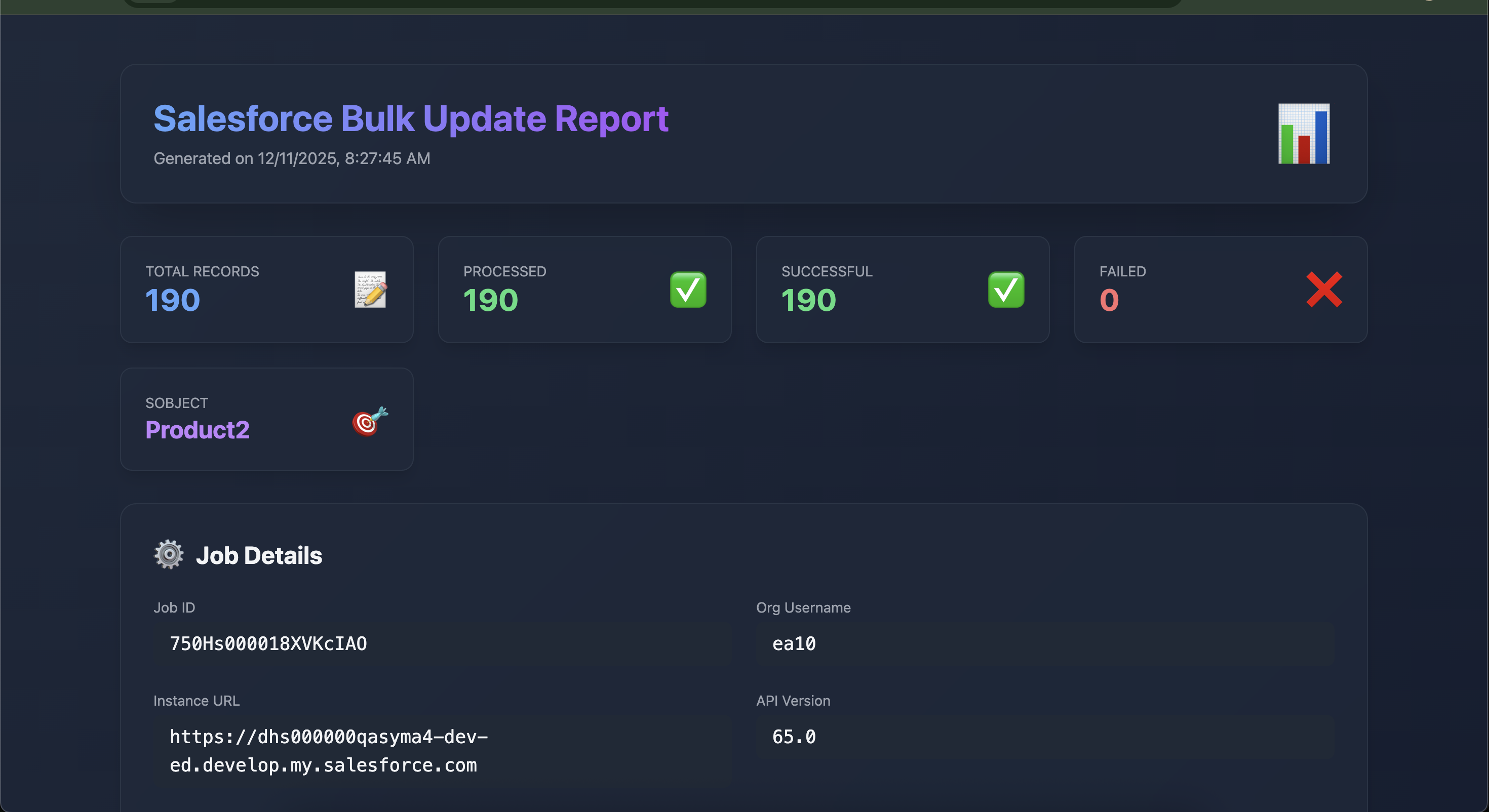
- 📊 Beautiful HTML Reports with dark/light theme
- 🔍 Interactive DataTable with sorting, search, and pagination
- 📥 CSV Export functionality
- 🆔 Auto UUID Generation for external IDs
- 🎨 Colorful CLI Output with step-by-step progress
- ⚡ Salesforce CLI Integration using
sfcommands - 📈 Real-time Statistics (processed, failed, total records)
- 🌐 Auto-opens Report in your default browser
Screenshot
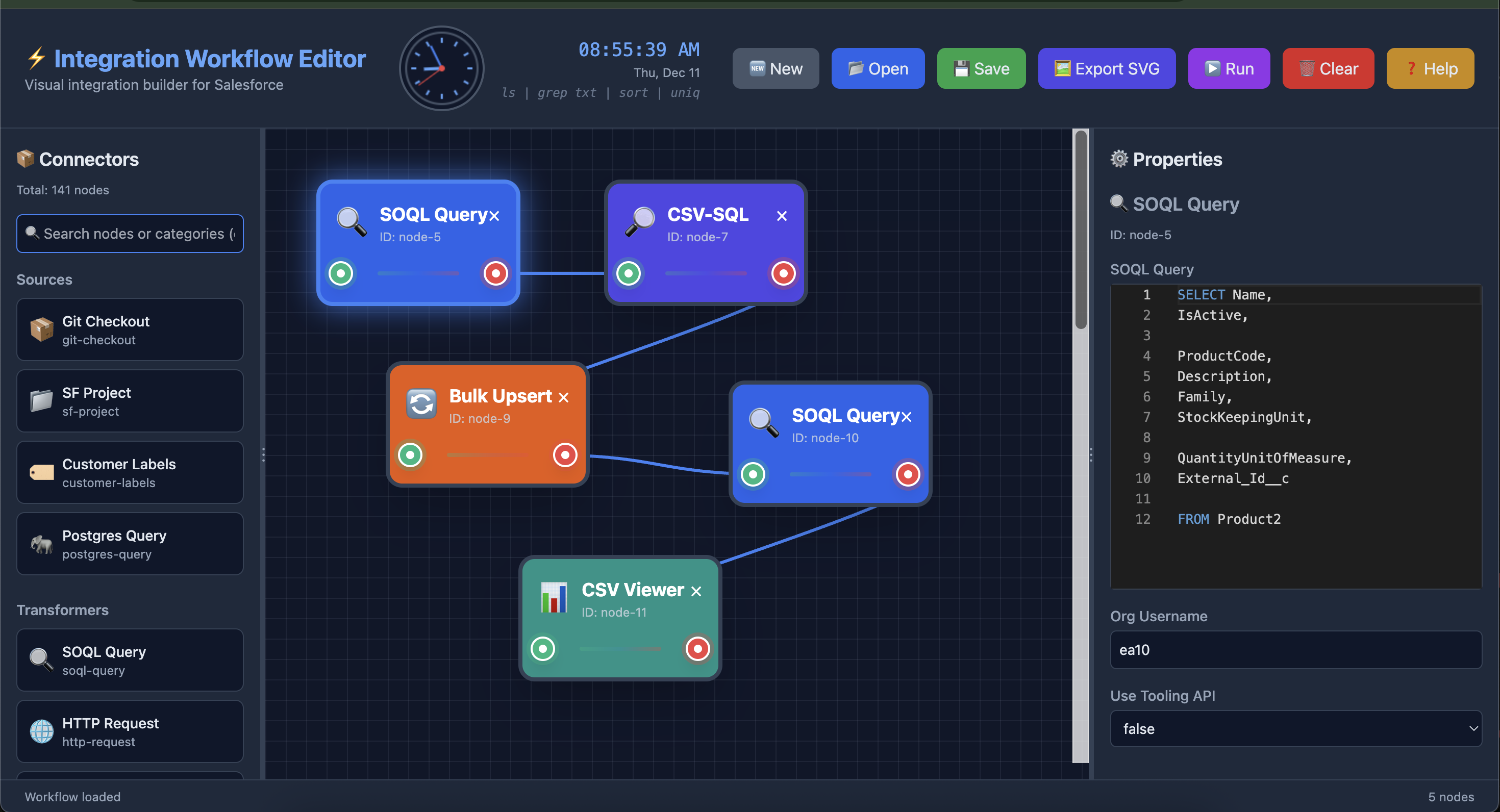
Using this in Integration Workflow Editor
📋 Prerequisites
- Node.js 16.x or higher
- Salesforce CLI (
sf) installed and authenticated - Active Salesforce org connection
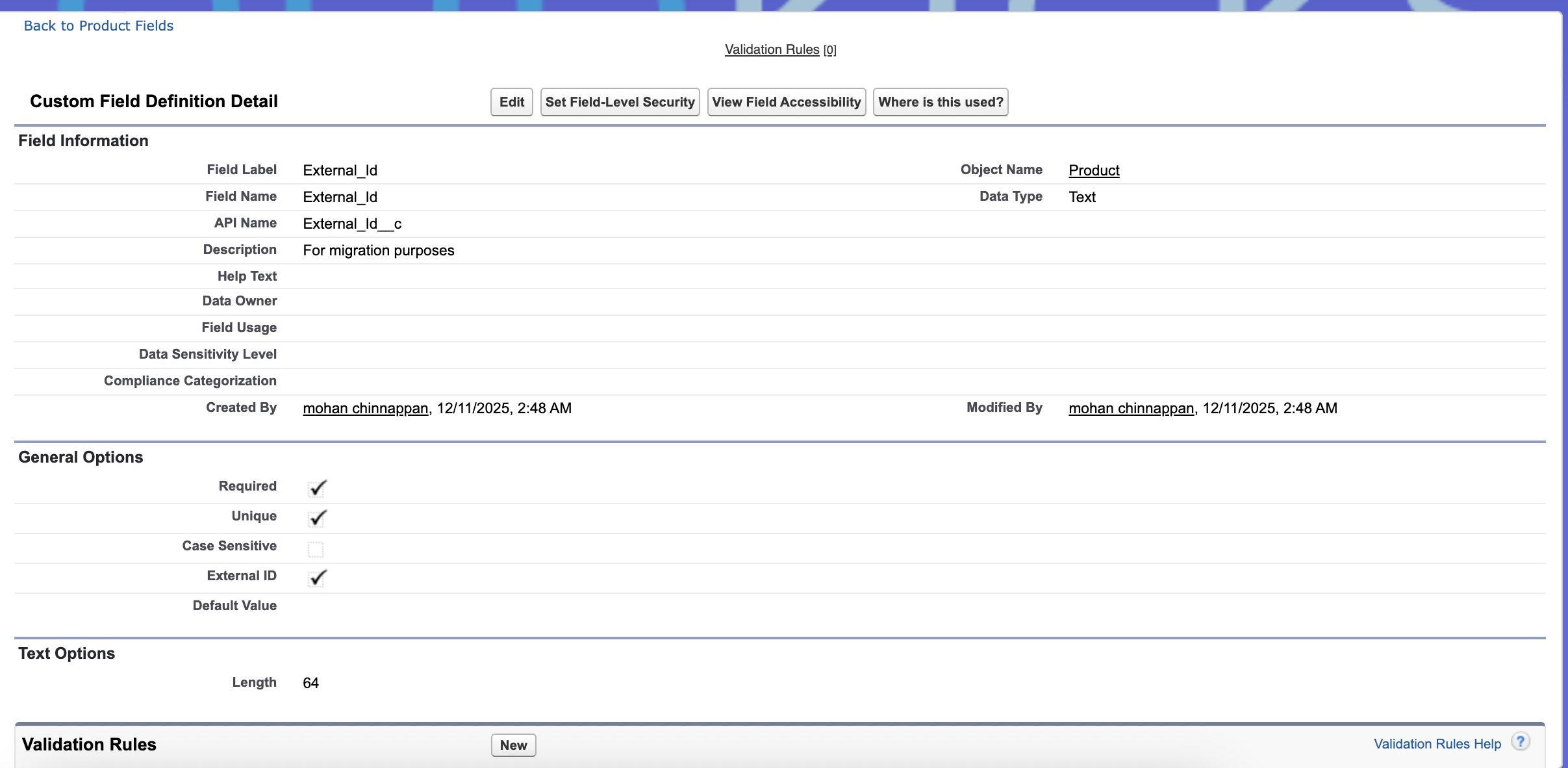
- Make sure to have required ExternalId field (example: External_Id__c) in the SObject
Install Salesforce CLI
npm install -g @salesforce/cliAuthenticate to Salesforce
sf org login web -a myorg🔧 Installation
Global Installation
npm install -g sf-bulk-upsert-uuid📖 Usage
Basic Syntax
sf-uuid-filler -o <username> -s <sobject> -q <query> [options]Required Options
| Option | Description | Example |
|--------|-------------|---------|
| -o, --org <username> | Salesforce org username or alias | [email protected] |
| -s, --sobject <name> | SObject API name | Account, Contact |
| -q, --query <soql> | SOQL query to fetch records | "SELECT Id, Name FROM Account" |
Optional Options
| Option | Description | Default |
|--------|-------------|---------|
| -e, --external-id <field> | External ID field name | Auto-generates UUID |
| -w, --wait <minutes> | Wait time for bulk job completion | 10 |
| -f, --file <path> | Use existing CSV file instead of query | - |
💡 Examples
Update Accounts with Auto-Generated UUID
sf-uuid-filler  \
  -o [email protected] \
  -e External_Id__c
  -s Account \
  -q "SELECT Id, Name, Industry, AnnualRevenue FROM Account WHERE Industry = 'Technology' LIMIT 100"
🎨 HTML Report Features
The generated HTML report includes:
Summary Dashboard
- Total Records: Number of records processed
- Processed: Successfully updated records
- Failed: Records that failed to update
- SObject: Target object name
Job Details Section
- Job ID
- Org Username
- Instance URL
- API Version
- SOQL Query (if used)
Interactive Data Table
- Sorting: Click column headers to sort
- Search: Global search across all columns
- Pagination: 10, 25, 50, 100, or All records per page
- Export: Download data as CSV
🔄 Workflow
- Authenticate: Connects to Salesforce org using provided username
- Query: Executes SOQL query to fetch records (or uses CSV file)
- Process: Adds external ID (UUID if not specified)
- Generate CSV: Creates temporary CSV file with records
- Bulk Update: Executes Salesforce bulk API operation
- Report: Generates beautiful HTML report
- Open: Auto-opens report in default browser
🛠️ Advanced Configuration
Error Handling
The CLI provides detailed error messages:
- ❌ Org authentication failures
- ❌ SOQL query errors
- ❌ Bulk API errors
- ❌ File I/O errors
📊 Sample Output
sf-uuid-filler  -o ea10  -s Product2  -q "SELECT Id, Name, External_Id__c FROM Product2"  -e External_Id__c

╔════════════════════════════════════════════════════════════╗
║       Salesforce Bulk Update Tool v1.0.0                   ║
╚════════════════════════════════════════════════════════════╝

[1/5] Fetching Salesforce org information...
Executing: Getting org details
 ›   Warning: @salesforce/cli update available from 2.113.6 to 2.114.5.
✓ Connected to: https://dhs000000qasyma4-dev-ed.develop.my.salesforce.com
✓ API Version: 65.0

[2/5] Querying Salesforce records...
Executing: Executing SOQL query
✓ Retrieved 190 records

[3/5] Processing records...

✓ CSV file created: /private/tmp/bulk-update-2025-12-11T12-23-39-848Z.csv

[4/5] Executing bulk update...
Executing bulk update command: sf data update bulk -f "/private/tmp/bulk-update-2025-12-11T12-23-39-848Z.csv" -s Product2 -w 10 -o ea10 --json
Starting bulk job...
Executing: Bulk update operation
 ›   Warning: @salesforce/cli update available from 2.113.6 to 2.114.5.
✓ Bulk update completed successfully
  Job ID: 750Hs000018XUmfIAG
  Records Processed: 190
  Successful Records: 190
  Records Failed: 0

[5/5] Generating HTML report...
✓ Report generated: /private/tmp/bulk-update-report-2025-12-11T12-23-47-209Z.html

╔════════════════════════════════════════════════════════════╗
║                  Operation Completed!                      ║
╚════════════════════════════════════════════════════════════╝
🐛 Troubleshooting
Issue: "sf command not found"
Solution: Install Salesforce CLI
npm install -g @salesforce/cliIssue: "Org not authenticated"
Solution: Login to your org
sf org login web -a myorgIssue: "SOQL query timeout"
Solution: Reduce record count or increase wait time
This project is licensed under the MIT License.
👤 Author
- Mohan Chinnappan
🙏 Acknowledgments
- Salesforce CLI team for the amazing
sfcommand - Commander.js for CLI framework
- DataTables for interactive tables
- Tailwind CSS for beautiful styling
🔮 Future Enhancements
- [ ] Support for bulk delete operations
- [ ] Real-time progress tracking
- [ ] Email notifications on completion
- [ ] Retry failed records
- [ ] Schedule bulk operations
- [ ] Multi-org support in single run
- [ ] Custom field mapping
- [ ] Dry-run mode
Made with ❤️ for the Salesforce community