
sf-cml-deploy
v1.0.7
Published
CML Fetch & Deploy Tool — CLI + Web UI for Salesforce Revenue Cloud

Maintainers
 mohanchinnappan
Readme
CML Deploy
Fetch, deploy, and copy Salesforce Revenue Cloud Constraint Model Language (CML) blobs between orgs.
CML source code is stored as a binary blob inside ExpressionSetDefinitionVersion.ConstraintModel — not as standard Salesforce metadata. The standard sf project retrieve/deploy commands do not capture it. This tool handles the REST API calls required to move CML between orgs.
Features
| | |
|---|---|
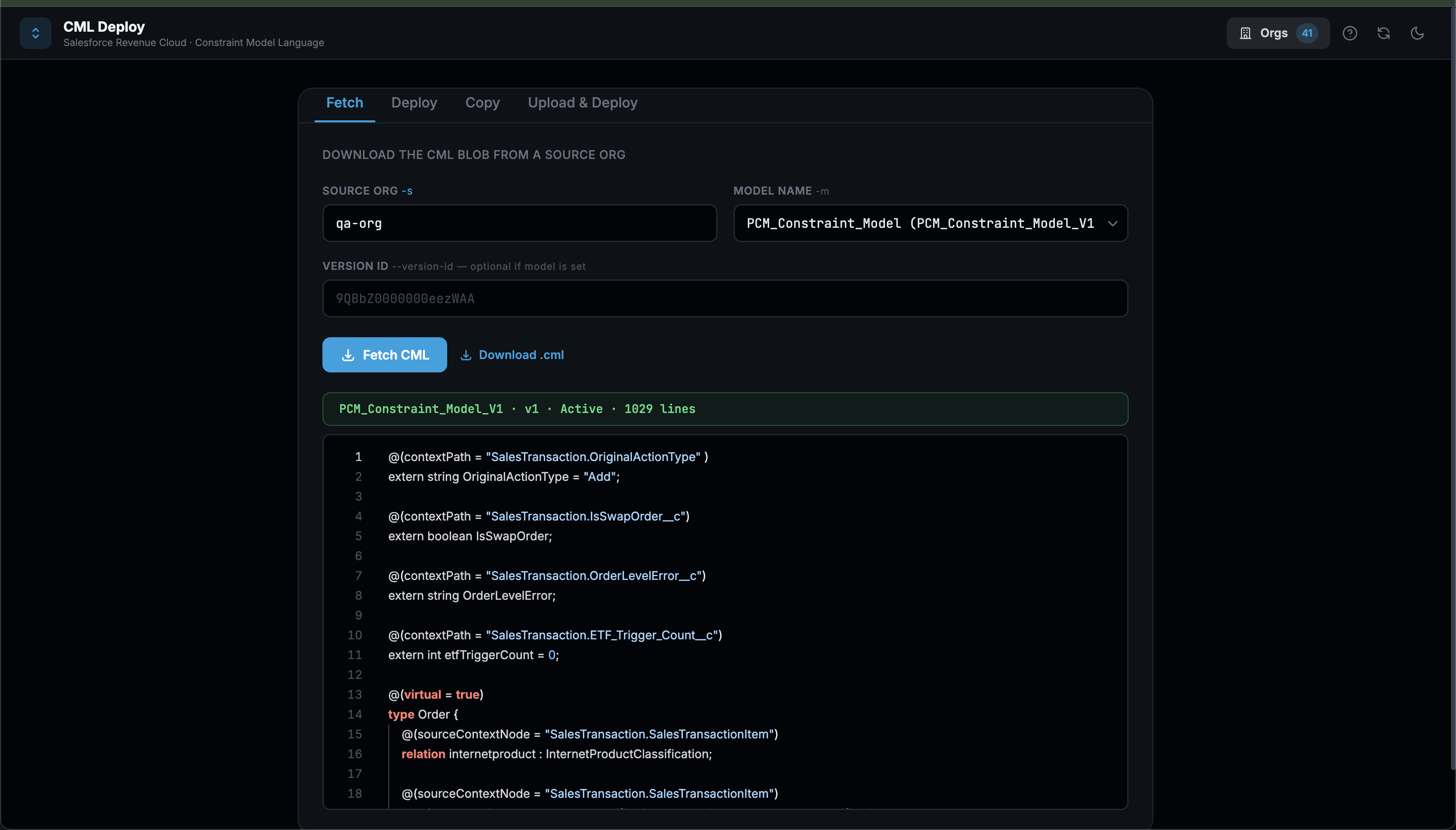
| Web UI | Monaco editor with CML syntax highlighting, model dropdowns auto-loaded per org, dark/light theme |
| CLI | Full commander-based CLI mirroring every UI operation |
| Fetch | Download a CML blob from any authenticated org |
| Deploy | Upload CML to a target org by model name or version ID |
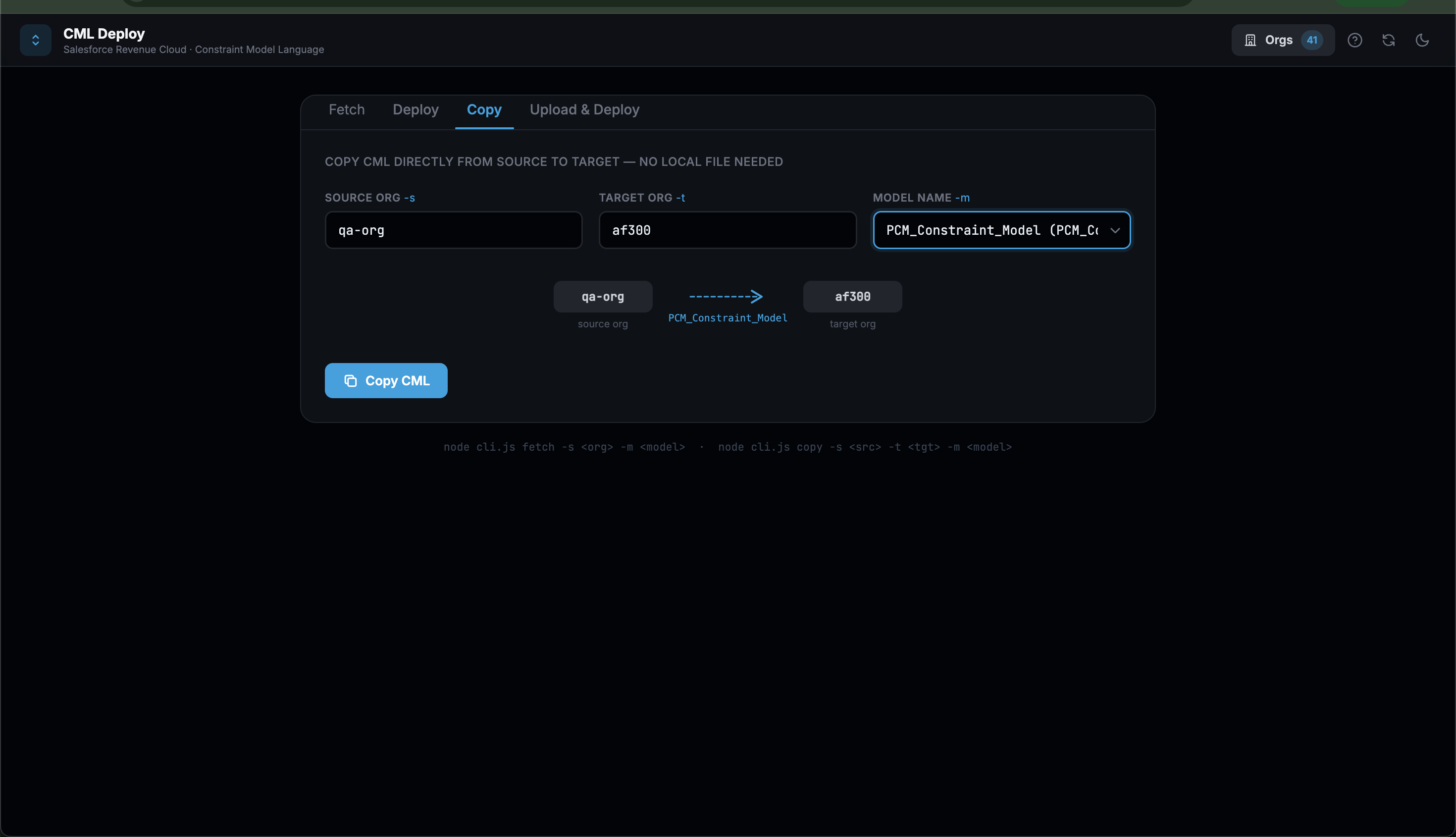
| Copy | Direct org-to-org transfer — no local file needed |
| Upload & Deploy | Drag-and-drop a local .cml file and deploy it |
| Org drawer | Searchable list of all sf-authenticated orgs |
| Context help | Slide-in help drawer with per-tab docs, concepts, and CLI reference |
Screenshots
Prerequisites
| Requirement | Version | Check |
|---|---|---|
| Node.js | ≥ 18 | node --version |
| Salesforce CLI | any | sf --version |
| Authenticated orgs | — | sf org list |
Authenticate an org if needed:
sf org login web --alias qa-org --instance-url https://test.salesforce.comInstallation
Global install (recommended)
npm install -g sf-cml-deployWeb UI
cml-deploy serve              # http://localhost:3000
cml-deploy serve --port 8080  # custom port
Open http://localhost:3000. The UI has four tabs:
| Tab | What it does |
|---|---|
| Fetch | Enter source org + pick model → view CML in Monaco editor → Download .cml |
| Deploy | Enter target org + model → paste CML into editor → Deploy |
| Copy | Enter source org, target org, model → copy directly between orgs |
| Upload & Deploy | Enter target org + model → drag-drop or browse for .cml file → Deploy |
CLI
List connected orgs
cml-deploy orgsFetch CML
# By model name (auto-discovers version ID)
cml-deploy fetch -s <orgAlias> -m <ModelName> -o output.cml

# By explicit version ID
cml-deploy fetch -s <orgAlias> --version-id 9QBbZ0000000eezWAA -o output.cml
Deploy CML
# By model name
cml-deploy deploy -t <orgAlias> -m <ModelName> ./model.cml

# By explicit version ID
cml-deploy deploy -t <orgAlias> --version-id 9QBbZ0000000eezWAA ./model.cml
Copy CML (org-to-org, no local file)
cml-deploy copy -s <sourceOrg> -t <targetOrg> -m <ModelName>Example
cml-deploy copy -s qa-org -t dev -m PCM_Constraint_Model ==> Copying 'PCM_Constraint_Model' from 'qa-org' → 'dev'...
SUCCESS — CML copied.
Source version : 9QBAq0000001UnFOAU (Active)
Target version : 9QBOL00000004d74AA
Lines : 1056Start web UI
cml-deploy serve --port 3000All commands support --help:
cml-deploy --help
cml-deploy fetch --help
cml-deploy deploy --help
API routes
The Express server exposes these JSON endpoints (consumed by the UI):
| Method | Route | Body / Params | Description |
|---|---|---|---|
| GET | /api/orgs | — | List all authenticated orgs |
| GET | /api/models?org=<alias> | — | List all ExpressionSetDefinitionVersions in org |
| POST | /api/fetch | { sourceOrg, model?, versionId? } | Download CML blob |
| POST | /api/deploy | { targetOrg, model?, versionId?, cml } | Upload CML blob |
| POST | /api/copy | { sourceOrg, targetOrg, model } | Org-to-org copy |
| POST | /api/upload-deploy | multipart: cmlFile, targetOrg, model?, versionId? | File upload + deploy |
How it works
Object model
ExpressionSetDefinition          ← container (name, type, context)
  └── ExpressionSetDefinitionVersion   ← version (number, status)
        └── ConstraintModel            ← binary blob (the CML source)
Fetch
Queries the org for the latest ExpressionSetDefinitionVersion by ExpressionSetDefinition.DeveloperName, retrieves the blob via:
GET /services/data/v66.0/sobjects/ExpressionSetDefinitionVersion/{id}/ConstraintModel
Authorization: Bearer {token}
Deploy
Base64-encodes the CML text and PATCHes the version record:
PATCH /services/data/v66.0/sobjects/ExpressionSetDefinitionVersion/{id}
{ "ConstraintModel": "<base64>" }
HTTP 204 = success (Salesforce returns no body on a successful blob PATCH).
What travels with the CML blob
| Included | Not included |
|---|---|
| All CML types, relations, variables, annotations | Product Classification Mappings |
| Constraint rules (require, constraint, message) | Context Definition (SalesTransactionContextExt) |
| Attribute definitions and default values | Custom fields referenced via @tagName |
| Virtual type declarations and @sourceContextNode | |
Items in the Not included column must exist independently in the target org before the deployed CML will function correctly.
Scenario A — Model already exists in target org
cml-deploy deploy -t <targetOrg> -m <ModelName> ./model.cmlScenario B — Model does not exist in target org
Step 1 — Deploy the definition XML with Inactive status:
sf project deploy start \
  --source-dir force-app/main/default/expressionSetDefinition/<ModelName>.expressionSetDefinition-meta.xml \
  --target-org <targetOrg> \
  --ignore-conflicts
Step 2 — Upload the CML blob:
cml-deploy deploy -t <targetOrg> -m <ModelName> ./model.cmlStep 3 — Activate the version (change <status>Inactive</status> back to Active in the XML, then redeploy), or activate via Setup UI.
CI/CD Pipeline Integration
Because cml-deploy is a standard Node.js CLI, it can be dropped into any pipeline that has Node.js ≥ 18 and an authenticated Salesforce CLI available.
General pattern
┌─────────────────────────────────────────────────┐
│  1. Authenticate source org (JWT / SFDX auth)   │
│  2. npm install -g sf-cml-deploy                │
│  3. cml-deploy fetch -s <srcOrg> -m <Model>     │  ← pull CML to artifact
│  4. (optional) diff / lint / test               │
│  5. cml-deploy deploy -t <tgtOrg> -m <Model> \  │  ← push CML to target
│               <fetched>.cml                     │
└─────────────────────────────────────────────────┘
GitHub Actions
# .github/workflows/deploy-cml.yml
name: Deploy CML

on:
  push:
    branches: [main]
    paths:
      - 'cml/**'          # only run when CML files change

jobs:
  deploy-cml:
    runs-on: ubuntu-latest
    steps:
      - uses: actions/checkout@v4

      - name: Setup Node.js
        uses: actions/setup-node@v4
        with:
          node-version: '20'

      - name: Install Salesforce CLI
        run: npm install -g @salesforce/cli

      - name: Install cml-deploy
        run: npm install -g sf-cml-deploy

      - name: Authenticate source org (JWT)
        run: |
          sf org login jwt \
            --client-id ${{ secrets.SF_CLIENT_ID }} \
            --jwt-key-file server.key \
            --username ${{ secrets.SF_SRC_USERNAME }} \
            --alias src-org

      - name: Authenticate target org (JWT)
        run: |
          sf org login jwt \
            --client-id ${{ secrets.SF_CLIENT_ID }} \
            --jwt-key-file server.key \
            --username ${{ secrets.SF_TGT_USERNAME }} \
            --alias tgt-org

      - name: Deploy CML
        run: |
          cml-deploy deploy \
            -t tgt-org \
            -m ${{ vars.CML_MODEL_NAME }} \
            cml/${{ vars.CML_MODEL_NAME }}.cml
Secrets to configure in GitHub → Settings → Secrets and variables:
| Secret / Variable | Description |
|---|---|
| SF_CLIENT_ID | Connected App consumer key |
| SF_SRC_USERNAME | Source org username |
| SF_TGT_USERNAME | Target org username |
| CML_MODEL_NAME | ExpressionSetDefinition.DeveloperName |
The JWT key file (server.key) should be stored as a GitHub secret and written to disk before the sf org login jwt step.
GitLab CI
# .gitlab-ci.yml
stages:
  - deploy

deploy-cml:
  stage: deploy
  image: node:20
  before_script:
    - npm install -g @salesforce/cli sf-cml-deploy
    - echo "$SF_JWT_KEY" > server.key
    - sf org login jwt --client-id $SF_CLIENT_ID --jwt-key-file server.key --username $SF_TGT_USERNAME --alias tgt-org
  script:
    - cml-deploy deploy -t tgt-org -m $CML_MODEL_NAME ./cml/$CML_MODEL_NAME.cml
  only:
    - main
  variables:
    CML_MODEL_NAME: "PCM_Constraint_Model"
Bitbucket Pipelines
# bitbucket-pipelines.yml
pipelines:
  branches:
    main:
      - step:
          name: Deploy CML
          image: node:20
          script:
            - npm install -g @salesforce/cli sf-cml-deploy
            - echo $SF_JWT_KEY > server.key
            - sf org login jwt --client-id $SF_CLIENT_ID --jwt-key-file server.key --username $SF_TGT_USERNAME --alias tgt-org
            - cml-deploy deploy -t tgt-org -m $CML_MODEL_NAME ./cml/$CML_MODEL_NAME.cml
Jenkins
// Jenkinsfile
pipeline {
    agent any
    environment {
        CML_MODEL_NAME = 'PCM_Constraint_Model'
    }
    stages {
        stage('Install tools') {
            steps {
                sh 'npm install -g @salesforce/cli sf-cml-deploy'
            }
        }
        stage('Authenticate') {
            steps {
                withCredentials([
                    string(credentialsId: 'SF_CLIENT_ID',   variable: 'SF_CLIENT_ID'),
                    string(credentialsId: 'SF_TGT_USERNAME', variable: 'SF_TGT_USERNAME'),
                    file(credentialsId:   'SF_JWT_KEY_FILE', variable: 'JWT_KEY_FILE')
                ]) {
                    sh '''
                        sf org login jwt \
                            --client-id $SF_CLIENT_ID \
                            --jwt-key-file $JWT_KEY_FILE \
                            --username $SF_TGT_USERNAME \
                            --alias tgt-org
                    '''
                }
            }
        }
        stage('Deploy CML') {
            steps {
                sh "cml-deploy deploy -t tgt-org -m ${CML_MODEL_NAME} ./cml/${CML_MODEL_NAME}.cml"
            }
        }
    }
}
Org-to-org promotion in any pipeline
Use cml-deploy copy to promote CML directly between orgs without storing it as a file artifact:
# e.g. promote from UAT → Production
cml-deploy copy \
  -s uat-org \
  -t prod-org \
  -m PCM_Constraint_Model
Copado DevOps Integration
Copado manages Salesforce deployments through User Stories, Pipelines, and Functions. Because CML blobs are not captured by standard metadata retrieval, they must be handled with a Copado Function that wraps cml-deploy.
Architecture overview
Git commit (CML source file)
        │
        ▼
Copado Pipeline Stage (e.g. QA → UAT → Prod)
        │
        ▼
Copado Function: cml-deploy-function
   ├── Runs in a container with Node.js + Salesforce CLI
   ├── Reads CML file from the commit artifact
   └── cml-deploy deploy -t <targetOrg> -m <model> <file>.cml
        │
        ▼
Target Salesforce Org (CML blob PATCHed via REST)
Step 1 — Store CML source in Git
Keep .cml files in your Salesforce DX project alongside standard metadata:
force-app/
  main/
    default/
      expressionSetDefinition/
        PCM_Constraint_Model.expressionSetDefinition-meta.xml
      cml/
        PCM_Constraint_Model.cml          ← CML source lives here
Commit this file as part of your normal User Story changes. Copado tracks it like any other file.
Step 2 — Create a Copado Function
In Copado → Functions, create a new Function named DeployCML:
Runtime: Custom (Node.js 20)
Script:
#!/bin/bash
set -e

# Install tools (or bake into a custom image to speed up runs)
npm install -g @salesforce/cli sf-cml-deploy

# Authenticate target org using the Copado-injected credentials
sf org login jwt \
  --client-id    "$SF_CONSUMER_KEY" \
  --jwt-key-file "$SF_JWT_KEY_FILE" \
  --username     "$SF_TARGET_USERNAME" \
  --alias        target-org

# Locate CML file(s) changed in this deployment
CML_DIR="${COPADO_WORKSPACE}/force-app/main/default/cml"

for cml_file in "$CML_DIR"/*.cml; do
  model_name=$(basename "$cml_file" .cml)
  echo "→ Deploying CML: $model_name"
  cml-deploy deploy -t target-org -m "$model_name" "$cml_file"
  echo "✓ $model_name deployed"
done
Environment variables (set in Function Parameters or Pipeline Environment):
| Variable | Source | Description |
|---|---|---|
| SF_CONSUMER_KEY | Copado Credential | Connected App consumer key |
| SF_JWT_KEY_FILE | Copado Credential | Path to JWT private key |
| SF_TARGET_USERNAME | Copado Pipeline Env | Target org username per stage |
| COPADO_WORKSPACE | Injected by Copado | Path to the checked-out commit |
Step 3 — Attach the Function to a Pipeline Step
In your Copado Deployment Pipeline:
- Open the Pipeline and select the target Stage (e.g. UAT).
- Add a Pipeline Step → Type: Function.
- Select
DeployCMLas the Function. - Set Execution Order to run after the standard metadata deployment step so the
ExpressionSetDefinitioncontainer exists before the CML blob is uploaded. - Set On Error: Fail deployment (prevents promotion with a broken CML state).
Step 4 — Handle new models (Scenario B)
When promoting a brand-new Constraint Model to an org for the first time:
- The standard Copado deployment deploys
*.expressionSetDefinition-meta.xmlwith<status>Inactive</status>. - The
DeployCMLFunction runs after and uploads the blob. - A second pipeline step (or manual action) redeploys the XML with
<status>Active</status>to activate the version.
You can automate step 3 by adding a second Copado Function that runs sf project deploy start on the activation XML after DeployCML succeeds.
Step 5 — Validation runs (Check-Only)
For Validation pipelines (check-only, no actual deploy), modify the Function script to run fetch-and-diff instead of deploy:
# Validation mode: fetch CML from target and diff against committed source
cml-deploy fetch -s target-org -m "$model_name" -o /tmp/current.cml
diff "$cml_file" /tmp/current.cml && echo "✓ No drift" || echo "⚠ Drift detected"
This surfaces any manual changes made directly in the target org that would be overwritten by the deployment.
Copado vs. standard metadata — summary
| | Standard metadata (sf deploy) | CML blob (cml-deploy) |
|---|---|---|
| Captured by sf retrieve? | ✓ Yes | ✗ No |
| Stored in Git? | ✓ Yes | ✓ Yes (.cml file) |
| Deployed by Copado auto-deploy? | ✓ Yes | ✗ Requires Function |
| Rollback supported? | ✓ Via Git | ✓ Fetch previous + redeploy |
ExpressionSetConstraintObj
Load Plan JSON
[
{
  "object": "ExpressionSetConstraintObj",
  "compositeKeys": [

    "ExpressionSet.Name",
    "ReferenceObject.Name"
  ],
  "query": "SELECT ExpressionSet.Name,ReferenceObject.Global_Key__c,ConstraintModelTag,ConstraintModelTagType FROM ExpressionSetConstraintObj",
  "fieldMappings": {
    "ExpressionSetId": {
      "lookup": {
        "object": "ExpressionSet",
        "key": "Name",
        "field": "ExpressionSet.Name"
      }
    },
    "ReferenceObjectId": {
      "lookup": {
        "object": "Product2",
        "key": "Global_Key__c",
        "field": "ReferenceObject.Global_Key__c"
      }
    },
    "ConstraintModelTag": "ConstraintModelTag",
    "ConstraintModelTagType": "ConstraintModelTagType"
  }
}
]
LICENSE
MIT (c) Mohan Chinnappan