
sf-code-scanner
v2.0.0
Published
Salesforce Code Scanner CLI for Apex and LWC best practices
Downloads
57

Maintainers
 mohanchinnappan
Readme
Salesforce Code Scanner CLI
A powerful Node.js CLI tool for scanning Salesforce Apex and LWC code for best practices and violations using PMD and custom rules.
Pre-requisites
1. Java
Install Java using Homebrew (macOS):
brew install openjdk@17Check java path:
which java
/opt/homebrew/opt/openjdk@17/bin/java
2. PMD
Download PMD from: https://pmd.github.io/
For macOS:
cd $HOME
curl -OL https://github.com/pmd/pmd/releases/download/pmd_releases%2F7.18.0/pmd-dist-7.18.0-bin.zip
unzip pmd-dist-7.18.0-bin.zip
alias pmd="$HOME/pmd-bin-7.18.0/bin/pmd"
pmd check -d /usr/src -R rulesets/java/quickstart.xml -f text
Features
- 🔍 Apex Code Analysis - Static code analysis using PMD
- ⚡ LWC Best Practices - Custom checks for Lightning Web Components
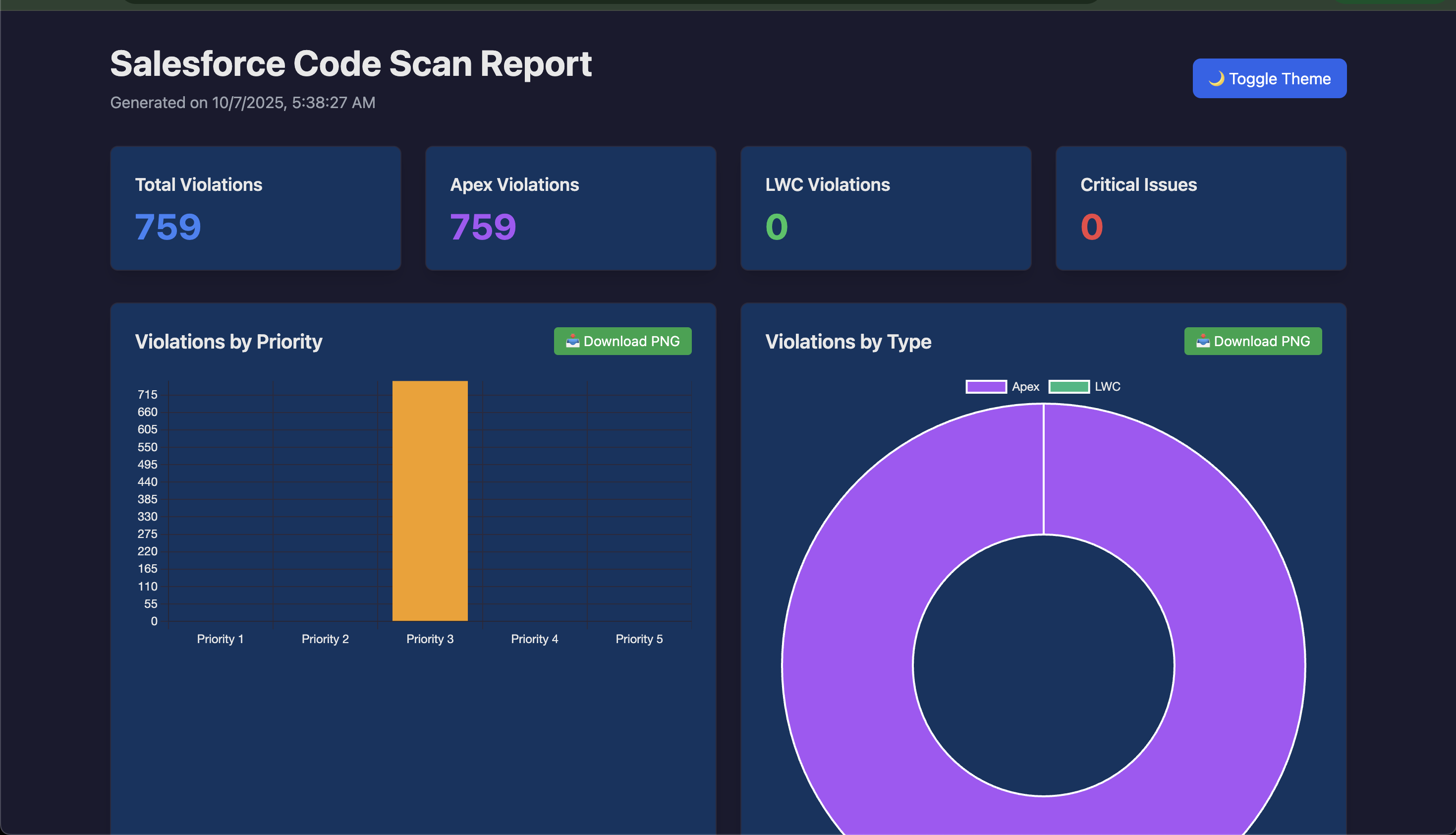
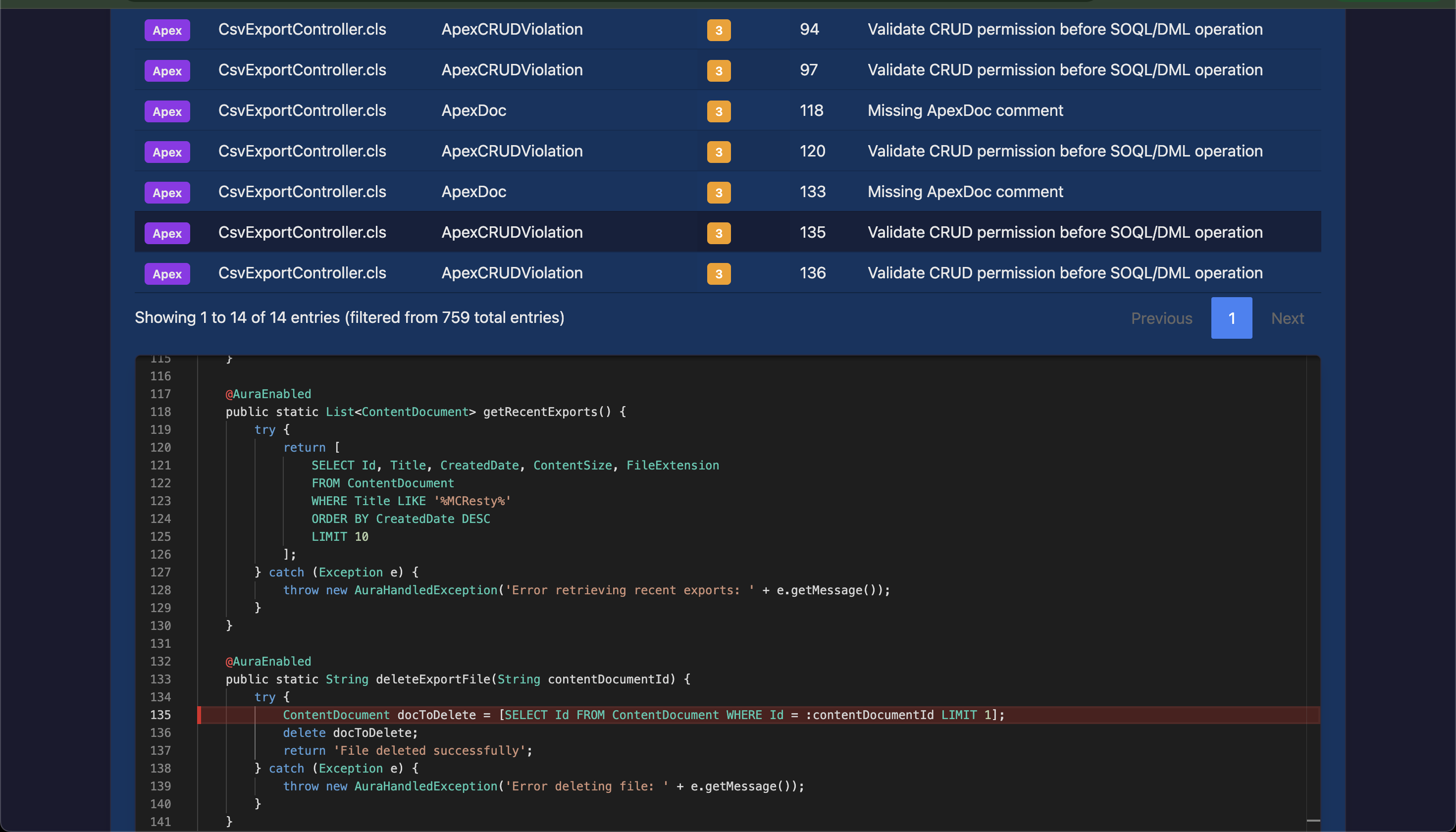
- 📊 Beautiful HTML Reports - Interactive reports with dark/light theme
- 📈 Data Visualization - Charts showing violations by priority and type
- 🔄 Export to CSV - Download violation data for further analysis
- 🎨 Modern UI - DataTables with search, sorting, and pagination
- 📥 Download Charts - Export charts as PNG images
Prerequisites
Node.js >= 14.0.0
Salesforce CLI (
sf) installed and authenticatedPMD (Download from https://pmd.github.io/)
Active Salesforce org connection
Installation
npm install -g sf-code-scannerUsage
sf-scan -u <username> -p <pmd-path> -s <scan-types> [options]Options
| Option | Alias | Required | Description |
| --------------------- | ----- | -------- | ------------------------------------------------------- |
| --username | -u | Yes | Salesforce org username or alias |
| --pmd-path | -p | Yes | Path to PMD binary directory |
| --scan | -s | Yes | Types to scan: Apex, LWC, or both (comma-separated) |
| --ruleset | -r | For Apex | Path to PMD ruleset file |
| --output | -o | No | Output directory for reports (default: ./reports) |
| --local-apex-folder | | No | Path to a local folder of .cls files — skips querying the org for Apex classes |
Examples
Scan Apex code only:
sf-scan \
  -u [email protected] \
  -p /usr/local/pmd/bin \
  -s Apex \
  -r ./rulesets/apex-ruleset.xml
Scan Apex from a local folder (no org query):
Use this when you already have .cls files on disk — e.g. from a sf project retrieve or a local SFDX project. The tool skips querying the Salesforce org and reads the files directly. A Salesforce org connection is still needed for LWC scanning, but if scanning Apex only with this flag, no org connection is required.
sf-scan \
  -u [email protected] \
  -p /usr/local/pmd/bin \
  -s Apex \
  -r ./rulesets/apex-ruleset.xml \
  --local-apex-folder ./force-app/main/default/classes
Scan LWC code only:
sf-scan \
  -u [email protected] \
  -p /usr/local/pmd/bin \
  -s LWC
Scan both Apex and LWC:
sf-scan \
  -u [email protected] \
  -p /usr/local/pmd/bin \
  -s Apex,LWC \
  -r ./rulesets/apex-ruleset.xml \
  -o ./my-reports
PMD Ruleset Configuration
Create a PMD ruleset XML file for Apex scanning. Example apex-ruleset.xml:
Download it from here:
<?xml version="1.0"?>
<ruleset name="Salesforce Apex Ruleset"
    xmlns="http://pmd.sourceforge.net/ruleset/2.0.0"
    xmlns:xsi="http://www.w3.org/2001/XMLSchema-instance"
    xsi:schemaLocation="http://pmd.sourceforge.net/ruleset/2.0.0
    https://pmd.sourceforge.io/ruleset_2_0_0.xsd">

    <description>Custom PMD Ruleset for Salesforce Apex</description>

    <rule ref="category/apex/bestpractices.xml">
        <priority>3</priority>
    </rule>

    <rule ref="category/apex/codestyle.xml">
        <priority>4</priority>
    </rule>

    <rule ref="category/apex/design.xml">
        <priority>3</priority>
    </rule>

    <rule ref="category/apex/errorprone.xml">
        <priority>2</priority>
    </rule>

    <rule ref="category/apex/performance.xml">
        <priority>2</priority>
    </rule>

    <rule ref="category/apex/security.xml">
        <priority>1</priority>
    </rule>

</ruleset>
LWC Best Practices Checks
The tool automatically checks for:
- ✅ Missing
@apidecorators on public properties - ✅ Deprecated
@trackusage - ✅ Direct DOM manipulation (document/window access)
- ✅ Improper event handling
Report Features
The generated HTML report includes:
Summary Dashboard
- Total violations count
- Apex violations count
- LWC violations count
- Critical issues (Priority 1) count
Interactive Charts
- Violations by Priority
- Violations by Type
- Download charts as PNG
Data Table
- Search
- Sort
- Pagination
- Export to CSV
Output Structure
reports/
├── scan-report-1234567890123.html
├── scan-report-1234567890456.html
└── ...
Troubleshooting
"PMD executable not found"
Ensure the PMD path points to the bin directory containing the pmd executable.
"Failed to fetch Salesforce credentials"
Authenticate using:
sf force auth web login -r <instance_url>
sf org display -o myorg --json
"No Apex classes found"
Verify org has Apex classes and user permissions.
"PMD scan failed"
Check ruleset XML validity and PMD compatibility.
Performance Tips
- Use specific rulesets for faster scans
- Run scans during off-peak hours
- Use org aliases for quicker authentication
Happy Scanning! 🚀