
sf-data-extractor
v1.0.5
Published
Extract Salesforce data based on load plan and generate beautiful HTML reports

Maintainers
 mohanchinnappan
Readme
🚀 Salesforce Data Extractor
A powerful Node.js CLI tool that extracts Salesforce data based on a load plan and generates beautiful, interactive HTML reports with dark theme.
✨ Features
- 📊 Extract data from multiple Salesforce objects using SOQL queries
- 🎨 Beautiful dark-themed HTML report with Tailwind CSS
- 📦 Optional ZIP archive of all CSV files
- 🔍 Searchable object list and data tables
- 📈 Column sorting and filtering
- 💾 CSV export functionality
- 🌳 Support for nested field names (e.g.,
Parent.Name,Product2.StockKeepingUnit) - ⚡ Real-time progress tracking
- 📱 Responsive design
🎨 Screenshots
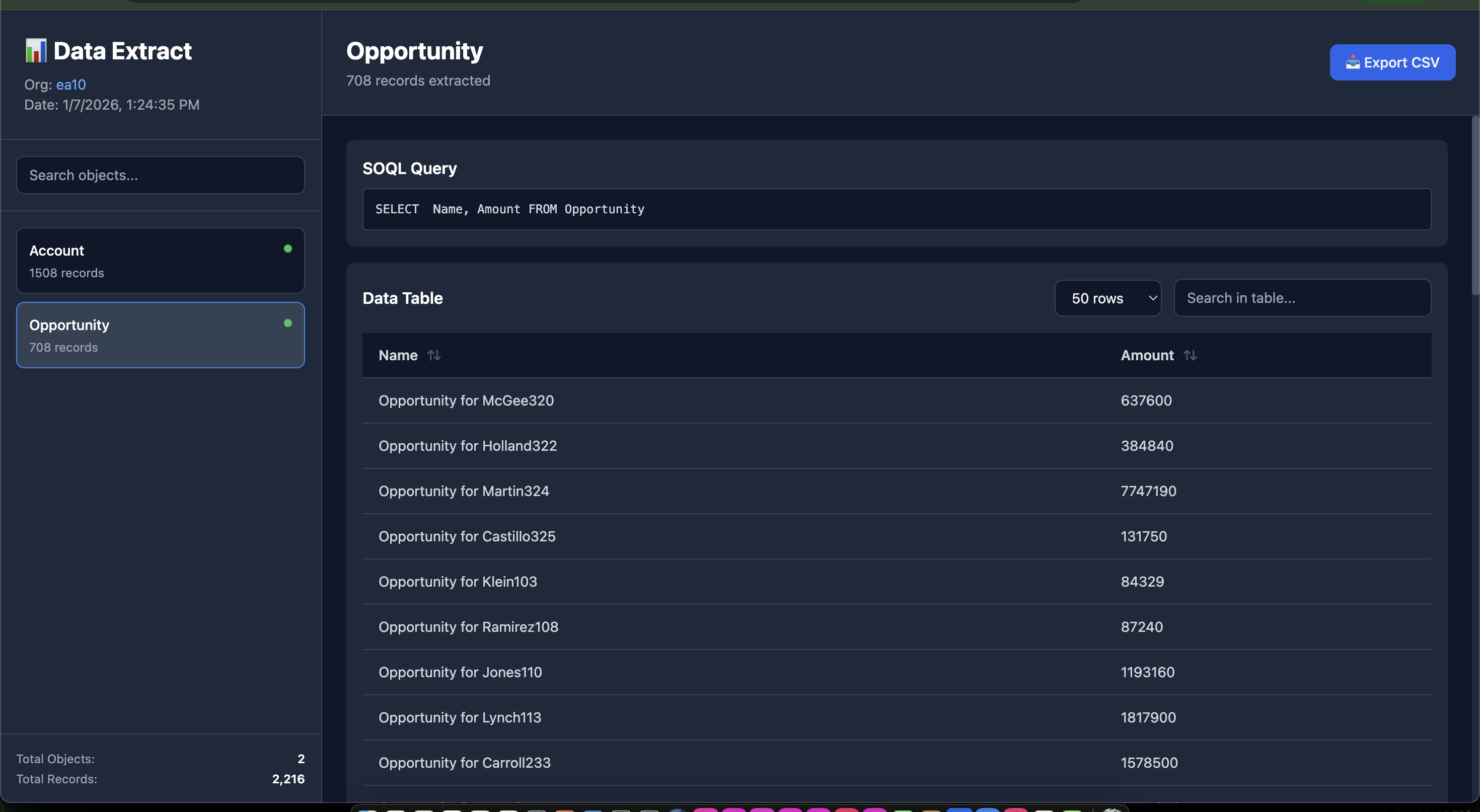
Security check load plan
📋 Prerequisites
- Node.js >= 14.0.0
- Salesforce CLI (
sf) installed and authenticated - Valid Salesforce org access
🔧 Installation
Global Installation
npm install -g sf-data-extractor📖 Usage
Basic Command
sf-data-extractor -o <salesforce-username> -l <load-plan.json>With Custom Output Directory
sf-data-extractor -o [email protected] -l load-plan.json -d ./my-reportsWith ZIP Archive
# Create a ZIP file containing all CSV files
sf-data-extractor -o [email protected] -l load-plan.json -z

# Combine with custom output directory
sf-data-extractor -o [email protected] -l load-plan.json -d ./my-reports -z
Command Options
| Option | Alias | Description | Required |
|--------|-------|-------------|----------|
| --org | -o | Salesforce org username or alias | ✅ Yes |
| --load-plan | -l | Path to load-plan.json file | ✅ Yes |
| --output-dir | -d | Output directory for results | ❌ No (default: ./sf-extract-output) |
| --zip | -z | Create a ZIP file containing all CSV files | ❌ No |
📄 Load Plan Format
Create a load-plan.json file with the following structure:
[
  {
    "object": "Account",
    "compositeKeys": [
      "Id"
    ],
    "query": "SELECT  Name, Industry FROM Account",
    "fieldMappings": {
      "Name": "Name",
      "Industry": "Industry",
      "Id": "Id"
    }
  },


    {
    "object": "Opportunity",
    "compositeKeys": [
      "Id"
    ],
    "query": "SELECT  Name, Amount FROM Opportunity",
    "fieldMappings": {
      "Name": "Name",
      "Id": "Id",
      "Amount": "Amount"
    }
  }
]
Anothe example
[
  {
    "object": "AttributeCategory",
    "compositeKeys": ["Code"],
    "query": "SELECT Name, Description, Code FROM AttributeCategory WHERE Code != null",
    "fieldMappings": {
      "Name": "Name",
      "Code": "Code",
      "Description": "Description"
    }
  },
  {
    "object": "Product2",
    "compositeKeys": ["StockKeepingUnit"],
    "query": "SELECT StockKeepingUnit, Name, ProductCode, Description FROM Product2",
    "fieldMappings": {
      "StockKeepingUnit": "StockKeepingUnit",
      "Name": "Name",
      "ProductCode": "ProductCode"
    }
  }
]
Load Plan Properties
- object (required): Salesforce object API name
- compositeKeys (optional): Keys used for identifying records
- query (required): SOQL query to extract data
- fieldMappings (optional): Field mappings for data transformation
🎯 Example
# Extract data from your org
sf-data-extractor -o [email protected] -l config/load-plan.json

# Extract and create ZIP archive
sf-data-extractor -o [email protected] -l config/load-plan.json -z

# Output:
# 🚀 Starting Salesforce Data Extraction...
# 📄 Reading load plan from: config/load-plan.json
# [1/5] Processing AttributeCategory...
#   ⏳ Executing query...
#   ✅ Extracted 25 records
# ...
# 📊 Generating HTML report...
# ✅ HTML report generated
# 📦 Creating ZIP archive...
#   📄 Adding 5 CSV files to archive...
#   📊 Total size: 2.34 MB
# ✅ ZIP file created: ./sf-extract-output/data-export.zip
# ✨ Extraction complete!
# 📁 Output directory: ./sf-extract-output
# 🌐 Open report: ./sf-extract-output/report.html
# 📦 ZIP archive: ./sf-extract-output/data-export.zip
📊 HTML Report Features
Left Panel
- 📋 List of all extracted objects
- 🔍 Search functionality
- 🟢/🔴 Status indicators
- 📊 Record counts
- 📈 Summary statistics
Right Panel
- 📝 SOQL query display
- 📊 Interactive data table
- 🔄 Column sorting (click headers)
- 🔍 Table search/filter
- 💾 Export to CSV
- 🎨 Nested field support
The HTML report features:
- Dark theme optimized for readability
- Responsive design for all screen sizes
- Smooth transitions and hover effects
- Professional data presentation
📝 Notes
- The tool uses the Salesforce CLI (
sf data query) command - All queries are executed in CSV format for efficient processing
- Large datasets are processed efficiently with streaming
- ZIP archive includes all CSV files organized in a
csv/folder with maximum compression - ZIP archive filename is always
data-export.zipin the output directory
🐛 Troubleshooting
Salesforce CLI errors
# Verify SF CLI is installed
sf --version

# Check org authentication
sf org list
📄 License
MIT License - (c) Mohan Chinnappan
Made with ❤️ for Salesforce developers