
sf-flow-viewer
v1.0.0
Published
A beautiful, interactive HTML viewer for Salesforce Flows with advanced search, sorting, and export capabilities

Maintainers
 mohanchinnappan
Readme
🌊 sf-flow-viewer
A beautiful, interactive HTML viewer for Salesforce Flows with advanced search, sorting, and export capabilities.


✨ Features
- 📊 Interactive HTML Interface - Beautiful, dark-themed UI with Tailwind CSS
- 🔍 Advanced Search - Real-time search across all flow elements
- 📑 Multi-format Export - Export flow lists as HTML, JSON, CSV, or table
- 📦 Comprehensive Flow Details - View versions, elements, metadata, and recent runs
- 🎯 Element Browser - Explore screens, decisions, assignments, loops, subflows, and more
- 📈 Sortable Tables - Click column headers to sort any data
- 💾 XML Export - Save flow metadata as XML files
- 🎨 Resizable Sidebar - Customize your viewing experience
- ⚡ Fast & Responsive - Pagination for large datasets
Screenshots
🚀 Installation
npm install -g sf-flow-viewer
Prerequisites
- Node.js 14 or higher
- Salesforce CLI (
sf) installed and authenticated - Access to a Salesforce org with Flow permissions
📖 Usage
List All Flows
Display all flows in your org with an interactive HTML dashboard:
sf-flow-viz list -o myorgOptions:
-o, --org <username>- Salesforce org username or alias (required)--format <format>- Output format:html(default),json,csv, ortable--no-open- Don't automatically open in browser
Examples:
# HTML dashboard (opens in browser)
sf-flow-viz list -o myorg

# JSON output to console
sf-flow-viz list -o myorg --format json

# CSV output
sf-flow-viz list -o myorg --format csv

# Table output
sf-flow-viz list -o myorg --format table

# Generate HTML but don't open browser
sf-flow-viz list -o myorg --no-open
View Flow Details
View comprehensive details for a specific flow:
sf-flow-viz view -o myorg -f MyFlowAPINameOptions:
-o, --org <username>- Salesforce org username or alias (required)-f, --flow <apiName>- Flow API name / DeveloperName (required)--no-open- Don't automatically open in browser
Examples:
# View flow and open in browser
sf-flow-viz view -o myorg -f Contact_Creation_Flow

# View flow without opening browser
sf-flow-viz view -o myorg -f Contact_Creation_Flow --no-open
📂 Output Structure
All generated files are saved in the flows/ directory:
flows/
├── index.html                    # Flow list dashboard
├── MyFlow.html                   # Individual flow viewer
├── MyFlow.flow-meta.xml          # Flow metadata XML
└── ...
🎨 Features Overview
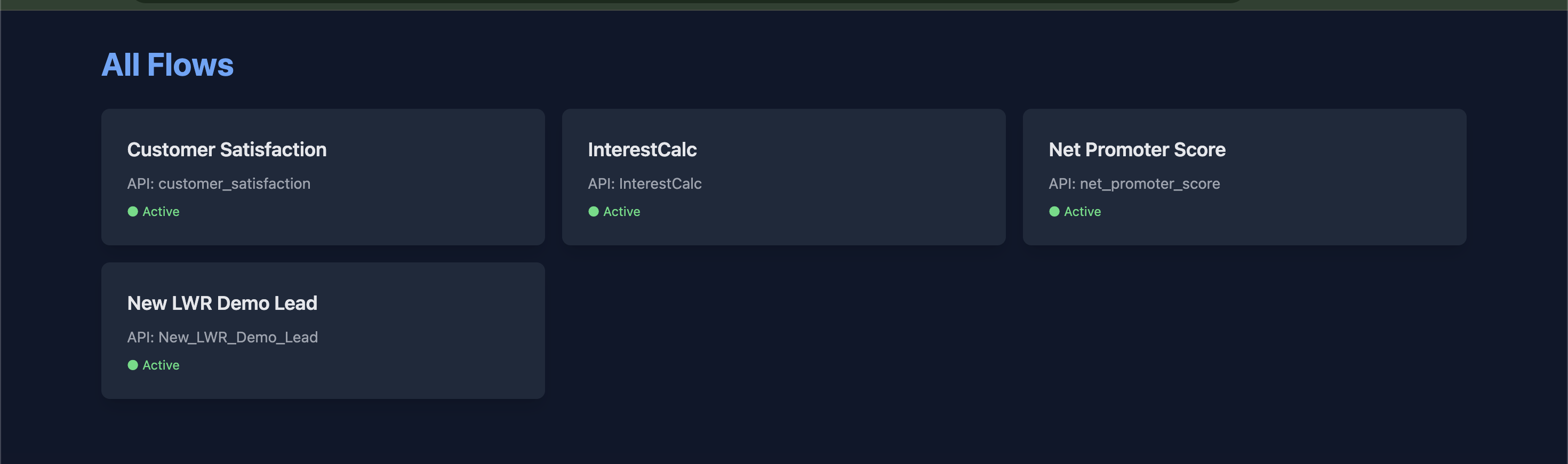
Flow List Dashboard
The list view provides:
- Grid of all flows in your org
- Active/Inactive status indicators
- Quick links to detailed flow views
- Responsive layout for all screen sizes
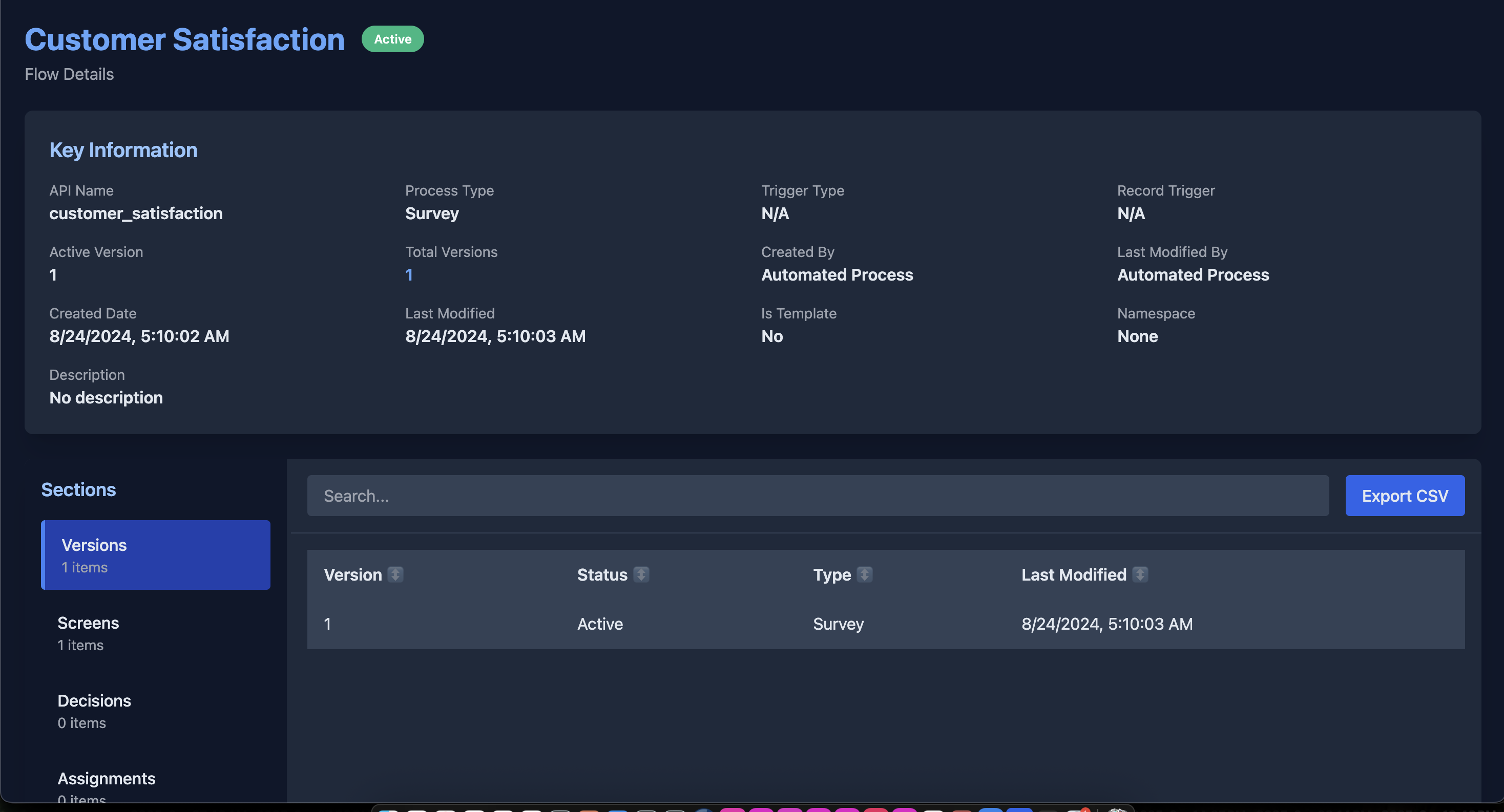
Flow Detail Viewer
The detail view includes:
📋 Key Information Panel
- API Name, Process Type, Trigger Type
- Active version, total versions
- Created/Modified dates and users
- Description and metadata
🗂️ Interactive Sidebar
Browse flow elements by category:
- Versions - All flow versions with status
- Screens - Screen elements and field counts
- Decisions - Decision elements and rule counts
- Assignments - Variable assignments
- Record Operations - Creates, Updates, Deletes, Lookups
- Loops - Loop elements and collections
- Subflows - Called subflows
- Actions - Apex actions and integrations
- Variables - Flow variables and data types
- Formulas - Formula fields and expressions
- Recent Runs - Flow interview history
🔧 Interactive Features
- Search - Filter any section in real-time
- Sort - Click column headers to sort ascending/descending
- Pagination - Navigate through large datasets (50 items per page)
- Export - Download current view as CSV
- Resize - Drag sidebar splitter to customize layout
🛠️ Technical Details
Architecture
- Pure Node.js - No external build tools required
- Salesforce APIs - Uses Tooling API for metadata access
- Single File HTML - Self-contained viewers with embedded JavaScript
API Usage
The tool queries the following Salesforce objects:
Flow- Flow versions and metadataFlowDefinition- Flow definitionsFlowInterview- Flow execution history (if accessible)
Compatibility
- Works with all Salesforce API versions
- Compatible with all flow types:
- Screen Flows
- Autolaunched Flows
- Record-Triggered Flows
- Platform Event-Triggered Flows
- Invocable Processes
🎯 Use Cases
For Administrators
- Document all flows in your org
- Audit flow configurations
- Track flow versions and changes
- Identify unused or obsolete flows
For Developers
- Understand flow logic quickly
- Review flow elements before modifications
- Export flow metadata for version control
- Analyze flow complexity and performance
For Business Analysts
- Create flow documentation
- Share flow details with stakeholders
- Compare flow versions
- Track flow usage patterns
🔒 Security & Permissions
Required Permissions
- View Setup and Configuration
- View All Data (or specific object access)
- API Enabled
Data Access
- Read-only access to Salesforce
- No modifications are made to your org
- All data stays local (saved to
flows/directory)
📝 Examples
Example 1: Document All Flows
# Generate HTML dashboard of all flows
sf-flow-viz list -o production

# Generate CSV for spreadsheet analysis
sf-flow-viz list -o production --format csv > flows.csv
Example 2: Flow Analysis
# View specific flow details
sf-flow-viz view -o production -f Lead_Scoring_Flow

# Check the flows/ directory for:
# - Lead_Scoring_Flow.html (interactive viewer)
# - Lead_Scoring_Flow.flow-meta.xml (metadata XML)
Example 3: Team Documentation
# Generate documentation for all flows
sf-flow-viz list -o production --no-open

# Share the flows/ directory with your team
# Open flows/index.html to browse all flows
🐛 Troubleshooting
"Failed to get org info"
Solution: Ensure you're authenticated with Salesforce CLI:
sf org login web -a myorg
sf org display -o myorg
"Flow not found"
Solution: Use the Flow's DeveloperName (API name), not the Label:
# ✅ Correct (DeveloperName)
sf-flow-viz view -o myorg -f Contact_Creation_Flow

# ❌ Incorrect (Label)
sf-flow-viz view -o myorg -f "Contact Creation Flow"
"FlowInterview not accessible"
Note: This is normal if you don't have access to FlowInterview object. The tool will continue without recent run data.
Empty or Missing Data
Solution: Ensure you have proper permissions:
- View Setup and Configuration
- API Enabled
- View All Data (or specific flow access)
📄 License
MIT License - feel free to use this tool in your projects! (c) Mohan Chinnappan
Made with ❤️ for the Salesforce community
Happy Flow Viewing! 🌊