
sf-load-plan-generator
v2.0.9
Published
Generate load plans and export data from Salesforce objects with an interactive HTML viewer

Maintainers
 mohanchinnappan
Readme
Salesforce Load Plan Generator
A CLI tool that connects to a Salesforce org, introspects an SObject's metadata via the REST API, and produces a complete load plan together with a rich HTML viewer for exploring field details, relationships, and live data.
Demo
What It Generates
| File | Description |
|------|-------------|
| load-plan-<Object>.json | JSON load plan with composite keys, SOQL query, and field mappings |
| <Object>-data.csv | Records exported from Salesforce using the generated query |
| <Object>-fields.csv | Full field metadata (requires sfdx-mohanc-plugins) |
| <Object>-diagram.svg | Object structure diagram (requires sfdx-mohanc-plugins) |
| <Object>-viewer.html | Self-contained HTML viewer with all of the above in one file |
Prerequisites
- Node.js v16 or later
- Salesforce CLI (
sf) installed and authenticated to the target orgnpm install -g @salesforce/cli sf org login web -a myorg - (Optional) sfdx-mohanc-plugins for SVG diagrams and field-detail CSVs:
sf plugins install sfdx-mohanc-plugins
Installation
npm install -g sf-load-plan-generator
Usage
sf-load-plan -o <username> -s <objectName> [OPTIONS]Required Arguments
| Argument | Description |
|----------|-------------|
| -o <username> | Salesforce org username or CLI alias |
| -s <objectName> | API name of the SObject to describe |
Options
| Flag | Description |
|------|-------------|
| --ignore-ownerId | Exclude OwnerId and Owner.Name from the query and load plan |
| --use-Global_Key__c | Use Global_Key__c as the external-ID lookup key where available |
| --use-Global_Key__c-not-null | Add WHERE Global_Key__c != NULL to the SOQL query (requires --use-Global_Key__c) |
| --data-output <dir> | Write all output files to this directory (created if absent). Defaults to . |
| --help, -h | Print help and exit |
Flags In Detail
--ignore-ownerId
Many standard objects have an OwnerId lookup to the User object. If Owner records differ between orgs or you simply don't want to migrate ownership, this flag strips both the OwnerId field and the Owner.Name traversal from the generated query and field mappings entirely.
# OwnerId and Owner.Name are excluded
sf-load-plan  -o [email protected] -s Opportunity --ignore-ownerId
--use-Global_Key__c
When your org uses a custom Global_Key__c field as a stable external identifier, this flag changes how lookups are resolved:
compositeKeysis set to["Global_Key__c"]instead of["Name", "Rel.Name", ...]- SELECT includes
Global_Key__cat the top (deduplicated — it will not appear twice even if the field is also part of the normal field list) - Each lookup field checks whether the referenced object also has
Global_Key__c. If it does, the mapping usesGlobal_Key__c; otherwise it falls back toName.
Example — without flag:
"UnitOfMeasureId": {
  "lookup": {
    "object": "UnitOfMeasure",
    "key": "Name",
    "field": "UnitOfMeasure.Name"
  }
}
Example — with --use-Global_Key__c (when UnitOfMeasure has the field):
"UnitOfMeasureId": {
  "lookup": {
    "object": "UnitOfMeasure",
    "key": "Global_Key__c",
    "field": "UnitOfMeasure.Global_Key__c"
  }
}
--use-Global_Key__c-not-null
Appends a WHERE clause to the generated SOQL so only records that already have a Global_Key__c value are exported. This prevents importing records that cannot be uniquely identified in the target org.
Requires
--use-Global_Key__cto be set. The tool will exit with an error if used alone.
Generated query shape:
SELECT Global_Key__c, Name, ... FROM AttributeDefinition WHERE Global_Key__c != NULL--data-output <dir>
All output files are written to the specified directory. The directory is created recursively if it does not exist. Useful for keeping one folder per object when processing many objects in a script.
--data-output ./output/AttributeDefinitionExamples
Basic — inspect an Account
sf-load-plan  \
  -o [email protected] \
  -s Account
Exclude owner, output to folder
sf-load-plan  \
  -o [email protected] \
  -s Opportunity \
  --ignore-ownerId \
  --data-output ./output/Opportunity
Use Global_Key__c as external ID, skip unkeyed records
sf-load-plan  \
  -o [email protected] \
  -s AttributeDefinition \
  --use-Global_Key__c \
  --use-Global_Key__c-not-null
Full example — all flags
sf-load-plan  \
  -o [email protected] \
  -s AttributeDefinition \
  --ignore-ownerId \
  --use-Global_Key__c \
  --use-Global_Key__c-not-null \
  --data-output ./output/AttributeDefinition
HTML Viewer
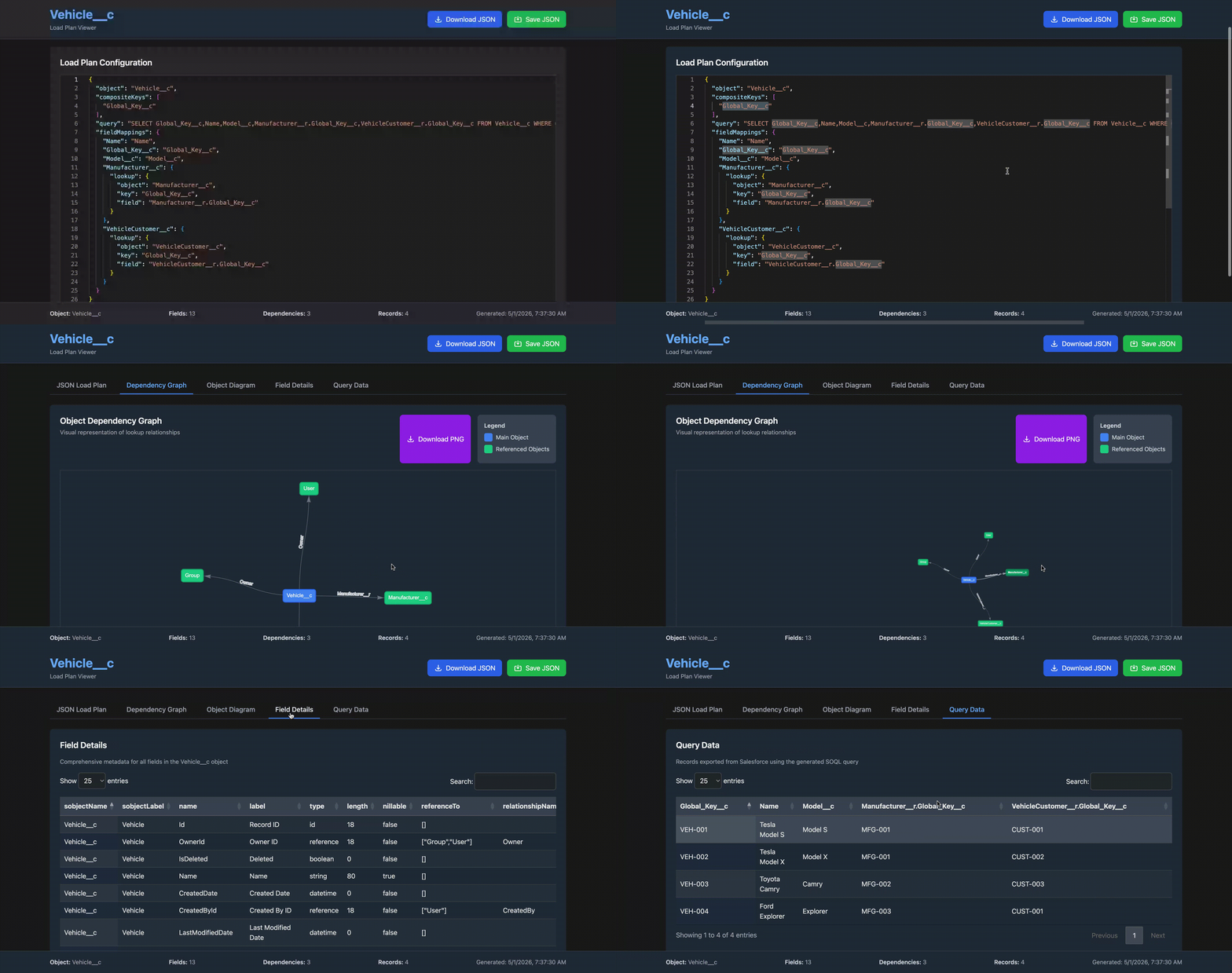
The generated <Object>-viewer.html is a self-contained single-file app. Open it in any browser — no server needed.
| Tab | Contents | |-----|----------| | JSON Load Plan | Monaco editor with the full load plan JSON — editable and downloadable | | Dependency Graph | Interactive vis.js graph of all lookup relationships | | Object Diagram | SVG diagram produced by sfdx-mohanc-plugins | | Field Details | Searchable DataTable of all field metadata | | Query Data | Searchable DataTable of the exported records |
Load Plan JSON Structure
{
  "object": "AttributeDefinition",

  // When --use-Global_Key__c: always ["Global_Key__c"]
  // Otherwise: ["Name", "UnitOfMeasure.Name", ...]
  "compositeKeys": ["Global_Key__c"],

  // Full SOQL query used to export data
  // Includes WHERE clause when --use-Global_Key__c-not-null is set
  "query": "SELECT Global_Key__c,Name,... FROM AttributeDefinition WHERE Global_Key__c != NULL",

  "fieldMappings": {
    // Regular field — maps to itself
    "Name": "Name",

    // Lookup using Global_Key__c (--use-Global_Key__c, referenced object has the field)
    "UnitOfMeasureId": {
      "lookup": {
        "object": "UnitOfMeasure",
        "key": "Global_Key__c",
        "field": "UnitOfMeasure.Global_Key__c"
      }
    },

    // Lookup falling back to Name (referenced object does not have Global_Key__c)
    "PicklistId": {
      "lookup": {
        "object": "Picklist",
        "key": "Name",
        "field": "Picklist.Name"
      }
    }
  }
}
How It Works
sf org display          →  get accessToken + instanceUrl
/sobjects/<Obj>/describe →  fetch all field metadata
generateLoadPlan()      →  build compositeKeys, SOQL query, fieldMappings
                            (per-lookup REST calls to check for Global_Key__c)
sf data query           →  export records to CSV
sf mohanc md describe   →  generate SVG + field-detail CSV  (optional)
generateHTMLViewer()    →  embed everything into a single HTML file
Troubleshooting
| Symptom | Likely cause | Fix |
|---------|-------------|-----|
| Error: command not found: sf | Salesforce CLI not installed | npm install -g @salesforce/cli |
| Failed to get org information | Org not authenticated | sf org login web -o <alias> |
| SVG / field CSV tabs show error | Plugin not installed | sf plugins install sfdx-mohanc-plugins |
| Query data tab shows SOQL error | Field not accessible or invalid relationship | Check the JSON Load Plan tab for the full query and test it in Developer Console |
| --use-Global_Key__c-not-null error | Used without --use-Global_Key__c | Add --use-Global_Key__c to your command |
License
MIT (c) Mohan Chinnappan