
sf-meta-cli
v1.1.2
Published
Analyze Salesforce manual steps and suggest Metadata API automation using LLM

Maintainers
 mohanchinnappan
Readme
Salesforce Metadata Automation Analyzer



Turn manual Salesforce org setup steps into Metadata API automation suggestions — using AI.
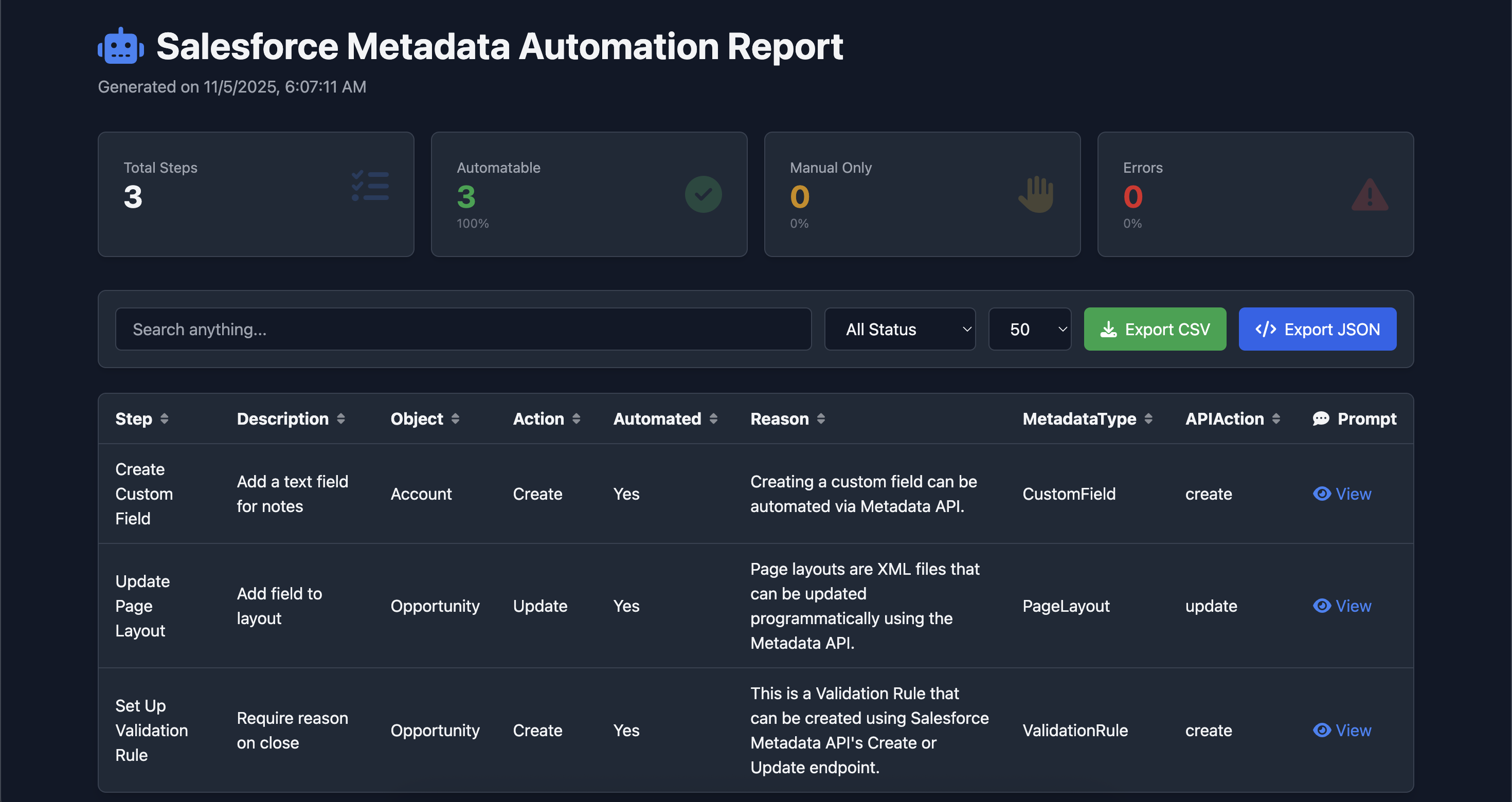
Upload a CSV of manual steps → Get an interactive HTML report with:
- Can this be automated?
- Which metadata type?
- What API action?
- Clear reasoning
- Search, sort, export, copy prompts
Screenshot
Features
| Feature | Description |
|--------|-----------|
| LLM-Powered Analysis | Uses Ollama, OpenAI, Claude, Groq, or Grok |
| Prompt-Only Mode | --just-prompt-only → Full HTML with all LLM prompts (no API calls) |
| Interactive HTML Report | Search, sort, paginate, export CSV/JSON |
| Dark Mode | --dark |
| Copy Prompt to Clipboard | One-click copy from modal |
| Batch Processing | With progress, retries, timeouts |
| Auto-open in Browser | Report opens immediately |
Quick Start
1. Install
npm install -g sf-meta-cli
Run Prompt-Only Mode (No LLM)
sf-meta steps.csv --just-prompt-only -o prompts.html --darkOpens interactive HTML with every LLM prompt — perfect for debugging or sharing.
Run Full Analysis
With Ollama (default, local)
sf-meta steps.csv -m llama3.2With OpenAI
sf-meta steps.csv -p openai -k sk-... -m gpt-4oWith Groq
sf-meta steps.csv -p groq -k gsk-... -m llama3-70b-8192CSV Format
Step,Description,Object,Action
Create Custom Field,Add a text field for notes,Account,Create
Update Page Layout,Add field to layout,Opportunity,Update
Set Up Validation Rule,Require reason on close,Opportunity,Create
All columns are preserved in the output.
Options
sf-meta <csv> [options]

  -m, --model <name>        LLM model (default: llama3.1)
  -p, --provider <name>     ollama|openai|claude|groq|grok (default: ollama)
  -k, --api-key <key>       API key (required for non-ollama)
  -u, --base-url <url>      Custom base URL
  -o, --output <file>       Output HTML file (default: report.html)
  --dark                    Enable dark mode
  --batch <size>            Batch size (default: 5)
  --timeout <ms>            Request timeout (default: 30000)
  --retry <count>           Retries on failure (default: 3)
  --just-prompt-only        Generate HTML with prompts only (no LLM)
Example: Prompt-Only Report
sf-meta steps.csv --just-prompt-only -o prompts.htmlResult:
- Full table with all prompts
- Search:
CustomField - Click View → modal with full prompt
- Click Copy Prompt → ready for LLM playground
Roadmap
- [ ] Export to Markdown
- [ ] Save prompts as
.txtfiles - [ ] VS Code extension
- [ ] Docker image
- [ ] Web UI
License
MIT (c) Mohan Chinnappan
Made with by Salesforce architects tired of manual setup steps.
“If it’s in the UI, it’s probably in the Metadata API.” — This tool proves it.