
sf-org-inspector
v1.0.1
Published
Salesforce Org Inspector CLI tool
Downloads
31

Maintainers
 mohanchinnappan
Readme
🔍 Salesforce Org Inspector
A powerful Node.js CLI tool that extracts and visualizes Salesforce org metadata with a beautiful, interactive web interface featuring Monaco Editor, tree views, and comprehensive metadata analysis.


✨ Features
🎯 Metadata Extraction
- Custom Metadata Types - Extract all custom metadata type definitions
- Remote Site Settings - List all external endpoints and their status
- Named Credentials - View authentication configurations
- External Data Sources - Identify external system connections
- Auth Providers - OAuth and authentication provider details
- Connected Apps - API integration configurations
Screenshots
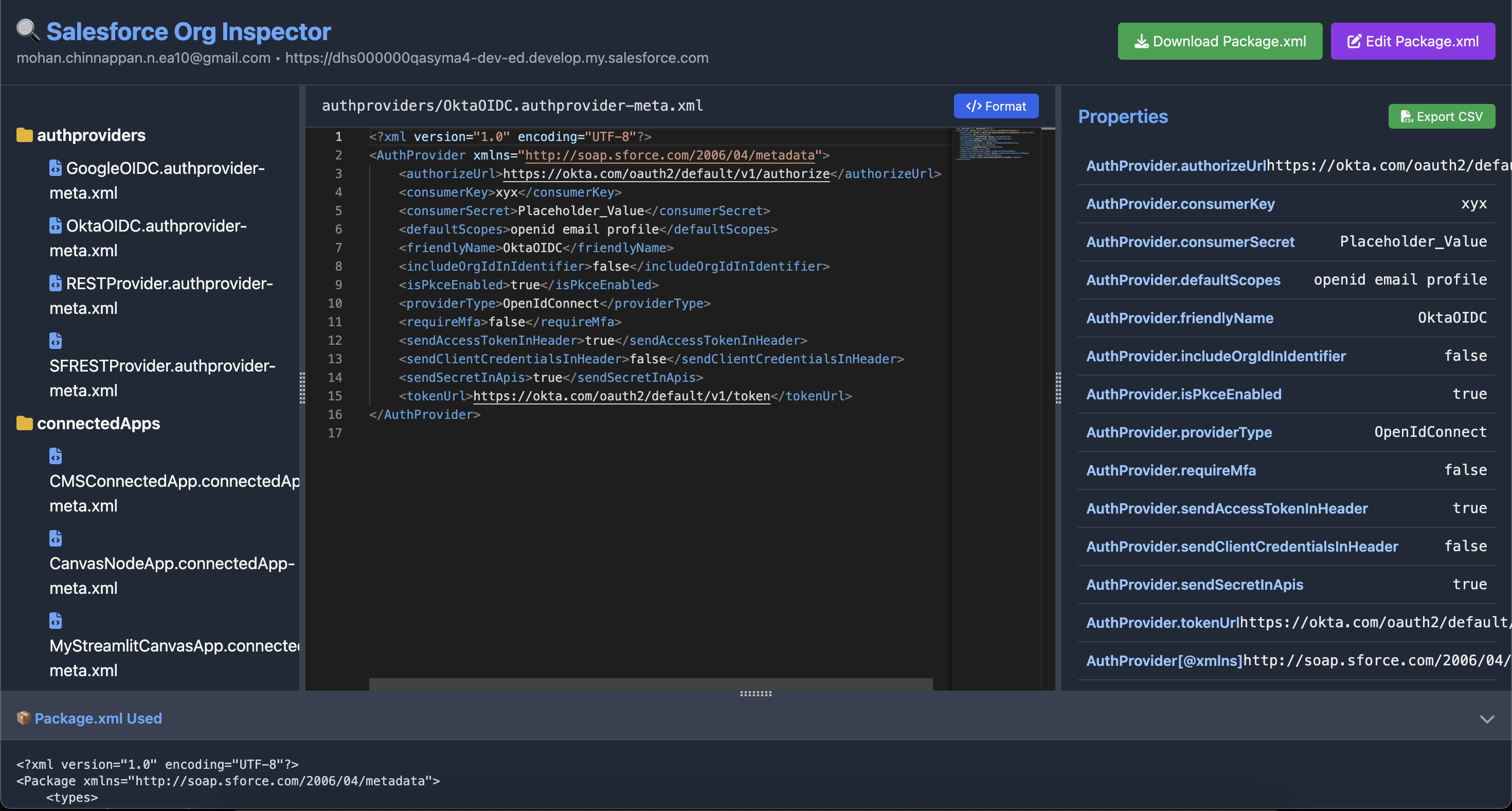
🎨 Interactive UI
3-Pane Layout with Resizable Splitters
Left Pane - Tree View
- 📁 Hierarchical folder/file structure
- 🔍 Real-time search with highlighting
- 📂 Collapsible folders
- Click to load files instantly
Middle Pane - Monaco Editor
- 💻 Full-featured code editor with XML syntax highlighting
- 🎨 One-click XML formatting
- 📝 Line numbers and minimap
- 🖱️ Cursor position tracking
- 💾 Edit and validate package.xml
Right Pane - Properties Viewer
- 📊 Auto-extracted XML properties
- 🔍 Smart highlighting based on cursor position
- 💾 Export properties to CSV
- Key-value pair display
Bottom Pane - Package.xml
- 📦 View the package.xml used for retrieval
- ⬇️ Collapsible/expandable panel
- ✏️ Edit directly in Monaco Editor
- 📥 Download modified package.xml
🚀 Advanced Features
HTTP Callout Detection - Automatically identifies Apex classes with:
- HttpRequest/HttpResponse usage
- Named credential callouts (
callout:) - WebService annotations
- Continuation patterns
Custom Package.xml Support - Use your own package.xml for selective retrieval
CSV Export - Export any metadata properties to CSV format
Dark Theme UI - Beautiful, modern dark interface powered by Tailwind CSS
📋 Prerequisites
- Node.js (>= 14.0.0)
- Salesforce CLI (sf CLI)
- Authenticated Salesforce org
🔧 Installation
npm install -g sf-org-inspector
🚀 Usage
Basic Usage
sf-inspector -o [email protected]With Custom Output File
sf-inspector -o myorgalias --output my-report.htmlUsing Custom Package.xml
sf-inspector -o myorg --package custom-package.xmlSkip Metadata Retrieval
sf-inspector -o myorg --no-metadataSkip Endpoint Queries
sf-inspector -o myorg --no-endpoints📖 Command Line Options
| Option | Description | Default |
|--------|-------------|---------|
| -o, --org <username> | Salesforce org username or alias (required) | - |
| --output <filename> | Output HTML filename | sf-org-report.html |
| --package <filename> | Custom package.xml file path | Built-in default |
| --no-metadata | Skip custom metadata retrieval | false |
| --no-endpoints | Skip integration endpoints retrieval | false |
| -V, --version | Output version number | - |
| -h, --help | Display help | - |
🎯 Use Cases
1. Org Documentation
Generate comprehensive documentation of your Salesforce org's metadata for audits, onboarding, or knowledge transfer.
2. Integration Discovery
Quickly identify all external integrations, API endpoints, and authentication configurations.
3. Security Audits
Review Remote Site Settings, Named Credentials, and HTTP callouts for security compliance.
4. Metadata Analysis
Browse and search through org metadata with powerful filtering and property extraction.
5. Package.xml Generation
Edit and customize package.xml files with validation and immediate feedback.
6. Code Review
Identify all Apex classes making external callouts for review and optimization.
📁 Generated Report Structure
The HTML report includes:
Summary Dashboard
- 📊 Metadata count cards
- 🎨 Color-coded by type
- 📈 Quick statistics overview
Interactive Tables
- 🔍 Search and filter
- 📑 Sortable columns
- 💾 CSV export for each table
- 📄 Pagination
Metadata Sections
- Custom Metadata Types - Type definitions and protection status
- Remote Site Settings - URLs, descriptions, and active status
- Named Credentials - Endpoints and authentication types
- Apex HTTP Callouts - Detailed callout analysis
File Browser
- Complete metadata file tree
- Search functionality
- Monaco Editor integration
- Property extraction
🛠️ Advanced Configuration
Default Package.xml
The tool retrieves these metadata types by default:
- CustomMetadata
- RemoteSiteSetting
- NamedCredential
- ExternalDataSource
- AuthProvider
- ConnectedApp
Custom Package.xml Example
Create a file custom-package.xml:
<?xml version="1.0" encoding="UTF-8"?>
<Package xmlns="http://soap.sforce.com/2006/04/metadata">
    <types>
        <members>*</members>
        <name>CustomMetadata</name>
    </types>
    <version>65.0</version>
</Package>
Run with custom package:
sf-inspector -o myorg --package custom-package.xml🎨 UI Features
Search & Filter
- Tree Search: Real-time file filtering with match highlighting
- Table Search: Built-in DataTables search across all columns
- Smart Highlighting: Cursor-based property highlighting
Resizable Panels
- Horizontal Splitters: Adjust left/middle/right pane widths
- Vertical Splitter: Adjust main content and bottom pane heights
- Persistent Layout: Drag gutters to customize your workspace
Export Options
- CSV Export: Each table has individual CSV export
- Package.xml Download: Save original or modified package.xml
- Properties Export: Export selected file properties
🔒 Security Notes
- Access tokens are retrieved via Salesforce CLI and used temporarily
- No credentials are stored in the generated HTML report
- The HTML report is self-contained and can be safely archived
- Consider access controls when sharing generated reports
🐛 Troubleshooting
Issue: "Failed to retrieve org details"
Solution: Ensure you're authenticated to the org:
sf org display -o [email protected]Issue: "Some metadata may not be available"
Solution: This is normal. Some metadata types may not exist in your org or require specific permissions.
Issue: Split.js not defined
Solution: Ensure you have internet connectivity. The HTML uses CDN resources for UI libraries.
Issue: Tooling API query failed
Solution: The user needs "View All Data" or "Modify All Data" permission to query certain metadata via Tooling API.
📊 Performance Tips
- Limit Apex Class Retrieval: Use custom package.xml to specify only needed classes
- Skip Endpoints: Use
--no-endpointsif you don't need callout analysis - Incremental Retrieval: Retrieve specific metadata types instead of using
*
🤝 Contributing
Contributions are welcome! Some ideas:
- Add more metadata types
- Enhance the Monaco Editor experience
- Add export to different formats (PDF, Word)
- Implement metadata comparison between orgs
- Add filtering by metadata type in tree view
🗺️ Roadmap
- [ ] Multi-org comparison view
- [ ] Metadata dependency graph
- [ ] Export to PDF/Word
- [ ] Custom metadata type filtering
- [ ] Real-time org monitoring
- [ ] Scheduled retrieval with diff reports
- [ ] Integration with CI/CD pipelines
📝 License
- MIT (c) Mohan Chinnappan
Made with ❤️ for the Salesforce Community
Happy Inspecting! 🔍