
sf-pe-helper
v1.0.1
Published
Platform Encryption Helper - Salesforce PE implementation assistant with web interface

Maintainers
 mohanchinnappan
Readme
PE Helper - Platform Encryption Helper
🔐 A comprehensive CLI tool and web interface for managing Salesforce Platform Encryption implementation.
Features
- Interactive Web Interface with beautiful dark theme using Tailwind CSS
- Object Browser - Browse and search all Salesforce objects in your org
- Field Metadata Viewer - View detailed field information with encryption eligibility
- Configuration Management - Save and export encryption configurations as CSV
- Built-in Help - Integrated markdown documentation viewer
- Real-time Updates - Editable encryption settings with instant save
Prerequisites
- Node.js (v14 or higher)
- Salesforce CLI (
sforsfdx) installed and configured - A Salesforce org with appropriate permissions
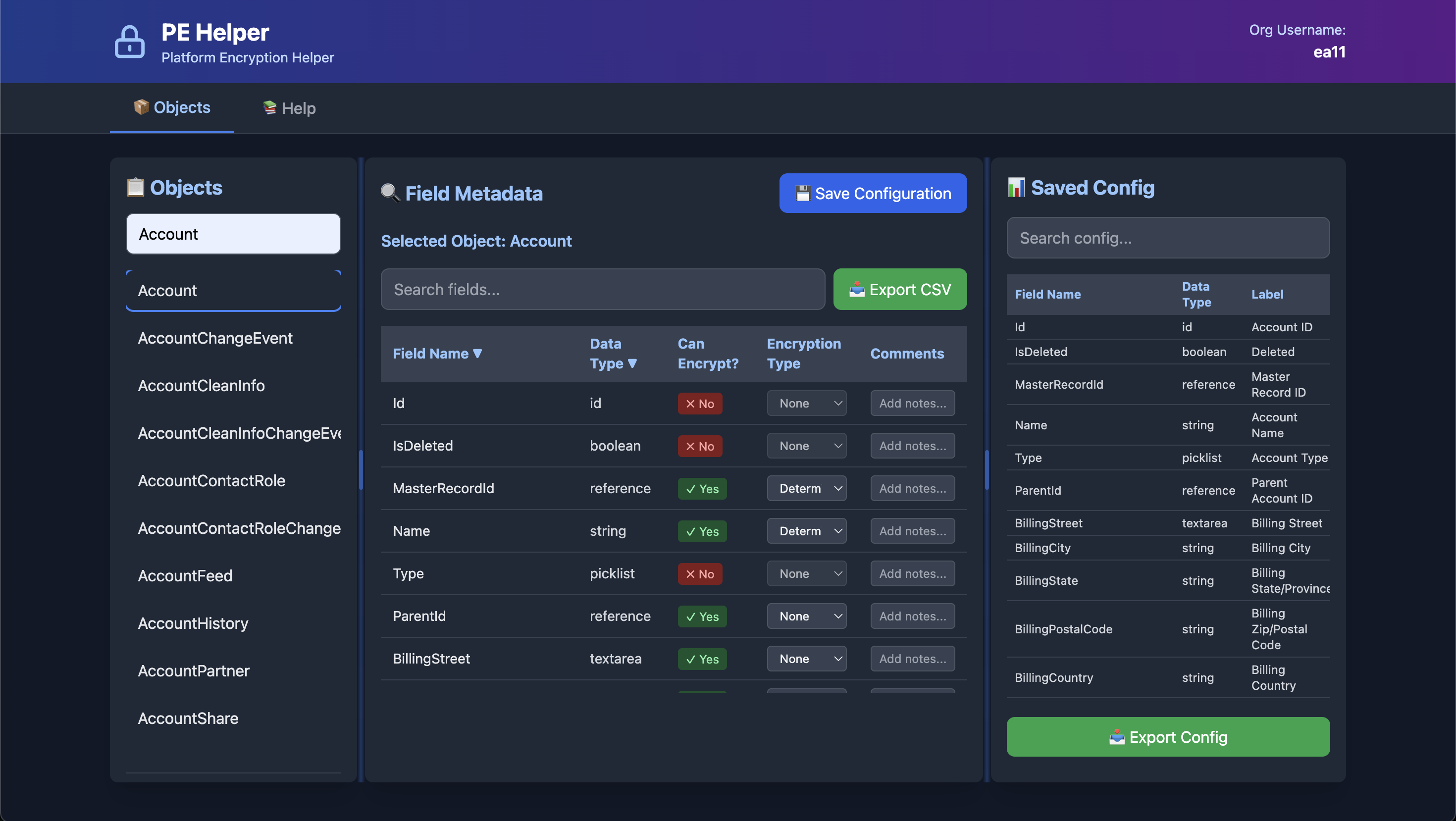
Screenshots
Installation
npm install -g sf-pe-helper


# Data directory is automatically created at:
# macOS/Linux: ~/.pe-helper/data/
# Windows: %USERPROFILE%\.pe-helper\data\
Usage
Start the Web Server
# If installed globally
pe-helper start -o [email protected] -p 3000
Command Options
-o, --org <username>- Salesforce org username (required)-p, --port <port>- Port number (default: 3000)
Example
pe-helper start -o [email protected] -p 3000Supported Field Types for Encryption
Platform Encryption supports the following custom field types:
- ✓ Text
- ✓ Text Area
- ✓ Phone
- ✓ URL
- ✓ External ID
- ✓ Date
- ✓ Date/DateTime
User Interface
Objects Tab
Left Pane - Object List
- Search and filter objects
- Click to select an object
Center Pane - Field Metadata
- View all fields for selected object
- See field type and encryption eligibility
- Edit encryption type (Deterministic/Probabilistic)
- Add comments for each field
- Search, sort, and filter fields
- Export to CSV
- Save configuration
Right Pane - Saved Configuration
- View previously saved configurations
- Search within saved data
- Export configuration to CSV
Help Tab
- View comprehensive Platform Encryption documentation
- Markdown-formatted slides
- Covers encryption concepts, implementation, and best practices
Data Storage Location
All configurations are saved to your home directory:
macOS/Linux:
~/.pe-helper/data/Windows:
%USERPROFILE%\.pe-helper\data\This ensures:
- ✅ Configurations persist across package updates
- ✅ No permission issues
- ✅ Easy to backup
- ✅ User-specific data
- ✅ Safe from accidental deletion
To find your data directory:
# The app prints it on startup:
pe-helper start -o [email protected]
# Output: Data directory: /Users/yourname/.pe-helper/data
CSV Output Format
The tool generates CSV files with the following columns:
- Field Name
- Data Type
- Label
- Can Be Encrypted
- Encryption Type (Deterministic/Probabilistic)
- Comments
API Endpoints
The Express server exposes the following REST API endpoints:
GET /api/org- Get org usernameGET /api/objects- List all objectsGET /api/object/:objectName- Get object field metadataPOST /api/save-config/:objectName- Save encryption configurationGET /api/config/:objectName- Get saved configurationGET /api/configs- List all saved configurationsGET /api/help- Fetch help documentation
Troubleshooting
"Org username not specified" Error
Make sure to provide the -o or --org flag when starting the server.
"Error loading objects" Message
- Ensure Salesforce CLI is installed and in your PATH
- Verify you're authenticated to the org:
sf org list - Check that the org username is correct
Port Already in Use
Use a different port with the -p flag: pe-helper start -o [email protected] -p 3001
Security Considerations
- This tool reads metadata from your Salesforce org but does not modify any data
- Configurations are saved locally in the
data/directory - Always review encryption configurations before implementing in production
- Follow Salesforce Platform Encryption best practices
License
MIT License (c) Mohan Chinnappan
Made with ❤️ for Salesforce Administrators and Architects