
sf-permset-viewer
v1.1.2
Published
View Salesforce Permission Set (PS) and Permission Set Group (PSG) details in a beautiful HTML interface
Downloads
41

Maintainers
 mohanchinnappan
Readme
🔐 Salesforce Permission Set Viewer
A powerful command-line tool to visualize and analyze Salesforce Permission Sets and Permission Set Groups with beautiful, interactive HTML reports.




📸 Screenshots
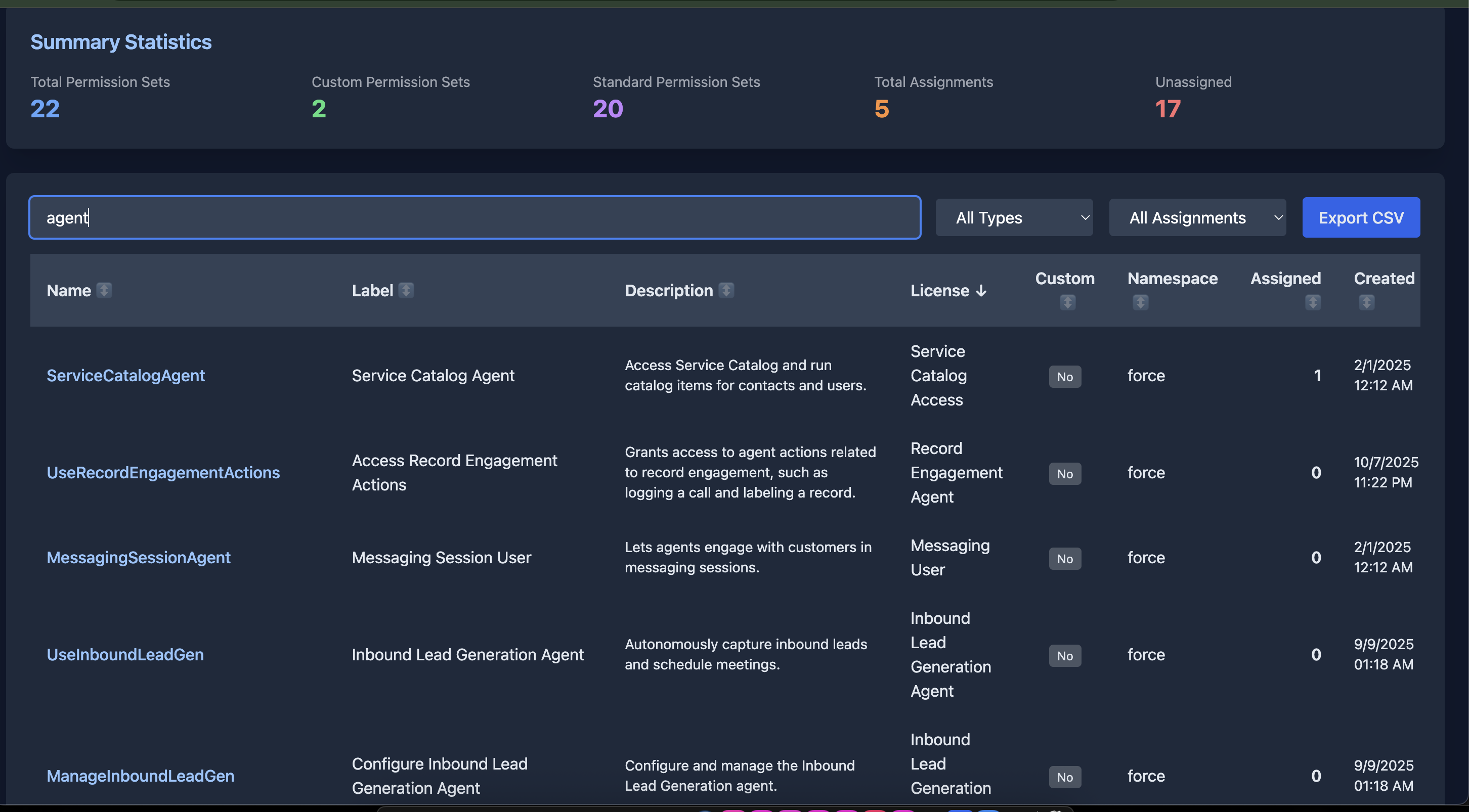
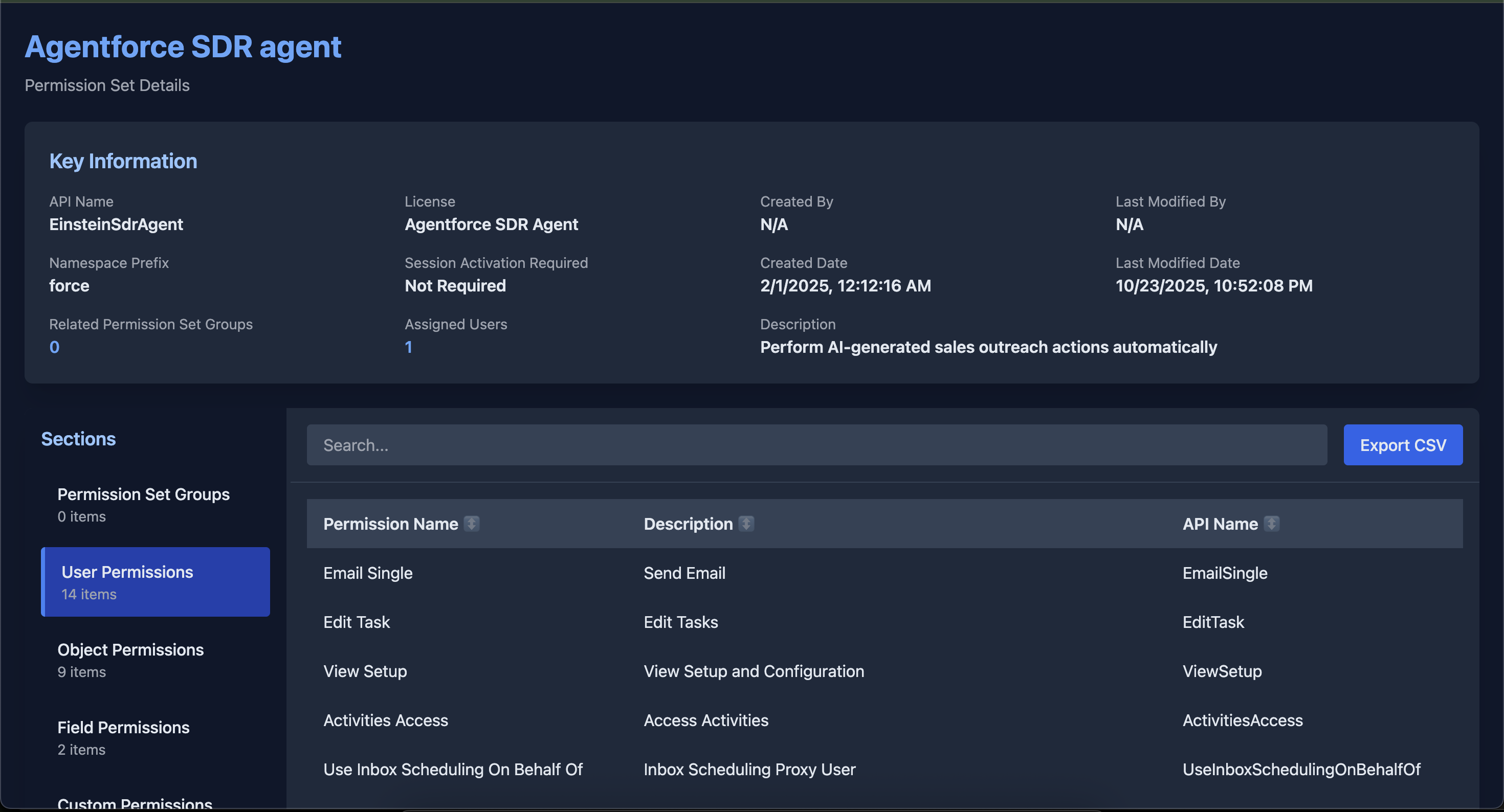
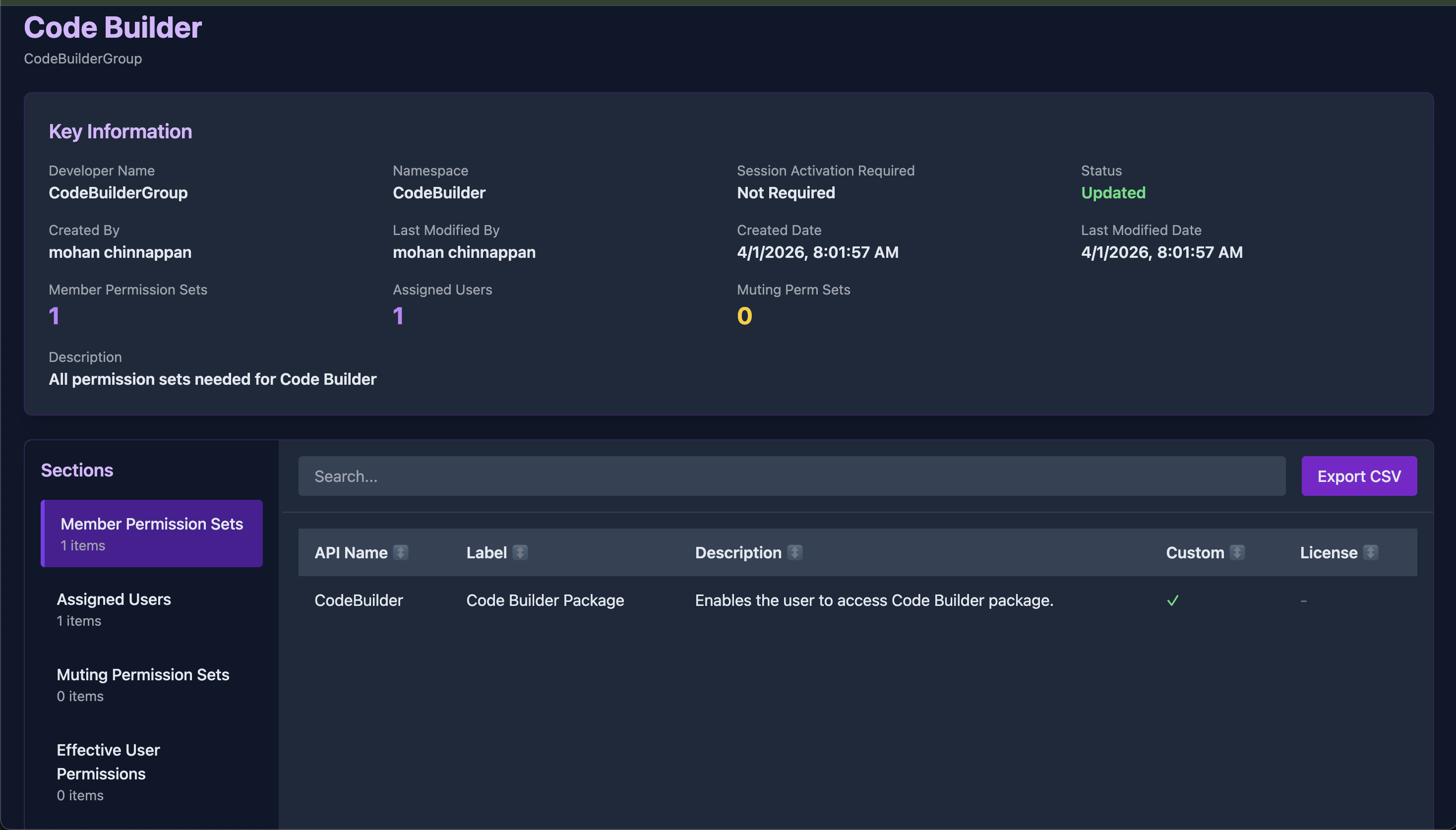
✨ Features
📋 List Permission Sets
- Interactive HTML Dashboard with real-time filtering and sorting
- Summary Statistics showing custom vs standard, assignments, and more
- Advanced Filtering by type (custom/standard) and assignment status
- Multi-column Sorting with visual indicators
- Smart Search across name, label, description, and more
- Export to CSV with filtered data
- Pagination with configurable page sizes
- Alternative formats: Table, JSON, CSV
🔍 View Permission Set Details
- Comprehensive Overview with all metadata
- Organized Sections:
- Permission Set Groups membership
- User Permissions (enabled only)
- Object Permissions (CRUD + View/Modify All)
- Field Permissions (FLS)
- Custom Permissions
- Tab Settings
- Resizable Sidebar for easy navigation
- Column Sorting on all data tables
- Search Functionality within each section
- Export to CSV for any section
- Pagination for large datasets
🗂️ List Permission Set Groups (new in v1.1)
- Interactive HTML Dashboard with status-aware filtering and sorting
- Summary Statistics showing Updated vs Outdated counts, total assignments
- Status Filtering — filter by
Updated/Outdatedrecalculation state - Member & Assignment Counts surfaced per group in the list view
- Smart Search across developer name, label, description, and namespace
- Export to CSV with current filters applied
- Alternative formats: Table, JSON, CSV
🔎 View Permission Set Group Details (new in v1.1)
- Comprehensive Overview with all PSG metadata including recalculation status
- Purple-themed UI — visually distinct from Permission Set reports
- Organized Sections:
- Member Permission Sets (all PSets composing the group)
- Assigned Users (with username, active status, expiration date)
- Muting Permission Sets (where applicable)
- Effective User Permissions (unioned across all member sets)
- Effective Object Permissions (OR-aggregated across all member sets)
- Effective Field Permissions (OR-aggregated across all member sets)
- Resizable Sidebar, Search, Sorting, Export to CSV, Pagination
📦 Installation
Prerequisites
- Node.js (v14 or higher)
- Salesforce CLI (
sforsfdx) - Authenticated Salesforce org
Install
npm install -g sf-permset-viewer🚀 Usage
List All Permission Sets
# HTML format (default) - opens in browser
sf-permset-viewer list -o myorg

# HTML without auto-opening
sf-permset-viewer list -o myorg --no-open

# Console table format
sf-permset-viewer list -o myorg -f table

# JSON format
sf-permset-viewer list -o myorg -f json

# CSV format
sf-permset-viewer list -o myorg -f csv
View Permission Set Details
# View with auto-open in browser
sf-permset-viewer view -o myorg -p MyPermissionSet

# View without auto-opening
sf-permset-viewer view -o myorg -p MyPermissionSet --no-open
List All Permission Set Groups (new)
# HTML format (default) - opens in browser
sf-permset-viewer list-psg -o myorg

# Console table format
sf-permset-viewer list-psg -o myorg -f table

# JSON / CSV
sf-permset-viewer list-psg -o myorg -f json
sf-permset-viewer list-psg -o myorg -f csv
View Permission Set Group Details (new)
# View with auto-open in browser
sf-permset-viewer view-psg -o myorg -g My_PSG_Developer_Name

# View without auto-opening
sf-permset-viewer view-psg -o myorg -g My_PSG_Developer_Name --no-open
📖 Command Reference
Global Options
-h, --help- Display help information-V, --version- Display version number
list Command
Lists all Permission Sets in the org (excludes profile-owned sets).
| Option | Required | Description |
|--------|----------|-------------|
| -o, --org <username> | ✅ | Salesforce org username or alias |
| -f, --format <type> | | Output format: html, table, json, csv (default: html) |
| --no-open | | Don't automatically open HTML in browser |
view Command
View detailed information about a specific Permission Set.
| Option | Required | Description |
|--------|----------|-------------|
| -o, --org <username> | ✅ | Salesforce org username or alias |
| -p, --permissionset <name> | ✅ | Permission Set API name |
| --no-open | | Don't automatically open HTML in browser |
list-psg Command (new)
Lists all Permission Set Groups in the org.
| Option | Required | Description |
|--------|----------|-------------|
| -o, --org <username> | ✅ | Salesforce org username or alias |
| -f, --format <type> | | Output format: html, table, json, csv (default: html) |
| --no-open | | Don't automatically open HTML in browser |
view-psg Command (new)
View detailed information about a specific Permission Set Group, including all effective permissions aggregated across its member sets.
| Option | Required | Description |
|--------|----------|-------------|
| -o, --org <username> | ✅ | Salesforce org username or alias |
| -g, --group <name> | ✅ | Permission Set Group developer name |
| --no-open | | Don't automatically open HTML in browser |
Example:
sf-permset-viewer view-psg -o myorg -g Call_Centre_Agent🎨 Features in Detail
List View Features (Permission Sets & Groups)
📊 Summary Statistics
Permission Sets: total count, custom vs standard, total assignments, unassigned count. Permission Set Groups: total count, Updated vs Outdated, total assignments.
🔍 Advanced Filtering
- Search: Real-time search across multiple fields
- Type Filter (PS): Show all, custom only, or standard only
- Status Filter (PSG): Show all, Updated only, or Outdated only
- Assignment Filter (PS): Show all, assigned only, or unassigned only
📑 Interactive Table
- Sortable Columns: Click any header to sort
- Visual Indicators: Up/down arrows show sort direction
- Hover Effects: Click a row to get the exact CLI command to view details
- Configurable Page Size: 25 / 50 / 100 / All
Detail View Features
Permission Set Sections
| Section | Description | |---------|-------------| | Permission Set Groups | Groups this permission set belongs to | | User Permissions | System-level permissions (enabled only) | | Object Permissions | CRUD and View/Modify All per object | | Field Permissions | Field-level security (FLS) | | Custom Permissions | Custom permission assignments | | Tab Settings | Tab visibility configuration |
Permission Set Group Sections (new)
| Section | Description | |---------|-------------| | Member Permission Sets | All PSets composing the group, with license and custom flag | | Assigned Users | Full assignee list with username, active status, expiration date | | Muting Permission Sets | Any muting perm sets attached to the group | | Effective User Permissions | Union of all user-level permissions across member sets | | Effective Object Permissions | OR-aggregated CRUD+ViewAll+ModifyAll across member sets | | Effective Field Permissions | OR-aggregated Read/Edit FLS across member sets |
How effective permissions are calculated: For Object and Field Permissions, the tool fetches raw rows for every member Permission Set and aggregates them in JavaScript using boolean OR — if any member set grants a permission, the group is shown as granting it. This mirrors how Salesforce itself evaluates the effective access for a user assigned to the group.
⚡ Performance & UX
- Resizable Sidebar: Drag to adjust width
- Pagination: Handle large datasets efficiently (50 rows/page default)
- In-section Search: Find specific items quickly
- Column Sorting: Sort any column ascending/descending
- Export to CSV: Export the current section with current filters applied
📁 Output Files
All HTML reports are saved to the output/ directory in the current working directory:
output/
├── permission-sets-list-1234567890.html      # list
├── permset-Custom_Access-1234567891.html     # view
├── psg-list-1234567892.html                  # list-psg
└── psg-Call_Centre_Agent-1234567893.html     # view-psg
🏗️ Architecture
sf-permset-viewer
├── CLI layer          (commander.js)
│   ├── list           → listPermissionSets()
│   ├── view           → viewPermissionSet()
│   ├── list-psg       → listPermissionSetGroups()
│   └── view-psg       → viewPermissionSetGroup()
│
├── Salesforce layer   (Node.js https)
│   ├── getSalesforceConnection()   — reads access token + instance URL via `sf org display`
│   ├── salesforceRequest()         — raw HTTPS GET with Bearer auth
│   └── querySOQL()                 — URL-encodes and dispatches SOQL queries
│
├── Data layer
│   ├── getPermissionSetData()      — fetches all sections for a single PS
│   └── getPermissionSetGroupData() — fetches all sections for a single PSG
│        ├── PSG record metadata
│        ├── PermissionSetGroupComponent  (member sets)
│        ├── PermissionSetAssignment      (users + count)
│        ├── MutingPermissionSet          (muting sets, graceful fallback)
│        ├── ObjectPermissions            (raw rows → JS OR aggregation)
│        ├── FieldPermissions             (raw rows → JS OR aggregation)
│        └── PermissionSet fields         (chunked 50-field queries → JS OR aggregation)
│
└── HTML generation layer
    ├── generateListHTML()          — PS list report (blue theme)
    ├── generateHTML()              — PS detail report (blue theme)
    ├── generatePSGListHTML()       — PSG list report (purple theme)
    └── generatePSGHTML()           — PSG detail report (purple theme)
        └── All reports include:
            ├── Self-contained single-file HTML (no server needed)
            ├── Tailwind CSS (CDN)
            ├── Resizable sidebar (mouse drag)
            ├── Client-side search, sort, paginate, CSV export
            └── Data embedded as JSON in <script> block
Key Design Decisions
Single-file HTML output — each report is a fully self-contained HTML file with all data embedded as a JSON literal inside a <script> block. No server, no external data files, no dependencies beyond the Tailwind CDN. Reports can be shared, emailed, or archived as-is.
Client-side everything — all filtering, sorting, pagination and CSV export happen in the browser. The CLI's only job is to fetch data from Salesforce and serialize it into the HTML template.
Chunked SOQL for user permissions — the PermissionSet object has 200+ boolean permission fields. Querying all of them in one SOQL statement exceeds URI length limits, so they are fetched in chunks of 50 fields per query.
JS-side boolean aggregation for PSGs — Salesforce SOQL does not support aggregate functions (MAX, MIN) on boolean fields. For PSG effective permissions, raw rows are fetched for all member set IDs and OR-folded in JavaScript: if any member set grants a permission, the group report shows it as granted.
Color-coded themes — Permission Set reports use a blue accent palette; Permission Set Group reports use purple. This makes it immediately obvious which type of record you are viewing.
Graceful fallback for MutingPermissionSet — the MutingPermissionSet object is not available in all org editions or API versions, so the query is wrapped in a try/catch and the section renders as empty rather than failing the whole report.
🔌 Data Fetching Reference
| SOQL Object | Used by |
|---|---|
| PermissionSet | list, view — metadata + user permission flags |
| PermissionSetAssignment | list, view, list-psg, view-psg — assignment counts & user list |
| PermissionSetGroup | list-psg, view-psg — group metadata |
| PermissionSetGroupComponent | view, list-psg, view-psg — member PS links |
| ObjectPermissions | view, view-psg — object CRUD flags |
| FieldPermissions | view, view-psg — field read/edit flags |
| SetupEntityAccess | view — custom permission assignments |
| PermissionSetTabSetting | view — tab visibility |
| MutingPermissionSet | view-psg — muting sets (graceful fallback) |
| REST Describe (/sobjects/PermissionSet/describe) | view, view-psg — discovers all boolean permission field names |
Performance
- Chunked queries (50 fields/query) for large permission sets
- Efficient pagination for large datasets
- Client-side filtering and sorting — zero round trips after load
- Minimal API calls: one describe call cached per run
Areas for Contribution
- Additional export formats (PDF, Excel)
- Permission comparison between multiple permission sets or groups
- Permission set assignment management
- Profile to permission set converter
- Performance optimizations
- UI/UX improvements
📝 License
This project is licensed under the MIT License. (c) Mohan Chinnappan
Made with ❤️ for the Salesforce Community