
sf-settings-viewer
v1.0.12
Published
A CLI tool to parse and view Salesforce settings XML files in a user-friendly HTML format.
Downloads
68

Maintainers
 mohanchinnappan
Readme
sf-settings-viewer
A Node.js CLI tool to retrieve Salesforce Settings metadata (like
Security.settings) and render it as a beautiful, dark-themed HTML UI, with options to export the data as JSON or CSV. Also supports custom package.xml files for retrieving any Salesforce metadata.
This tool is especially useful for admins, architects, and developers who want a readable, auditable view of org-level settings that are otherwise buried in XML.
Screenshots
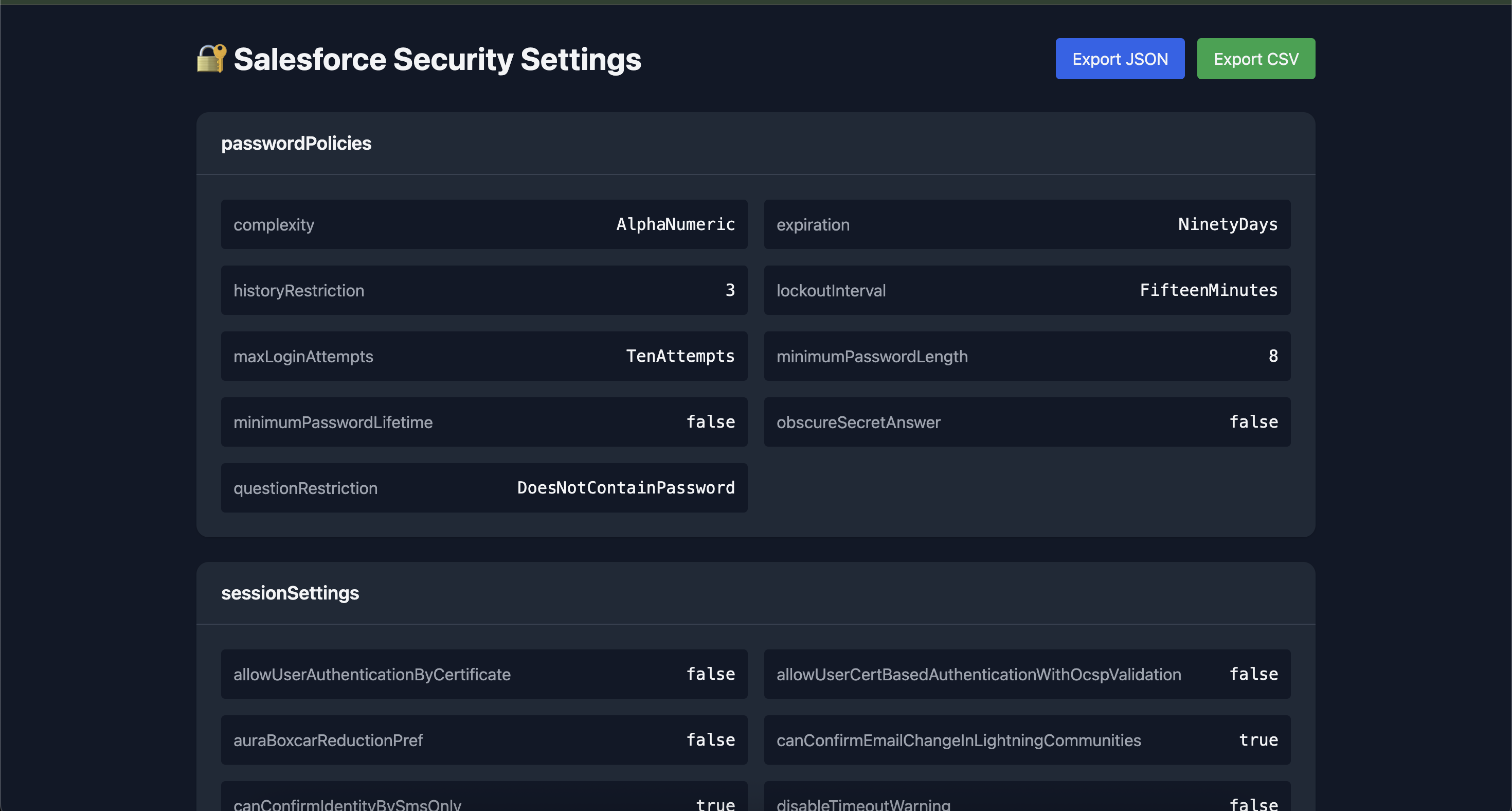
Security Settings
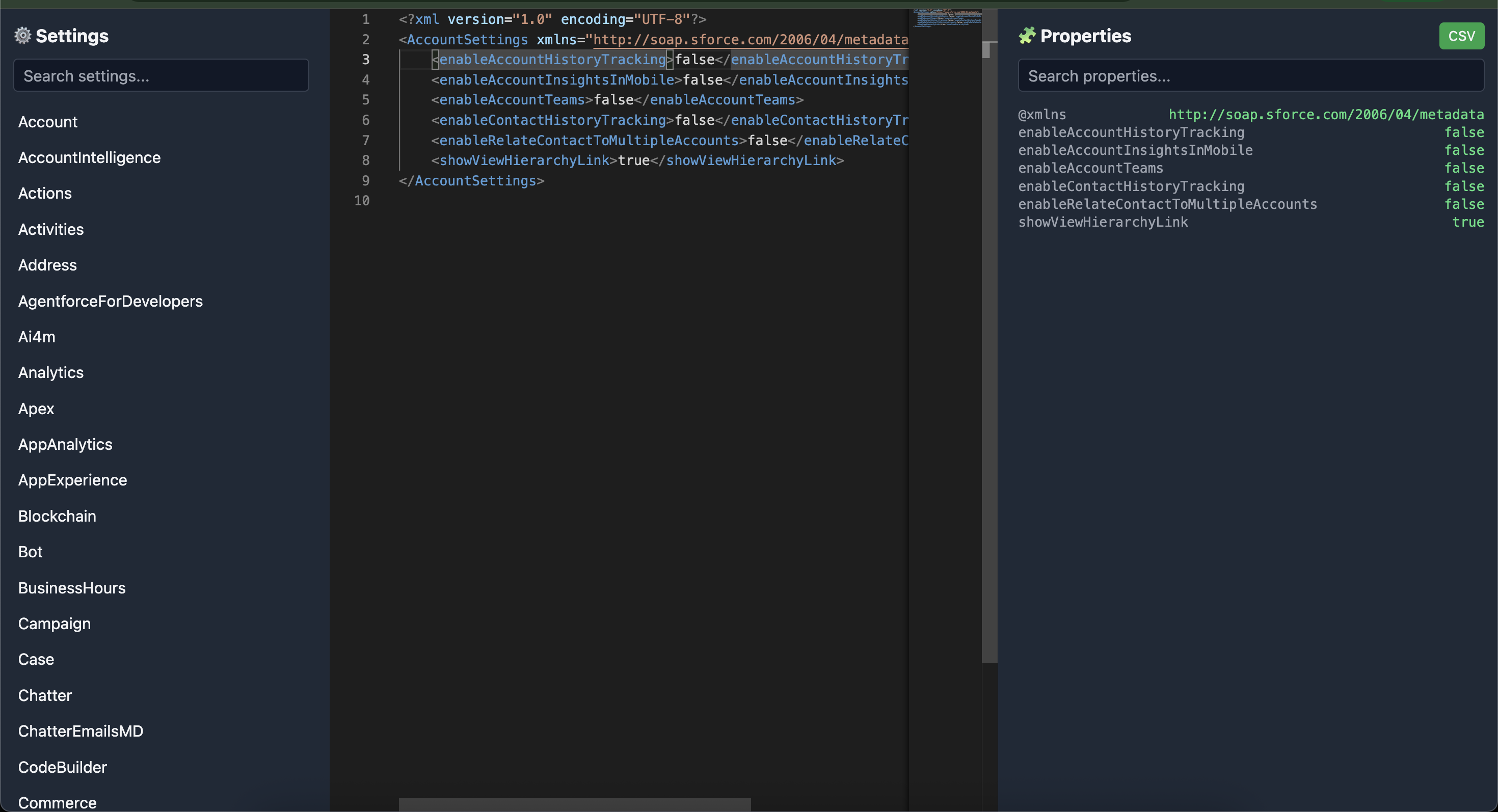
All Settings
✨ Features
- 🔐 Retrieves Salesforce Settings metadata (e.g.,
Security) - 📦 Automatically generates a
package.xmlor use your own - 🎯 NEW: Support for custom
package.xmlfiles to retrieve any metadata type - ⚙️ Uses Salesforce CLI (
sf) under the hood - 📊 Export settings to JSON or CSV
- 🚀 Opens the generated UI automatically in your browser
📦 Installation
npm install -g sf-settings-viewer🧰 Prerequisites
Make sure you have:
- Node.js 18+
- Salesforce CLI (
sf) installed - Authenticated Salesforce org (
sf auth web login)
🚀 Usage
Get Security Settings
sf-settings-viewer \
  -o myOrgAlias \
  -i Security \
  -d ./mywork
Get All Settings
sf-settings-viewer \
  -o myOrgAlias \
  -i '*' \
  -d ./mywork
Use Custom Package.xml (NEW)
sf-settings-viewer \
  -o myOrgAlias \
  -p /path/to/package.xml \
-d ./mywork- Use this metadata search tool to get the package.xml for the required metadata type.
This allows you to retrieve any metadata type defined in your custom package.xml file (not just Settings). Perfect for:
- Retrieving multiple metadata types at once
- Custom retrieval workflows
- Integration with existing package.xml files
- Opens the folder in the VS Code Editor
Options
| Option | Description | Required |
| ---------------------- | ----------------------------------- | -------- |
| -o, --org <username> | Salesforce org username or alias | Yes |
| -i, --item <name> | Settings name (e.g., Security or *) | Either -i or -p |
| -p, --package <file> | Path to custom package.xml file | Either -i or -p |
| -d, --dir <dir> | Working directory | Yes |
| -a, --artifact <name>| Artifact name (default: Settings) | No |
✅ The
-doption is required and defines where the Salesforce project and metadata will be generated.⚠️ You must specify either
-i(item) or-p(package), but not both.
🔄 What the CLI Does (Step-by-Step)
When using -i (Settings mode)
- Creates a Salesforce project
sf project generate --name <dir>- Generates
package.xml
   <types>
     <members>Security</members>
     <name>Settings</name>
</types>- Retrieves metadata
sf project retrieve start -x package.xml -o <org> -w 10- Reads the settings file
force-app/main/default/settings/Security.settings-meta.xmlParses XML and generates UI
- Dark theme (Tailwind CSS)
- Collapsible sections
- Searchable keys & values
Outputs
settings.htmlsettings.jsonsettings.csv
Automatically opens the UI in your browser
When using -p (Custom package mode)
- Creates a Salesforce project (if needed)
- Copies your custom package.xml to the project directory
- Retrieves metadata based on your package.xml
- Saves package.xml to
output/package.xml - Reports success and shows where metadata was retrieved
🖥️ UI Preview
The generated UI includes:
- 📁 Grouped sections (Password Policies, Session Settings, SSO, etc.)
- 🔍 Easy readability for audits
- 📤 Buttons to export as CSV or JSON
📁 Output Structure
Settings Mode (-i)
mywork/
├── force-app/
│   └── main/default/settings/
│       └── Security.settings-meta.xml
├── output/
│   ├── security-settings.html
│   ├── security-settings.json
│   ├── security-settings.csv
│   └── package.xml
Custom Package Mode (-p)
mywork/
├── force-app/
│   └── main/default/
│       ├── classes/
│       ├── triggers/
│       └── ... (whatever your package.xml retrieves)
├── output/
│   └── package.xml
💡 Example Use Cases
Audit Security Settings
sf-settings-viewer -o production -i Security -d ./audit-2024Retrieve Multiple Metadata Types
Create a package.xml:
<?xml version="1.0" encoding="UTF-8"?>
<Package xmlns="http://soap.sforce.com/2006/04/metadata">
  <types>
    <members>*</members>
    <name>ApexClass</name>
  </types>
  <types>
    <members>*</members>
    <name>ApexTrigger</name>
  </types>
  <version>65.0</version>
</Package>
Then run:
sf-settings-viewer -o myOrg -p ./package.xml -d ./retrieve-allCompare Settings Across Orgs
# Retrieve from prod
sf-settings-viewer -o production -i Security -d ./prod-settings

# Retrieve from sandbox
sf-settings-viewer -o sandbox -i Security -d ./sandbox-settings

# Compare the JSON files
diff ./prod-settings/output/settings.json ./sandbox-settings/output/settings.json
🔮 Future Enhancements
- Diff between two orgs
- Support all Settings types
- CI-friendly export mode
- Interactive UI for editing and deploying settings
📜 License
MIT © Mohan Chinnappan