
sf-sharing-cli
v1.0.7
Published
A CLI tool to read and write Salesforce object sharing models with beautiful HTML reports

Maintainers
 mohanchinnappan
Readme
sf-sharing-cli
A powerful CLI tool to manage Salesforce object sharing models with beautiful HTML reports

✨ Features
- 📖 Read sharing models from Salesforce metadata files
- ✍️ Write sharing models back to metadata files from CSV
- 🔍 Smart Change Detection - Only updates when values differ
- 📦 Auto-generates package.xml for deployment
- 📊 Beautiful HTML Reports with dark mode support
- 🔍 Search & Filter through your objects
- 📄 Pagination for large datasets
- 🎨 Color-coded sharing model badges
- 📥 Export to CSV from the HTML report
- ⚡ Fast & Lightweight
Screenshot
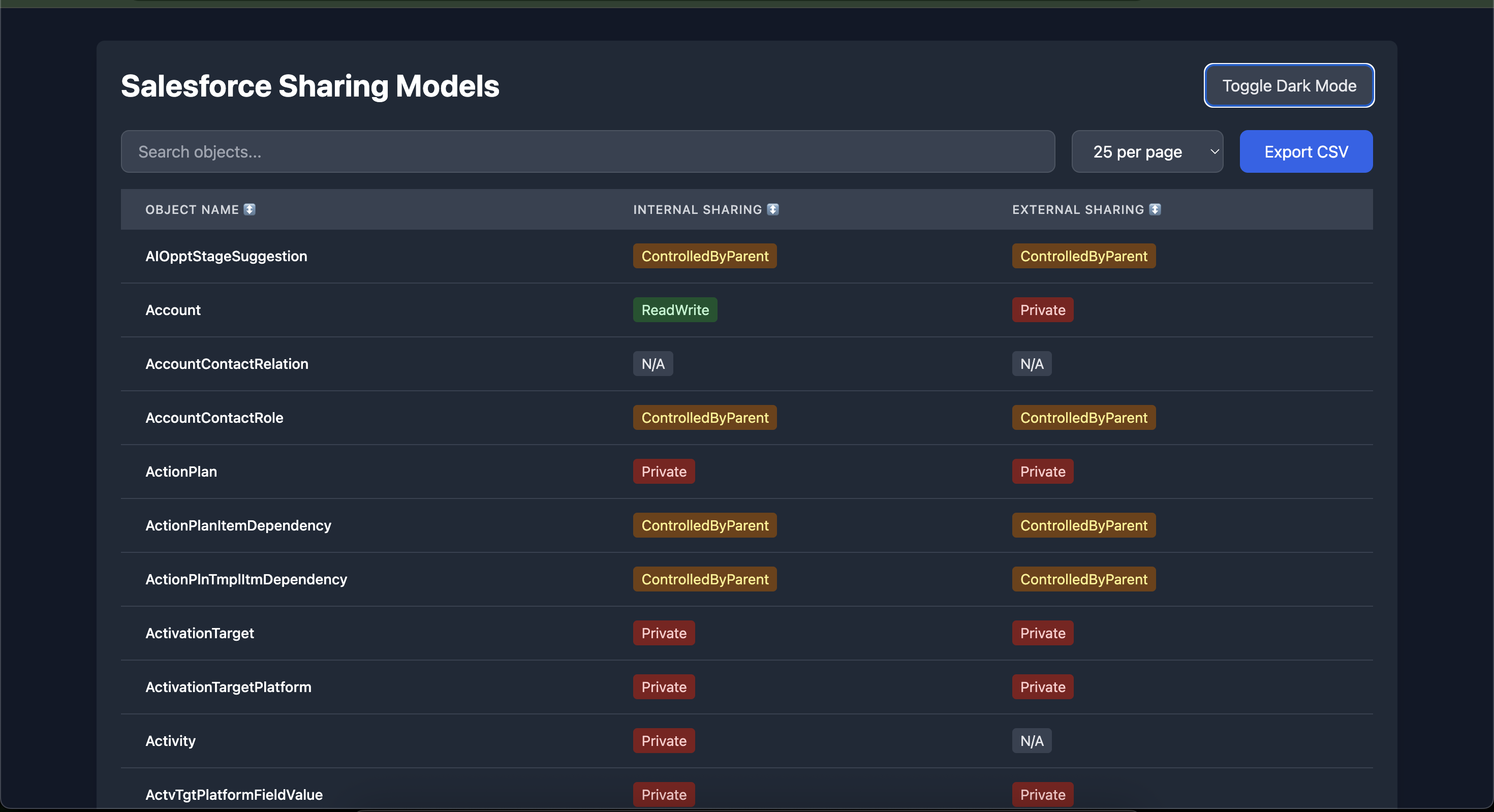
Demo for a use case:
We like to change the external sharing for Account object from Private to ReadWrite using: sf-sharing tool:
📦 Installation
Global Installation (Recommended)
npm install -g sf-sharing-cli🚀 Usage
Read Command
Extract sharing models from your Salesforce project and generate reports:
sf-sharing read -p /path/to/sfdx/projectThis command will:
- Scan
force-app/main/default/objectsfor object metadata - Extract
sharingModel(Internal) andexternalSharingModel(External) - Generate
sharing-models.csvin your current directory - Create
sharing-models-report.htmlwith an interactive table
Options
-p, --project <path>- (Required) Path to your SFDX project folder
Example
sf-sharing read -p ~/projects/my-sfdx-projectOutput:
✅ CSV file created: /current/path/sharing-models.csv
✅ HTML report created: /current/path/sharing-models-report.html
Write Command
Update object sharing models from a CSV file:
sf-sharing write -p /path/to/sfdx/project -c sharing-models.csvThis command will:
- Read the CSV file with object sharing settings
- Compare current values with CSV values
- Update only the objects with different values
- Auto-generate package.xml with changed objects for deployment
- Skip objects not found in your project (gracefully handles extra records)
Options
-p, --project <path>- (Required) Path to your SFDX project folder-c, --csv <path>- (Required) Path to the CSV file
CSV Format
ObjectName,InternalSharing,ExternalSharing
Account,Private,Private
Contact,ReadWrite,Read
CustomObject__c,Private,N/A
Example
sf-sharing write -p ~/projects/my-sfdx-project -c sharing-models.csvOutput:
✅ Updated: Account (sharingModel: ReadWrite → Private)
✅ Updated: Contact (externalSharingModel: Private → Read)
ℹ️  No change required for: CustomObject__c
⏭️  Skipped (not found in project): AnotherObject__c

📊 Summary:
✅ Updated: 2 object(s)
ℹ️  No change needed: 1 object(s)
⏭️  Skipped 1 object(s) not found in project:
   - AnotherObject__c

📦 package.xml created with 2 object(s)

🚀 To deploy changes, first validate:
   sf project deploy validate -x package.xml -w 30 -o <username>

   Then deploy:
   sf project deploy start -x package.xml -w 30 -o <username>
📦 Auto-Generated package.xml
When objects are updated, a package.xml file is automatically created in your current directory:
<?xml version="1.0" encoding="UTF-8"?>
<Package xmlns="http://soap.sforce.com/2006/04/metadata">
    <types>
        <members>Account</members>
        <members>Contact</members>
        <name>CustomObject</name>
    </types>
    <version>64.0</version>
</Package>
This file includes only the objects that were actually modified, making deployment efficient and trackable.
🚀 Deploy Changes
After running the write command, deploy your changes to Salesforce:
sf project deploy validate -x package.xml -w 30 -o <username>

# then

sf project deploy start -x package.xml -w 30 -o <username>
Where:
-x package.xml- Uses the auto-generated package file-w 30- Waits up to 30 minutes for deployment-o <username>- Target org username or alias
📊 HTML Report Features
The generated HTML report includes:
🎨 Visual Features
- Dark Mode Toggle - Eye-friendly viewing
- Responsive Design - Works on all screen sizes
- Color-coded Badges - Easy identification of sharing models
🔧 Functionality
- Search Bar - Filter objects by name or sharing model
- Sortable Columns - Click headers to sort
- Pagination - Choose 10, 25, 50, 100, or show all records
- Export Button - Download filtered results as CSV
- Record Counter - Shows total and filtered counts
🏷️ Sharing Model Badge Colors
| Sharing Model | Color | |---------------|-------| | Private | Red | | Read | Blue | | ReadWrite | Green | | ReadWriteTransfer | Purple | | ControlledByParent | Yellow | | N/A | Gray |
📋 Supported Sharing Models
Internal Sharing Models
PrivateReadReadWriteReadWriteTransferControlledByParentFullAccess
External Sharing Models
PrivateReadReadWriteReadWriteTransferControlledByParent
🛠️ Requirements
- Node.js >= 14.0.0
- A valid Salesforce DX project structure
📁 Project Structure
Your SFDX project should have the following structure:
your-sfdx-project/
├── force-app/
│   └── main/
│       └── default/
│           └── objects/
│               ├── Account/
│               │   └── Account.object-meta.xml
│               ├── Contact/
│               │   └── Contact.object-meta.xml
│               └── CustomObject__c/
│                   └── CustomObject__c.object-meta.xml
💡 Best Practices
- Always read first: Run the
readcommand to generate a baseline CSV before making changes - Review changes: Check the console output to see what will be changed before deploying
- Test in sandbox: Deploy to a sandbox org first using the generated package.xml
- Version control: Commit both the CSV and package.xml to your repository for tracking
- Incremental updates: The tool only updates objects that have changed, making it safe for iterative workflows
External Sharing Settings Best Practices
Understanding and properly configuring external sharing settings is crucial for Salesforce orgs with Experience Cloud (Communities) or portal users:
What are External Sharing Settings?
- External sharing settings (
externalSharingModel) control data access for external users (Community, Experience Cloud, and portal users) - Internal sharing settings (
sharingModel) control data access for internal users (employees with Salesforce licenses) - External sharing can never be more permissive than internal sharing
Key Considerations:
Security First: External sharing should generally be more restrictive than internal sharing
- ✅ Good: Internal =
ReadWrite, External =PrivateorRead - ❌ Risky: External =
ReadWritewhen not necessary
- ✅ Good: Internal =
Portal/Community Objects: For objects accessed by external users:
- Use
Privatefor sensitive data (HR records, internal financial data) - Use
Readwhen external users need view-only access (knowledge articles, public content) - Use
ReadWriteonly when external users legitimately need to edit records (support cases, feedback)
- Use
Standard Objects:
- Account/Contact: Often set to
PrivateorReadfor external users, controlled via sharing rules - Case: Commonly
ReadWritefor self-service portals where customers manage their cases - Opportunity: Usually
Privatefor external users unless partners need access
- Account/Contact: Often set to
Compliance & Data Privacy:
- Review external sharing settings during security audits
- Ensure compliance with regulations (GDPR, CCPA, HIPAA)
- Document why each object has its external sharing configuration
Performance Impact:
- More restrictive sharing (Private) requires more sharing calculations
- Balance security needs with system performance
- Use sharing rules strategically for external access
Testing External Access:
- Always test with actual external user profiles after changing settings
- Verify that external users can only see what they should
- Check both record access and field-level security
🔄 Typical Workflow
# 1. Read current sharing models
sf-sharing read -p ~/my-sfdx-project

# 2. Edit the generated sharing-models.csv file

# 3. Apply changes (generates package.xml)
sf-sharing write -p ~/my-sfdx-project -c sharing-models.csv

# 4. Review the console output and package.xml

# 5. Deploy to your org after validating:

#--- from your my-sfdx-project folder ----
# cd my-sfdx-project
#--- provide full path of your package.xml here:
sf project deploy validate -x package.xml -w 30 -o my-org-alias

sf project deploy start -x package.xml -w 30 -o my-org-alias
📝 License
This project is licensed under the MIT License - see the LICENSE file for details.
Made with ❤️ for the Salesforce community